Category Archives: Swift Tutorial

Swift Tutorial

Swift If Else

Swift If Else

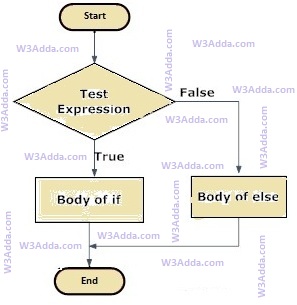
In Swift, when we want to execute a block of code when if condition is true and another block of code when if condition is false, In such a case we use if…else statement.

Swift If…else Statement Flow Diagram

swift-if-else

swift-if-else

Syntax:-

Here, Condition is a Boolean expression that results in either True or False, if it results in True then statements inside if body are executed, if it results in False then statements inside else body are executed.

Example:-

Output:-

swift_if_else_statement

Swift Nested If Else

Swift Nested If Else

In swift, when there is an if statement inside another if statement then it is known as nested if else. Nested if else can also be simplified using Swift Switch Statement.

Syntax:-

Example:-

When we run the above swift program, will see following output –

Output:-

swift_nested_if_statement

swift_nested_if_statement

Swift Operators

Swift Operators

An operator is a special symbol that is used to carry out some specific operation on its operand. In Swift, we have rich set of built in operators to carry out different type of operations. There are operators for assignment, arithmetic operations, logical operations and comparison operations etc. Swift operators can be used with many types of variables or constants, but some of the operators are restricted to work on specific data types. Most operators are binary, meaning they take two operands, but a few are unary and only take one operand.

Type of operators in Swift

In Swift, we have following types of operators available –

  • Arithmetic Operators
  • Assignment Operators
  • Comparison (Relational) Operators
  • Logical Operators

Swift Arithmetic Operators

Arithmetic Operators are used to perform arithmetic operations like addition, subtraction, multiplication, division, %modulus, exponent, etc.

Let variable a holds 20 and variable b holds 10, then −

Swift Arithmetic operators
Operator Name Description Example
+ Addition Addition of given operands
a+b returns 30
- Subtraction Subtraction of second operand from first a-b returns 10
* Multiply Multiplication of given operands a*b returns 200
/ Division Returns Quotient after division
a/b returns 2
% Modulus Returns Remainder after division a%b returns 0

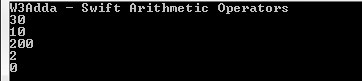
Example:-

Output:-

swift-arithmetic

Swift Assignment Operators

Assignment operators are used to assign value to a variable, you can assign a variable value or the result of an arithmetical expression.

Swift Assignment operators
Operator Description Expression
= Assignment Operator
a=b
+= add and assign a+=b is equivalent to a=a+b
-= subtract and assign a-=b is equivalent to a=a-b
*= multiply and assign a*=b is equivalent to a=a*b
/= divide and assign a/=b is equivalent to a=a/b
%= mod and assign a%=b is equivalent to a=a%b
<<= Left shift AND assign a<<=5 is equivalent to a=a<<5
>>= Right shift AND assign a>>=5 is equivalent to a=a>>5
&= Bitwise AND assign a&=5 is equivalent to a=a&5
^= Bitwise exclusive OR and assign a^=5 is equivalent to a=a^5
|= Bitwise inclusive OR and assign a|=5 is equivalent to a=a|5

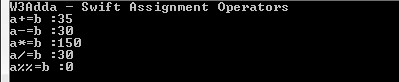
Example:-

Output:-

swift-assignment-operators

Swift Comparison (Relational) Operators

Comparison Operators are used evaluate a comparison between two operands. The result of a comparison operation is a Boolean value that can only be true or false. Comparison Operators are also referred as relational operators.

Let variable a holds 20 and variable b holds 10, then −

Swift Relational operators
Operator Description Example
> greater than a>b returns TRUE
< Less than a<b returns FALSE
>= greater than or equal to a>=b returns TRUE
<= less than or equal to a<=b returns FALSE
== is equal to a==b returns FALSE
!= not equal to a!=b returns TRUE

Example:-

Output:-

swift-relational-operators

Swift Logical Operators

Logical operators are used to combine expressions with conditional statements using logical (AND,OR,NOT) operators, which results in true or false.

Let variable a holds true or 1 and variable b holds false or 0, then −

Swift Logical operators
Operator Name Description Example
&& Logical AND return true if all expression are true (a && b) returns false
|| Logical OR return true if any expression is true (a || b) returns true
! Logical NOT return complement of expression !a returns false

Example:-

Output:-

swift-logical-operators

String concatenation Operator

In Swift, strings can be concatenated using the + operator or the += assignment operator.

Swift Ternary Operator ( ? : )

In Swift, ternary operator is considered as short hand for if-else statement.

Syntax:

If condition is true the expression will return result1, if it is not it will return result2.

Example:-

Output:-

Swift Range Operator

In Swift, range operator is used to define range of numbers (x…y) starting from x to y but the value of x always must be less than y. It is generally used to iterate over with loop statements.

Example:-

Ouput:-


Swift Literals

Swift Literals

Literals are used to express certain values within the source code of the program. In Swift, literals can be used to represent value of an integer, floating-point number, or string type. Here are some of valid literals examples –

In Swift, literals can be of following types –

Integer Literals

Integer literal are used to represent a decimal, binary, octal, or hexadecimal constant value. In Swift, a binary literals starts with 0b, octal literals starts with 0o, and hexadecimal literals starts with 0x and rest every integer literal is a decimal literals.

Example:-

Floating-point Literals

A floating-point literal is used to represent value for a float and double variable or constants. A floating-point literals can be represented either in decimal form or hexadecimal form.

A decimal floating-point literals is composed of a sequence of decimal digits followed by either a decimal fraction, a decimal exponent, or both.While, a hexadecimal floating-point literals composed of a 0x prefix, followed by an optional hexadecimal fraction, followed by a hexadecimal exponent.
Example1:-

Output:-

Example2:-

Output:-

String & Character literals

String literals are represented as a sequence of characters surrounded by double quotes and a character literal is represented as a single character surrounded by double quotes.

Example:-

Here, “S” is a character literal and “W3Adda Swift” is a string literal.

Boolean Literals

Boolean literals are used to represent true and false value.

Example:-

Here, true is a boolean literal which is assigned to the constant flg.

Swift Constants

Swift Constants

Constants are basically immutable literals whose values cannot be modified or changed during the execution of program.

Declaring Constants In Swift

The Constants are created in the same way you create variables but instead of using the var keyword here we use the let keyword and by convention constant names are always preferred in uppercase.

Syntax:-

Example:-

Here, we have declared a constant called number which is of type Int.

Initializing Constants

The assignment operator (=) is used to assign values to a constants, the operand in the left side of the assignment operator (=) indicates the name of the constant and the operand in the right side of the assignment operator (=) indicates the value to be stored in that constant.

Syntax:-

or

Example:-

Here, we have declared a constant called number which is of type Int with value of 10.

Declaring and Initializing Multiple Constants

In Swift, it is possible to define multiple constants of same type in a single statement separated by commas, with a single type annotation after the final constant name as following-

Example:-

Example:-

Output:-

Printing Constants

In Swift, print() function is used to print the current value of a constant. String interpolation can be done by wrapping the constant name as placeholder in parentheses and escape it with a backslash before the opening parenthesis. Swift compiler replaces placeholder with the current value of corresponding constant.

Example:-

Output:-

Swift Operator Precedence

Swift Operator Precedence

Operator precedence defines the order in which given mathematical expression is evaluated. When an expression includes multiple operators then each of the single part of given expression is evaluated in a certain order following some rules defined as per operator precedence.Operator with higher precedence is evaluated first and operator with lowest precedence is evaluated at last.

Following is swift operator precedence table –

Swift Operator Precedence (Highest to Lowest)
Operator Groups Examples
Bitwise shift precedence >> &<< &>> >>
Multiplication precedence &* % & * /
Addition precedence | &+ &- + – ^
Range Formation Precedence ..< …
Casting Precedence is as
Nil-Coalescing Precedence ??
Comparison Precedence != > < >= <= === ==
Logical Conjunction Precedence &&
Logical Disjunction Precedence ||
Default Precedence ~>
Ternary Precedence ?:
Function Arrow precedence ( )
Assignment Precedence |= %= /= &<<= &>>= &= *= >>= <<= ^= += -=

Operator Associativity

Operators with same precedence follows operator associativity defined for its operator group. In Swift, operators can either follow left-associative, right-associative or have no associativity. Operators with left-associative are evaluated from the left to right, operators with right-associative are evaluated from right to the left and operators with no associativity, does not follow any predefined order.

Swift Operator Associativity Table (Highest to Lowest)
Operator Groups Examples Associativity
Bitwise shift precedence >> &<< &>> >> none
Multiplication precedence &* % & * / left
Addition precedence | &+ &- + – ^ left
Range Formation Precedence ..< … none
Casting Precedence is as none
Nil-Coalescing Precedence ?? right
Comparison Precedence != > < >= <= === == none
Logical Conjunction Precedence && left
Logical Disjunction Precedence || left
Default Precedence ~> none
Ternary Precedence ?: right
Function Arrow precedence ( ) right
Assignment Precedence |= %= /= &<<= &>>= &= *= >>= <<= ^= right

Swift Tuples

Swift Tuples

Tuple is an ordered list of zero or more comma-separated values (items or elements), where elements can be of different types. Tuple allows you to represent a collection of values that are closely linked to each other.

Example:-

Creating a Tuple

In Swift, a tuple is defined within a pair of parentheses () where items are separated by commas. Tuple declaration is same as an array literal, except the parenthesis (instead of square brackets), and it can take values of any type.

Example:-

Named Tuple Elements

In Swift, there is another way to define a tuple where you can use named key for tuple elements.

Example:-

Tuple Types

The type of any tuple can be determined by it element’s value. So (“W3Adda”, 1) will be of type (String, Int). If the tuple has only one element then the type of that tuple is the type of the element.

Example 1:-

Here, we have declared a tuple with type (String, Int)

Example 2:-

Here, we have declared a named tuple with type (String, Int)

Empty Tuple

Tuple with no element is termed as empty tuple, it can be represented using pair of parentheses () with no elements.

Reading Tuple

In Swift, Commonly there are two ways we can accessing the data in a tuple by index or by name.

by index:-

We can access the tuple element’s values using the dot(.) notation followed by the index of the value. Tuple index value starts from zero(0).

Example:-

Output:-

by name:-

In Swift, you can assign name to the tuple elements and then can use those names to access them as following –

Example:-

Output:-

Multiple assignment

A tuple can be used to initialize more than one variable in once as following –

Example:-

here, tuple values being assigned to variables a, b and c correspondingly.

Returning multiple values

In Swift, tuple can be used to return multiple values from a swift function as following –

Example:-

Decomposing Tuples

In Swift, a tuple elements can be decomposed into separate constants or variables and can be used further as normal constant or variables.

Example:-

here, we have created a tuple named siteInfo with two elements , later in next line we have assigned its elements to separate variables named siteName and siteRank correspondingly. If you only want to extract some of the tuple values then you can use an underscore (_) in place of the element you want to ignore when you decompose the tuple.

Example 1:-

Example 2:-

Nested Tuple(Tuple inside another tuple)

In Swift, a tuple can contain another tuple as following –

Example:-

Output:-

Swift Optionals

Swift Optionals

In Swift, when we declare a variable they are non-optional by default, which means you are required to assign a non-nil value as initial value to that variable. If you not assign an initial value or try to set a nil value to it, you will get a compile time error.

Lets take a look into following example code –

Here we have defined some variables, It’s all good with the above declarations until we try setting it as below.

In the above code we have not assigned any value to “fname” and we have assigned “nil” to “lname”, now when we run the above code, it will throw compile time error because in swift variables are non-optional by default. So if a variable is defined without assigning any initial value or nil value it will generate a compile time error.

In order to overcome this problem swift introduced a data type called “optional”. Optionals is a powerful feature which allows variables and constants to hold non-existing or nil values.It gives you way to anticipate a ‘nil’ value and still keep your app running safely, Optionals can also be used to anticipate values that are nil at the moment, but later on might not be.

In Swift, Optional type variables or constants can hold value or nil value.

Declaring Swift Optional

Optional can be defined by using question mark (“?”) operator after the type declaration.

Syntax:-

Example:-

Here, we have declared two Optionals with different data types, when we execute above program it does not throw any compilation errors instead we will get the output as following –

Output:-

Optional types is like a wrapper over the normal data types which allow the variable/constant to hold nil value, thus when we print an optional variable/constant it wrap the value inside Optional().

Swift Optional Unwrapping

In the above example we have seen, when we print an optional variable/constant it’s values is wrapped inside Optional() as following –

thus in order to access the value out of it, we need to unwrap it. Swift Optional unwrapping gives you way to convert an optional type to a normal type.

Optional unwrapping can be of following two types –

  1. Force Unwrapping
  2. Implicit Unwrapping

Swift Force Unwrapping

An Optional variable/constant can be unwrapped by appending exclamation mark (!) at the end of the variable/constant name.

Example:-

Output:-

Swift Implicitly Unwrapping

In the above example we have unwrapped an optional variable value manually using exclamation mark (!), but implicit Unwrapping allows you to unwrap optional value automatically.

When we want to unwrap an optional variable/constant value automatically then we have to declare optional with exclamation mark (“!”) instead of question mark (“?”).

Example:-

Output:-

Swift Optional Binding (if let)

There is a much safer way to unwrap an optional, lets have a look at below snippet –

The above statement allows us to first check if the “site” is not nil before we force unwrap and print its value, as “site” doesn’t have a value, which means it will not be forced unwrapped by accident.

In Swift, there’s a more elegant way to acheive the same is called optional binding. Optional binding is the recommended way to unwrap an optional. Let’s have look at below code snippet –

Example:-

Output:-

Here, in the above example we assign the value stored in the optional variable “site” to a temporary constant “siteName”, which is then used in the if statement. Here the value of the optional variable “site” is bound to the constant “siteName” and used in the if statement.

Swift Optional Binding (guard let)

Guard let is similar to if let, but unlike if let the guard statements only executed in the case when optional value is nil.

A guard let is preceded by an “else” block which is executed when optional value is nil. Guard statement works only inside a functions. Lets have a look at following code snippet –

Example:-

Output:-

Here, guard expression checks whether optional constant “age” contains a value or not. If “age” contains a value then guard-let statement will unwraps the value and places the unwrapped value in temp constant. Otherwise, else block gets executed when “age” is empty or set to nil and it would return to the calling function.

Nil-coalescing operator

There may be chance we want to use a default value when an optional is nil. In Swift, there is a Nil coalescing (??) operator allows you unwrapping an optional if it has a value, or providing a default value present on the right hand side if the optional value is nil.

Example:-

Output:-


Swift Variables

Swift Variables

Variables is an identifier used to refer memory location in computer memory that holds a value for that variable, this value can be changed during the execution of the program. When you create a variable in Swift, this means you are allocating some space in the memory for that variable. The size of memory block allocated and type of the value it holds is completely dependent upon the type of variable.

Rules for naming a variable –

Constant and variable names cannot contain whitespace characters, mathematical symbols, arrows, private-use (or invalid) Unicode code points, or line- and box-drawing characters.

  • Variable name can consist of letter and alphabets.
  • Keywords are not allowed to use as a variable name.
  • Blank spaces are not allowed in variable name.
  • Mathematical symbols, arrows, Unicode code points are not allowed.

Recommendation :- Variable name must be readable and should be relative to its purpose.

Declaring Variables In Swift

In Swift, a variables must be declared before they are used. In Swift, variables are declared using the var keyword followed by variable name that you want to declare, a colon (:) and then the data type you want to hold in that variable.

Syntax:-

or

Variable assignment In Swift

The assignment operator (=) is used to assign values to a variable, the operand in the left side of the assignment operator (=) indicates the name of the variable and the operand in the right side of the assignment operator (=) indicates the value to be stored in that variable.

Example:-

Output:-

Here, we have three assignment statements. In first statement variable “myvar” is assigned an string value “Hello, World!”. Similarly, in the second statement a floating point value 80.5 is assigned to variable “marks” and 25 is a integer assigned to the variables “age”.

Type Annotations

In Swift, while declaring a variable you can optionally provide a type annotation, to suggest type of values the variable can hold.

Syntax:-

Example:-

Here, type annotation for a variable called “myvar” is provided that indicate the variable can hold String values.

Multiple assignments

In Swift, it is possible to define multiple variables of same type in a single statement separated by commas, with a single type annotation after the final variable name as following-

Example:-

Example:-

Output:-

Type Inference

Swift is a type inferred language, which allows us to drop the type annotation from the declaration. In Swift, compiler automatically infer(know) the type of data we want to store based on the initial value we assign.

Example:-

Here, type annotation is not used in the declaration but the Swift compiler simply infer the type automatically for us.

Printing Variables

In Swift, print() function is used to print the current value of a variable. String interpolation can be done by wrapping the variable name as placeholder in parentheses and escape it with a backslash before the opening parenthesis. Swift compiler replaces placeholder with the current value of corresponding variable.

Example:-

Output:-

Swift Data Types

Swift Data Types

Variables are used to represent reserved memory locations that is used to store values, when we create a variable we are a suppose to allocate some memory space for that variable. Swift is a statically typed programming language. This means that variables always have a specific type and that type cannot change. Every variable have data type associated to it, data type for a variable defines –

  • The amount of memory space allocated for variables.
  • A data type specifies the possible values for variables.
  • The operations that can be performed on variables.

Swift has following built-in data types –

  • Numbers
  • Boolean
  • Characters
  • String
  • Optional

Swift Numbers:- The Number data type is used to hold the numeric values. Swift supports following numerical data types –

Integer:- Integers are used to store whole numbers. Swift supports several integer types, varying internal sizes for storing signed and unsigned integers.

Signed Integers
Type Size Description Range
int8 8 bits 8 bit Signed Integer (two’s complement) -128 to 127
int16 16 bits 16 bit Signed Integer (two’s complement) -215 to 215 -1
int32 32 bits 32 bit Signed Integer (two’s complement) -231 to 231 -1
int64 64 bits 64 bit Signed Integer (two’s complement). They can also be represented in octal and hexadecimal -263 to 263 -1
Unsigned Integers
Type Size Description Range
uint8 8 bits 8 bit Unsigned Integer 0 to 127
uint16 16 bits 16 bit Unsigned Integer 0 to 216 -1
uint32 32 bits 32 bit Unsigned Integer 0 to 232 -1
uint64 64 bits 64 bit Unsigned Integer 0 to 264 -1


Swift Float:- A Float type is used to store numbers that contain a decimal component (real numbers). In Swift, float is used to represent a 32-bit floating-point number and numbers with smaller decimal points. An uninitialized float has default value of 0.0.

Example:-

Swift Double:- In Swift, double is used to represent a 64-bit floating-point number and numbers with larger decimal points. An uninitialized double has default value of 0.0.
Example:-

Swift Bool:- The Boolean data type is used to represent the truth values, which can be either True or False. Boolean are commonly used in decision making statements.

Example:-

Output:-

Swift Characters:- The character data type is used to hold the single literal. Character are declared using double quotes. It can also include emoji or languages character other than English using escape sequence \u{n} (unicode code point ,n is in hexadecimal)

Example:-

Swift String:- A string variable is used to hold series or sequence of characters – letters, numbers, and special characters. Strings are immutable. Strings can either be declared using double quotes “Hello World”.

Example:-

Output:-

Swift Comments

Swift Comments

Swift Comments are a set of statements that are not executed by the Swift compiler and interpreter. The use of comments makes it easy for humans to understand the source code.Usually comments gives you inside or explanation about the variable, method, class or any statement that exists in source code. The comment statements are ignored during the execution of the program.

Swift Single-line Comments:-

A ‘//’ (double forward slash) is used to specify a single line comment, which extends up to the newline character.

Output:-

Swift Multi-line Comments:-

If you want to comment multiple lines then you can do it using /* and */, everything in between from /* to */ is ignored by the compiler-

Output:-

Swift Hello World

Swift Hello World Program

The “Hello world!” program is a simplest program that will display some text on the screen. The “Hello world!” program is a simple yet complete program for beginners that illustrates the basic syntax of any programming language. The “Hello world!” program gives you a way to test systems and programming environment.

This tutorial will guide you through writing a basic “Hello, World” program in Swift Programming.

Step 1:- Create a file called “hello_world.swift” using a text editor program of your choice. The .swift file extension is used to specify swift language file.

Step 2:- Let’s open the “hello_world.swift” file that we created, and put the following line of code in it and save it.

The print() is a function that tells Swift to display or output the content inside the parentheses.

Step 3:- Now, run the following command to compile and run the swift program

Once the program is executed it will print “Hello, World”.

Output:-