Category Archives: Swift Tutorial

Swift Tutorial

Swift Closures

Swift Closures

Closures are anonymous functions consists of self-contained blocks of code and that can passed around in our code as a function parameters.In swift, we can assign closure references to constants or variables, later we can access or retrieve the value of closure based on our requirements.

Closures are like functions but they do not have name associated with it.Generally swift functions are considered as a special kind of closures and closures can take any one of three form –

Global functions :- These are closure having a name and cannot capture any values.
Nested functions :- These are closure having a name and can capture values from their enclosing functions
Closure expressions :- These are closure having a name and can capture values from their context

Declaring a closure

In Swift, there are two ways we can define a closure.

Closure expressions –

In this method a closure is defined using curly brackets { } followed by parameters of the closure wrapped in a pair of parentheses, separated from the return type by the -> symbol and in keyword separate the closure header from closure body.
Syntax:-

In case closure does not return any value we can omit the arrow (->) and the return type as following –
Syntax:-

Example:-

Output:-
 

Trailing Closure –

If the last parameter of a function is a closure, then we can put closure definition directly after the function call instead passing it as a function parameter. It is termed as trailing closures.

Example:-

Output:-

swift_trailing_closures

Swift Closures Type Inferring

In Swift, type inference allows to infer the return type from the context in which the closure is defined so we can remove (->) sign and return type to create short form of using closures in swift.

Example:-

Output:-

swift_closure_type_inference

Swift Closures with Implicit Returns

If closures body contains only one statement which return the result in that statement, so we choice to omit the return keyword.

Example:-

Output:-

swift_closure_implicit_return

Swift Shorthand Parameter Names

Swift provides a shorthand method to access the closures parameters, in which it provides a list of shorthand names for parameters.In order to use shorthand parameter names you need to ignore the first part of the declaration then you can refer the parameters as $0, $1, $2 and so on.

Example:-

Output:-

swift_closure_shorthand_parameters_name

Swift Closures to Capture Values

In swift closure can hold the references of any variables or constants defined in its surrounding and later it can access or retrieve the value of those variables and constants based as per the requirement. Closure is allowed to modify variable or constant for which it holds the reference till program stops execution.

Example:-

Output:-

swift_closure_capture_values

Swift Closures Are Reference Types

In Swift closures are of reference types, which means if a closure is assigned to more than one variable or constant they will be pointing to the same closure.

Example:-

Output:-

swift_closures_are_reference_type

Swift Escaping Closure

non escaping closure –

A closure that is passed to a function as a parameter is said to be non escaping closure it is being called before the return statement.

escaping closure –

A closure that is passed to a function as a parameter is said to be escaping closure it is being called after the return statement.In order to allow a closure to escape function body we need to add @escaping keyword before the parameter type to indicate that it escaping closure.

Example:-

Output:-

swift_escaping_closure

Swift Autoclosures

In swift autoclosure allows to wrap closure expression passed as an argument to a function.In order to allow a closure to wrap closure statements we need to add @autoclosure keyword before the parameter type.

Example:-

Output:-

swift_autoclosure

Swift Default Arguments

Swift Function Argument

In Swift, we pass information in function call as its arguments and the function can either returns some value to the point it where it called from or returns nothing.

Swift Default Arguments

In Swift, we can assign default parameter values in a function definition, so when we call that function with no argument passed for a parameter then its default value assigned. When a function is called with argument, then these arguments is used as parameter values in function, but when a function is called or invoked without passing argument for any specific parameters than default parameter values been used as parameters value as per function definition.

Syntax:-

Example :-

Output:-

swift_function_default_arguments

Swift Functions

Swift Functions

In Swift, function gives you way to wrap up the set of statements that means to perform any specific task and give it a name, so that it can be invoked later from any where in the program.

Functions makes it easy to divide the complete program into sub-units that perform a specific task for that program, this way it enhance the modular approach and increase the code re-usability of the program.

We pass information in function call as its parameter and the function can either returns some value to the point it where it called from or returns nothing.

Advantages of function

  • It enhance the modularity of the program.
  • It enhance the re usability.
  • It makes development easy as development can be shared in team.
  • It reduces the coupling.
  • It reduces duplication.

Type Of Function

  • Built in function
  • User defined functions

Swift Built In Function

Built in functions are the functions available in swift Programming Language to perform some common and standard tasks that includes the functions for file access, mathematical computations, graphics, memory management etc.

Swift User defined functions

User defined function are custom function defined by user it self to perform as custom task that is not available as built in, in this way user can define and write subprograms as functions to perform a task relevant to their programs.

Defining a function In Swift

In swift, a function can be declared using “func” keyword with list of required parameters and return type if any. Below is the general syntax of a swift function.

Syntax:-

func :- It is swift a keyword which is used to define a function.
fun_name :- It is replaced with the name of the function .
parameter_list :- It represents the list of the parameters need to be passed when function call made.
return_type :- It represents return type of the function.

Syntax:-

Swift function without return value.

func :- It is swift a keyword which is used to define a function.
fun_name :- It is replaced with the name of the function .
parameter_list :- It represents the list of the parameters need to be passed when function call made.

Functions without parameters without return value

Example:-

Output:-

Function with Multiple Parameters and return value

Example:-

Output:-

Function with Multiple Parameters and no return value

Example:-

Output:-

swift_function_sum_of_two_numbers

Swift Function with Multiple Return Values

In Swift, it is possible to return multiple values from a function in a single return statement by using tuple type as a function return type.

Syntax:-

Example:-

Output:-

swift_function_multiple_return_value

Swift Function with Default Parameter Values

In Swift, we can assign default parameter values in a function definition, so when we call that function with no argument passed for a parameter then its default value assigned. When a function is called with argument, then these arguments is used as parameter values in function, but when a function is called or invoked without passing argument for any specific parameters than default parameter values been used as parameters value as per function definition.

Syntax:-

Example :-

Output:-

swift_function_default_arguments

Swift External parameter names

In Swift, we can assign external name or alias for function parameters, so we can use them making a function call.By default local name is used as external parameter name for parameters, which you can change by defining external parameter names just before the local name.

Example:-

Output:-

swift_external_parameter_name

If you want to ignore the external name then you can do it using _ in before parameter name as following –

Example:-

Output:-

swift_ignore_external_parameter_name

Swift Variadic Function

A variadic function is a function that can accept variable number of arguments. In Swift, when are you not sure about the input parameter for a function then you have option to create a A variadic function. A variadic function allows us to You can pass zero or more parameters for a function. A variadic function can be declare using an ellipsis/three dots after type of parameter.

Example:-

Output:-

swift_variadic_function

Swift Assign Function to Variable

In Swift, a function can be assigned to a variable.In order to assign a function to a variable, variable must be parameter type and return type same as the function.

Example:-

Output:-

swift_assign_function_to_variable

Swift Nested Functions

In Swift, we are allowed to define a function inside another function. A function inside another function is called nested function. Nested functions can only be accessed by their enclosing functions.

Example:-

Output:-

swift_nested_function

Swift Dictionaries

Swift Dictionaries

In Swift Dictionary is an unordered collection of multiple key-value pairs of same type. Dictionary is similar to associative arrays or hashes consist of key-value pairs. In dictionary each of the value is associated with a unique key, and this key is used to accessed corresponding dictionary value. In Swift, dictionaries are strongly typed, which means it is mandatory to specify types for both the keys and the values.

All the keys in a dictionary have the same type and all the values also have the same type, it is not necessary that the keys and values both of the same type. The type of any dictionary can be determined by the type of the keys and the type of the values it holds. A dictionary of type[Int:String] has keys of type Int and values of type String.

Declaring Dictionaries

In Swift, a dictionary can be declared using square brackets as following –

Syntax 1:-

OR

Syntax 2:-

Here, DictionaryName is replaced with the actual dictionary variable name and KeyType and ValueType are replaced with the data type of key and value respectively.

Initializing Dictionary

In Swift, we can initialize a dictionary with a dictionary literal as following –

Syntax:-

Here, a dictionary literal is a list of key-value pairs, separated by commas, surrounded by a pair of square brackets. A key-value pair is a combination of a key and a value separate by a colon(:).

Example:-

Swift Initializing an Empty Dictionary

There are multiple ways we can initialize an empty dictionary –

Syntax 1:- Full Syntax

Syntax 2:- Shorthand Method

Syntax 3:- Empty Dictionary Using Dictionary Literals

Note:- If we don’t specify the type explicitly then Swift automatically infers the type.

Accessing Dictionary Elements In Swift

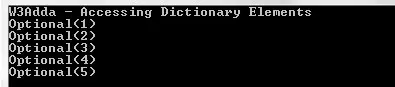
In swift a dictionary element can simply be accessed using subscript syntax, in order to access any specific dictionary element we need to pass associated key within the brackets.

Example:-

Output:-

swift_accessing_dictionary_elements

Here, dictionary value returned by subscript can be unwrapped using optional binding or forced value operator (!) as following –

Example:-

Swift Checking If a Dictionary Is Empty (isEmpty)

In Swift, isEmpty property can be used to check whether the given dictionary is empty or not.The isEmpty property returns a boolean value to indicate whether the dictionary is empty or not.

Example:-

Output:-

swift_check_dictionary_isempty

Swift Get Dictionary Elements Count

In swift count property can be used to get the count of elements of given dictionary.

Example:-

Output:-

swift_dictionary_count

Swift Add Elements to Dictionary

In swift, we can add a new item to dictionary by simply taking a new key of appropriate type and assign new value of appropriate type to it.

Example:-

Output:-

swift_add_item_dictionary

Swift Update Dictionary Element

The simplest way update a dictionary element values by assigning new values to associated key.

Example:-

Output:-

swift_dictionary_update

Dictionary element can also be updated using updateValue(_, forKey: _) method as following –

Example:-

Output:-

swift_dictionary_updatevalue

Removing Dictionary Elements in Swift

The simplest way remove a dictionary element values by assigning nil to associated key, alternatively we can remove an element using removeValue(forKey: _) method.

Example:-

Output:-

swift_dictionary_remove_element

Iterating Over a Dictionary in Swift

In Swift, we can loop through the dictionary elements using for-in loop as following –

Example:-

Output:-

swift_iterating_dictionary_elements

Iterating Over a Dictionary Keys

In Swift, we can loop through the dictionary keys only using keys property as following –

Example:-

Output:-

swift_iterating_dictionary_keys

Iterating Over a Dictionary Values

In Swift, we can loop through the dictionary values only using values property as following –

Example:-

Output:-

swift_iterating_dictionary_values


Swift Sets

Swift Sets

In Swift, Set is a unordered list of distinct values of same types. Set is much similar to an array but it is unordered and won’t allows duplicate elements, each value contained in a set is unique. Swift sets are typed, thus once you declare the type of the set or swift infers it then you would only have elements of the same type. Sets are useful when we want to hold distinct values of single data type in single variable and order of items is not important.

Set values must be hashable which means it should comply with Hashable protocol and provide a hashValue property.It is important because set values are stored in unordered manner thus hashValue is used to access the set elements.

Declaring Set In Swift

There are multiple ways we can declare/initialize sets in swift.

Syntax:-

Here, set_var_name is replaced with the set name and <type> is replaced with the data type of set and value, value, … will be replaced with actual values

Example:-

here, we initialized a set named persons of type String with values “John”, “Doe”, “Smith”, “Alex”.

Output:-

swift_creating_set

Note:- If we don’t specify the type explicitly then Swift automatically infers the type.

Declaring/Initialize an empty Set

In Swift, empty set can be created in following ways –

Syntax 1:-

Here, SetName is replaced with the name of set variable and Type is replaced with the data type of set.

Syntax 2:-

Here, we have created a empty set named secondSet by passing an empty array literal [] and Type is replaced with the data type of set.

Declaring/Initialize Set with a Sequence

In Swift, it is possible to pass a sequence as a parameter which populate the elements within the set.

Example:-

Output:-

swift_creating_set_using_sequence

Swift Check Set Empty (isEmpty)

In Swift, isEmpty property can be used to check whether the given set is empty or not.

Example:-

Output:-

swift_check_empty_set_isempty

Swift Get Set Elements Count

In swift count property can be used to find the number of elements in a set.

Example:-

Output:-

swift_set_count

Swift Add Elements using insert method

In Swift insert function is used to add or insert an element into given set.

Example:-

Output:-

swift_set_insert_element

Swift Finding Elements in a Set

In swift contains property can be used to find an element in a set, it takes a single element of the same type to be find within the set and returns a boolean value to indicate given element is exists or not.

Example:-

Output:-

swift_set_find_using_contains

Swift Finding the Index of an Element in a Set

In Swift index(of:<ele>) method can be used to find the index of given elements, it takes a single element of the same type to be find within the set and returns index position if element is found in set.

Example:-

Swift Remove Elements using remove method

In Swift remove function is used to remove or delete an element from given set.

Example:-

Output:-

swift_set_remove_element

Swift Iterating Over a Set Elements

In Swift, we can loop through the set elements using for-in loop as following –

Example:-

Output:-

swift_iterating_set

In Swift, Set elements doesn’t have any defined order, we can use sorted() method to iterate over Set elements in a specified order.

Example:-

Output:-

swift_iterating_set_sorted

Swift Set Equality

In Swift, equality of two sets can be tested using == operator. It returns true if two sets contains same elements otherwise returns false.

Example:-

Output:-

swift_check_set_equality


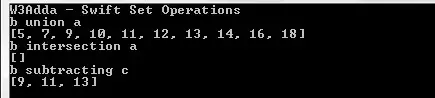
Swift Set Operations

In swift we can perform some of the following basic set operations on any Set –

Union :- The union of two sets a and b is the set combining values of a and b.

intersection :- The intersection of two sets a and b is a set that contains all elements common in both sets.

subtracting :- The subtraction of two sets a and b is set containing all elements of set a and removing elements that belongs to set b.

Example:-

Output:-

swift_set_operations

Swift Set membership

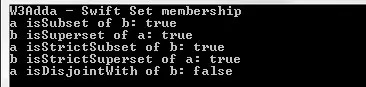
isSubset(of:) :- This method is used to check if all of the values in a set are contained in specified set.
isSuperset(of:) :- This method is used to check if a set contains all the values exists in a specified set
isStrictSubset(of:) :- This method is used to check if a set is a subset of a specified set, but not equal to it.
isStrictSuperset(of:) :- This method is used to check if a set is a superset of a specified set, but not equal to it.
isDisjoint(with:) :- This method is used to check if two sets have no values in common.

Example:-

Output:-

Swift_Set_membership

Swift Arrays

Swift Arrays

In Swift, an array is ordered collection of homogeneous elements placed in contiguous memory locations that can be accessed individually by adding an index or subscript to a unique identifier. Swift arrays are typed, thus once you declare the type of the array or swift infers it then you would only have elements of the same type. An arrays variable is useful when we want to hold multiple values of single data type in single variable.

Declaring Array In Swift

Declaring arrays in swift is straightforward, we can simply create an array using a list of values surrounded by square brackets.

Syntax:-

Example:-

here, we have created an array named arrayOfIntOne of integers, but if we don’t declare type explicitly then swift automatically infers the type.

Example:-

here, we initialized an array named arrayOfIntTwo with value [1,2,3,4,5] and without declaring the type explicitly then Swift automatically infers that it is an integer array.

Declaring an empty array

In Swift, an empty array of a certain type can be created in following ways –

Syntax 1:-

Syntax 2:-

Example:-

here, we have created an empty array named emptyIntArr of integers, now when we run this program we will see following output –

Output:-

Declaring an array of specified length with repeated value

In Swift it is possible to create an array of a given size initialized with a specified value repeated for all elements.

Syntax:-

Example:-

Now, when we run this program we will see following output –

Output:-

swift_array_repeat_value

Accessing Array Elements In Swift

In swift an array elements can be accessed by using it’s index positions, an array’s index position always starts from zero (0).

Example:-

Output:-

swift_accessing_array_elements

In swift, we can also use array properties first and last to access first and last elements of given array as following –

Example:-

Output:-

swift_accessing_array_elements_first_last

Swift Check Array Empty (isEmpty)

In Swift, isEmpty property can be used to check whether the given array is empty or not.

Example:-

Output:-

swift_check_empty_array_isempty

Swift Get Array Elements Count

In swift count property can be used to get the count of elements of given array.

Example:-

Output:-

swift_array_count

Swift Add Elements to an Array (append)

In Swift append function is used to add or insert an element at the end of the array.

Example:-

Output:-

swift_append_element

Swift Add Elements using insert method

In Swift insert function is used to add or insert an element at specified index position of given array.

Example:-

Output:-

swift_insert_element_in_array

Swift Remove Elements using remove method

In Swift remove function is used to remove or delete an element from specified index position of given array.

Example:-

Output:-

swift_array_remove_element

Swift Reverse array elements using reversed method

In Swift reversed function is used to reverse array elements.

Example:-

Output:-

swift_reverse_array

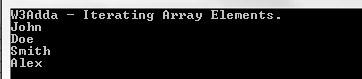
Swift Iterating Over an Array Elements

In Swift, we can loop through the array elements using for-in loop as following –

Example:-

Output:-

swift_iterating_array_elements

Swift Characters

Swift Characters

A character is used to represents a single literal, it could an alphabet, number or any special symbol.In Swift, character data type is used to hold a character value. Character can also be a languages character other than English using escape sequence \u{n} (unicode code point ,where n is in hexadecimal)

Declaring character

In Swift, character is declared same as string using double quotes.

Syntax:-

Example:-

Loop through characters from string

In Swift, string is a collection of characters thus it is possible to loop through characters from given string using for-in loop as following –

Example:-

Output:-

loop-through-characters-in-string

Swift Strings

Swift Strings

String is a series or sequence of characters, a string variable is used to hold string value that could be consists of letters, numbers, and any special characters.

Example:-

Below is a list of some valid string –

Declaring Strings In Swift

In Swift, a strings can be declared using double quotes “Hello World”.

Syntax:-

Example:-

Output:-

Swift Strings Concatenation

In Swift, strings can be concatenated simply using the plus (‘+’) operator or the += assignment operator.

Example:-

When you will run above code, you will see the following output.

Output:-

If you want to append a characters to any string it can be simply done using append() method as following –

Example:-

Output:-

swift_append_string

Swift Strings Comparison

In swift, equal to (==) and not equal (!=) operators can used to check whether the given two strings are equal or not.
The equality operators will perform case-sensitive comparison which means “HELLO” and “hello” are not equal.

Example:-

When you will run above code, you will see the following output.

Output:-

swift_string_comparison

Swift Check Empty Strings

In swift, isEmpty property can be used check if a given string is empty string or not.

Example:-

When you will run above code, you will see the following output.

Output:-

swift_isempty_string


Swift Loops

Swift Loops

Loop statements are used to execute the block of code repeatedly for a specified number of times or until it meets a specified condition. Loop statement are very useful when we want to perform same task for multiple times. In Swift, we have following loop statements available-

Swift Loop Control Statements

In Swift, you have loop control statements that can be used to alter or control the flow of loop execution based on specified conditions. In Swift, we have following loop control statements –

Swift If Statement

Swift If Statement

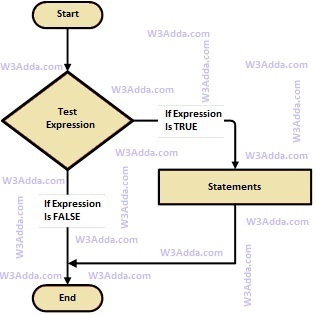
In Swift, If statement allows a block of code to be executed only when a specified condition is true. An if statement evaluates a boolean expression followed by one or more statements. The given boolean expression results in a boolean value that can only be either true or false.

Swift If Statement Flow Diagram

swift-if-statement

swift-if-statement

Syntax:-

Here, Condition is a Boolean expression that results in either True or False, if it results in True then statements inside if body are executed, if it results in False then execution is skipped from if body.

Example:-

Output:-

swift_if_statement

Swift If Else If

Swift If Else If

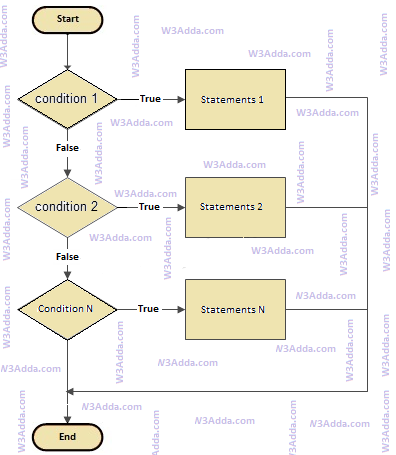
In Swift, if..else..if statement allows us add alternative set of test conditions in if..else statement using else-if and single else statements for if condition. In such way if..else..if statement is used to select one among several blocks of code to be executed.

Swift if..else..if Statement Flow Diagram

swift-if-else-if

swift-if-else-if

Syntax:-

Example:-

Output:-

swift_if_else_if_statement

swift if else if statement

Swift Decision Making

Swift Decision Making Statements

There are case where we want a a block of code to be executed when some condition is satisfied. In Swift, we have rich set of Decision Making Statement that enable computer to decide which block of code to be execute based on some conditional choices. Decision making statement statements is also referred to as selection statements.

Decision making statement evaluates single or multiple test expressions which results is “TRUE” or “FALSE”. The outcome of the test expression/condition helps to determine which block of statement(s) to executed if the condition is “TRUE” or “FALSE” otherwise.

In Swift, we have following decision making statements –

Swift Decision Making Statements
Statement Description
if Statements Block of statement executed only when specified test expression is true.
if else Statements When we want to execute some block of code if a condition is true and another block of code if a condition is false, In such a case we use if….else statement.
if else if Statements When we want to add multiple condition checks in single if else statement then by using swift if else-if else statement we can easily add multiple conditions.In if else-if else statement we have a option to add alternative else if statements but we are limited to have only one if and else block in statement.
Nested If Statements When there is an if statement inside another if statement then it is known as nested if else.
Switch Statement A switch statement evaluates an expression against multiple cases in order to identify the block of code to be executed.