Category Archives: Swift Tutorial

Swift Tutorial

Swift Keywords

Swift Keywords

In Swift, there are is a set of reserved words that you cannot use as an identifier. These words are known as “reserved words” or “Keywords”. Keywords are standard identifiers and their functions is predefined by the compiler. We cannot use keywords as variable names, class names, or method names, or as any other identifier.

Following is a Swift Keyword Table –

Class deinit Enum extension Func import Init
operator private protocol public static struct subscript
break case continue default do else for
return switch where while as false is
dynamicType super true _COLUMN_ Let in _FILE_
internal typealias if nil var self unowned
_FUNCTION_ _LINE_ associativity convenience dynamic didSet precedence
final get infix inout right set type
lazy left mutating none weak willSet prefix
nonmutating optional override postfix Protocol required

Swift Recursion

Swift Recursion

Recursion is the process where a function calls itself, and the function which calls itself is know as recursive function.

Characteristics of a recursive function

  • A recursive function is a function which calls itself.
  • The speed of a recursive program is slower because of stack overheads.
  • A recursive function must have terminating conditions, and recursive expressions.

Advantages of Recursion

  • It requires few variables which make program clean.
  • It shorten the complex and nested code.

Disadvantages of Recursion

  • It is hard to debug recursive function.
  • It is tough to understand the logic of a recursive function.

To understand how recursion works lets have one of the popular example of recursion. In this example we will calculate the factorial of n numbers. The factorial of n numbers is expressed as a series of repetitive multiplication as shown below:

Example:

Example:-

Output:-

swift_recursion

Swift Flow Control Statements

Swift Flow Control Statements

Loops statements gives you a way execute the block of code repeatedly. But sometimes, you may want to exit a loop completely or skip specific part of a loop when it meets a specified condition. It can be done using flow control mechanism.

In Swift, you have flow control statements that can be used to alter or control the flow of loop execution based on specified conditions. We have following flow control statements –

Swift Ranges

Swift Ranges

Range is a collection of consecutive or sequential values, defined by its lower and upper bound. Elements in ranges can be of both the element type and the index type in the collection.

Example:-

In Swift, ranges can be created with two range operators as following –

Half Open Range Operator (lowerBound..<upperBound)

The ranges created with half-open range operator included all the consecutive values in the interval except its upperBound value. Half open range can be declared using ..< operator as following –

Syntax:-

Example:-

Closed Range Operator (lowerBound…upperBound)

The ranges created with closed range operator included all the consecutive values in the interval include its lowerBound and upperBound values. Closed range can be declared using …(3 dots)operator as following –

Syntax:-

Example:-

Swift Ternary Operator

Swift Ternary Operator

In swift, ternary (?:) operator is a shorthand method for if else statement, which allows to express if else statement in single line. It is also known as conditional operator.

Syntax:-

Here, condition is a Boolean expression that results in either True or False, if it results in True then result1 will be returned, if it results in False then result2 will be returned.

Example:-

Output:-

swift_ternary_operator

Swift guard Statement

Swift guard Statement

In Swift, the guard statement enable us to transfer program control out of a scope on specified condition. The guard statements are very similar to swift if statement, but unlike if, the guard statement allows block of code to be executed only when test expression returns False.

Syntax:-

Here, Condition is a Boolean expression that results in either True or False, if it results in False then statements inside else body are executed, if it results in True then statements inside else body are skipped and control jumps to next statement.The else body must contain a return, break, continue or throw in order to exit from the scope.

Example :-

Output:-

swift_guard_statement

Swift Fallthrough Statement

Swift Fallthrough Statement

In Swift, the switch statement generally executes only the matching block, and then execution come at the end of the switch statement. Unlike many other programming languages there is no need of break keyword to stop the execution. Look at the below general syntax of a switch statement in other programming languages –

Syntax:-

Here, the switch statement generally executes only the matching block, and then execution come at the end of the switch statement as soon as it find break keyword. But, if we omit the break keywords from the cases,then all of the subsequent cases after the matching case will be executed additionally. This execution of additional cases is termed as the “fall through” behavior of switch statement.

The switch statement in swift generally executes only the matching block, and then execution come at the end of the switch statement. Look at the below general syntax of a switch statement in swift –

Syntax:-

In Swift, the fallthrough keyword allows to execute all the following statements after a matching block found.

Switch without fallthrough

Example:-

Output:-

switch_without_fallthrough

Switch with fallthrough

Example:-

Output:-

switch_with_fallthrough

Swift Throw Statement

Swift Throw Statement

In swift, the throw statement is an error handling statement. The throw statement allows function to stop the execution and throw an error if there is any exception or error occurs. In Swift, if a function, method, or an initializer can throw an error, it must be added throws keyword in its definition after the parameter list and before the return type.

If a function or an initializer can throw an error, the throws modifier must be added in the definition itself right after the paratheses and just before the return type (->).

Syntax:-

Example:-

When we run the above swift program, we see the following output –

Output:-

swift_throw_statement

swift_throw_statement


Swift Return Statement

Swift Return Statement

In Swift, the return statement is simply used to return values or expression from enclosing function. The return statement allows you to return single or multiple values in single statement.

Syntax:-

Or

Example:-

Here, return statement return the sum of two number passed in the enclosing function named sum.

When we run the above swift program, we will see the following output –

Output:-

swift_return_statement

swift_return_statement

Swift Break Statement

Swift Break Statement

In Swift, break statement inside any loop gives you way to break or terminate the execution of loop containing it, and transfers the execution to the next statement following the loop. It is almost always used with if..else construct.

Swift Break Statement Flow Diagram
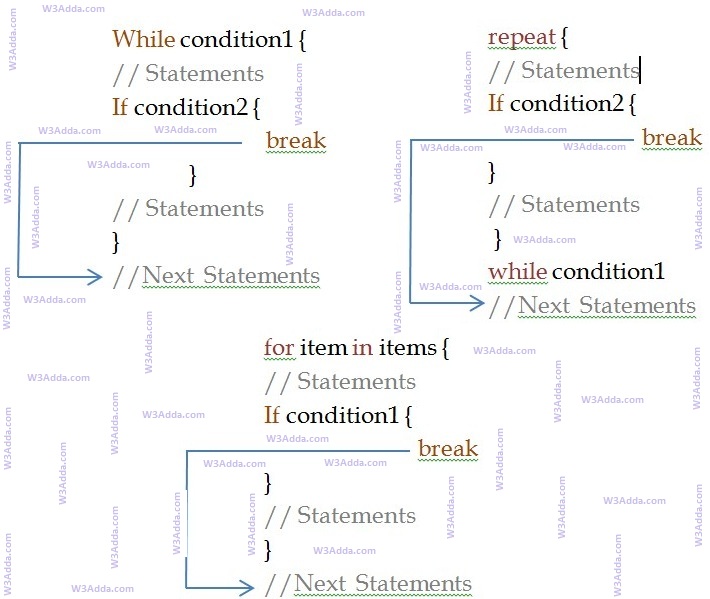
swift_break_statement

swift_break_statement

Syntax:-

Example:-

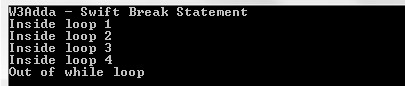
In this above program, the variable count is initialized as 0. Then a while loop is executed as long as the variable count is less than 10. Inside the while loop, the count variable is incremented by 1 with each iteration (count = count + 1). Next, we have an if statement that checks the variable count is equal to 5, if it return TRUE causes loop to break or terminate. Within the loop there is a print() statement that will execute with each iteration of the while loop until the loop breaks. Then, there is a final print() statement outside of the while loop.

When we run this code, our output will be as follows –

Output:-
swift_break_statement

swift_break_statement

Swift Labeled break

The standard unlabeled break statement is used to terminates the nearest enclosing loop. In Swift, there is another form of break (labeled break) statement is used to terminate specified loop and control jumps to the statement immediately following the labeled statement. In Swift, Label is an identifier which is followed by colon (:) sign, for example abc:, test:.

Example:-

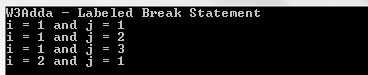
Here, when i == 2 expression is evaluated to true, break outer is executed which terminates the loop marked with label outer:.

When we run this code, our output will be as follows –

Output:-
swift_labeled_break_statement

swift_labeled_break_statement
Swift Continue Statement

Swift Continue Statement

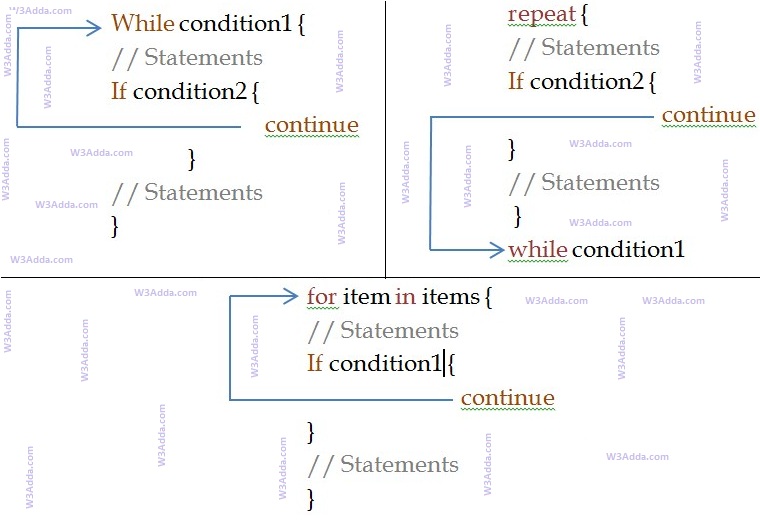
In Swift, the continue statement gives you way to skip over the current iteration of any loop. When a continue statement is encountered in the loop, the rest of statements in the loop body for current iteration and returns the program execution to the very first statement in the loop body. It does not terminates the loop rather continues with the next iteration.

Swift Continue Statement Flow Diagram

swift_continue_flow_diagram

swift_continue_flow_diagram

Syntax:-

Example:-

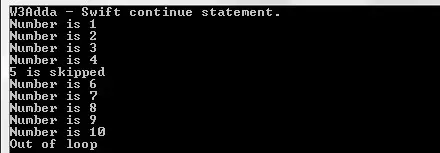
When we run the above swift program, we will see following output –

Output:-

swift_continue_statement

As you can see when ctr == 5, continue statement is executed which causes the current iteration to end and the control moves on to the next iteration.

Swift Repeat While Loop

Swift Repeat While Loop

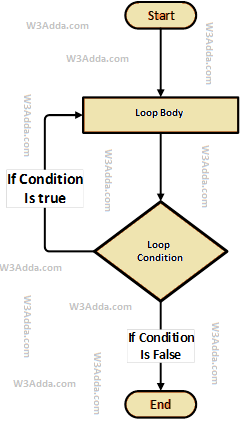
The repeat…while loop executes block of statements inside loop body first and then test the condition for next iteration and executes next only if condition is true. The repeat…while loop is much similar to swift while loop with one major difference, in repeat…while loop block of statements inside loop body executes at least once.

Swift Repeat While Loop Flow Diagram

swift-repeat-while-loop-flowchart-diagram

Syntax:-

Here, loop executes block of statements inside loop body first and then test the condition provided along with while keyword for next iteration and executes next only if condition is true. Condition is a Boolean expression that results in either True or False, if it results in True then statements inside loop body are executed and condition is evaluated again. This process is repeated until the condition is evaluated to False. If the condition results in False then loop is terminated and control is transferred to next statement.

Example:-

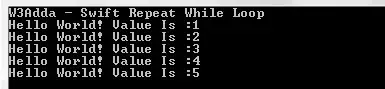
Here, we have initialized ctr and maxCtr to 1 and 5 respectively, in the next statement we have loop body inside the pair of curly brackets {} after repeat keyword, statements inside loop body are executed first then control is passed to the condition ctr <= maxCtr provided along with while keyword for next iteration. If the test condition returns True, then control is passed again to loop body for the next iteration. If the condition results in False then loop is terminated and control is transferred to next statement. Inside the loop body we have incremented the ctr value by one for each if the iteration. When we run the above swift program, we see the following output –

Output:-

swift_repeat_while_loop