Category Archives: Swift Tutorial

Swift Tutorial

Swift Basic Syntax

Swift Basic Syntax

In this article, we will explore about various basic syntax in swift.

Swift Printing and String interpolation

In Swift, print() function is used to print a value and \() for string interpolation as following –

Swift Comments

Swift Comments are a set of statements that are not executed by the Swift compiler and interpreter. The use of comments makes it easy for humans to understand the source code.

Swift Single-line Comments:-

A ‘//’ (double forward slash) is used to specify a single line comment, which extends up to the newline character.

Output:-

Swift Multi-line Comments:-

If you want to comment multiple lines then you can do it using /* and */, everything in between from /* to */ is ignored by the compiler-

Output:-

Semicolons In Swift

In Swift it is not mandatory to put a semicolon (;) at the end of each statement, it is optional in swift.But, if you are typing multiple statements in single line, then it is necessary to use a semicolon as a delimiter, otherwise the compiler will raise a syntax error.

Example 1:-

OR

Here, both the statements are valid swift statement.

Example 2:-

Swift Whitespaces

In Swift, Whitespace is used to indicate blanks, tabs, newline characters, comments. Whitespace are also useful separate one part of any statement from another.

Example:-

Swift REPL

Swift REPL

Swift REPL is a interactive read-eval-print-loop terminal, it provides you a way to interactively explore, running and debug swift code. XCode Playground is more like Swift REPL, If you’ve latest version of Xcode installed on your system then you are able to launch Swift REPL by typing in swift command on terminal as following –


Swift installation

Swift installation

In this article you will find information about the how to setup local Swift programming environment. In order to setup Swift Programming environment you need to have latest version of Xcode installed installed, so if you don’t have it installed, check the following instruction to get XCode installed. If you’ve already have it installed in your system, you can skip this part.

Step 1:- Log in to the Apple Developer’s Account

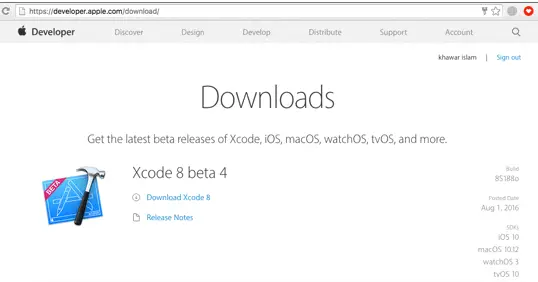
Step 2:- Download the latest version of Xcode Setup from the official Apple’s website, link given below –

download-xcode-from-apple-website-for-ios-apps

Step 3:- Run the Xcode installer (the .dmg file you downloaded in the previous step.)

Step 4:- Follow the installation wizard and accept the terms and conditions to install Xcode.

Let’s create a simple “Hello World” program in Swift, Swift Playground is the easiest way to run Swift code. Swift Playgrounds allows you to interactively run the Swift code.

Step 5:- Launch the Xcode and click “Get started with a playground” in order to create a new playground

get_started_with_playgrounds

Step 6:- Enter playground name and save it.

swift-project-playground-name

Step 7:- Put the following lines of code in left hand side of the Swift Playground

Step 8:- You will see the following output in Right hand side of the Swift Playground


Swift Introduction

Swift Introduction

Swift is a general-purpose, multi-paradigm, object and protocol oriented programming language developed by Apple Inc. It supports the existing core concepts of Objective C like multi-threading, optional chaining, late binding with added new features like automatic memory management, protocols and introduced the protocol oriented programming. It is open source programming language developed for iOS, macOS, watchOS and tvOS. Swift is a powerful yet very easy to learn programming language. Swift syntax are very concise and expressive.

Swift Features

  • Swift is Open Source
  • Swift is much powerful, faster yet safer
  • It Supports Dynamic Library
  • It provides interactive Playgrounds and REPL in Xcode
  • It is Objective-C Interoperable

Swift History

Swift 1 :-

In October, 2014 Apple announced the swift 1.0 as the new programming language for iOS and macOS application development. Swift is being promoted as a modern, safe, fast, and interactive programming language.

Swift 2:-

In September, 2015 Apple announced the Swift 2.0 as the upgraded version of Swift at WWDC Conference along with Xcode 8 editor.

Swift 3:-

In September 2016, Apple announced the Swift 3.0 with some major code changes including enhancement in OOP Concept etc.

Swift 4:-

In September 2017, Apple announced the Swift 4.0 with some core data type enhancement in strings, subscript, etc.