Category Archives: R Tutorial

R Tutorial

R Function

R Function

Function gives you way to wrap up the set of statements that means to perform any specific task and give it a name, so that it can be invoked later from any where in the program. Functions makes it easy to divide the complete program into sub-units that perform a specific task for that program, this way it enhance the modular approach and increase the code re-usability of the program. We pass information in function call as its parameter and the function can either returns some value to the point it where it called from or returns nothing.

Advantages of function

  • It enhance the modularity of the program.
  • It enhance the re usability.
  • It makes development easy as development can be shared in team.
  • It reduces the coupling.
  • It reduces duplication.

Type Of Function In R

  • Built in function
  • User defined functions

R Built In Function

Built in functions are the functions available in R to perform some common and standard tasks. R supports a rich set of in-built functions including file access, mathematical computations, graphics, memory management etc.

R User defined functions

User defined function are custom function defined by user it self to perform as custom task that is not available as built in, in this way user can define and write subprograms as functions to perform a task relevant to their programs.

Defining a function In R

In R, a function can be declared using “function” keyword with list of required parameters if any as following –

Syntax:-

Above is the general syntax of a R function, here

function :- It is R keyword which is used to define a function.
func_name :- It is replaced with the name of the function.
parameter_list :- It represents the list of the parameters need to be passed when function call made.

Example:-

Let’s create a function to calculate the power of given number.

Calling a function In R

In R, a function can be invoked simply by its name with arguments list as following –

let’s put together in R script as following –

Example:-

When run the above R script, we see the output as following –

Output:-

r_functions

Return Value from Function

Sometimes we may want a function to return some value to the point it where it is called from. In R, there is return() function allows a function to return value.

Syntax:-

Example:-

Let modify the above function we created to return power of given number.

Output:-

r_function_with_return_value

R Function with Multiple Return Values

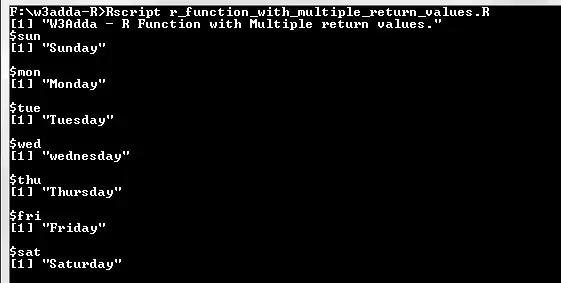
In R, if we want a function to return multiple values, this can be achieved using a list object in return() as following –

Example:-

Output:-

f_function_with_multiple_return_values

R next Statement

R next Statement

In R, the next statement gives you way to skip over the current iteration of any loop and continues with the next iteration. When a next statement is encountered in the loop, the rest of statements in the loop body for current iteration and returns the program execution to the very first statement in the loop body. It does not terminates the loop rather continues with the next iteration.

Syntax:-

Example:-

When we run the above swift program, we will see following output –

Output:-

r_next_statement

As you can see when ctr == 5, next statement is executed which causes the current iteration to end and the control moves on to the next iteration.

R break Statement

R break Statement

In R, break statement inside any loop gives you way to break or terminate the execution of loop containing it, and transfers the execution to the next statement following the loop. It is almost always used with if..else construct. If break statement is used inside a nested loop, it allows to break and exit from the innermost loop it is used in.

Syntax:-

Example:-

In this above program, the variable count is initialized as 0. Then a while loop is executed as long as the variable count is less than 10. Inside the while loop, the count variable is incremented by 1 with each iteration (count = count + 1). Next, we have an if statement that checks the variable count is equal to 5, if it return TRUE causes loop to break or terminate. Within the loop there is a print() statement that will execute with each iteration of the while loop until the loop breaks. Then, there is a final print() statement outside of the while loop.

When we run this code, our output will be as follows –

Output:-

r_break_statement

R repeat Loop

R repeat Loop

The repeat loop executes a block of code repeatedly, until it meets an explicit condition to break and exit the loop. Repeat loop construct don’t have any conditional check over iterations, thus it is mandatory to define an explicit condition with a break statement inside loop body, which allows program to exit the loop. Otherwise, it will result into an infinite loop.

Syntax:-

Example:-

Here, we have defined ctr variable and initialized it with 1. Next, we have a repeat loop and inside the loop body we have a print statement that prints “Hello, World!” string after this we are incrementing ctr value by 1, then we have an if condition which break the loop if ctr > 5.

When we run the above R script, we see the following output –

Output:-

R while Loop

R While Loop

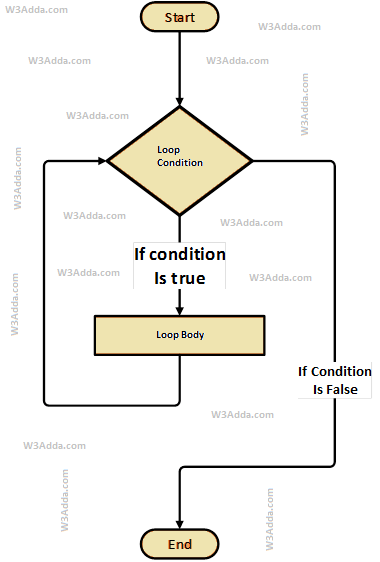
The while loop will execute a block of statement as long as a test expression is true. While loop is useful when the number of iterations can not be predicted beforehand. The while loop evaluates test expression at beginning of each pass.

R While Loop Flow Diagram

swift-while-loop-flowchart-diagram

Syntax:-

Here, Condition is a Boolean expression that results in either True or False, if it results in True then statements inside loop body are executed and condition is evaluated again. This process is repeated until the condition is evaluated to False. If the condition results in False then execution is skipped from loop body and while loop is terminated.

Example:-

Here, we have initialized ctr and maxCtr to 1 and 5 respectively, in the next statement we have while loop, that checks the condition ctr <= maxCtr for each of the iteration. If the test condition returns True, the statements inside loop body are executed and if test condition returns False then the while loop is terminated. Inside the loop body we have incremented the ctr value by one for each if the iteration. When we run the above R script, we see the following output –

Output:-


R for loop

R for loop

The for in loop takes a list or collection of data(list, data frame, vector, matrix , or anything that provides an iterator) and iterate through the its elements one at a time in sequence.

Swift For In Loop Flow Diagram

swift-for-in-loop-flowchart-dagram

Syntax:-

Here, items is a vector that allows us to fetch each of the single element, and item hold the the current element fetched from the items.

Iterating over a Vector using for loop

In R, we can loop over a vector using for loop as following –

Example:-

Here, we have initialized a vector employees with 4 elements and then loop over it using for loop. When we run the above R script, we see the following output –

Output:-

r_iterating_vector_using_for_loop

Iterating over a list using for loop

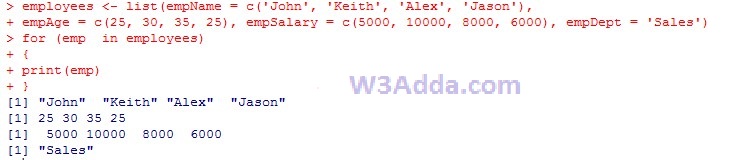
In R, we can loop over a list using for loop as following –

Example:-

Here, we have created a list employees with four vectors empName, empAge, empSalary and empDept. Next, we are iterating over it.

When we run the above R script, we see the following output –

Output:-

r_iterating_list_using_for_loop

Iterating over a matrix using for loop

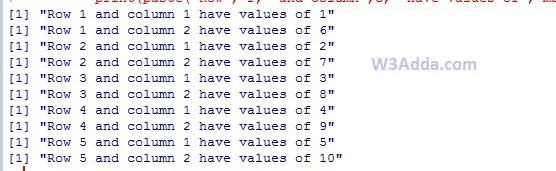
In R, we can loop over a matrix using for loop as following –

Example:-

Here, we have [5,2] matrix with 5 row 2 columns. In order to iterating over its elements we would need two for loops, one for rows and another one for columns.

Output:-

r_iterating_matrix_using_for_loop

R Loops

R Loops

Loop statements are used to execute the block of code repeatedly for a specified number of times or until it meets a specified condition. Loop statement are very useful to iterate over collection/list of items or to perform a task for multiple times. In R, we have following loop statements available-

R Loop Control Statements

In R, you have loop control statements that can be used to alter or control the flow of loop execution based on specified conditions. In R, we have following loop control statements –

R ifelse() Function

R ifelse() Function

In R, the ifelse function is a vectorized version of standard R if..else statement. The ifelse function returns a value in the same shape as of the test expression. This vectorization makes it much faster than applying the same function to each of the vector element individually.

Syntax:-

expression :- Boolean Vector

x :- Return values for true elements of expression

y :- Return values for false elements of expression

Here, expression is a boolean vector (or coerced to boolean) and return value x and y is also vector with the same length as expression. The element i is x[i] if expression[i] is true, or y[i] if expression[i] is false.

Example:-

Output:-

r_ifelse_function

r_ifelse_function

R Switch Statement

R Switch Statement

In R, switch statement evaluates equality of an variable/expression value against multiple case values in order to identify the block of code to be executed.

Syntax:-

Here, expression values is tested against multiple case values (case1, case2, case3…., caseN)

The following rules apply to a switch statement –

  • If the expression value is not a character string it is coerced to integer.
  • In switch you are allowed to have any number of case statements.
  • If there is more than one match, the first matching element is returned.
  • There is no default value/case is available.
  • If no match found and there is an unnamed element, its value is returned.

Example:-

Output:-

r_switch_statement

r_switch_statement

R if else if Statement

R if else if Statement

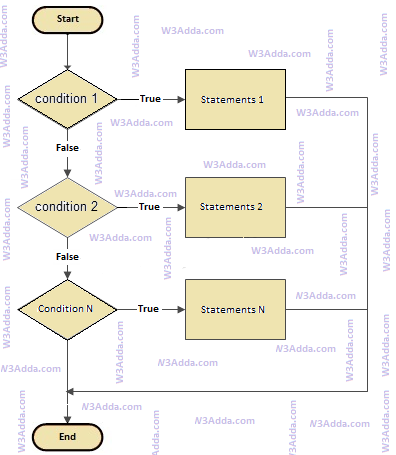
In R, if..else..if statement allows us add alternative set of test conditions in if..else statement using else if and single else statements for if condition. In such way if..else..if statement is used to select one among several blocks of code to be executed.

R if..else..if Statement Flow Diagram

r-if-else-if

r-if-else-if

Syntax:-

Example:-

Output:-

r_if_else_if_statement

R if else Statement

R if else Statement

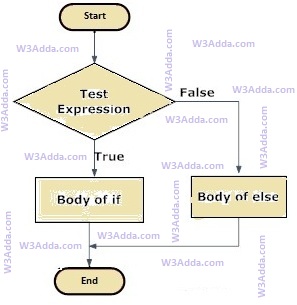
In R, when we want to execute a block of code when if condition is true and another block of code when if condition is false, In such a case we use if…else statement.

R If…else Statement Flow Diagram

R-if-else

R-if-else

Syntax:-

Here, Condition is a Boolean expression that results in either True or False, if it results in True then statements inside if body are executed, if it results in False then statements inside else body are executed.

Example:-

Output:-

r_if_else_statement

R If Statement

R if Statement

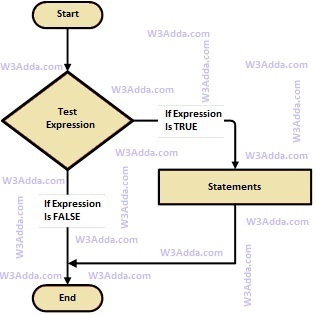
In R, If statement allows a block of code to be executed only when a specified condition is true. An if statement evaluates a boolean expression followed by one or more statements. The given boolean expression results in a boolean value that can only be either true or false.

R If Statement Flow Diagram

R-if-statement

R-if-statement

Syntax:-

Here, condition is a Boolean expression that results in either True or False, if it results in True then statements inside if body are executed, if it results in False then execution is skipped from if body.

Example:-

Output:-

r_if_statement