Category Archives: R Tutorial

R Tutorial

R String toString

R String toString

The toString() function is used to convert an R Object to a Character String. It is a helper function used with format, to produce a single character string describing an R object.

Syntax:-

Above is the general syntax of toString() function, it first converts x to character type and then concatenates the elements with “, “. If width is passed and it is not a NULL value, then it returns the first width – 4 characters of the result appended with (….), in case of full result using more than width specified.

x:- It is a R object to be converted.
width:- It represents the maximum field width. The minimum value for width can be 6 and anything smaller than 6 is taken as 6, 0 or NULL indicate no maximum.
… :- It is the optional arguments passed to or from methods.

Example:-

Output:-

r_tostring


R Vectors

R Vectors

Vector is one of the basic data structure in R. Vector is basically a collection of data elements of the same basic type i.e. logical, integer, double, character, complex or raw. The elements in a vector are termed as components.

Creating a Vector in R

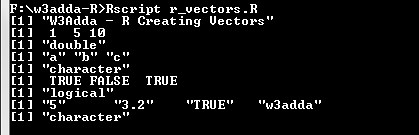
Vectors are commonly created using the c() function, it is the easiest way to create vectors in R. While, creating vector we must pass elements of the same type, but, if the elements are of different type then elements are converted to the same data type from lower data type to higher data types from logical to integer to double to character.

Example:-

Output:-

r_creating_vectors

Vectors of consecutive or sequential numeric values can simply be generated using colon (:) operator as following –

Syntax:-

start:- It is the start/first element value.
end:- It is the end/last element value.

Example:-

Output:-

r_creating_vector_colon

Vector using seq() function

The seq() function enable us to create vectors with sequential values at specified step size.

Syntax:-

Above is the general syntax of seq() function, here

stepSize:- It is step or interval size between vector elements.
startValue:- It is the start value.
endValue:- It is the end value.

Example:-

Output:-

r_creating_vector_using_seq

Accessing Vector Elements

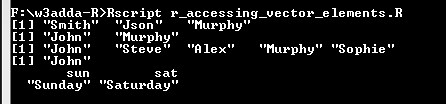
Vector elements can be accessed by passing index value(s) in brackets [ ]. An index value can be logical, integer or character.

integer Index:-

An integer index can be used to denote the element position. An integer index value start with 1.

logical Index:-

TRUE, FALSE or 0 and 1 can be used as logical index corresponding to the vector element position, vector with TRUE index position is returned.

character Index:-

Character index vector can be used with named vectors.

Example:-

Output:-

r_accessing_vector_elements

Modifying Vector Elements

Vector element value can be modified by assigning it new value as following –

Example:-

Output:-

r_vector_modify_element

Deleting Vector

Vector can be deleted by simply assigning it NULL value as following –

Example:-

Output:-

r_delete_vector

R String Substring

R String Substring

The part of a string is termed as substring. In R, the substring() function is used to extract new string out of a string. The substring begins with the character at the start index and extends to the character at the end index.

Syntax:-

Above is the general syntax of substring() function, here

str:- It is a vector input representing a string.
startIndex:- It is start position of the first character to be extracted.
endIndex:- It is the last position of the last character to be extracted.

Example:-

Output:-

r_substring

R String toupper

R String toupper

The toupper() function is used to convert given string characters to uppercase.

Syntax:-

Above is the general syntax of toupper() function, here

str:- It is a vector input representing a string.
Example:-

Output:-

r_string_toupper

R Strings

R Strings

String is a series or sequence of characters – letters, numbers, and special characters. In R, strings can either be declared using double quotes “Hello World” or single quote ‘Hello World’, internally all string values stored in double quotes, even it is created with single quote.

Example:-

Output:-

R String Paste Function

R String Paste Function

In R, the paste() function is used for concatenating multiple strings in one string. The paste() function can combine any number of strings together.

Syntax:-

Above is the general syntax of paste() function, here

…:- It represents arguments that needs to be concatenated.
sep:- It is a separator, which is used to combine arguments with. It is an optional parameter
collapse:- It is used to remove unwanted space between two string. It does not remove space between two words in a string.

Example:-

Output:-

r_string_paste_function

R String Length

R String Length

In R, the nchar() function is used to count number of characters in a string including the space.

Syntax:-

str:- It is a vector input representing a string.
Example:-

Output:-

r_nchar_string_length

R Infix Function

R Infix Function

In R, generally functions are prefix, where function name comes before the argument list enclosed in parentheses, for example – fun(a,b). But with infix functions, the function name comes in between its arguments. For example, operators like + and – are actually infix functions, in fact these operators do a function call in the background. For instance, the expression

is actually converted its infix equivalent as

.Example:-

Infix operators in R

Following is a list of predefined infix operators available in R –

Infix operators in R
%% Remainder operator
%/% Integer division
%*% Matrix multiplication
%o% Outer product
%x% Kronecker product
%in% Matching operator

User defined infix operator

In R, a user-defined infix operator can be created as following –

Syntax:-

here, func_name is replaced with actual function name enclosed between percent sign(%). As percent sign(%) is a special character, you need to use it inside back ticks. Once an infix function is defined later it can invoked as following –

Syntax:-

Example:-

Output:-

r_infix_operators

R String Format

R String Format

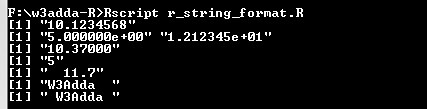
Sometime we may want to convert a number or string into any specific format. In R, the format() function is used to format numbers and strings into specified format.

Syntax:-

Above is the general syntax of format() function, here –

str:- It is a vector input representing a string.

digits:- Number of digits to be displayed.

nsmall:- It represents the min. number of digits after the decimal point.

scientific:- It is set to TRUE to display scientific notation.

width:- It represents the min. width to be displayed, it allows padding blank space in the beginning.

justify:- It is used to set display of the string to left, right or center.

Example:-

Output:-

r_string_format

R Scope

R Scope

Scope defines the region of visibility or availability for a variable, out of which we can not reference that variable. There are two main kinds of scope.

  • global
  • local

R Global Variable

Global variables can be accessed at any point throughout the program, and can be used in any function. There is single copy of the global variable is available. Global variables are defined outside of all the functions, usually on top of the program.

R Local Variable

Variable declared inside a function or block of code are called local variables. They can be accessed only inside that function or block of code. Local variables are not available outside the function.

Example:-

Let’s take a simple R program –

In the above example R program, for funB() both a and b are global variables. However, for funA(), b is a local variable and only a is global variable. The variable c is completely invisible to funA().

Note :- A program can have same name for local and global variables but local variable overrides the value.

Example:-

Output:-

r_local_variable

Accessing global variables

In R, super assignment operator “<<-” is used to refer variables from global environment, if we try to access a variable that does not exists then it is created and assigned at the global level.

Example:-

Output:-

r_accessing_global_variable

R Environment

R Environment

In R, as soon as R interpreter is started a run time environment is automatically created. This run time environment holds up a collection of all run-time entities being created including functions, variables etc.

R Global Environment

The top level environment, when the R interpreter is started is termed as global environment. This can be referred to as .GlobalEnv in R program, a

R ls() function

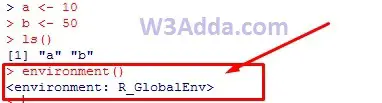
In R, ls() function is used to list all of the variables and functions available in current environment.

Example:-

r_ls_function

R environment() function

The environment() function is used to show current environment.

Example:-

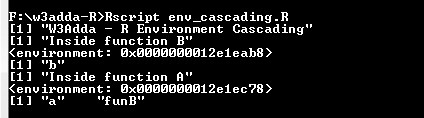
R Environments Cascading

In R, whenever a new function is defined, a new environment is created for it. An environment actually has a frame, that contains all of the entities being defined, it also contains a pointer to its enclosing (parent) environment. In R, defining a function inside another function results in cascading of environment.

Example:-

Here, we have function named funA which is accepting a parameter “a”, inside this we have function named funB which accepting parameter “b”.

Let’s run the above program to see the output –

Output:-

r_environment_cascading

R Recursion

R Recursion

Recursion is the process where a function calls itself, and the function which calls itself is know as recursive function.

Characteristics of a recursive function

  • A recursive function is a function which calls itself.
  • The speed of a recursive program is slower because of stack overheads.
  • A recursive function must have terminating conditions, and recursive expressions.

Advantages of Recursion

  • It requires few variables which make program clean.
  • It shorten the complex and nested code.

Disadvantages of Recursion

  • It is hard to debug recursive function.
  • It is tough to understand the logic of a recursive function.

To understand how recursion works lets have one of the popular example of recursion. In this example we will calculate the factorial of n numbers. The factorial of n numbers is expressed as a series of repetitive multiplication as shown below:

Example:

Example:-

Output:-

r_recursion