Category Archives: java

Java Arithmetic Operators

Java Arithmetic Operators

Arithmetic Operators are used to performing arithmetic operations like addition, subtraction, multiplication, division, %modulus, exponent, etc. Let variable a hold 20 and variable b hold 10, then −

Java Arithmetic operators
Operator Name Description Example
+ Addition Addition of given operands
a+b returns 30
- Subtraction Subtraction of second operand from first a-b returns 10
* Multiply Multiplication of given operands a*b returns 200
/ Division Returns Quotient after division
a/b returns 2
% Modulus Returns Remainder after division a%b returns 0

Example:-

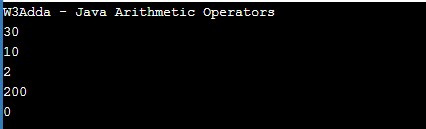
When you run the above java program, you will see the following output.

Output:-

java_arithmetic_operators_example

Java Operators

Java Operators

An operator is a special symbol that is used to carry out some specific operation on its operand. In Java, we have a rich set of built-in operators to carry out different types of operations. There are operators for assignment, arithmetic operations, logical operations, comparison operations, etc. Java operators can be used with many types of variables or constants, but some of the operators are restricted to working on specific data types. Most operators are binary, meaning they take two operands, but a few are unary and only take one operand.

Type of operators in Java

In Java, we have the following types of operators available –

  • Assignment
  • Arithmetic
  • Unary
  • Relational
  • Logical
  • Conditional
  • Bitwise
  • instanceof
  • Dot (.)

Java Assignment Operators

Assignment operators are used to assigning value to a variable, you can assign a variable value or the result of an arithmetical expression. In many cases, the assignment operator can be combined with other operators to build a shorthand version of an assignment statement known as a Compound Statement. For example, instead of a = a+5, we can write a += 5.

Java Assignment operators
Operator Description Expression
= Assignment Operator
a=b
+= add and assign a+=b is equivalent to a=a+b
-= subtract and assign a-=b is equivalent to a=a-b
*= multiply and assign a*=b is equivalent to a=a*b
/= divide and assign a/=b is equivalent to a=a/b
%= mod and assign a%=b is equivalent to a=a%b
<<= Left shift AND assign a<<=5 is equivalent to a=a<<5
>>= Right shift AND assign a>>=5 is equivalent to a=a>>5
&= Bitwise AND assign a&=5 is equivalent to a=a&5
^= Bitwise exclusive OR and assign a^=5 is equivalent to a=a^5
|= Bitwise inclusive OR and assign a|=5 is equivalent to a=a|5


Java Arithmetic Operators

Arithmetic Operators are used to performing arithmetic operations like addition, subtraction, multiplication, division, %modulus, exponent, etc. Let variable a hold 20 and variable b holds 10, then −

Java Arithmetic operators
Operator Name Description Example
+ Addition Addition of given operands
a+b returns 30
- Subtraction Subtraction of second operand from first a-b returns 10
* Multiply Multiplication of given operands a*b returns 200
/ Division Returns Quotient after division
a/b returns 2
% Modulus Returns Remainder after division a%b returns 0


Java Unary Operators (post and pre)

In Java, ++ and — are known as increment and decrement operators respectively. These are unary operators which means they work on a single operand. ++ adds 1 to operand and — subtracts 1 to operand respectively. When ++ is used as a prefix(like ++i), ++i will increment the value of i and then return it but, if ++ is used as a postfix(like i++), It will return the value of the operand first and then only increment it.

Operator Example Description
++ [prefix] ++a The value of an increment
++ [postfix] a++ The value of a before an increment
— [prefix] –a The value of an after decrement
— [postfix] a– The value of a before the decrement

Java Comparison (Relational) Operators

Comparison Operators are used to evaluating a comparison between two operands. The result of a comparison operation is a Boolean value that can only be true or false. Comparison Operators are also referred to as relational operators.

Let variable a hold 20 and variable b hold 10, then −

Java Relational operators
Operator Description Example
> greater than a>b returns TRUE
< Less than a<b returns FALSE
>= greater than or equal to a>=b returns TRUE
<= less than or equal to a<=b returns FALSE
== is equal to a==b returns FALSE
!= not equal to a!=b returns TRUE


Java Logical Operators

Logical operators are used to combine expressions with conditional statements (AND, OR, NOT) which results in true or false. Let variable a hold true or 1 and variable b holds false or 0, then −

Java Logical operators
Operator Name Description Example
&& Logical AND return true if all expression are true (a && b) returns false
|| Logical OR return true if any expression is true (a || b) returns true
! Logical NOT return complement of expression !a returns false

Java Conditional operator ( ? : )

In Java, the conditional operator is considered shorthand for an if-else statement. The conditional operator is also called as “Ternary Operator”.

Syntax:

If the condition is true the expression will return the result1, if it is not it will return result2.

Java Bitwise Operators

Bitwise operators are used to performing the bit-level operations over its operand.

Let A = 60; and B = 13;

Binary equivalent

A = 0011 1100

B = 0000 1101

Operator Meaning Example Description
& Binary AND (A & B) It returns 12 which is 0000 1100
| Binary OR (A | B) It returns 12 which is 0000 1100
^ Binary XOR (A ^ B) It returns 49 which is 0011 0001
~ One’s Complement (~A ) It returns -60 which is 1100 0011
<< shift left A << 2 It returns 240 which is 1111 0000
>> shift right A >> 2 It returns 15 which is 0000 1111

Java instanceof Operator

In Java, the instanceof operator is used to determine whether an object is an instance of a class, a subclass, or an interface or not.

Java Dot(.) Operator

The (.) operator is also known as the member operator it is used to access the member of a package or a class.

Java Constants

Java Constants

Constants refer to immutable values. Constants are basically literals whose values cannot be modified or changed during the execution of the program. Java doesn’t provide built-in support for constants, but it is possible to create a constant using static and final modifiers. A constant can be used to make the program more readable and understood by others. In addition, a constant is cached by the JVM as well as your application, so using a constant can improve performance.

Static Modifier

The static modifier allows a class variable to be used without creating an instance of that class. Static class members are associated with the class itself, rather than an individual object. All of the instances of a class share the same copy of a static variable.

Example:-

here, class classOne contains a static variable days_in_week, thus we are allowed to use it in classTwo without explicitly creating a class one object.

Final Modifier

The final modifier makes a variable’s value immutable. Once the value is assigned, it cannot be changed later in the program. The final modifier is used in conjunction with Primitive data types (i.e., int, short, long, byte, char, float, double, boolean) to make a variable immutable.

Example:-

Note:- By convention constant names are always preferred to be in uppercase.

Java Type Casting

Java Type Casting

The conversion of a data type into another type is called typecasting. Type Casting is a mechanism that allows a variable of one data type to be converted to another data. When a variable is typecast into a different type, the compiler basically treats the variable as the new data type. Casting can only be performed, when they are compatible with the rules defined. Typecasting can be of two types.

Types of Type Casting In Java

Implicit Casting (Widening)

Explicit Casting (Narrowing)

Implicit Casting

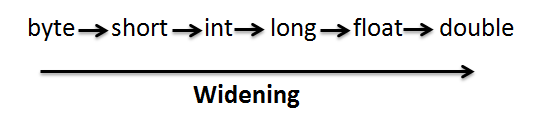
An implicit or automatic casting compiler will automatically change one type of data into another. Implicit or automatic casting can happen if both types are compatible and the target type is larger than the source type.

Java--implicit-Type-Casting-Widening

In Java, there is no need for Explicit casting for the above sequence. For instance, if you assign an integer value to a floating-point variable, the compiler will insert code to convert the int to afloat. When we are assigning a smaller type to a larger type, there is no need for explicit casting required, casting happens automatically.

Example:-

Here the value of 'a' has been promoted from short to int and we have not had to specify any type-casting operator. implicit conversions affect primitive data types. Typecasting should always be used in the right order (low to higher data). Typecasting in the wrong places may result in a loss of precision, which the compiler can signal with a warning. for example like for instance truncating afloat when typecasting to an int. This can be avoided with an explicit conversion. In implicit casting a smaller type is converted into a larger thus it is also known as widening conversion.

Explicit Casting

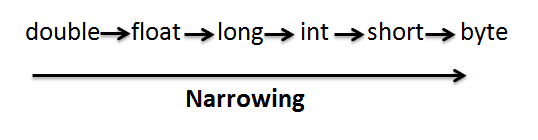
There may be situations when we want to convert a value having a larger type to a smaller type. In this case, casting needs to be performed explicitly. Explicit casting allows you to make this type of conversion explicit, or to force it when it wouldn’t normally happen.

Java-explicit-Type-Casting-Narrowing

Syntax:-

To perform typecasting, put the desired type including modifiers inside parentheses to the left of the variable or constant you want to cast.

Example:-

Here, the size of source type int is 32 bits, and the size of destination type byte is 8 bits. Since we are converting a source type having a larger size into a destination type having less size, such conversion is known as narrowing conversion.

Java Literals

Java Literals

Literals are used to express certain fixed values within the source code of the program. They are used to represent a value directly in the code without any computation. Java literals can be assigned to any primitive type variable.

Example:-

Here,

boolean:- is a data type.

flg:- – is variable

false:- is literal.

In Java, literals can be used to represent the value of an integer, floating-point number, or string type. Here are some valid literals examples –

In Java, literals can be of following types –

Integer Literals

Integer literals are used to represent a decimal, binary, or hexadecimal value. Integer literals are used to initialize variables of integer data types byte, short, int, and long. Integer literal that ends with l or L is of type long. In Java, a binary literals starts with 0b, and hexadecimal literal starts with 0x, and the rest of every integer literal is a decimal literal.

Example:-

Floating-point Literals

A floating-point literal is used to represent the value for a float and double variable or constants. A decimal floating-point literal is composed of a sequence of decimal digits followed by either a decimal fraction, a decimal exponent, or both. If a floating-point literal ends with f or F, it’s of type float. Otherwise, it’s of type double. A double type can optionally end with D or d. They can also be expressed in scientific notation using E or e.
Example1:-

String & Character literals

String literals are represented as a sequence of characters surrounded by double quotes and a character literal is represented as a single character surrounded by single quotes. Java also allows the use of escape sequences in string and character literals. For example, \b (backspace), \t (tab), \n (line feed), \f (form feed), \r (carriage return), \” (double quote), \’ (single quote), and \\ (backslash).

Example:-

Here, ‘A’ is a character literal, and “W3Adda Java Tutorial” is a string literal.

Boolean Literals

Boolean literals are used to represent true and false value.

Example:-

Here, true is a boolean literal which is assigned to the variable flg.

Java Type Conversion

Java Type Conversion

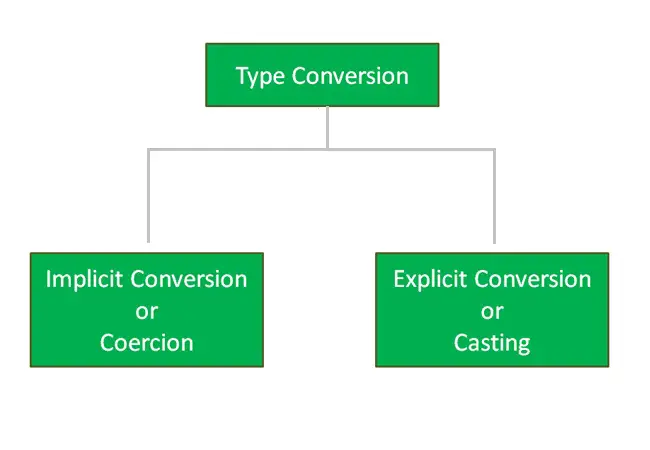
When a data type is converted into another type is called type conversion. Java type Conversion is a mechanism that allows a variable of one data type to be converted to another data. When a variable is converted into a different type, the compiler basically treats the variable as the new data type. Conversion can only be performed, when they are compatible with the rules defined. Conversion can be of two types.

Type of Type Conversion In Java

Implicit Conversion (Coercion)

Explicit Conversion (Casting)

java-Type-conversion

Implicit Conversion (Coercion)

In implicit or automatic conversion compiler will automatically change one type of data into another. Implicit or automatic conversion can happen if both types are compatible and the target type is larger than the source type.

Java--implicit-Type-Casting-Widening

In Java, there is no need for Explicit casting for the above sequence. For instance, if you assign an integer value to a floating-point variable, the compiler will insert code to convert the int to afloat. When we are assigning a smaller type to a larger type, there is no need for explicit casting required, conversion happens automatically. In implicit conversion a smaller type is converted into a larger thus it is also known as widening conversion.

Example:-

Here the value of 'a' has been promoted from short to int and we have not had to specify any type-casting operator. implicit conversions affect primitive data types. Conversion should always be used in the right order (low to higher data). Typecasting in the wrong places may result in a loss of precision, which the compiler can signal with a warning. for example like for instance truncating afloat when typecasting to an int. This can be avoided with an explicit conversion.

Explicit Conversion (Casting)

There may be situations when we want to convert a value having a larger type to a smaller type. In this case, casting needs to be performed explicitly. Explicit casting allows you to make this type of conversion explicit, or to force it when it wouldn’t normally happen.

Java-explicit-Type-Casting-Narrowing

Syntax:-

To perform typecasting, put the desired type including modifiers inside parentheses to the left of the variable or constant you want to cast.

Example:-

Here, the size of source type int is 32 bits, and the size of destination type byte is 8 bits. Since we are converting a source type having a larger size into a destination type having less size, such conversion is known as narrowing conversion.

Java Datatype

Java Datatype

Like in any other programming language Java Variables are one of the vital building blocks of any Java Program. Variables are used to represent reserved memory locations that are used to store values, when we create a variable we are supposed to allocate some memory space for that variable. Java is a statically typed programming language, which means that variables always have a specific type and that type cannot change. In Java, all variables must first be declared before they can be used. This involves stating the variable’s data type and name of the variable. Get clear your fundamentals of java datatype here itself.

Example:-

Here, age is a variable, and the data type of the variable is int. The int data type determines that the age variable can only contain an integer value.

In Java, every variable has a data type associated with it, the data type for a variable defines –

  • The amount of memory space allocated for variables.
  • A java datatype specifies the possible values for variables.
  • The operations that can be performed on variables.

Java data types can be broadly classified as –

  • Primitive Data Types
  • Non-Primitive Data Types

Java Primitive Data Types

The primitive data type is a basic building block provided by the Java programming language. The primitive data type is predefined by the language and for which the programming language provides built-in support. Java supports eight primitive data types, which are further classified into four groups –

Integer:- Integers are used to store whole numbers. Java supports four different integer types, varying internal sizes for storing signed.

Type Contains Default Size Range
byte Signed integer 0 8 bit or
1 byte
-27 to 27-1 or
-128 to 127
short Signed integer 0 16 bit or
2 bytes
-215 to 215-1 or
-32,768 to 32767
int Signed integer 0 32 bit or
4 bytes
-231 to 231-1 or
-2147,483,648 to 2147,483,647
long Signed integer 0 64 bit or
8 bytes
-263 to 263-1 or
-9223,372,036,854,755,808 to 9223,372,036,854,755,807

byte:- It is 1 byte (8-bits) integer data type. It can hold values ranging from -128 to 127. It’s used instead of int or other integer data types to save memory if the value of a variable will be within -128 to 127. An uninitialized byte has a default value of zero(0). the byte can be declared using the byte keyword.

Example:-

short:- It is 2 bytes(16-bits) integer data type. It can hold values ranging from -32768 to 32767. An uninitialized short has a default value of zero(0). The short can be declared using a short keyword.

Example:-

int:- It is 4 bytes(32-bits) integer data type. It can hold values ranging from -2147483648 to 2147483647. An uninitialized int has a default value of zero(0). the int can be declared using the int keyword.

Example:-

long :- It is 8 bytes(64-bits) integer data type. It can hold values ranging from -9,223,372,036,854,775,808 to 9,223,372,036,854,775,807. An uninitialized long has default value of zero(0). the long can be declared using long keyword.

Example:-

Floating Point Number:- The floating-point numbers are used to store numbers that contain a decimal component (real numbers). Java supports two different types of floating-point numbers.

Type Contains Default Size Range
float IEEE 754 floating point
single-precision
0.0f 32 bit or
4 bytes
±1.4E-45 to
±3.40282347E+38F
double IEEE 754 floating point
double-precision
0.0 64 bit or
8 bytes
±439E-324 to
±1.7976931348623157E+308

float:- A float is used to represent a 32-bit floating-point number and numbers with smaller decimal points. An uninitialized float has default value of 0.0 (0.0f). Float can be declared using the float keyword.

Example:-

double:- A double is used to represent a 64-bit floating-point number and numbers with larger decimal point values. An uninitialized double has default value of 0.0 (0.0d). Double can be declared using the double keyword.

Boolean:- The Boolean data type is used to represent the truth values, which can be either True or False. An uninitialized float has a default value of false. Boolean is commonly used in decision-making statements. Boolean can be declared using the boolean keyword.

Type Contains Default Size Range
boolean true or false false 1 bit true or false

Example:-

Characters (char):- The character data type is used to hold the single literal (16-bit Unicode character). Characters are declared using single quotes. A char type occupies two bytes of memory space. The char is declared char keyword.

Type Contains Default Size Range
char Unicode character
unsigned
\u0000 16 bits or
2 bytes
0 to 216-1 or
\u0000 to \uFFFF

Example:-

Java Non-Primitive Data Types

In Java, non-primitive data types are those derived from primitive data types or defined by the programmer itself such as Classes, Interface, Arrays, etc.

Java Variable Scope

Java Variable Scope

What Is Variable Scope?

The scope of a variable defines the region of visibility or availability for a variable, out of which we can not reference that variable. Variable declared inside main() function can not be accessed outside the main() function. The scope of a variable is limited to the curly braces containing it, if you try to access that variable outside those curly braces then you will get a compilation error. In Java, variables can be of the following two types based on their scope.

  • Local Variables
  • Instance Variables
  • Class/Static variables

Example:-

Java Local Variable

Variables declared inside a method, constructors, or blocks of code are called local variables. They can be accessed only inside that method or block of code. Local variables are not available outside the function it is defined in. A block begins with an opening curly brace and ends with a closing curly brace. Access specifiers cannot be used for local variables.

Example:-

Here, age is a local variable. This is defined inside the get Age() method and its scope is limited to only this method. When we run the above java program, we will see the following output.

Output:-

Java Instance Variables

Java Instance variables are declared inside a class outside any method, constructor, or block. Instance variables can be declared at the class level and visible for all methods, constructors, and blocks in the class. Instance variables have default values. Values for instance variables can be assigned during the declaration or within the constructor. Instance variables can be accessed directly by calling the variable name inside the class, but for static methods, they should be called using the fully qualified name. Instance variables are created when an object is created and destroyed once the object is destroyed. They are also referred to as fields. Access specifiers can be given for instance variables and if nothing is mentioned the default specifier is used.

Example:-

When we run the above java program, we will see the following output.

Output:-

Java Class/Static Variables

In Java class variables are declared using static keywords in a class, but outside a method, constructor, or block. They are also known as static variables. Static variables are created when the program starts and destroyed when the program ends. There can be only one copy of a class variable, regardless of how many call objects are created. All of the instance of that class shares the same copy of a static variable.

Example:-

When we run the above java program, we will see the following output –

Output:-

Note:- When class variables are declared as public static final, then variable names (constants) are all in upper case.

Static/Class variables can be accessed outside with the class name as follows –

Syntax:-

Java Variable

Java Variable

A Variable is an identifier used to refer to a memory location in computer memory that holds a value for that variable, this value can be changed during the execution of the program. When you create a variable in java, this means you are allocating some space in the memory for that variable. The size of the memory block allocated and the type of the value it holds are completely dependent upon the type of variable.

Rules for naming a variable in Java

Constant and variable names cannot contain whitespace characters, mathematical symbols, arrows, private-use (or invalid) Unicode code points, or line- and box-drawing characters. Naming a variable in Java Programming is an important task and must follow some rules, listed below –

  • The variable name can consist of letters and alphabets.
  • Keywords are not allowed to use as a variable name.
  • Blank spaces are not allowed in variable names.
  • The first character of the variable should always be an alphabet and cannot be a digit.
  • Variable names are case sensitive i.e. UPPER and lower case are significant.
  • Special characters like #, $ are not allowed except the underscore.
  • Mathematical symbols, arrows, and Unicode code points are not allowed.

Recommendation:- Variable name must be readable and should be relative to its purpose.

Declaring Variables In Java

In Java, variables must be declared before they are used. Variables are declared using the data type followed by the variable name that you want to declare.

Syntax:-

or

Example:-

Here is an example of declaring an integer, which we’ve called counter. (Note the semicolon at the end of the line; that is how your compiler separates one program statement from another.)

This statement means we’re declaring some space for a variable called counter, which will be used to store integer data. Note that we must specify the type of data that a variable will store.

Declaring multiple variables

In Java, it is possible to declare multiple variables of the same type in a single statement separated by commas, with a single type annotation as follows-

Syntax:-

Example:

Variable assignment In Java

The assignment operator (=) is used to assign values to a variable, the operand on the left side of the assignment operator (=) indicates the name of the variable and the operand on the right side of the assignment operator (=) indicates the value to be stored in that variable.

Example:-

Output:-

Initializing Variable In Java

In Java, it is possible to declare and assign some initial value to a variable in a single statement.

Syntax:-

Example:-

Multiple assignments In Java

In Java, it is possible to assign multiple variables the same value in a single statement as follows.

Example:-

Output:-

Java Keywords

Java Keywords

In Java, there are is a set of reserved words that you cannot use as an identifier. These words are known as “reserved words” or “Keywords”.

Keywords are standard identifiers and their functions are predefined by the compiler. We cannot use keywords as variable names, class names, method names, or any other identifier. Below is a list of available keywords in Java –

Java Keywords List
abstract assert boolean break byte
case catch char class const
continue default do double else
enum extends final finally float
for goto if implements import
instanceof int interface long native
new package private protected public
return short static strictfp super
switch synchronized this throw throws
transient try void volatile while

In addition to the above, you cannot also use true, false and null as identifiers.

Java Tokens

Java Tokens

The token is basically the smallest element that can be identified by the compiler. Java expressions and statements are constructed using java tokens. A java program is basically made up of different types of tokens that can either be a keyword, an identifier, a constant, a string literal, or a symbol.

Here are some types of tokens mentioned below please take a look:

  • Keywords
  • Identifiers
  • Constants
  • Separators
  • Operators

Keywords:- In Java, there are is a set of reserved words that you cannot use as an identifier. These words are known as “reserved words” or “Keywords”. Keywords are standard identifiers and their functions are predefined by the compiler. We cannot use keywords as variable names, class names, or method names, or as any other identifier.

Identifiers:- Identifier is basically used as variable names such as sum, total, etc.

Constants:- Constants are expressions with an immutable value.

Separators:- Separator is a token used to separate two individual tokens used in a java program. Separators are also known as punctuators. In Java, we have the brace { and }, parenthesis ( and ), and brackets [ and ], comma (,), semicolon (;), asterisk (*), colon (:), number sign #(hash) as punctuators.

Operators:- An operator is a symbol that represents a specific mathematical or non-mathematical operation.

Java Compile and Run Program

Creating, Compiling, and Running a Java Program

Clear all the difficulties related to java compile and run the program with just one click. Get step-by-step solutions for your project.

Editing Java Program

Step 1:- Create a file called “HelloWorld.java” using a text editor program of your choice. The .java file extension is used to specify the java language file.

Step 2:- Let’s open the “HelloWorld.java” file that we created, put the following line of code in it, and save it.

The println() is a function that tells java to display or output the content inside the parentheses.

Compiling Java Program

Step 3:- Now, go to the terminal and switch to the project directory and run the following command to compile the java program we created.

Running Java Program

Step 4:- After compilation the .java file gets translated into the .class file(byte code). Now we can run the program. To run the program, type the following command and press enter –

Once the java program is executed it will print “Hello, World!”.

Output:-