Category Archives: java

Java If Statement

Java if statement

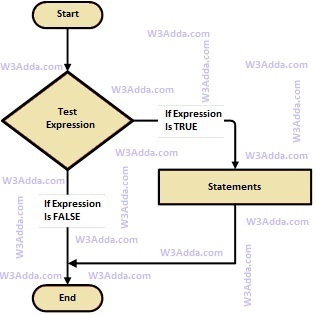
Java if statement allows a block of code to be executed only when a specified condition is true. An if statement evaluates a boolean expression followed by one or more statements. The given boolean expression results in a boolean value that can only be either true or false.

Java If Statement Flow Diagram

java-if-statement

java-if-statement

Syntax:-

Here, a condition is a Boolean expression that results in either True or False, if it results in True then statements inside the body is executed, if it results in False then execution is skipped from if body.

Example:-

Output:-

java_if_statement_example


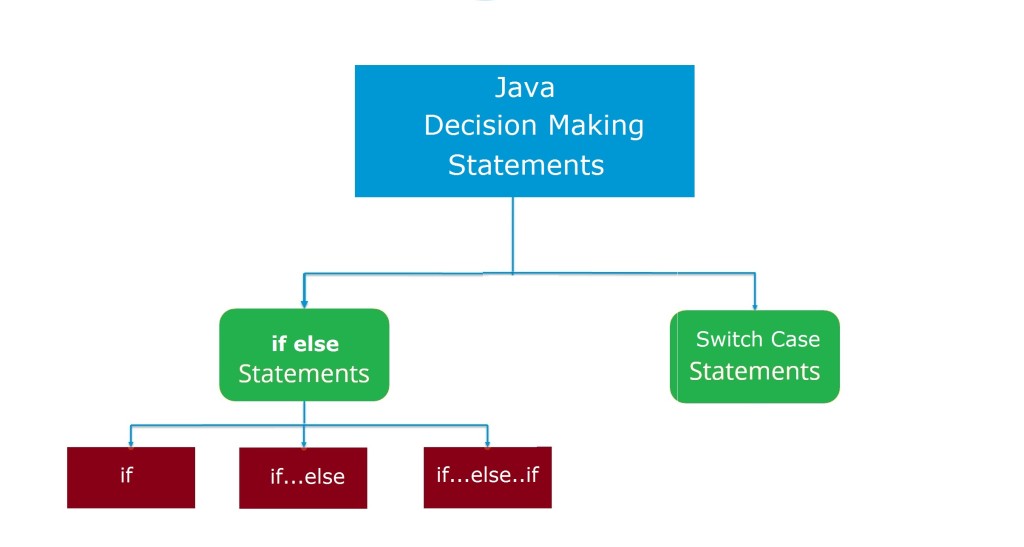
Java Decision Making Statements

Java Decision Making Statements

There are cases where we want a block of code to be executed when some condition is satisfied. In Java, we have a rich set of decision-making statements that enable computer to decide which block of code to execute based on some conditional choices. Decision-making statement.  A Decision-making statement evaluates single or multiple test expressions which result is “TRUE” or “FALSE”. The outcome of the test expression/condition helps to determine which block of the statement(s) to execute if the condition is “TRUE” or “FALSE” otherwise.

In Java, we have the following decision-making statements

java-decision-making-statements

Java If Statement

If a statement allows a block of code to be executed only when a specified condition is true. An if statement evaluates a boolean expression followed by one or more statements. The given boolean expression results in a boolean value that can only be either true or false.

Syntax:-

Here, a condition is a Boolean expression that results in either True or False, if it results in True then statements inside the body is executed, if it results in False then execution is skipped from if body.

Java If Else Statement

In Java, when we want to execute a block of code when the if the condition is true and another block of code when the if the condition is false, In such a case we use the if…else statement.

Syntax:-

Here, a condition is a Boolean expression that results in either True or False, if it results in True then statements inside the body is executed, if it results in False then statements inside else body are executed.

Java If Else If Statement

When we want to add multiple condition checks in a single if-else statement then by using the if else-if else statement we can easily add multiple conditions. In Java, if..else…if statement allows us to add an alternative set of test conditions in the if..else statement using else-if and single else statements for the if condition. In such way if..else…if statement is used to select one among several blocks of code to be executed.

Syntax:-

Java Nested If Statement

In Java, when there is an if statement inside another if statement then it is known as nested if-else. Nested if-else can also be simplified using Java Switch Case Statement.

Syntax:-

Java Switch Case Statement

In Java, a switch case statement is a simplified form of the Java Nested if-else statement, it helps to avoid a long chain of if..else if..else statements. A switch-case statement evaluates an expression against multiple cases in order to identify the block of code to be executed.

Syntax:-

Java Control Flow Statements

Java Control Flow Statements

Control flow or flow of control is the order in which instructions, statements, and functions call are being executed or evaluated when a program is running. The control flow statements are also called Flow Control Statements. In Java, statements inside your code are generally executed sequentially from top to bottom, in the order that they appear. It is not always the case for your program statements to be executed straightforwardly one after another sequentially, you may require to execute or skip a certain set of instructions based on condition, jump to another statement, or execute a set of statements repeatedly. In Java, control flow statements are used to alter, redirect, or control the flow of program execution based on the application logic.

Java Control Flow Statement Types

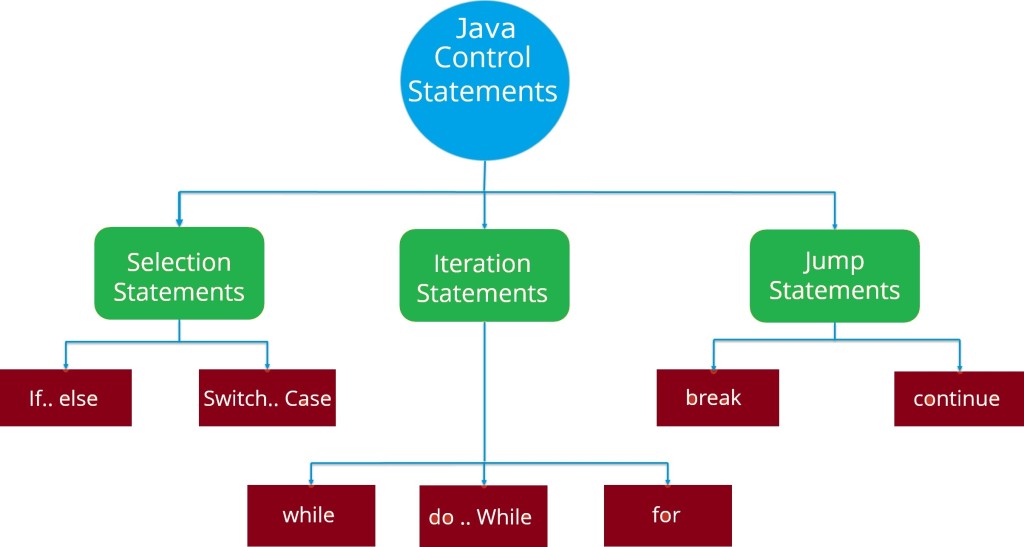
In Java, Control flow statements are mainly categorized into the following types –

java-control-flow-statements

Java Selection Statements

In Java, Selection statements allow you to control the flow of the program during the run time on the basis of the outcome of an expression or state of a variable. Selection statements are also referred to as Decision-making statements. Selection statements evaluate single or multiple test expressions which result in “TRUE” or “FALSE”. The outcome of the test expression/condition helps to determine which block of the statement(s) to execute if the condition is “TRUE” or “FALSE” otherwise.

In Java, we have the following selection statements –

Java Iteration Statements

In Java, Iteration statements are used to execute the block of code repeatedly for a specified number of times or until it meets a specified condition. Iteration statements are commonly known as loops or looping statements.

In Java, we have the following iteration statements available-

Java Jump Statements

Jump statements are used to alter or transfer the control to other sections or statements in your program from the current section.

In Java, we have the following types of jump statements –

All of the above jump statements cause different types of jumps.


Java Operator Precedence and Associativity

Java Operators Precedence

Operator precedence defines the order in which a given mathematical expression is evaluated. When an expression includes multiple operators then every single part of the given expression is evaluated in a certain order following some rules defined as per operator precedence. The higher precedence is evaluated first and the lowest precedence is evaluated last.

Java Operator Associativity

With the same precedence follow operator associativity defined for their operator group. In Java, operators can either follow left-associative, right-associative, or have no associativity. Operators with left-associative are evaluated from the left to right, operators with right-associative are evaluated from right to the left, and with no associativity, do not follow any predefined order.

Following are the java precedence tables with their respective associativity.

Operator Precedence in Java (Highest to Lowest)
Category Operator Associativity
Postfix ++ – – Left to right
Unary + – ! ~ ++ – – Right to left
Multiplicative * / % Left to right
Additive + – Left to right
Shift << >> Left to right
Relational < <= > >= Left to right
Equality == != Left to right
Bitwise AND & Left to right
Bitwise XOR ^ Left to right
Bitwise OR | Left to right
Logical AND && Left to right
Logical OR || Left to right
Conditional ?: Right to left
Assignment = += -= *= /= %=>>= <<= &= ^= |= Right to left

Java Dot Operator

Java Dot(.) Operator

The dot (.) operator is also known as the member operator it is used to access the member of a package or a class.

Example:-


Find the java program output here, please take a look:

Output:-

java_dot_operator_example

Java Instanceof Operator

Java instanceof Operator

In Java, the instanceof operator is used to determine whether an object is an instance of a class, a subclass, or an interface or not.

Example:-

Output:-

java_instanceof_operator_example

When you run the above java program, it will output true. It’s because str is the instance of the String class.

Java Conditional Operators

Java Conditional Operators( ? : )

In Java, a conditional operators or ternary operator is considered shorthand for a java if-else statement. The conditional operator is also called as “Ternary Operator”.

Syntax:

If the condition is true the expression will return the result1, if it is not it will return result2.

Example:-

Output:-

java_ternary_operator_example

Java Bitwise Operators

Java Bitwise Operators

Bitwise operators are used to performing the bit-level operations over their operand.

Let A = 60; and B = 13;

Binary equivalent

A = 0011 1100

B = 0000 1101

Operator Meaning Example Description
& Binary AND (A & B) It returns 12 which is 0000 1100
| Binary OR (A | B) It returns 12 which is 0000 1100
^ Binary XOR (A ^ B) It returns 49 which is 0011 0001
~ One’s Complement (~A ) It returns -60 which is 1100 0011
<< shift left A << 2 It returns 240 which is 1111 0000
>> shift right A >> 2 It returns 15 which is 0000 1111

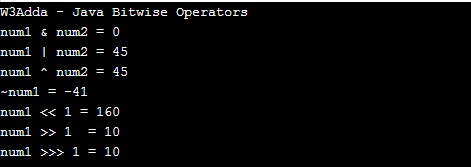
Example:-

When you run the above java program, you will see the following output.

Output:-

java_bitwise_operators_example

Java Unary Operators

Java Unary Operators (post and pre)

In Java, ++ and — are known as increment and decrement operators respectively. These are unary operators which means they work on a single operand. ++ adds 1 to operand and — subtracts 1 to operand respectively. When ++ is used as prefix(like: ++i), ++i will increment the value of i and then return it but, if ++ is used as postfix(like: i++), operator will return the value of operand first and then only increment it.

Operator Example Description
++ [prefix] ++a The value of an increment
++ [postfix] a++ The value of a before the increment
— [prefix] –a The value of an after decrement
— [postfix] a– The value of a before the decrement

Example:-

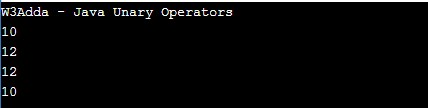
When you run the above java program, you will see the following output.

Output:-

java_unary_operators_example

Java Assignment Operators

Java Assignment Operators

Assignment operators are used to assigning value to a variable, you can assign a variable value or the result of an arithmetical expression. In many cases, the assignment operators can be combined with other operators to build a shorthand version of an assignment statement known as a Compound Statement. For example, instead of a = a+5, we can write a += 5.

Java Assignment operators
Operator Description Expression
= Assignment Operator
a=b
+= add and assign a+=b is equivalent to a=a+b
-= subtract and assign a-=b is equivalent to a=a-b
*= multiply and assign a*=b is equivalent to a=a*b
/= divide and assign a/=b is equivalent to a=a/b
%= mod and assign a%=b is equivalent to a=a%b
<<= Left shift AND assign a<<=5 is equivalent to a=a<<5
>>= Right shift AND assign a>>=5 is equivalent to a=a>>5
&= Bitwise AND assign a&=5 is equivalent to a=a&5
^= Bitwise exclusive OR and assign a^=5 is equivalent to a=a^5
|= Bitwise inclusive OR and assign a|=5 is equivalent to a=a|5

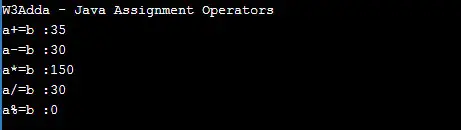
Example:-

Output:-

java_assignment_operators_example

Java Logical Operators

Java Logical Operators

Logical operators are used to combine expressions with conditional statements using logical (AND, OR, NOT) operators, which results in true or false. Let variable a hold true or 1 and variable b hold false or 0, then −

Java Logical operators
Operator Name Description Example
&& Logical AND return true if all expression are true (a && b) returns false
|| Logical OR return true if any expression is true (a || b) returns true
! Logical NOT return complement of expression !a returns false

Example:-

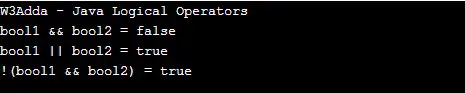
When you run the above java program, you will see the following output.

Output:-

java_logical_operators_example

Java Relational Operators

Java Relational Operators

Relational Operators are used to evaluating a comparison between two operands. The result of a relational operation is a Boolean value that can only be true or false. Relational Operators are also referred to as comparison operators.

Let variable a hold 20 and variable b holds 10, then −

Java Relational operators
Operator Description Example
> greater than a>b returns TRUE
< Less than a<b returns FALSE
>= greater than or equal to a>=b returns TRUE
<= less than or equal to a<=b returns FALSE
== is equal to a==b returns FALSE
!= not equal to a!=b returns TRUE

Example:-

When you run the above java program, you will see the following output.

Output:-

java_relational_operators_example