Category Archives: java

Java Continue Statement

Java Continue Statement

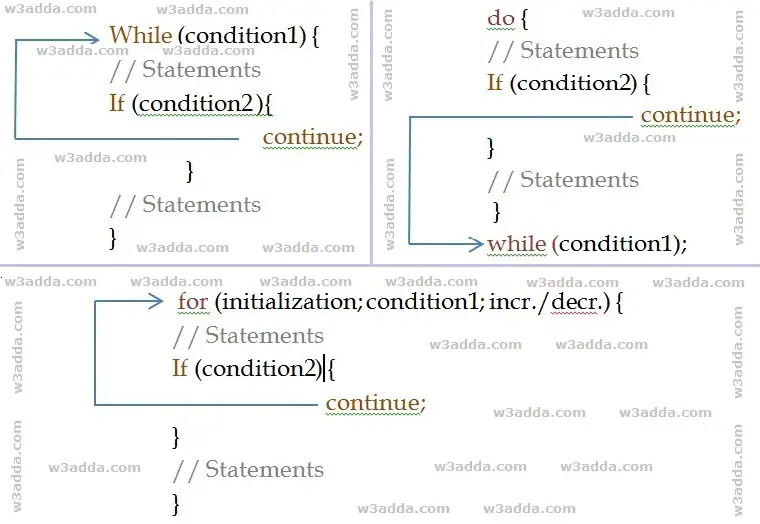
In Java, the continue statement gives you way to skip over the current iteration of any loop. When a continue statement is encountered in the loop, the rest of statements in the loop body for current iteration and returns the program execution to the very first statement in the loop body. It does not terminates the loop rather continues with the next iteration.

Java Continue Statement Flow Diagram

cpp_continue_flow_diagram

Syntax:-

Example:-

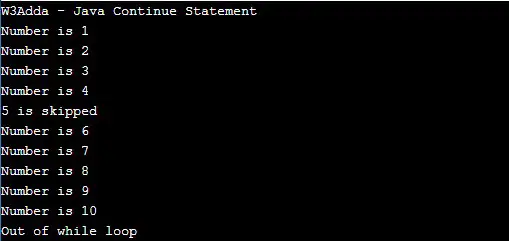
When we run the above Java program, we will see following output –

Output:-

java_continue_statement_example

As you can see when ctr == 5, continue statement is executed which causes the current iteration to end and the control moves on to the next iteration.

Java Break Statement

Java Break Statement

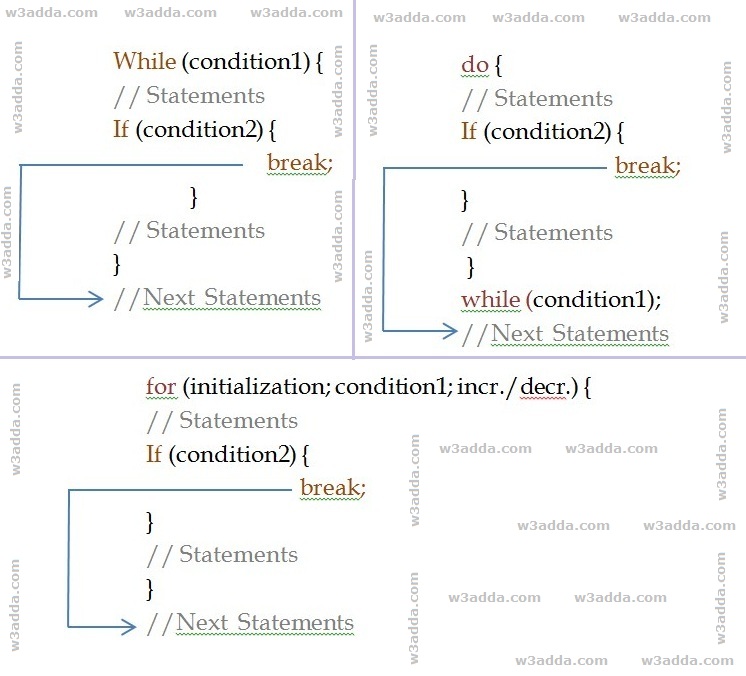
Java break statement inside any loop gives you a way to break or terminate the execution of the loop containing it and transfers the execution to the next statement following the loop. It is almost always used with if..else construct.

Java Break Statement Flow Diagram

cpp_break_statement_example

Syntax:-

Example:-

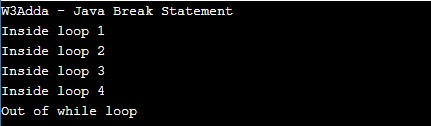
In the above program, the variable count is initialized as 0. Then a while loop is executed as long as the variable count is less than 10. Inside the while loop, the count variable is incremented by 1 with each iteration (count = count + 1). Next, we have an if statement that checks the variable count is equal to 5, if it returns TRUE causes the loop to break or terminate. Within the loop, there is a court statement that will execute with each iteration of the while loop until the loop breaks. Then, there is a final cout statement outside of the while loop.

When we run this code, our output will be as follows –

Output:-

java_break_statement_example

Java Do While Loop

Java Do While Loop

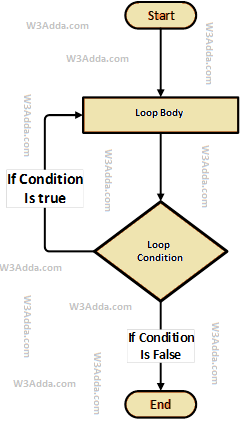
The do-while loop executes a block of statements inside the loop body first and then tests the condition for the next iteration and executes next only if the condition is true. The do…while loop is much similar to Java while loop with one major difference, in the do…while loop block of statements inside the loop body executes at least once.

Java Do-While Loop Flow Diagram

swift-repeat-while-loop-flowchart-diagram

Syntax:-

Here, the loop executes a block of statements inside the loop body first and then tests the condition provided along with the while keyword for the next iteration and executes next only if the condition is true. Condition is a Boolean expression that results in either True or False, if it results in True then statements inside the loop body are executed and the condition is evaluated again. This process is repeated until the condition is evaluated as False. If the condition results in False then the loop is terminated and control is transferred to the next statement.

Example:-

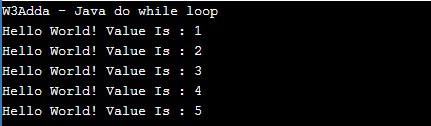
Here, we have initialized ctr and maxCtr to 1 and 5 respectively, in the next statement we have loop body inside the pair of curly brackets {} after do keyword, statements inside loop body are executed first then control is passed to the condition ctr <= maxCtr provided along with while keyword for next iteration. If the test condition returns True, then control is passed again to loop body for the next iteration. If the condition results in False then the loop is terminated and control is transferred to the next statement. Inside the loop body, we have incremented the ctr value by one for each iteration. When we run the above java program, we see the following output –

Output:-

java_do_while_loop_example

Java while Loop

Java while Loop

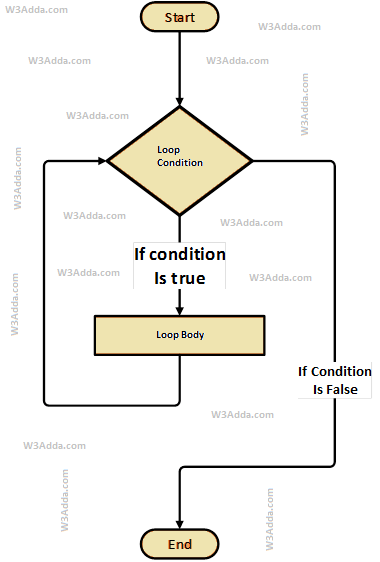
The while loop will execute a block of statements as long as a test expression is true. While loop in java is useful when the number of iterations can not be predicted beforehand. The while loop evaluates test expression at beginning of each pass.

Java While Loop Flow Diagram

cpp-while-loop-flowchart-diagram

Syntax:-

Here, a condition is a Boolean expression that results in either True or False, if it results in True then statements inside the loop body are executed and the condition is evaluated again. This process is repeated until the condition is evaluated as False. If the condition results in False then execution is skipped from the loop body and while loop is terminated.

Example:-

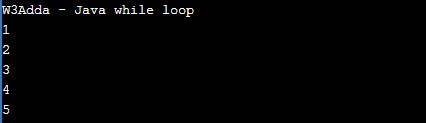
Here, we have initialized ctr and maxCtr to 1 and 5 respectively, in the next statement we have a while loop, that checks the condition ctr <= maxCtr for each iteration. If the test condition returns True, the statements inside the loop body are executed and if the test condition returns False then the while loop is terminated. Inside the loop body, we have incremented the ctr value by one for each iteration. When we run the above java program, we see the following output –

Output:-

java_while_loop_example

Java for loop

Java for Loop

The for loop is used when we want to execute a block of code known times. In Java, the basic for loop is similar to what it is in C and C++. The for loop takes a variable as an iterator and assigns it with an initial value, and iterates through the loop body as long as the test condition is true. Once the loop statements are executed for the current iteration, the iterator is updated with a new value and if the test condition is still valid, we loop another time. When the test condition returns a false value, the for loop is ended.

Syntax:-

Above is the general syntax of a for a loop. We just initialize the iterator, check the condition and then increment or decrement the iterator value. The for loop has three components separated by semicolons.

initialization:- In this section is used to declare and initialize the loop iterator. This is the first statement to be executed and executed only once at the beginning.

condition:- Next, the test condition is evaluated before every iteration, and if it returns a true value then the loop body is executed for the current iteration. If it returns a false value then the loop is terminated and the control jumps to the next statement just after the for a loop.

incr/decr:- Once, the loop body is executed for the current iteration then the incr/decr statement is executed to update the iterator value and if the test condition is evaluated again. If it returns a true value then the loop body is executed another time. If the test condition returns a false value then the loop is terminated and the control jumps to the next statement just after the for a loop.

Java For Loop Flow Diagram
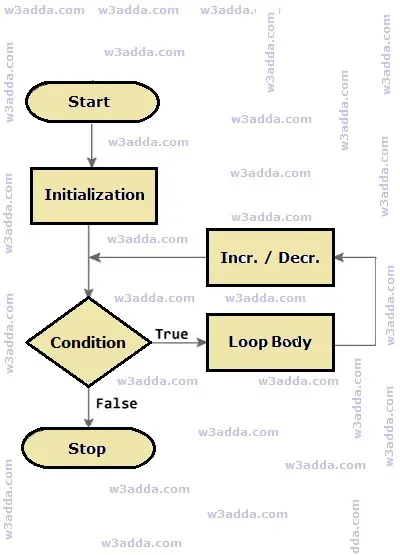
cpp-for-loop-flow-chart-diagram

Example:-

Here, we have initialized ctr with an initial value of 1, in the next, we check the condition ctr <= 5 for each of the iterations. If the test condition returns True, the statements inside the loop body are executed and if the test condition returns False then the for loop is terminated. In the incr/decr section we have incremented the ctr value by one for each iteration. When we run the above c++ program, we see the following output –

Output:-
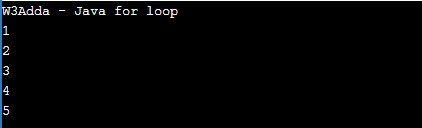
java_for_loop_example

Java Infinite For Loop

When a loop executes repeatedly and never stops, it is said to be infinite for loop. In Java, if we leave the “initialization”, “increment” and “condition” statement blank, then the for loop will become an infinite loop.

Syntax:-

Example:-

Java Loops

Java Loops

The loop statements are used to execute the block of code repeatedly for a specified number of times or until it meets a specified condition. Java loops statements are very useful to iterate over a collection/list of items or to perform a task multiple times. In Java, we have the following loop statements available-

Java for Loop

The for loop is used when we want to execute a block of code known times. In Java, the basic for loop is similar to what it is in C and C++. The for loop takes a variable as an iterator and assign it with an initial value, and iterates through the loop body as long as the test condition is true.

Syntax :-

Example:-

Output:-

java_for_loop_example

Java While Loop

The while loop will execute a block of statement as long as a test expression is true.

Syntax:-

Example:-

Output:-

java_while_loop_example

Java do…while Loop

The do…while statement executes loop statements and then test the condition for next iteration and executes next only if condition is true.

Syntax:-

Example:-

When we run the above java program, we see the following output –

Output:-

java_do_while_loop_example

Java Ternary Operator

Java Ternary Operator ( ? : )

In Java, a conditional or ternary operator is considered shorthand for a java if-else statement. The conditional operator is also called as “Ternary Operator”.

Syntax:

If the condition is true the expression will return the result1, if it is not it will return result2.

Example:-

Output:-

java_ternary_operator_example

Java Switch Case Statement

Java Switch Case Statement

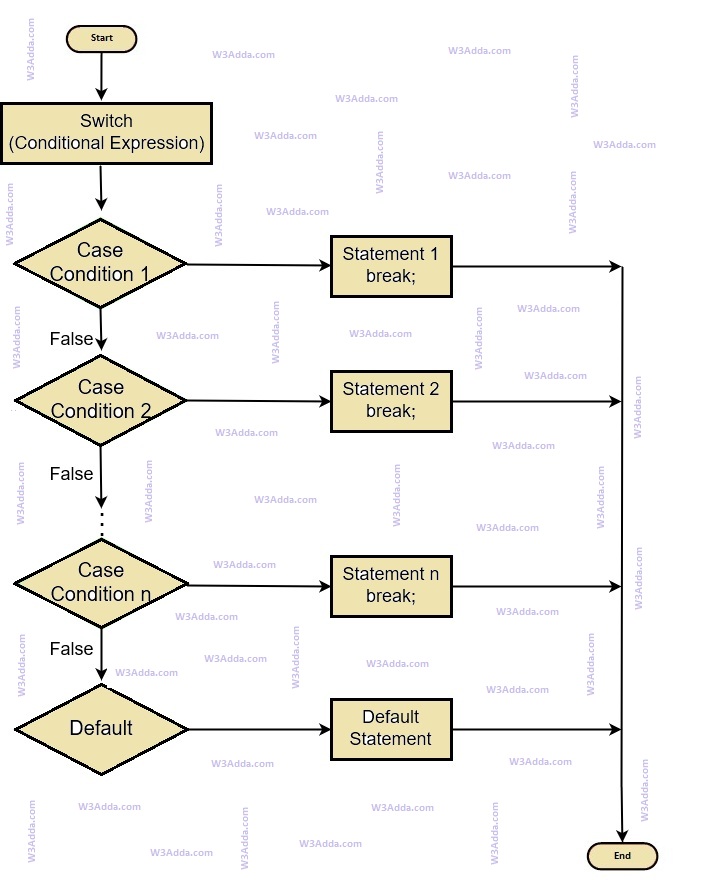
In Java, a switch case statement is a simplified form of the Java Nested if-else statement, it helps to avoid a long chain of if..else if..else statements. A switch-case statement evaluates an expression against multiple cases in order to identify the block of code to be executed.

Java Switch Case Flow Diagram

cpp-switch-case-statement-flowchart

Syntax:-

Example:-

In the above program we have an integer variable dayOfWeek with initial value of 5, and we pass this variable as expression to following switch statement, value of dayOfWeek is tested with multiple cases to identify the block of code to be executed.

When we run the above java program, will see the following output –

Output:-

java_switch_case_statement_example

Java Nested If Else Statement

Java Nested if-else Statement

In Java, when there is an if statement inside another if statement then it is known as nested if-else. Nested if-else can also be simplified using Java Switch Case Statement.

Syntax:-

Example:-

When we run the above Java program, will see following output –

Output:-

java_nested_if_statement_example

Java If Else If Ladder Statement

Java if else if ladder statement

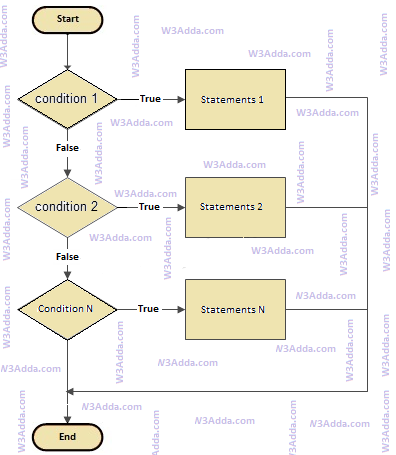
In Java, if..else.if statement allows us to add an alternative set of test conditions in if else if ladder statement using else-if and single else statements for if condition. In such way if..else.if statement is used to select one among several blocks of code to be executed.

Java if..else…if Statement Flow Diagram

java-if-else-if

java-if-else-if

Syntax:-

Example:-

Output:-

java_if_else_if_ladder_statement_example

Java if else statement

Java if-else statement

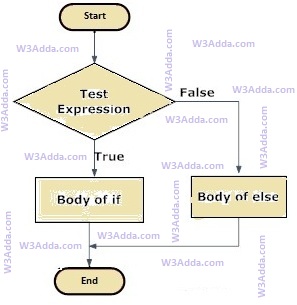
In Java, when we want to execute a block of code when if the condition is true and another block of code when if the condition is false, In such a case we use the if-else statement.

Java If…else Statement Flow Diagram

rust-if-else-flowchart

Syntax:-

Here, Condition is a Boolean expression that results in either True or False, if it results in True then statements inside if body are executed, if it results in False then statements inside else body are executed.

Example:-

Output:-

java_if_else_statement_example