Category Archives: Dart Tutorial

Dart Tutorial

Dart Conditional Operators

Dart Conditional Operators ( ? : )

The conditional operator is considered as short hand for if-else statement. Conditional operator is also called as “Ternary Operator”.

Syntax 1:-

If condition is true the expression will return expr1, if it is not it will return expr2.

Example:-

Output:-

Syntax 2:-

If expr1 is non-null, returns its value; otherwise, evaluates and returns the value of expr2.

Example:-

Output:-

Dart Bitwise operators

Dart Bitwise Operators

Bitwise operator are used to perform bit level operation over its operand. Let A = 60; and B = 13;

Binary Equivalent:-

Operator Meaning Example Description
& Binary AND (A & B) It returns 12 which is 0000 1100
| Binary OR (A | B) It returns 12 which is 0000 1100
^ Binary XOR (A ^ B) It returns 49 which is 0011 0001
~ Ones Complement (~A ) It returns -60 which is 1100 0011
<< shift left A << 2 It returns 240 which is 1111 0000
>> shift right A >> 2 It returns 15 which is 0000 1111

Example:-

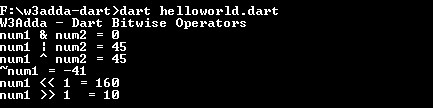
When you run the above Dart program, you will see the following output.

Output:-

dart_bitwise_operators

Dart Logical operators

Dart Logical Operators

Logical operators are used to combine expressions with conditional statements using logical (AND,OR,NOT) operators, which results in true or false. Let variable a holds true or 1 and variable b holds false or 0, then −

Dart Logical operators
Operator Name Description Example
&& Logical AND return true if all expression are true (a && b) returns false
|| Logical OR return true if any expression is true (a || b) returns true
! Logical NOT return complement of expression !a returns false

Example:-

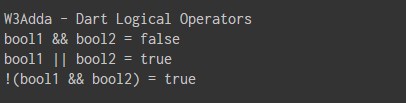
When you run the above Dart program, you will see following output.

Output:-

dart_logical_operators

Dart Assignment operators

Dart Assignment Operators

Assignment operators are used to assign value to a variable, you can assign a variable value or the result of an arithmetical expression. In many cases assignment operator can be combined with other operators to build a shorthand version of a assignment statement are known as Compound Statement. For example, instead of a = a+5 , we can write a += 5.

Dart Assignment operators
Operator Description Expression
= Assignment Operator
a=b
+= add and assign a+=b is equivalent to a=a+b
-= subtract and assign a-=b is equivalent to a=a-b
*= multiply and assign a*=b is equivalent to a=a*b
/= divide and assign a/=b is equivalent to a=a/b
~/= divide and assign(Integer) a~/=b is equivalent to a=a~/b
%= mod and assign a%=b is equivalent to a=a%b
<<= Left shift AND assign a<<=5 is equivalent to a=a<<5
>>= Right shift AND assign a>>=5 is equivalent to a=a>>5
&= Bitwise AND assign a&=5 is equivalent to a=a&5
^= Bitwise exclusive OR and assign a^=5 is equivalent to a=a^5
|= Bitwise inclusive OR and assign a|=5 is equivalent to a=a|5

Example:-

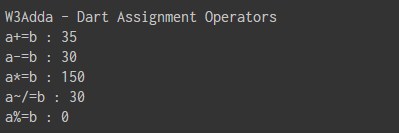
When you run the above Dart program, you will see following output.

Output:-

dart_assignment_operators

Dart Type test operators

Dart Type test operators

The Type test operators are used to check type of an object. These operators are handy for checking types at runtime.

Operator Meaning
is True if the object has the specified type
is! False if the object has the specified type

is Operator

Example:- sdf

When you run the above Dart program, you will see following output.

Output:-

is! Operator

Example:-

When you run the above Dart program, you will see following output.

Output:-

Dart Relational operators

Dart Relational Operators

Relational Operators are used evaluate a comparison between two operands. The result of a relational operation is a Boolean value that can only be true or false. Relational Operators are also referred as Comparison operators.

Let variable a holds 20 and variable b holds 10, then −

Dart Relational operators
Operator Description Example
> greater than a>b returns TRUE
< Less than a<b returns FALSE
>= greater than or equal to a>=b returns TRUE
<= less than or equal to a<=b returns FALSE
== is equal to a==b returns FALSE
!= not equal to a!=b returns TRUE

Example:-

When you run the above Dart program, you will see following output.

Output:-

dart_relational_operators

Dart Arithmetic operators

Dart Arithmetic Operators

Arithmetic Operators are used to perform arithmetic operations like addition, subtraction, multiplication, division, %modulus, exponent, etc. Let variable a holds 20 and variable b holds 10, then −

Dart Arithmetic operators
Operator Name Description Example
+ Addition Addition of given operands
a+b returns 30
- Subtraction Subtraction of second operand from first a-b returns 10
-expr Unary Minus
reverse the sign of the expression -(a-b) returns -10
* Multiply Multiplication of given operands a*b returns 200
/ Division Returns Quotient after division
a/b returns 2
~/ Division(Int) Return an integer result
a/b returns 2
% Modulus Returns Remainder after division a%b returns 0

Example:-

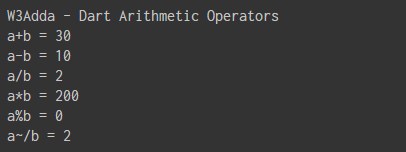
When you run the above Dart program, you will see following output.

Output:-

dart_arithmetic_operators

Dart Operators

Dart Operators

An operator is a special symbol that is used to carry out some specific operation on its operand. In Dart, we have rich set of built in operators to carry out different type of operations. There are operators for assignment, arithmetic operations, logical operations and comparison operations etc. Operators can be used with many types of variables or constants, but some of the operators are restricted to work on specific data types. Most operators are binary, meaning they take two operands, but a few are unary and only take one operand.

Type of operators in Dart

In Dart, we have following types of operators available –

  • Assignment Operators
  • Arithmetic Operators
  • Type test Operators
  • Relational Operators
  • Logical Operators
  • Bitwise Operators
  • Conditional Operators
  • Casecade notation(..) Operator

Dart Assignment Operators

Assignment operators are used to assign value to a variable, you can assign a variable value or the result of an arithmetical expression. In many cases assignment operator can be combined with other operators to build a shorthand version of a assignment statement are known as Compound Statement. For example, instead of a = a+5 , we can write a += 5.

Dart Assignment operators
Operator Description Expression
= Assignment Operator
a=b
+= add and assign a+=b is equivalent to a=a+b
-= subtract and assign a-=b is equivalent to a=a-b
*= multiply and assign a*=b is equivalent to a=a*b
/= divide and assign a/=b is equivalent to a=a/b
~/= divide and assign(Integer) a~/=b is equivalent to a=a~/b
%= mod and assign a%=b is equivalent to a=a%b
<<= Left shift AND assign a<<=5 is equivalent to a=a<<5
>>= Right shift AND assign a>>=5 is equivalent to a=a>>5
&= Bitwise AND assign a&=5 is equivalent to a=a&5
^= Bitwise exclusive OR and assign a^=5 is equivalent to a=a^5
|= Bitwise inclusive OR and assign a|=5 is equivalent to a=a|5

Dart Arithmetic Operators

Arithmetic Operators are used to perform arithmetic operations like addition, subtraction, multiplication, division, %modulus, exponent, etc. Let variable a holds 20 and variable b holds 10, then −

Dart Arithmetic operators
Operator Name Description Example
+ Addition Addition of given operands
a+b returns 30
- Subtraction Subtraction of second operand from first a-b returns 10
-expr Unary Minus
reverse the sign of the expression -(a-b) returns -10
* Multiply Multiplication of given operands a*b returns 200
/ Division Returns Quotient after division
a/b returns 2
~/ Division Return an integer result
a/b returns 2
% Modulus Returns Remainder after division a%b returns 0

Dart Unary Operators (post and pre)

In Java, ++ and — are know as increment and decrement operators respectively. These are unary operators it means they works on single operand. ++ adds 1 to operand and — subtracts 1 to operand respectively. When ++ is used as prefix(like: ++i), ++i will increment the value of i and then return it but, if ++ is used as postfix(like: i++), operator will return the value of operand first and then only increment it.

Operator Example Description
++ [prefix] ++a The value of a after increment
++ [postfix] a++ The value of a before increment
— [prefix] –a The value of a after decrement
— [postfix] a– The value of a before decrement

Dart Type test Operators

The Type test operators are used for checking types at runtime.

Operator Meaning
as Typecast
is True if the object has the specified type
is! False if the object has the specified type

Dart Relational Operators

Relational Operators are used evaluate a comparison between two operands. The result of a relational operation is a Boolean value that can only be true or false. Relational Operators are also referred as Comparison operators.

Let variable a holds 20 and variable b holds 10, then −

Dart Relational operators
Operator Description Example
> greater than a>b returns TRUE
< Less than a<b returns FALSE
>= greater than or equal to a>=b returns TRUE
<= less than or equal to a<=b returns FALSE
== is equal to a==b returns FALSE
!= not equal to a!=b returns TRUE

Dart Logical Operators

Logical operators are used to combine expressions with conditional statements using logical (AND,OR,NOT) operators, which results in true or false. Let variable a holds true or 1 and variable b holds false or 0, then −

Dart Logical operators
Operator Name Description Example
&& Logical AND return true if all expression are true (a && b) returns false
|| Logical OR return true if any expression is true (a || b) returns true
! Logical NOT return complement of expression !a returns false

Dart Bitwise Operators

Bitwise operator are used to perform bit level operation over its operand. Let A = 60; and B = 13;

Binary Equivalent:-

Operator Meaning Example Description
& Binary AND (A & B) It returns 12 which is 0000 1100
| Binary OR (A | B) It returns 12 which is 0000 1100
^ Binary XOR (A ^ B) It returns 49 which is 0011 0001
~ Ones Complement (~A ) It returns -60 which is 1100 0011
<< shift left A << 2 It returns 240 which is 1111 0000
>> shift right A >> 2 It returns 15 which is 0000 1111

Dart Conditional Operators ( ? : )

The conditional operator is considered as short hand for if-else statement. Conditional operator is also called as “Ternary Operator”.

Syntax 1:-

If condition is true the expression will return expr1, if it is not it will return expr2.

Syntax 2:-

If expr1 is non-null, returns its value; otherwise, evaluates and returns the value of expr2.

Dart Cascade notation(..) Operator

Cascades (..) allow you to perform a sequence of operations on the same object. The Cascades notation(..) is similar to method chaining that saves you number of steps and need of temporary variable.

Dart Variables

Dart Variables

Variables is an identifier used to refer memory location in computer memory that holds a value for that variable, this value can be changed during the execution of the program. When you create a variable in Dart, this means you are allocating some space in the memory for that variable. The size of memory block allocated and type of the value it holds is completely dependent upon the type of variable.

Rules for naming a variable in Dart

Constant and variable names cannot contain whitespace characters, mathematical symbols, arrows, private-use (or invalid) Unicode code points, or line- and box-drawing characters. Naming a variable in Dart Programming is an important task and must follow some rules, listed below –

  • Variable name can consist of letter and alphabets.
  • Keywords are not allowed to use as a variable name.
  • Blank spaces are not allowed in variable name.
  • First character of variable should always be alphabet and cannot be digit.
  • Variable name are case sensitive i.e. UPPER and lower case are significant.
  • Special characters like #, $ are not allowed except the underscore (_) and the dollar ($) sign.

Recommendation :- Variable name must be readable and should be relative to its purpose.

Declaring Variables In Dart

In Dart, a variables must be declared before they are used. Variables are declared using the var keyword followed by variable name that you want to declare. Dart is a type inferred language, which allows compiler automatically infer(know) the type of data we want to store based on the initial value we assign.

Syntax:-

or

Example:-

This statement means we’re declaring some space for a variable called counter. Note that the semicolon at the end of the line; that is how your compiler separates one program statement from another.

Type Annotations

Although Dart is a type inferred language, you can optionally provide a type annotation while declaring a variable to suggest type of the value variable can hold. In Dart, by prefixing the variable name with the data type ensures that a variable holds only data specific to a data type.

Syntax:-

or

Example:-

Here is an example of declaring an integer, which we’ve called counter. This statement means we’re declaring some space for a variable called counter, which will be used to store integer data.

Declaring multiple variable

In Dart, it is possible to declare multiple variables of same type in a single statement separated by commas, with a single type annotation as following-

Syntax:-

Example:

Variable assignment In Dart

The assignment operator (=) is used to assign values to a variable, the operand in the left side of the assignment operator (=) indicates the name of the variable and the operand in the right side of the assignment operator (=) indicates the value to be stored in that variable.

Example:-

Initializing Variable In Dart

In Dart, it is possible to declare and assign some initial value to a variable in single statement.

Syntax:-

Example:-

Default Value

In Dart, uninitialized variables are provided with an initial value of null. Even variables with numeric types are initially assigned with null value, because numbers like everything else in Dart are objects.

Example:-

Dart Data Types

Dart Data Types

Variables are used to represent reserved memory locations that is used to store values, when we create a variable we are a suppose to allocate some memory space for that variable. Dart is a statically typed programming language. This means that variables always have a specific type and that type cannot change. Every variable have data type associated to it, data type for a variable defines –

  • The amount of memory space allocated for variables.
  • A data type specifies the possible values for variables.
  • The operations that can be performed on variables.

Note :- Although Dart is strongly typed, type annotations are optional because Dart can infer types.
Dart has following built-in data types –

  • Numbers
  • Strings
  • Boolean
  • Lists
  • Maps
  • Runes
  • Symbols

Dart Numbers:- The Number data type is used to hold the numeric values. Dart supports following numerical data types –

  • Integer
  • Double

Dart Integer:- Integers are used to store whole numbers. An integer data type is used to represent 64 bit non-decimal number between -263 to 263 – 1. An integer can be used to store either signed and unsigned integer value. Integers can be declared using int keyword.

Dart Double :- In Dart, double is used to represent a 64-bit (double-precision) floating-point numbers or numbers with larger decimal points. Double can be declared using double keyword.

Dart Strings :- A string variable is used to hold series or sequence of characters – letters, numbers, and special characters. In Dart, string can be represented either using single quotes or double quotes. In Dart, strings can be declared using the String keyword.

Dart Boolean :- The Boolean data type is used to represent the truth values, which can be either True or False. Boolean are commonly used in decision making statements. In Dart, you cannot use 0 or 1 to represent true or false. Boolean can be declared using bool keyword.

Dart Lists :- In Dart, list data type is used to represent a collection of objects. A List is an ordered group of objects. The List data type in Dart is synonymous to the concept of an array in other programming languages. An array is used to hold multiple values in single variable. In Dart, arrays are List objects, so most people just call them lists. Dart list literals look like JavaScript array literals. A list variable is defined by having values separated by commas and enclosed within square brackets ([]).

Dart Maps :- The Map is an object that is used to represents a set of values as key-value pairs. In Map, both keys and values can be of any type of object. In Map, each key can only occurs once, but the same value can be used multiple times. The Map can be defined by using curly braces ({ }) and values can be assigned and accessed using square braces ([]).

Dart Runes :- Dart string is a sequence of Unicode UTF-16 code units, 32-bit Unicode values within a string are represented using a special syntax. A rune is an integer representing a Unicode code point. For example, the heart character ‘♥ is represented using corresponding unicode equivalent \u2665, here \u stands for unicode and the numbers are hexadecimal, which is essentially an integer. If the hex digits are more or less than 4 digits, place the hex value in curly brackets ({ }). For example, the laughing emoji ‘😆’ is represented as \u{1f600}.

Example:-

Output:-

Dart Symbols :- Dart Symbol object used to refer an operator or identifier declared in a Dart program. Dart symbol are commonly used in APIs that refer to identifiers by name, because an identifier name can changes but not identifier symbols. Symbol for an identifier can be created using a hash (#) followed by the identifier name.

Dart Dynamic Type

Dart is an optionally typed language. If the type of a variable is not explicitly specified, the variable’s type is dynamic. The dynamic keyword can also be used as a type annotation explicitly.

 

Dart Comments

Dart Comments

Comments are a set of statements that are not executed by the compiler. The use of comments makes it easy for humans to understand the source code. Usually comments gives you inside or explanation about the variable, method, class or any statement that exists in source code. The comment statements are ignored during the execution of the program.

Types of Dart Comments

In Dart, there are 3 types of comments.

  • Dart Single Line Comment
  • Dart Multi Line Comment
  • Dart Documentation Comment

Dart Single line Comments

A ‘//’ (double forward slash) is used to specify a single line comment, which extends up to the newline character. This can be used to comments-out everything until a line break

Syntax:-

Example:-

Output:-

Dart Multi line Comments

If you want to comment multiple lines then you can do it using /* and */, everything in between from /* to */ is ignored by the compiler-

Uses:-

  • Useful for commenting out a section of code
  • Cannot be nested within other multi-line comments

Syntax:-

Example:-

Output:-

Dart Documentation Comment

This is a special type of comment mainly used to generate documentation or reference for a project/software package. Documentation comments are multi-line or single-line comments that begin with /// or /**. Using /// on consecutive lines has the same effect as a multi-line doc comment. The Dart compiler ignores all text inside a documentation comment except it is enclosed in brackets. The brackets are used to refer classes, methods, fields, top-level variables, functions, and parameters. The names in brackets are resolved in the lexical scope of the documented program element.

Uses:-

  • Similar to multi-line comments but used to document dart code (classes, methods, expressions)

Syntax:-

Dart Keywords

Dart Keywords

There is a set of reserved words that you cannot use as an identifier. These words are known as “reserved words” or “Keywords”. Keywords are standard identifiers and their functions is predefined by the compiler. We cannot use keywords as variable names, class names, or method names, or as any other identifier.

Below is list of available keywords in Dart programming Language –

abstract 1 continue false new this
as 1 default final null throw
assert deferred 1 finally operator 1 true
async 2 do for part 1 try
async* 2 dynamic 1 get 1 rethrow typedef 1
await 2 else if return var
break enum implements 1 set 1 void
case export 1 import 1 static 1 while
catch external 1 in super with
class extends is switch yield 2
const factory 1 library 1 sync* 2 yield* 2