Category Archives: Dart Tutorial

Dart Tutorial

Dart Basic Syntax

Dart Basic Syntax

In this article, we will explore about various basic syntax in Dart Programming.

Dart Identifiers

An identifiers is a name given to program elements such as variables, array, class and functions etc. An identifier is a sequence of letters, digits, and underscores, the first character of which can not be a digit. Following rules must be kept in mind while naming an identifier.

  • The first character must be an alphabet (uppercase or lowercase) or can be an underscore.
  • An identifier can not start with a digit.
  • All succeeding characters must be alphabets or digits.
  • No special characters or punctuation symbol is allowed except the underscore”_” or a dollar sign ($).
  • No two successive underscores are allowed.
  • Keywords can not be used as identifiers.

Note :- Dart is a case-sensitive programming language, which means “Abc” and “abc” are not the same.

Dart Printing and String interpolation

In Dart, print() function is used to print a value and ${expression} for string interpolation as following –

Output:-

Dart Comments

Comments are a set of statements that are not executed by the Swift compiler and interpreter. The use of comments makes it easy for humans to understand the source code.

Dart Single-line Comments:-

A ‘//’ (double forward slash) is used to specify a single line comment, which extends up to the newline character.

Output:-

Dart Multi-line Comments:-

If you want to comment multiple lines then you can do it using /* and */, everything in between from /* to */ is ignored by the compiler-

Output:-

Semicolons In Dart

The semicolon is a statement terminator, that is each of the individual statement must be ended with a semicolon. In Dart, it is mandatory to put a semicolon (;) at the end of each of the executable statement. If you are typing multiple statements in single line, then it is necessary to use a semicolon as a delimiter. Otherwise, the compiler will raise a syntax error.

Example 1:-

Dart is case-sensitive. This means that Dart differentiates between uppercase and lowercase characters.

Dart Whitespace and Line Breaks

Whitespace is used to indicate blanks, tabs, newline characters, comments. Whitespace are also useful separate one part of any statement from another. In Dart, you can use spaces, tabs, and newlines in your program to format and indent your programs that make it easy to read and understand.

Block in Dart

Block is a set of statement grouped together inside opening and closing braces.In Dart, an opening and closing curly braces is used to group all of the statements in a block.

Example:-

Dart Hello World Program

Dart Hello World Program

The “Hello world!” program is a simplest program that will display some text on the screen. The “Hello world!” program is a simple yet complete program for beginners that illustrates the basic syntax of any programming language. The “Hello world!” program gives you a way to test systems and programming environment. This tutorial will guide you through writing a basic “Hello, World” program in Dart Programming Language.

Prerequisites

Before starting with this tutorial we assume that you already have Dart SDK installed (If you do not have Dart SDK installed then install it before you get started) as well as a local programming environment must be set up on your computer.

Creating Dart Hello World Program

Step 1:- Create a file called “helloworld.dart” using a text editor program of your choice. The .dart file extension is used to specify a Dart Program file.

Step 2:- Let’s open the “helloworld.dart” file that we created, and put the following line of code in it and save it.

Let’s understand each and every part of the above program.

1. Comments – This is comment statements being used to provide information about the program we created.

2. main() – It is the entry point of our program from where the program execution begins. It is special, required, top-level function where execution of program begins.

3. print() – The print() function is used to output/display the content between double quotes to the screen. The print() method is similar to Perl, Java, or any other language.

Example:-

Running Dart program

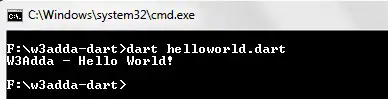
Step 3:- Now, compile and run above the Dart program

Once the program is executed it will print “Hello World!”.

Output:-

dart_hello_world_program

Dart Installation

Dart Installation

In order to setup Dart Programming Environment you need to have Dart installed, so if you don’t have it installed, check the following instruction to get Dart Language installed. If you’ve already have installed Dart Language in your system, you can skip this part.

Step 1:- Download the Dart Installer from the official website, link given below –

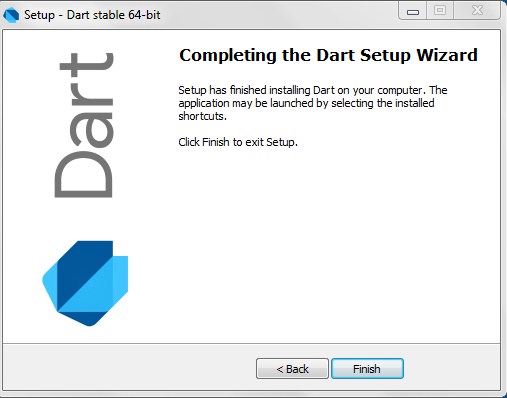
Step 2:- Run the Dart Installer (the .exe file you downloaded in the previous step) and follow the installation wizard.

dart_installation_1

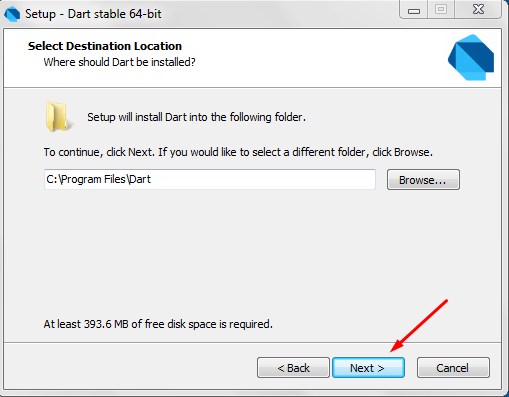
Step 3:- Select the Installation path and click next.

dart_installation_2 dart_installation_3

Step 4:- After SDK installation is done, you may require to set the PATH environment variable to “C:\Program Files\Dart\dart-sdk\bin” in advanced system properties.

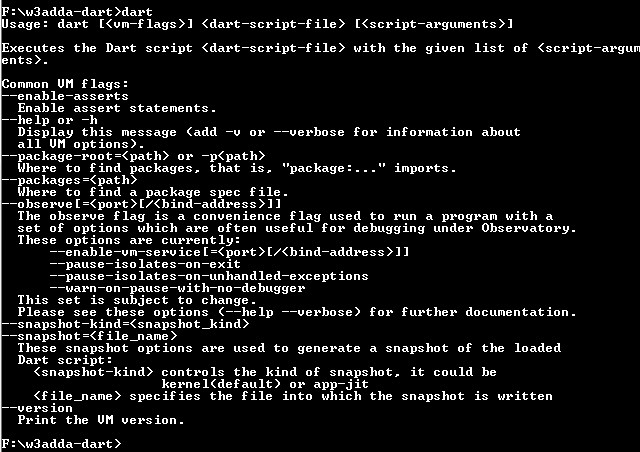
Step 5:- Now, lets open the terminal and run the following command in order to verify the Dart installation.

dart_installation_4

On successful installation, it will show the dart runtime.

Running Dart Program Online with DartPad

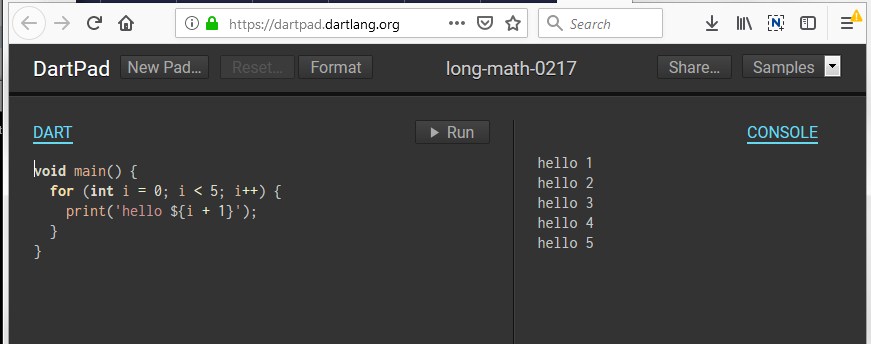
You can run your Dart Program online using the online Dart editor provided at https://dartpad.dartlang.org/. The Dart Editor executes the script and displays both HTML as well as console output. The Dartpad editor also contains some sample program to learn. The Dartpad online editor looks like as below –

dart_dartpad_online_editor

Dart History

Dart History

The Dart is an open source object-oriented programming language developed by Lark Bak and Kasper Lund at Google. The project was founded in October 2011, and the latest stable release is version 2.0 which came out in August 2018.

2011 :- In October 10–12, 2011 Dart project was founded by Lars Bak and Kasper Lund at Google. Dart was unveiled at the GOTO conference in Aarhus, Denmark.

2013 :- The first release of Dart version 1.0 was released on November 14th, 2013.

2014 :- Ecma International approved the Dart language specification first edition in July 2014, at its 107th General Assembly, and a second edition in December 2014.

2018 :- In August 2018, the latest stable release of Dart version 2.0 was released with language changes including a sound type system.

Dart Features

Dart Features

The Dart is an open source, object oriented programming language. The Dart provides lots of convenient features mainly focused on compilation, execution, safety, memory management, and concurrency. Below is a list of some of important features among Dart’s features are –

Object Oriented Programming :- Dart is an object-oriented programming language with support for inheritance, interfaces and optional typing features. It also supports interfaces, mixins, abstract classes, reified generics, static typing, and a strong type system.

Open Source :- Dart is an open source programming language and it comes with a set of tools for compiling and executing Dart Code. It is recognized as an ECMA standard and is available with a BSD licence.

Cross-Platform :- Dart is cross-platform and supports all major operating systems. The Dart compiler come with its own Virtual Machine which allows Dart programs to run on every systems.

Browser Support :- The Dart code can be trans-compiled into JavaScript using source-to-source compilation. There is a dar2js compiler which transpile Dart code into optimized JavaScript code that runs on all modern web browsers.

Type Safe :- The Dart is type safe programming language. Dart uses a combination of static type checking and runtime checks to ensure that a variable’s value always matches the variable’s static type. Although Dart is strongly typed, type annotations are optional because of type inference.

Ahead-Of-Time (AOT) :- Dart supports Ahead-Of-Time (AOT) compilation mode. In this mode, the Dart code can be directly converted into native machine code. Apps built with Flutter are deployed to app stores as AOT Compiled Dart code.

Reuse Of Code :- Dart cade can be compiled optimized JavaScript code that can be executed on all modern web browsers. This allows Dart code reuse between mobile apps and web apps. It is being reported that Dart code can be reused as high as 70% code between their mobile and web apps.

Flexible Compilation and Execution :- Dart is unusually flexible at compilation and execution. Dart code can be efficiently compiled AOT or JIT, interpreted, or transpiled into other languages. Not only is Dart compilation and execution unusually flexible, it is especially fast.

Asynchronous Programming :- Dart supports asynchronous programming which let your program run without getting blocked. Dart is a single threaded programming language that helps the developer ensure that critical functions to be executed till completion, without preemption.

Concurrency :- Dart is an asynchronous programming language. Dart uses isolates in order to achieve concurrency. Isolates are independent workers that do not share memory, but instead communicate by passing messages over channels, isolates are similar to actors in Erlang or web workers in JavaScript. Since isolates are communicating via passing messages thus it needs a way to serialize a message. This is done using a snapshot, which is generated from a given object, and then this is transferred to another isolate for deserializing.

Strong Tooling :- Dart SDK ships with an extensive set of execution environments, libraries and tools that are designed exclusively for the language.

The Dart project also ships an editor. You’ll find code completion, refactoring, quick fixes, code navigation, debugging, and more. Also, IntelliJ has a Dart plugin.

Libraries :- Dart comes with a rich set of inbuilt libraries installed in the Dart SDK including core, async, math, convert etc. Dart allows you to organize Dart code into libraries, for easier namespacing and reusability. Later you can import a library, and libraries can re-export.

Familiar Syntax :- As far as concern to language syntax, Dart doesn’t reinvent the wheel. if you look at Dart code you will find its syntax is quite similar to Java and C#.

Community :- Dart is backed with a large community of Dart developers. So it is easy to find help if you stuck at some point while developing an application.

Dart Introduction

Dart Introduction

Dart is a modern general-purpose programming language originally developed by Google (designed by Lars Bak and Kasper Lund). Dart is a new programming language that appeared first time in 2007 and it’s latest stable version is released in June 2017. Not many people knows about Dart, the significant growth of Flutter made it more popular.

Dart is an open source programming language not only used for developing mobile applications but it is approved as a standard by Ecma and is used to build web, server, desktop, mobile applications and the Internet of Things (IoT) devices. The Dart compiler come with its own Virtual Machine which allows Dart programs to run on every systems. When Dart is used in web applications, there is a dar2js compiler which transpile Dart code into optimized JavaScript code so it runs on all modern web browsers.

Dart is an object-oriented, class-based, optionally typed programming language and it also support mixin-base inheritance. Syntactically it looks quite similar to Java, which makes it easy to learn if you prefer Java as programming language. Likewise Java, it also has a final keyword, String Class, Object class, extends keyword, and many more. The Dart compiler also shows a warning and error like any other structured programming language.

Why Dart ?

  • Dart is cross-platform and supports all major operating systems.
  • It is open source and available with a BSD licence. It is recognised as an ECMA standard.
  • Dart is very stable and it can be used to build production quality real-time applications.
  • It is an object-oriented programming language with support for inheritance, interfaces and optional typing features.
  • The Dart code can be transcompiled into JavaScript using source-to-source compilation. There is a dar2js compiler which transpile Dart code into optimized JavaScript code that runs on all modern web browsers.
  • The Dart software development kit (SDK) ships with a stand-alone Dart VM, allowing Dart code to run in a command-line interface environment.
  • Dart can also be executed in AOT mode. AOT stands for Ahead-Of-Time compilation. In this mode, the Dart code can be directly converted into native machine code.