Category Archives: Dart Tutorial

Dart Tutorial

Dart Control Flow Statements

Dart Control Flow Statements

Control flow or flow of control is the order in which instructions, statements and function calls being executed or evaluated when a program is running. The control flow statements are also called as Flow Control Statements. In Dart, statements inside your code are generally executed sequentially from top to bottom, in the order that they appear. It is not always the case your program statements to be executed straightforward one after another sequentially, you may require to execute or skip certain set of instructions based on condition, jump to another statements, or execute a set of statements repeatedly. In Dart, control flow statements are used to alter, redirect, or to control the flow of program execution based on the application logic.

Dart Control Flow Statement Types

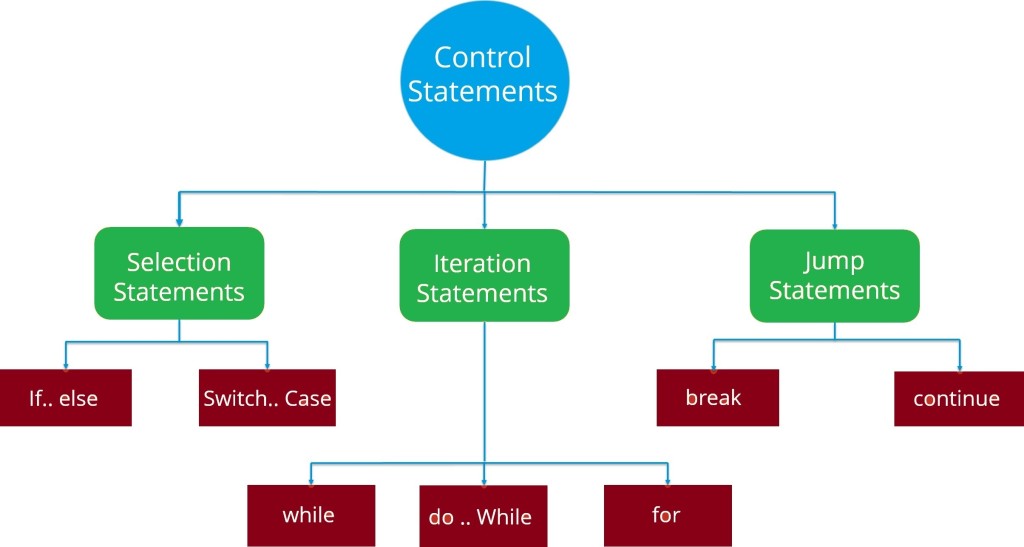
In Dart, Control flow statements are mainly categorized in following types –

dart-control-statements

Dart Selection Statements

In Dart, Selection statements allow you to control the flow of the program during run time on the basis of the outcome of an expression or state of a variable. Selection statements are also referred to as Decision making statements. Selection statements evaluates single or multiple test expressions which results in “TRUE” or “FALSE”. The outcome of the test expression/condition helps to determine which block of statement(s) to executed if the condition is “TRUE” or “FALSE” otherwise.

In Dart, we have following selection statements –

Dart Iteration Statements

In Dart, Iteration statements are used to execute the block of code repeatedly for a specified number of times or until it meets a specified condition. Iteration statements are commonly known as loops or looping statements.

In Dart, we have following iteration statements available-

Dart Jump Statements

Jump statements are used to alter or transfer the control to other section or statements in your program from the current section.

In Dart, we have following types of jump statements –

All of the above jump statements cause different types of jumps.

Dart Enumeration

Dart Enumeration

An enumeration is a set of predefined named values, called as members. Enumerations are useful when we want deal with limited set of values for variable. For example you can think of the colors of a traffic light can only be one of three colors– red, yellow or green.

Defining an enumeration

In Dart, enumeration can be declared using the enum keyword followed by a list of the individual members enclosed between pair of curly brackets {}.

Syntax:-

Example:-

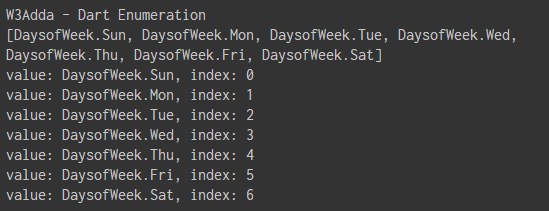
Let’s define an enumeration for days of week –

Example:-

Output:-

dart_enum_enumeration_example

Dart Runes

Dart Runes

String is used to hold sequence of characters – letters, numbers, and special characters. In Dart, string is represented as sequence of Unicode UTF-16 characters. If you want to use 32-bit Unicode characters within a string then it must be represented using a special syntax. A rune is an integer representing a Unicode code point. For example, the heart character ‘♥ is represented using corresponding unicode equivalent \u2665, here \u stands for unicode and the numbers are hexadecimal, which is essentially an integer. If the hex digits are more or less than 4 digits, place the hex value in curly brackets ({ }). For example, the laughing emoji ‘😆’ is represented as \u{1f600}.

Example:-

Output:-

Runes can be accessed using the String class available in dart:core library. The String code units / runes can be accessed in following three ways –

  • Using String.codeUnitAt() function
  • Using String.codeUnits property
  • Using String.runes property

String.codeUnitAt() Function

The Code units of a character in a string can be accessed through their indexes. The codeUnitAt() function returns the 16-bit UTF-16 code unit at the given index.

Syntax:-

Example:-

Output:-

dart_codeunitat_function_example

String.codeUnits Property

The codeUnits property returns a list of UTF-16 code units for specified string.

Syntax:-

Example:-

Output:-

dart_codeunits_property

String.runes Property

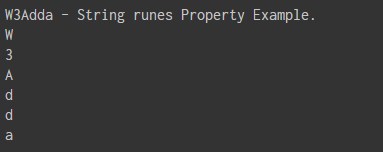
This runes property iterate through the UTF-16 code units in a given string.

Syntax:-

Example:-

Output:-

dart_string_runes_property_example

Dart Symbol

Dart Symbol

Dart Symbol object used to refer an operator or identifier declared in a Dart program. Dart symbol are commonly used in APIs that refer to identifiers by name, because an identifier name can changes but not identifier symbols.

Dart symbols are opaque, dynamic string name used in reflecting out metadata from a library. Symbols is basically means to save the relationship between a human readable string and a string that is optimized to be used by computers.

Reflection is a mechanism that used to get metadata of a type at run-time for example – the number of methods in a class, the number of constructors it has or the number of parameters in a function.

In Dart, all of the reflection related classes are available in the dart:mirrors package. This library can be used with web applications as well as command line applications.

Syntax:-

Symbol for an identifier can be created using a hash (#) followed by the identifier name.

Here, the name must be a valid class, function, public member name, public constructor name, or library name.

Example:-

Lets create a file Foo.dart and put the following code in it –

Foo.dart

Here, we have declared a class Foo in a library foo_lib, and defined three methods m1, m2, and m3 in class Foo.

Now, create another dart file FooSymbol.dart and put the following code in it –

FooSymbol.dart

In the above code we are loading Foo.dart library along with the dart:mirrors library because we will be reflecting the metadata from the above library. In the above code we are basically searching for the Foo class in foo_lib using Symbol.

The following line of code iterate through every declaration in the library at runtime and prints the declarations as type of Symbol.

When we run the above Dart Program, we will see the following output –

Output:-

Display Number of Instance Methods In a Class

Example:-

Output:-

Dart Convert Symbol to String

The MirrorSystem class available in dart:mirrors library allow us to convert a Symbol back to string.

Example:-

Output:-

Dart Map

Dart Map

The Map is an object that is used to represents a set of values as key-value pairs. In Map, both keys and values can be of any type of object, it is not necessary that the keys and values both of the same type.. In Map, each key can only occurs once, but the same value can be used multiple times. In Map, each of the value is associated with a unique key, and this key is used to accessed corresponding Map value. The Map can be defined by using curly braces ({ }) and values can be assigned and accessed using square braces ([]).

Declaring Map In Dart

In Dart, Maps can be declared in following two ways –

  • Using Map Literals
  • Using a Map constructor

Declaring Map using Map Literals

In Dart, we can declare a map with a map literal as following –

Syntax:-

Here, a map literal is a list of key-value pairs, separated by commas, surrounded by a pair of curly braces ({ }). A key-value pair is a combination of a key and a value separate by a colon(:).

Example:-

Declaring/Initialize Map using Map Constructor

In Dart, we can declare/initialize a map with a map constructor as following –

Syntax :-

Declare an empty map as follows –

Now, lets initialize the map as follows –

Example:-

Output:-

Map Properties

Below is a list of properties supported by Dart Map.

Property Description
Keys Returns an iterable object representing all keys in respective map object
Values Returns an iterable object representing all values in respective map object
Length Returns the size of the Map
isEmpty Returns true if the Map is an empty Map
isNotEmpty Returns true if the Map has at least one item.

Map Methods

Below is a list of commonly used methods supported by Dart Map.

Method Description
addAll() Adds all key-value pairs to this map.
clear() Removes all key-value pairs from the map.
remove() Removes key and its associated value, if present, from the map.
forEach() Iterate through and applies function to each key-value pair of the map.

Dart Sets

Dart Sets

In Dart, Set is a unordered list of distinct values of same types. Set is much similar to an array but it is unordered and won’t allows duplicate elements, each value contained in a set is unique. Dart sets are typed, thus once you declare the type of the set or Dart infers it then you would only have elements of the same type. Sets are useful when we want to hold distinct values of single data type in single variable and order of items is not important.

Dart Declaring/Initialize Set

There are two ways we can declare/initialize an empty set, use {} preceded by a type argument, or assign {} to a variable of type Set.

Or

Here, SetName is replaced with the name of set variable and type is replaced with the data type of set.

Note :- The syntax for map literals is similar to that for set literals. If you forget the type annotation with {} or with the variable it’s assigned to, then Dart would creates an Map object instead of Set.

Example:-

Output:-

dart_declaring_set

Add Element Into Set

In Dart, add() or addAll() function is used to add or insert item(s) into given set. The add() method is used to insert single item into an existing set while addAll() method is used to add multiple items into the given set. Duplicate value in a set will be ignored.

Syntax:-

Example:-

Output:-

dart_add_item_in_set_add_method_new

Dart Get Set Element at Index

The elementAt() method is used to get the item at specified index position. Indexing of a Set starts from zero (0) to the last element of Set which is size – 1 where size is the number of elements in a set. If you enter a number bigger than maximum index it will throw an error.

Syntax:-

Example:-

Output:-

dart_get_item_at_index

Dart Get Set Elements Count

In Dart lenth property can be used to find the number of elements in a set.

Syntax:-

Example:-

Output:-

dart_get_set_length

Dart Finding Element in a Set

Dart contains() method can be used to find an element in a set, it takes a single element of the same type to be find within the set and returns a boolean value to indicate given element is exists or not.

Syntax:-

Example:-

Output:-

dart_set_find_using_contains

Dart Remove Set Element

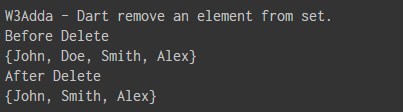
In Dart remove() method is used to remove or delete an element from given set.

Syntax:-

Example:-

Output:-

dart_remove_set_element

Dart Iterating Over a Set Elements

In Dart, we can loop through the set elements using forEach method as following –

Example:-

Output:-

dart_iterating_set_elements

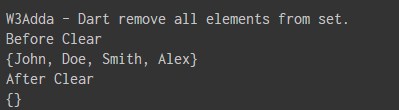
Dart Remove all Set Elements

The clear() method is used to remove or delete all from given set.

Syntax:-

Example:-

Output:-

dart_clear_remove_all_set_elements

Dart Convert Set to List

Dart toList()method is used to convert a Set object to List object. The type of the List must be the same as the type of Set elements.

Syntax:-

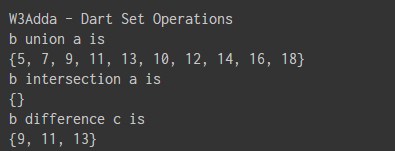
Dart Set Operations

In Dart, we can perform some of the following basic set operations on any Set –

Union :- The union of two sets a and b is the set combining values of a and b.

intersection :- The intersection of two sets a and b is a set that contains all elements common in both sets.

subtracting :- The subtraction of two sets a and b is set containing all elements of set a and removing elements that belongs to set b.

Example:-

Output:-

dart_set_operations

Dart Set Properties

Below is a list of properties supported by Dart Sets.

Property Description
first It returns the first element in set.
isEmpty It returns true if the set has no elements.
isNotEmpty It returns true if the set has at least one element.
length It returns length/size of the set, can also be seen as number of elements in a given set.
last It returns the last element in the set.
hashCode It returns an hash code for the corresponding object.
Single It is used to checks if the set has only one element and returns it.

Dart Lists

Dart Lists

In Dart, list data type is used to represent a collection of objects. A List is an ordered group of objects. The List data type is actually similar to the concept of an array in other programming languages. An array is used to hold multiple values in single variable, similarly in Dart, an array is a List objects that hold multiple objects/values in single variable , so most people just call them lists. A list variable is defined by having values separated by commas and enclosed within square brackets ([]).

Example:-

Below is logical representation of the list –

logical_representation_of_a_list_1

Here,

list1 :- It is the identifier that used to refer the corresponding list object.

Index:- Individual elements in a list can be accessed easily by index or subscript like list_name[index]. Indexing of a list starts from zero (0) to the last element of list which is list_name[size-1] where size is the number of elements in the list.

Elements:- List elements refers to the actual values/objects stored in a given list.

In Dart, lists can be classified as –

  • Fixed Length List
  • Growable List

Fixed Length List

A List object declared with size specified cannot be changed runtime.

Syntax:-

Below Is Syntax for Declaring Fixed Size List

Syntax:-

Below Is Syntax for Initializing Fixed Size List Elements.

Example:-

Output:-

When you run the above Dart Program, you will see following output –

Growable List

A List object declared without size is termed as Growable List. The length of the growable list can changed in runtime.

Syntax:-

Below Is Syntax for Declaring Growable List

Or

Syntax:-

Below Is Syntax for Initializing Growable List Elements.

Example:-

Here, we have created a list of even numbers and initialized it with four elements and later added one more element to it.

Output:-

When you run the above Dart Program, you will see following output –

List Properties

Below is a list of properties supported by Dart List.

Property Description
first It returns the first element case.
isEmpty It returns true if the collection has no elements.
isNotEmpty It returns true if the collection has at least one element.
length It returns length/size of the list, can also be seen as number of elements in a given list.
last It returns the last element in the list.
reversed It returns an iterable object containing the lists values in the reverse order.
Single It is used to checks if the list has only one element and returns it.

Inserting Elements into List

add() :- The add() function is used to append a specified value to the end of the list and returns a modified list object.

Syntax:-

Example:-

Output:-

addAll() :- The addAll() function is used to append multiple values to the given list object. It accepts multiple comma separated values enclosed within square brackets ([]) and appends it to the list.

Syntax:-

Example:-

Output:-

insert() :- The insert() function is used to insert an element at specified position. It accepts a value and inserts it at the specified index.

Syntax:-

Example:-

Output:-

insertAll():- The insertAll() function is used to inserts a list of multiple values to a given list at specified position. It accepts index position and a list of multiple comma separated values enclosed within square brackets ([]) and insert the list values beginning from the index specified.

Syntax:-

Example:-

Output:-

Updating List

The simplest way a list element can be modified by accessing element and assigning it new value.

Syntax:-

Example:-

Output:-

replaceRange() :- The replaceRange() function is used to update a range of list items. This function updates the value of the elements within the specified range.

Syntax:-

Example:-

Output:-

Removing List Elements

remove() :- The remove() function is used to remove an elements from the list. It removes the first occurrence of a specified element in the list. It returns true if the specified element is removed from the list.

Syntax:-

Example:-

Output:-

removeAt() :- The removeAt() function is used to remove an element from specified index position and returns it.

Syntax:-

Example:-

Output:-

removeLast() :- The removeLast() function is used to remove and returns the last element from the given list.

Syntax:-

Example:-

Output:-

removeRange() :- The removeRange() function is used to remove the items within the specified range. It accepts the start and end index position and removes all elements between the specified range.

Syntax:-

Example:-

Output:-

Dart Iterating List Elements

In Dart, we can loop through the list elements using forEach method as following –

Example:-

Output:-

dart_iterating_list_elements

Dart Boolean

Dart Boolean

The Boolean data type is used to represent the truth values, which can be either True or False. Boolean are commonly used in decision making statements. In Dart, you cannot use 0 or 1 to represent true or false. Boolean can be declared using bool keyword.

Example:-

Output:-

Dart String

Dart String

A string variable is used to hold series or sequence of characters – letters, numbers, and special characters. In Dart, string can be represented either using single quotes or double quotes. In Dart, strings can be declared using the String keyword.

Printing String

In Dart, the print() function is used to print the formatted message to the screen, or other standard output device. The message can be a string, any other object, or any expression, the object and expression will be converted into a string before written to the screen.

Example:-

Output:-

String Concatenation

In Dart, strings can be concatenated simply using the plus (‘+’) operator or the += assignment operator.

Example:-

Output:-

String Interpolation

String interpolation is the process of evaluating a string containing placeholders, variables and interpolated expressions. When an interpolated string is evaluated the placeholders, variables and expressions are replaced with their corresponding values. In Dart, ${expression} is used for string interpolation.

Example:-

Output:-

String Properties

Below is a list of properties supported by Dart Strings.

Property Description
codeUnits Returns an unmodifiable list of the UTF-16 code units of this string.
isEmpty Returns true if this string is empty.
Length Returns the length of the string including space, tab and newline characters.

String Methods

Below is a list of commonly used methods supported by Dart Strings.

Method Description
toLowerCase() Converts all characters in this string to lower case.
toUpperCase() Converts all characters in this string to upper case.
trim() Returns the string without any leading and trailing whitespace.
compareTo() Compares this object to another.
replaceAll() Replaces all substrings that match the specified pattern with a given value.
split() Splits the string at matches of the specified delimiter and returns a list of substrings.
substring() Returns the substring of this string that extends from startIndex, inclusive, to endIndex, exclusive.
toString() Returns a string representation of this object.
codeUnitAt() Returns the 16-bit UTF-16 code unit at the given index.

Dart Numbers

Dart Numbers

The Number data type is used to hold the numeric values. Dart supports following numerical data types –

  • Dart Integer
  • Dart Double

Dart Integer:- Dart Integers are used to store whole numbers. Dart integer data type is used to represent 64 bit non-decimal number between -263 to 263 – 1. An integer can be used to store either signed and unsigned integer value. Integers can be declared using int keyword.

Dart Double :- Dart double is used to represent a 64-bit (double-precision) floating-point numbers or numbers with larger decimal points. Double can be declared using double keyword.

Example:-

Output:-

Rules for integers:-

  • An integer must have at least one digit
  • Integers are numbers without a decimal point
  • An integer can be either positive or negative
  • Integer values no larger than 64 bits, depending on the platform.

Dart parse() function

The Dart parse() function converts a numeric string into a number.

Example:-

Output:-

The parse() function throws a FormatException if it is passed any value other than numerals.

Number Properties

Below is a list of properties supported by Dart numbers.

Property Description
hashcode It Returns a hash code for a numerical value provided.
isFinite It returns True if the number is finite; otherwise, false.
isInfinite It returns True if the number is positive infinity or negative infinity; otherwise, false.
isNan It returns True if the number is a Not-a-Number value; otherwise, false.
isNegative It returns True if the number is negative; otherwise, false.
sign It returns minus one, zero or plus one depending on the sign and numerical value of the number.
isEven It returns true if the number is an even number.
isOdd It returns true if the number is an odd number.

Number Methods

Below is a list of commonly used methods supported by Dart numbers.

Method Description
abs It returns the absolute value of the given number.
ceil It returns the least integer no smaller than the number.
Floor It returns the greatest integer not greater than the given number.
compareTo It is used to compare the with other number.
remainder It returns the truncated remainder after dividing the two numbers.
Round It returns the integer closest to the current numbers.
toDouble It returns the double equivalent of the number.
toInt It returns the integer equivalent of the number.
toString It returns the string equivalent representation of the number.
truncate It returns an integer after discarding any fractional digits.

Dart Constants

Dart Constants refers to an immutable values. Constants are basically literals whose values cannot be modified or changed during the execution of program. Constant must be initialized when declared as values cannot be assigned it to later.

How to Define Constants In Dart

In Dart, constants can be created in following two ways –

  • Using final keyword.
  • Using const keyword.

In Dart, final and const keyword are used to declare constants. Dart prevents to change the values of a variable declared using the final or const keyword. The final or const keywords can be used in conjunction with data type. A final variable can be set only once while const keyword represents a compile-time constant. The constant declared with const keyword are implicitly final.

Define Constants Using final Keyword

Syntax:-

Or

Example:-

Output:-

Define Constants Using const Keyword

Syntax:-

Or

Example:-

Output:-

Note :- Dart throws an exception if an attempt is made to modify variables declared with the final or const keyword.

Dart Cascade notation (..)

Dart Cascade notation(..) Operator

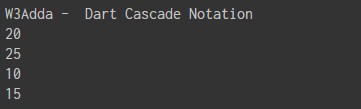
Cascades (..) allow you to perform a sequence of operations on the same object. The Cascades notation(..) is similar to method chaining that saves you number of steps and need of temporary variable.

Example:-

Output:-

dart_cascade_notation_operator