Category Archives: Python Programs

Python Programs

Python Program to Slice Lists

In this tutorial, we will learn to create a Python Program to Slice Lists using python Programming.

Prerequisites

Before starting with this tutorial we assume that you are best aware of the following Python programming topics:

  • Python Operator.
  • Basic Input and Output
  • Basic Python  programming.
  • Python Data type.
  • List in Python.

Python slice() function.

The slice() method provided by Python that returns a portion of an List .With this Method(), we can specify the starting  point of slicing and end point of slicing, and also the step. Output returns a List slice form original list to  a new list from the existing one.

Python Program to Slice Lists.

In this program we will Slice a list like [start:stop:step].where Start is starting point Stop is ending point ans Step is index jump.Firstly we declare required header file and variable and also initiates required values in variable. Next we take value from user at run time and then after we will Slice a list to given points.

List Declaration.

Here we will Demonstrate is a simple program, to display a whole list.
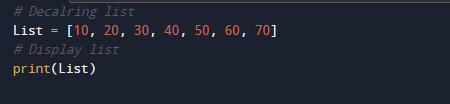
The above image shows a “List” Declaration and displaying all the elements of a list.

Output

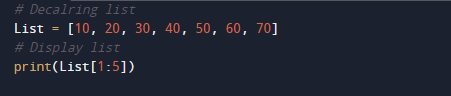
Items between One Position(1) to Another Position(5).

Let say from one two five items will be displayed.
Output

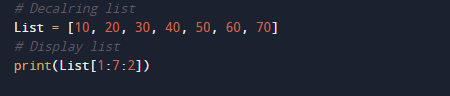
Items between One Position to Another Position with index.

where 1 is start point 7 is end point and 2 is index value of list(Jumping index).
Output

Items between One Position to Another Position without index.

If you want to take elements between two specific indices, you can mention them before and after [ : ].No need to assign index.
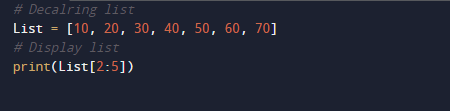
Output

Items till to Another Position.

In that case you need to give only end point position elements form start to that point will be diplayed.
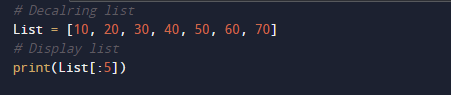
Output

Same work can be done through slice() Function.

It will take three arguments Slice(Start:Stop:step)

  • Start  – Start where the slicing of the List starts.
  • Stop -Slicing stops at i stop.
  • Index (optional) – It will determines the increment  index for slicing.

Python Program to Make a Flattened List from Nested List

In this tutorial, we will learn to create a Python Program to Make a Flattened List from Nested List using python Programming.

Prerequisites

Before starting with this tutorial we assume that you are best aware of the following Python programming topics:

  • Python Operator.
  • Basic Input and Output
  • Basic Python  programming.
  • Python if-else statements.
  • Python Loop.
  • List in Python.

How do you flatten a list in Python?

Flattening a list refers to the process of removing a dimension from a list.
There are three ways to flatten a list:

  1. Using a list comprehension.
  2. By Using a nested for loop.
  3. Using the ‘itertools’ method chain().

Python Program to Make a Flattened List from Nested List

In this program we will create a program to make a Flattened List from Nested List .First we would declared and initialized the required variables.then we make a Flattened List from Nested List.

Output

Flatten_list.

In our Python Program to Make a Flattened List from Nested List. First we would declared and initialized the required variables. Next, we would prompt user to input the value  then Flattened List from Nested  List.

In our program, we have first declared and initialized a set variables required in the program.

  • List = Declaring list in it.
  • flatten_list= it will show flatten list .
  • sublist=it will hold temporary list.
  • number= it will hold list number.

Then we create an empty list flatten_list.

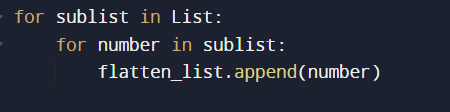
Now we are going to access each and all element’s of list in the “sublist” using a nested loop and  append the element in to flatten_list variable.

In this tutorial will learnt to make a flattened list from a nested list and at last we will print the flatten list to see our output.

Python Program to Create Pyramid Patterns

In this tutorial, we will learn to create a Python Program to Create full Pyramid Patterns  using python Programming.

Prerequisites

Before starting with this tutorial we assume that you are best aware of the following Python programming topics:

  • Python Operator.
  • Basic Input and Output
  • Basic Python  programming.
  • Python if-else statements.
  • Python Loop.
  • List in Python.

What is Pyramid?

Pyramid is a polygon structure and formed by connecting a polygonal base and a point. Each base edge and apex form a triangle.To print pyramid patterns in Python we  will use  two nested for loops and a while loop.The outermost loop is responsible for rows of pyramid triangle where inner one  will print the required number of stars (*) in each row.

Python Program to Create Pyramid Patterns

In this tutorial we will create a program of full Pyramid using nested for loop and a while loop. We would first declared and initialized the required variables. Then we will create the Pyramid using below program.Let’s have a look at the code.

Output

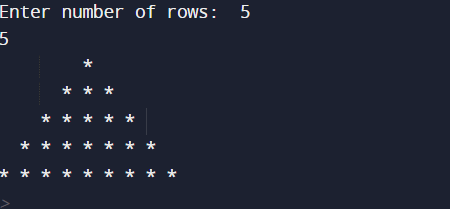
In our program we are printing Full Pyramid using nested for and while loop. We would first declared and initialized the required variables. First of all we take value form user to print number of rows and later we will print a Full Pyramid.

First, we get the  number of rows of the pyramid  from the user.As shown in image below


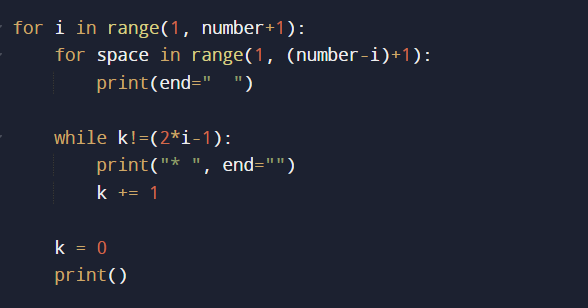
The first  for loop starts from i = 1 to i = number+ 1.

the inner for loops, prints the spaces for each row using formula

(number-i)+1, here number is the total number of rows and i is the current row number.

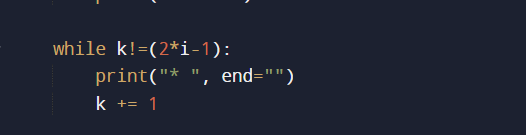
The while loop prints number of stars using  “2 * i – 1″. This formula gives the number of stars for each row.

And the final output of our program is like that.

Python Program to Illustrate Different Set Operations

In this tutorial, we will learn to create a Python Program to Illustrate Different Set Operations using python Programming.

Prerequisites 

Before starting with this tutorial we assume that you are best aware of the following Python programming topics:

  • Python Operator.
  • Basic Input and Output
  • Basic Python  programming.
  • Python Data type.
  • Python in-built Functions.
  • Loops in Python.
  • List in python.

Different set operations

Following are  Different set of operation are.

Intersection
AB
all elements which are in both A and B.
Union
AB
all elements which are in either A or B (or both)
Difference
AB
all elements which are in A but not in B
Complement
A¯or AC
all elements which are not in A

Python Program to Illustrate Different Set Operations

In this program we will create a Python program to ‘Illustrate Different Set Operations’ . We would first declared and initialized the required variables. Next, we would prompt user to input the values  later we will find  Different Set Operations.

Output

In our program we will  ‘Illustrate Different Set Operations’ . We would first declared and initialized the required variables.First  we declared and initialized a set variables required in the program.

  • S  and N= are two set elements.

We will demonstrates different operations set
Union of S and N is {1, 2, 3, 4, 5, 6, 7, 8}.
Intersection of S and N is {1, 2}.
Difference of S and N is {8, 4, 6}
Symmetric difference of S and N is {3, 4, 5, 6, 7, 8}.

Python Provide’s a Datatype called “Set” Elements within the “set” must be unique.So It can be used to perform different Operations like union, intersection, difference and symmetric difference.

Union.

Intersection.

Difference.

Symmetric Difference.

In this program above, we have taken two different sets to perform different “set” operations on them.

Python Program to Sort Words in Alphabetic Order

In this tutorial, we will learn to create a Python Program to Sort Words in Alphabetic Order using python Programming.

Prerequisites

Before starting with this tutorial we assume that you are best aware of the following Python programming topics:

  • Python Operator.
  • Basic Input and Output
  • Basic Python  programming.
  • Python Data type.
  • Python in-built Functions.
  • Loops in Python.
  • List in python.
  • Sting in python.

Lexicographical (Alphabetic order).

Lexicographic or Lexicographical sequence is a normally the Alphabetical order( Ascending order) Sequences of ordered letters ,String or elements in a ordered set.

Python Program to Sort Words in Alphabetic Order

In this program we will create a Python program to sort “Alphabetically”  or in “Ascending” order .We would first declared and initialized the required variables. Next, we would prompt user to input the values  later we will sort a string in Alphabetic Order.

Output

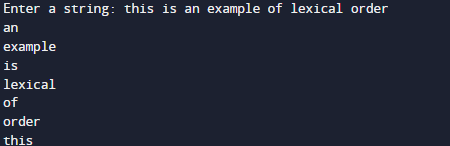
In our program above  we going to sort entered list of word in “Alphabetical” order. within the program first we break string in to word and with “sort” function sort the word in Lexicographic order.

In the above program, we have first declared and initialized a set variables required in the program.

  • Strng  = it will hold entered string.
  • words=it will hold hold word.
  • word= gives sorted words.

.

After taking string from user we pass this string to function where we break the string to words using split() method.

We take a String form the user and using the split() method string breakdown into a list of words.The function split(), splits the string at “white-spaces”.

So the elements of List(words) will be sorted using the “sort()” in-built method As show in image above and all the words are display as shown in here.

Python Program to Multiply Two Matrices

In this tutorial, we will learn to create a Python Program to Multiply Two Matrices using python Programming.

Prerequisites

Before starting with this tutorial we assume that you are best aware of the following Python programming topics:

  • Python Operator.
  • Basic Input and Output.
  • Basic Python  programming.
  • Python Data type.
  • Python in-built Functions.
  • Loops in Python.
  • List in Python.

Matrix Multiplication ?

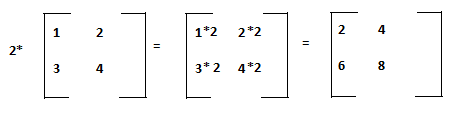
A Matrix is a table consist of numbers.Let take an example how of matrix multiplication takes place.If we want to multiply 2 in our 2*2 matrix then how it will be done as shown in image below.

As we cane see in the image above that multiplying a matrix by a single number (2) is shown in image above Means 2 is multiply with each and every element.

2×1=2 2×2=4
2×3=6 2×4=8


Python Program to Multiply Two Matrices

In this program below we create a program to multiply two Matrices using nested for loop . We would first declared and initialized the required variables. Next, we would prompt user to input the values and later we will multiply two matrices.


Output

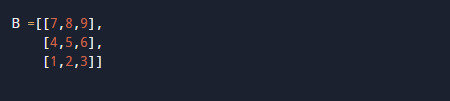
Matrix A and B:

Result:

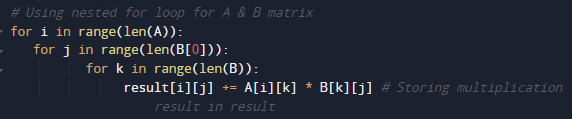
In our program above  we going to use nested “for” loops to iterate through each and every row’s and column’s. within the loop we “Multiply” the corresponding elements of the two matrices and store it in variable “result”.

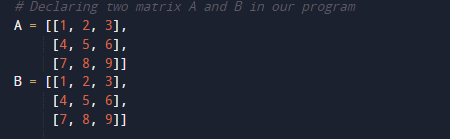
In the above program, we have first declared and initialized a set variables required in the program.

  • A = it will hold first matrix.
  • B= it will hold second matrix.
  • result=it will hold added values of matrices.
  • i,j and k = For iteration.

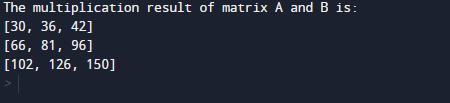
Here we will multiply two matrices of 3*3  using nested for loops to iterate through each row and column. We multiply  the corresponding elements values of  two matrices and store it in the result variable.At last we will display the value stored in variable “Result” after Multiplying of two matrices .

In matrix multiplication of two matrices, the first row elements of matrix(A) are multiplied to the column elements of the second matrix (B). And this process followed till we reach all the element of rows.

And finally we get resultant Output we required.

Python Program to Transpose a Matrix

In this tutorial, we will learn to create a Python Program to Transpose a Matrix using python Programming.

Prerequisites

Before starting with this tutorial we assume that you are best aware of the following Python programming topics:

  • Python Operator.
  • Basic Input and Output
  • Basic Python  programming.
  • Python Data type.
  • Python in-built Functions.
  • Loops in Python.
  • List in Python.

Transpose of a Matrix.

The transpose of a matrix is simply a overturn version of Original matrix. We can transpose a matrix by transpose its rows with its columns.

Original Matrix

Transpose Matrix

In Mathematics in linear algebra,Transpose of a matrix is actually an operator that flips a matrix above its diagonal by switching the row and column.

Python Program to Transpose a Matrix.

In this program we create a program that will Transpose a Matrix using nested for loop . We would first declared and initialized the required variables. Next, we would prompt user to input the values  later we will Transpose the matrix.

Output

Before Transpose.

After Transpose.

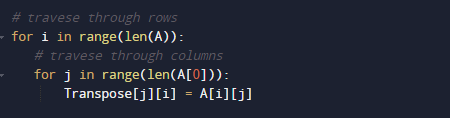
In our program, we have using nested “For” loops for traverse through each row and column. And after traversing at each point we replace the values of ” A[i][j]” to Transpose[j][i].

In the above program, we have first declared and initialized a set variables required in the program.

  • A = it will hold Original matrix
  • Transpose= it will hold transpose matrix.
  • t=it will show Transpose matrix.

Original Matrix.

set default value of Transpose to zero.

Now , we will Transpose the matrix is by exchanging the rows and columns. Transpose of a matrix is done by changing elements of rows to columns into columns to rows. Or we can say, transpose of T[][] is obtained by changing A[i][j] to A[j][i].

Simply If we changes the rows value of a matrix with the value of column of the same matrix, called Transpose of a matrix.

Original Matrix.

Transpose Matrix.

So here we learnt to transpose a matrix using nested for loop.

Python Program to Add Two Matrices

In this tutorial, we will learn to create a Python Program to Add Two Matrices using python Programming.

Prerequisites

Before starting with this tutorial we assume that you are best aware of the following Python programming topics:

  • Python Operator.
  • Basic Input and Output
  • Basic Python  programming.
  • Python Data type.
  • Python in-built Functions.
  • Loops in Python.
  • Built in Modulus.

Adding a Matrices

A matrix can only be added ,if the  both the matrices have the same dimensions.

for example:-

To add two matrices of 2*2 we need just to add the corresponding entries means( First element of matrix added to first element of second matrix), and place this sum in the corresponding position in the results. matrix and this process continues till we reach to last elements.

Python Program to Add Two Matrices

In this program we will add two Matrices using nested for loop . We would first declared and initialized the required variables. Next, we would prompt user to input the values  later we will add two matrices.

Output

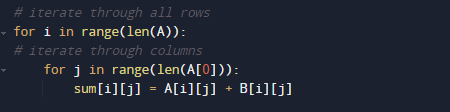
In our program above  we going to use nested “for” loops to iterate through each and every rows and columns. within the loop we “add” the corresponding elements of the two matrices and store the result in variable “sum”.

In the above program, we have first declared and initialized a set variables required in the program.

  • A = it will hold first matrix
  • B= it will hold second matrix
  • sum=it will hold added values of matrices

First Matrix.

Second matrix.

and variable sum is initiate to zero.

Now , we will add two matrices using Nested loop and after that we display it.

Here we use two for loops to iterate through each row and column. We added the corresponding elements of  two matrices and store the result  in the variable “sum” .At last we will display the value stored in variable “sum” after addition of two matrices.

Using for loop we displayed the resultant of added matrices.

Python Program to Display Calendar

In this tutorial, we will learn to create a Python Program to Display Calendar using python Programming.

Prerequisites

Before starting with this tutorial we assume that you are best aware of the following Python programming topics:

  • Python Operator.
  • Basic Input and Output
  • Basic Python  programming.
  • Python Data type.
  • Python in-built Functions.
  • Loops in Python.
  • Built in Modulus

Python Program to Display Calendar

In this program we will create a program in which we will Display Calendar .We would first declared and initialized the required variables. Next, we would prompt user to input the values  later we will Display Calendar.

Output

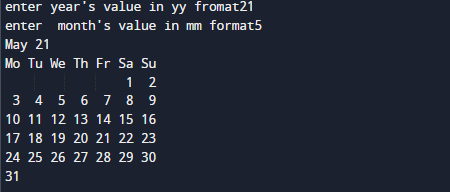
As you can see we have taken value of year in ‘yy’ format and month in ‘mm’ format in display the inputted year and month using in-built calendar.month() Method .

In the above program, we have first declared and initialized a set variables required in the program.

  • yy = it will hold Year value.
  • mm= it will hold months value.

And in the next statement user will be prompted to enter two values of “Year”  and “Month” and assigned them to variables ‘yy‘ and ‘mm’ respectively.

In this program above, we import the module called “Calendar”.

In which built-in method “month() ” inside this module we take the value of  year and the month as an arguments (Parameter) and displays the calendar for that month and that year.

Python Program to Display Calendar.

In our program we will create a program in which we will Display whole year Calendar .We would first declared and initialized the required variables. Next, we would prompt user to input the values  later we will Display Calendar.

Ouptput

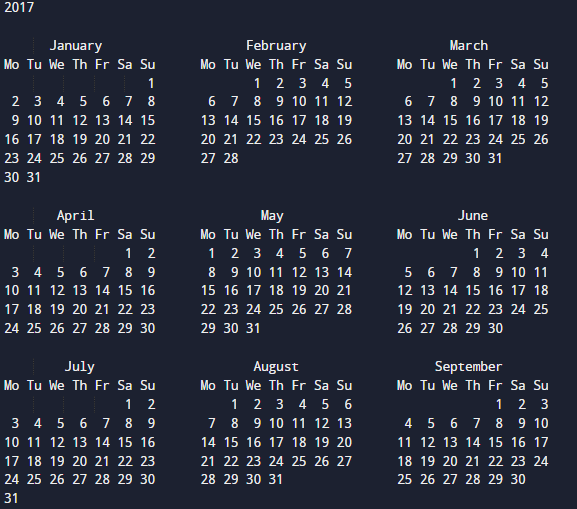
In this program First we import the calendar module. The built-in function calendar () inside the module takes in the year and displays the whole year calendar for that year.

Python Program to Shuffle Deck of Cards

In this tutorial, we will learn to create a Python Program to Shuffle Deck of Cards using python Programming.

Prerequisites

Before starting with this tutorial we assume that you are best aware of the following Python programming topics:

  • Python Operator.
  • Basic Input and Output
  • Basic Python  programming.
  • Python Data type.
  • Python in-built Functions.
  • Loops in Python.
  • Python Modules.
  • Python Random Module.

Shuffling of Deck

Shuffling is a Method used to shuffle deck of playing cards to provide an element of chance in card games.

Python Program to Shuffle Deck of Cards.

In this program we will Shuffle deck of cards Using Random Module . We would first declared and initialized the required variables. Next, we will shuffle deck of cards. Let have a look at the program.

Output

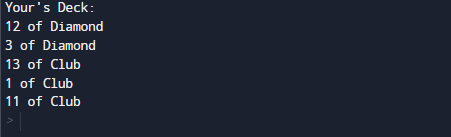
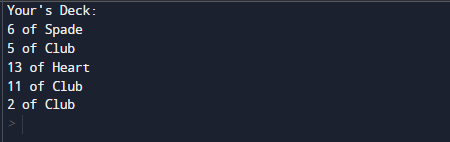
Here we will shows Two output that will Display random values.

First Output.

Second Output.

In the above program, we have to first declared and initialized required set of variables and initiate in the program.

  • Deck = it will hold Different decks.

Explanation of The Above Program Logic.

First of all import all required packages in our  program.

Here we use ‘itertools’ package , and also the ‘product()’ method is used to get the deck of cards in form of random list.

This will shuffle list using the ‘shuffle’ method present in the ‘random’ library or in Python library.


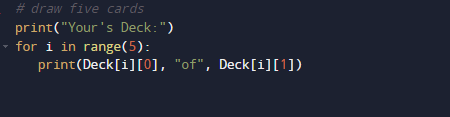
The Deck data Shuffled to range 5.


This will be displayed on the screen as shown in above image.

In this our program, we used the “Product()” Method  which is present in ‘itertools’ module to create a Deck of cards. Function performs the Cross product of the different sequences of Deck of Cards.

Python Program to Find Numbers Divisible by Another Number

In this tutorial, we will learn to create a Python Program to Find Numbers Divisible by Another Number using python Programming.

Prerequisites

Before starting with this tutorial we assume that you are best aware of the following Python programming topics:

  • Python Operator.
  • Basic Input and Output
  • Basic Python  programming.
  • Python Data type.
  • List in Python.
  • Python in-built Function.

Divisibility of a number ?

Divisibility of a number is said to be divisible by another number if the remainder of a given number is 0  ( num1 % num2 == 0 ).

Example: suppose a  number 10 and another number is 5 so (10 % 5 == 0) So 10 is Divisible by 5.

Python Program to Find Numbers Divisible by Another Number

In this program we will Find  A number is Divisible by Another number or not . We would first declared and initialized the required variables. Next, we would prompt user to input the values  later we will check these two number is divisible or not.

Output

Divisible

Not Divisible

In the above program, we have first declared and initialized a set variables required in the program.

  • num1 = it will hold Numerator value
  • num2= it will hold Denominator Value

And in the next statement user will be prompted to enter values of Numerator (First number) and Denominator(Second number) and assigned to variable ‘num1‘ and ‘num2’ respectively.

After that  user inputs let say 10 as first number, then press ‘enter’ key,and then enter second number say 5 now  we will  check whether the number are divisible by 10 or not,As shown in the image given below:

If the above condition  satisfied means the number is Numerator is divisible by Denominator.If not that means Numerator is not divisible by Denominator.

In our program we will test whether a number(entered by user) is divisible by another number or not.

Python Program to Find the Sum of Natural Numbers

In this tutorial, we will learn to create a Python program to Find the Sum of Natural Numbers    using Python programming.

Prerequisites

Before starting with this tutorial we assume that you are best aware of the following Pyhton programming topics:

  • Basic Input and Output
  • Basic Python  programming.
  • Python if-else statements.
  • Python Loop.

What Is Natural  Number?

Simply all the counting numbers start from {1, 2,3.4…} are commonly called Natural numbers.Natural numbers  include all the positive integers from 1 to infinity (∞).

Python Program to Find the Sum of Natural Numbers

In this program we will Find the Sum of Natural Numbers.Firstly we declare required variable and also initiates required values in variable. Next we take value from user at run time and then after we will find the sum of all natural number to given number.

Output

In our program while will run until  all numbers adds all numbers to the variable Sum (sum+=number).and after calculating value we will print sum or all natural number.

In the above program, we have first declared and initialized a set variables required in the program.

  • number=to take value from user.
  • sum = for counting sum of numbers.

In the above program, we have first declared and initialized a set variables required in the program. In our  program first we will take a value from user.

And after that we will check the given number is valid or not

and after that we will calculate sum of all digit between given number.

Within the loop, we add all values in variable Sum(sum+=number) .After calculating values  of all natural number between the given numbers natural number.At last we will Print sum of the all Natural number given by user.