Category Archives: Python Programs

Python Programs

Python Program to Find Armstrong Number in an Interval

In this tutorial, we will learn to create a Python program to Find Armstrong Number in an Interval using Python programming.

Prerequisites

Before starting with this tutorial we assume that you are best aware of the following Python programming topics:

  • Basic Input and Output
  • Basic Python  programming.
  • Python if-else statements.
  • Python Loop.

What Is Armstrong Number?

A number is called An Armstrong  number in which the sum of the cube of the individual digits in number  is equal to the number itself.
For example 0, 1, 153, 370, 371 and 407 are the Armstrong numbers. Let’s try to understand why 153 is an Armstrong number.

=>407 = ((4*4*4)+(0*0*0)+(7*7*7) )

= 407 =( 64 + 0 + 343)

=>407 = 407 (So this is an Armstrong number.)

Python Program to Find Armstrong Number in an Interval

In this program we will find Armstrong number between the given Interval using while loop. We would first declared and initialized the required variables. Next, we would prompt user to input a upper and lower limit range . Later we will find Armstrong numbers.

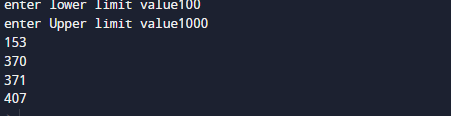
Output

In this program we take lower and upper limit from user  and find Armstrong number between given intervals.

In the above program, we have first declared and initialized a set variables required in the program.

  • lowerlimit = it  will hold lower-limit.
  • upperlimit = it  will hold upper-limit.
  • number= it will hold number value
  • temp= for holding remainder
  • sum = for adding values.
  • Digit= for finding Armstrong number.

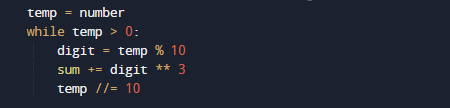
After taking upper and lower limit from user we will use a for loop to iterate between lower to upper limit and within the range we will find Armstrong number.

Here, we take value from user and within the interval we want to search Armstrong numbers. Within the interval we find and display all the Armstrong numbers that meet our condition.
With in the Interval we can see that there are 4 three(3) digit Armstrong numbers.
Python Program to Print the Fibonacci sequence

In this tutorial, we will learn to create a Python Program to Print the Fibonacci sequence using Python programming.

Prerequisites

Before starting with this tutorial we assume that you are best aware of the following Pyhton programming topics:

  • Basic Input and Output
  • Basic Python  programming.
  • Python if-else statements.
  • Python Loop.

Fibonacci sequence:

Take a look at Fibonacci sequence that begins with the 0 and 1 normally. 0, 1, 1, 2, 3, 5, 8, 13, 21, 34, 55, 89, 144, and so on . As you can see looking at  the series, you can easily understand the logic behind the series that each number in the sequence is the addition or sum of the two previous number.

Python Program to Print the Fibonacci sequence

In this program we will find Fibonacci Sequence  between the given number using while loop. We would first declared and initialized the required variables. Next, we would prompt user to input a number . Later we will find Fibonacci sequence.

Output

In the above program, we have first declared and initialized a set variables required in the program.

  • number= it will hold number value
  • f= for holding first element value.
  • s = for holding  second  elements value.
  • n= it will hold next value.

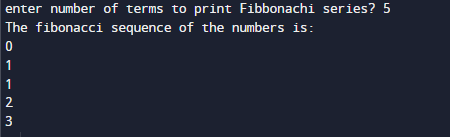
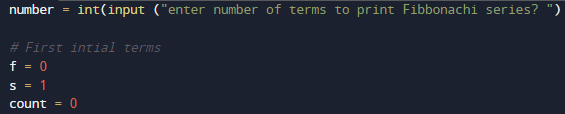
After Declaring values we will take a number from user till we print the Fibonacci series of nth terms.

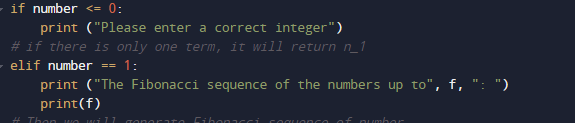
and initiate f to zero (f=0) and s to one (s=1) and count to zero.and then we will check if the number of terms is valid or not ?

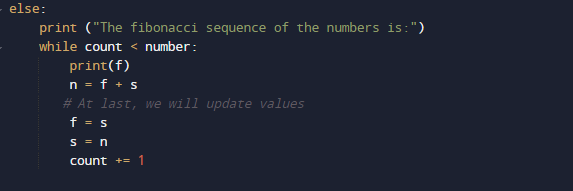
If the given number is greater than 2, than within the while loop for finding the next term of Fibonacci sequence by adding the previous two terms.

We will then update the variable by exchanging the value of f=s (second to first )and s=n (next to second )them, and it will continue till we will  reach the number of  terms the user wants to print.

Python Program to Find the Factorial of a Number

In this tutorial, we will learn to create a Python Program to Find the Factorial of a Number  using Python programming.

Prerequisites

Before starting with this tutorial we assume that you are best aware of the following Python programming topics:

  • Basic Input and Output
  • Basic Python  programming.
  • Python if-else statements.
  • Python Loop.

What is Factorial ?

Factorial of a given number ‘n’ is the product of all its positive integers numbers.

Example: The factorial of 5 is 120.
5! =  5 * 4 * 3 * 2 *1
5! = 120.

Python Program to Find the Factorial of a Number

In this program we will find factorial of a given number . We would first declared and initialized the required variables. Next, we would prompt user to input a number .Later we will Find Factorial.

Output

In the above program, we have first declared and initialized a set variables required in the program.

  • number = it will hold entered number.
  • fact = it will hold a factorial of a number.
  • i =  for iteration.

In this program, First we declare and initiate variables and later we will find factorial of a given number.
First of all we take a number as input from user and store the value in variable ‘number’. and fact  to one ( fact=1).

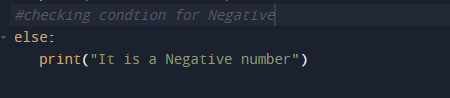
And now we will check first that the given number is greater than 1 or not ( number< 0 ) if not we show message in below.

Now we will check condition for number is equal to zero ( number ==0 ).

As we know that if number is zero it’s factorial is one and after all his we finally find factorial of a given number.

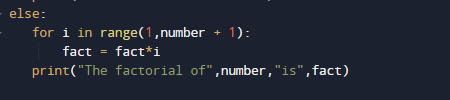
In this  program user is promoted to enter a positive integer as show in image above , the  for loop runs from ‘1 to number’. In every iteration , fact is multiplied with i ( fact=fact*i ) and after all iterations we will get the value of factorial of number.

Python Program to Find the Largest Among Three Numbers

In this tutorial, we will learn to create a Python Program to Find the Largest Among Three Numbers using Python programming.

Prerequisites

Before starting with this tutorial we assume that you are best aware of the following Python programming topics:

  • Basic Input and Output
  • Basic Python  programming.
  • Python if-else statements.
  • Python Loop.

Largest Among three?

In our program we will take three numbers  from user and stored in  variables a,b and c respectively. here we will use ‘if-elif-else’ ladder statement to find the largest among the three and display it.

Python Program to Find the Largest Among Three Numbers

In this program we will Find Largest among three elements. We would first declared and initialized the required variables. then  we would prompt user to input values .Later we will find largest among three.

Output

In the above program, we have first declared and initialized a set variables required in the program.

  • a = it will hold entered  first variable value. 
  • b = it will hold entered  second variable value.
  • c = it will hold entered third variable value.

In our program, we will use 3 values in variable ‘a,b and c‘ ,after getting these values we will find the largest among  three.
First of all we declare variables and initialize value from user.

After initiate values we will check condition for first variable has greatest value among three if the value in first variable is greater than second and third variable we can say that the value in first is largest among two.

if not we will move to elif section where we check second variable is greatest among two if it then we print second is the largest among these three.

else if we again jump to next ‘elif’ statement where we check renaming last variable is greatest

if all these condition false it means the value within the variable is either zero or equal .

Here use the ‘if…elif…else‘ ladder to find the largest among the three.

Python Program to Check Leap Year

In this tutorial, we will learn to create a Python Program to Check enter year is a Leap Year  or not using Python programming.

Prerequisites

Before starting with this tutorial we assume that you are best aware of the following Python programming topics:

  • Python Operator.
  • Basic Input and Output
  • Basic Python  programming.
  • Python if-else statements.
  • Python Loop.

What is Leap Year?

Leap Year:
If the value given by user is completely divisible by 4, 100 and 400 then it is a leap year.
If the given value by user is divisible by 4 but not  by 100 then it is a leap year.

Not a Leap Year:
If the value  given by user  is not divisible by 4 then it is not a leap year
If the given value is divisible by 4 and 100 but not divisible by 400 then it is not a leap year.

For example,

  • 2000 is a leap year.
  • 1890 is not  a leap year.

Python Program to Check Leap Year

In our program below we will check condition for Leap year.First we would declared and initialized the required variables.Next, we would prompt user to input the value for Year. Later we will find entered year by user is leap year or not.

Output

Leap year

Not a Leap year.

In our program, we have first declared and initialized a set variables required in the program.

  • year =taking year value from user.

First of all  we declare variable and take a value from user to check whether a year is leap or not is.

After taking values from user we will check three different conditions on a given year

  1. If given year is completely divisible by 4 (year % 4==0).
  2. And complete  divisible by 100 i.e ( year % 100==0)
  3. Also Divisible by  400 ( year % 400 == 0 ).

If all three conditions satisfied then the Year is a Leap Year.

A year is leap year if it is exactly divisible by 4 except for century years (years ending with 00). Year is leap year if century year perfectly divisible by 400.

if all these condition falls then the entered year is a not a leap year.

Python Program to Check if a Number is Odd or Even

In this tutorial, we will learn to create a Python Program to Check if a Number is Odd or Even using python Programming.

Prerequisites

Before starting with this tutorial we assume that you are best aware of the following Python programming topics:

  • Python Operator.
  • Basic Input and Output
  • Basic Python  programming.
  • Python if-else statements.
  • Python Loop.

What is Even Number?

A Number is a Even number that can be divided by two is Even number and end  usually with 0, 2, 4, 6, 8.

What is Odd Numbers?

Odd Number is just reverse of Even Number they cannot be divisible by 2 and usually ends with 1,3,5,7,9.

Python Program to Check if a Number is Odd or Even

In our program below we will check given number is Even or Odd .First we would declared and initialized the required variables. Next, we would prompt user to input the value. Later we will find entered value is Even or Odd.

Output

Even

Odd

In our program, we have first declared and initialized a set variables required in the program.

  • number =taking year value from user.

First of all  we declare variable and take a value from user to check whether a entered number is Even or Odd.

After taking values from user we will check that if a number is completely divisible by 2 then the given number is Even.

If the given number is not divisible by 2 that means the given number is Odd.

So a number is even if it is completely divisible by 2 (number % 2== 0) gives remainder zero( 0 ). When the given number is divided by 2,here we will use the modulus operator % to find the remainder. If the remainder is zero, the number is Even if not number is Odd.

Python Program to Check if a Number is Positive, Negative or 0

In this tutorial, we will learn to create a Python Program to Check if a Number is Positive, Negative or Zero(0) using python Programming.

Prerequisites

Before starting with this tutorial we assume that you are best aware of the following Python programming topics:

  • Python Operator.
  • Basic Input and Output
  • Basic Python  programming.
  • Python if-else statements.
  • Python Loop.

What is Positive Numbers ?

A number is called to be a positive number if it has a value Bigger than 0 (number >0), for example ‘1,2,3,4,5,6,7,8,9,10,11,12,13,..’,etc. All are Positive number and also natural numbers.
What is Negative Numbers ?

A number is called to be a Negative number if it has a value smaller than 0 (number < 0), for example ‘-1,-2,-3,-4,-5,-6,-7,-8,-9,-10,-11,-12,-13,..’etc .All are Negative number and also natural  numbers.
Python Program to Check if a Number is Positive, Negative or 0

In our program below we will check given number is Positive ,Negative or Zero number .First we would declared and initialized the required variables. Next, we would prompt user to input a number .Later we will find entered value is positive ,negative or Zero.

Output

Inputted Number is Positive Number

Negative Number

Inputted Number is  Zero.

In our program, we have first declared and initialized a set variables required in the program.

  • number =taking year value from user.

First of all  we declare variable and take a value from user to check whether a entered number is  positive ,negative or Zero.

After taking values from user we will check that if a number is greater than zero (number>0)then the given number is Positive .

Now  we will check that if a number is smaller than zero (number<0)then the given number is Negative .

Here, we going to use if…elif…else statement.Now at last if the given number is equal to Zero than the given number is zero.

Python Program to Convert Kilometers to Miles

In this tutorial, we will learn to create a Python Program to Convert Kilometres to Miles  using python Programming.

Prerequisites

Before starting with this tutorial we assume that you are best aware of the following Python programming topics:

  • Python Operator.
  • Basic Input and Output
  • Basic Python  programming.
  • Python if-else statements.
  • Python Loop.

What is kilometre?

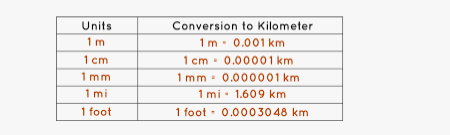
A Unit of measuring Length which is equal to 1,000 meters. So we can say that                          => ‘1 Kilometre = 1,000 Meters’.

The Algorithm is as follow :

  1. First of all ask user to enter value in kilometre which will be assign to variable ‘km’.
  2. Factor of kilometre to mile is approx 0.621371 miles.

  3. So,to get the value in mile multiply the  inputted value with factor with km*factor .
  4. Print  the required result  in miles.
  5. Exit the program.

Python Program to Convert Kilometres to Miles

In our Program below we will create a program that will Convert Kilometre to Miles.First we would declared and initialized the required variables. Next, we would prompt user to input value in kilometre.Later we will covert entered value into meter.

Output

In our program, we have first declared and initialized a set variables required in the program.

  • km =taking year value from user.
  • mile=hold converted value of kilometres.

First of all  we declare variable and take a value from user and assign in ‘km’ and convert it into miles .

After taking values from user we will add conversion factor ‘ factor = 0.621371‘ to variable Factor.

Another Mile’s unit of length is Equal to ‘1760 yards’. Since 1 kilometre is equal to 0.621371 miles, we can get the value of miles by simply multiplying kilometres with the factor (km* 0.621371).

And Finally we have learnt to convert kilometres to miles and display it.

Python Program to Swap Two Variables

In this tutorial, we will learn to create a Python Program to Swap Two Variables using python Programming.

Prerequisites

Before starting with this tutorial we assume that you are best aware of the following Python programming topics:

  • Python Operator.
  • Basic Input and Output
  • Basic Python  programming.
  • if-else statements in Python.
  • Loops in Python.

Swapping two variable

This is one the basic Program in any language, where  we  display the how operator work and also how the assigned values in variables and use or operators in it.

Python Program to Swap Two Variables

In this program we will swap two variables value using third variable .First we would declared and initialized the required variables. Next, we would prompt user to input two values. Later we swap their values.

Output

In our program, we have first declared and initialized a set variables required in the program.

  • a= it will hold first value from user.
  • b= it will hold second value from user.
  • c= it will hols temporary value of variables.

First of all  we would declare variable and take a value from user and assign in variable ‘a‘ and ‘b‘  respectively.

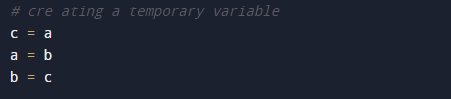
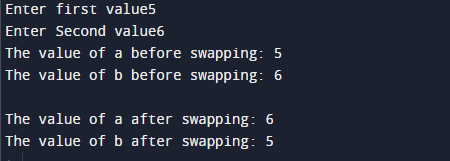
In our program, we use the temporary variable ‘c‘ which will hold the value of ‘a‘ temporarily. then we put the value of ‘b‘ in ‘a‘ and after that ‘c’in ‘b’ .Which s shown in image below.

we can also swap values of variables using arithmetic operations to do the same without using third variable.

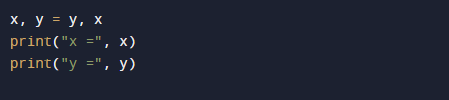
and also there is a simple method to swap variables. The code below does the same as above but without the use of any temporary  variable or arithmetic operator.

Finally we will print the swapped value from user.

are

Python Program to Solve Quadratic Equation

In this tutorial, we will learn to create a Python Program to Solve Quadratic Equation using python Programming.

Prerequisites

Before starting with this tutorial we assume that you are best aware of the following Python programming topics:

  • Python Operator.
  • Basic Input and Output
  • Basic Python  programming.
  • Python if-else statements.
  • Python Loop.

what is Quadratic Equations?

The Standard  Quadratic Equation looks like this:

Here,

    • a, b and c are known values.and  ‘a‘ cannot be 0.
    • x‘ is  unknown  variable.

The name Quadratic is come from Latin and means “to square”  from “quad” means square, because the variable gets squared (like x2).
Quadratic equations are second-degree algebraic expressions and are of form ax2 + bx + c = 0.

Python Program to Solve Quadratic Equation

In this program we will create a program which will solve a Quadratic Equation.First we would declared and initialized the required variables. Next, we would prompt user to input the value. Later we will find solution of Quadratic Equation.

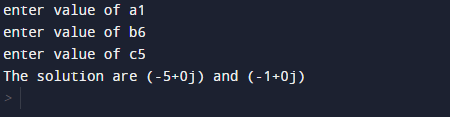
Output

In our program, we have first declared and initialized a set variables required in the program.

  • a =taking value for a.
  • b =taking value for b.
  • c =taking value for c.
  • s1=for solution one.
  • s2=for solution  two

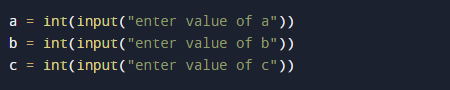
First of all  we declare variable and take three value from user and assign to ‘a’,’b’ and in ‘c’ variable.

After these values we will find  the value of discriminant

here we calculated the discriminant and then now we find the two possible solutions of the quadratic equation.

In our program you can change coefficient and real numbers ‘a’,’b’and‘c’ and get different different solution of quadratic equation.

Python Program to Calculate the Area of a Triangle

In this tutorial, we will learn to create a Python Program to Calculate the Area of a Triangle  using python Programming.

Prerequisites

Before starting with this tutorial we assume that you are best aware of the following Python programming topics:

  • Python Operator.
  • Basic Input and Output
  • Basic Python  programming.
  • Python if-else statements.
  • Python Loop.

Area of a Triangle ?

Area of the triangle is going to be calculated by using ‘Heron’s formula’ gives the area of a triangle when the length of all three sides are known.

Python Program to Calculate the Area of a Triangle

In our program , we will calculate area of triangle.First we would declared and initialized the required variables. Next, we would prompt user to input height and width. Later we will find Area of a Triangle.

Output

in our program, we have first declared and initialized a set variables required in the program.

  • a= it will hold first value.
  • b= it will hold second value.
  • c= it will hold third value.
  • s=for calculating the semi-perimeter
    • area= it will hold area or traingle.

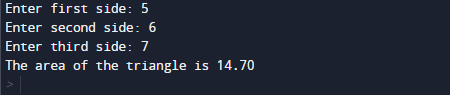
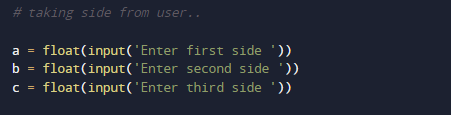
First of all  we declare variable and take three  values from user and assign them in ‘a’,’b’ and ‘c’ respectively.

After taking these values from user we will calculate the semi-perimeter of Triangle.

And after calculating the semi-perimeter we going to find the area of triangle using ‘Heron’s formula’  as follow.

So we will use following steps to find area of Triangle.

    • First ask the user to enter three lengths of a triangle.
    • using Heron’s formula to calculate the semi-perimeter.
    • Now  Area = (s*(s-a)*(s-b)*(s-c)) **0.5  to calculate the Area of the Triangle.

At the end we will display the area we calculate area or Triangle.

Python Program to Find the Square Root

In this tutorial, we will learn to create a Python Program to Find the Square Root using Python Programming.

Prerequisites

Before starting with this tutorial we assume that you are best aware of the following Python programming topics:

  • Python Operator.
  • Basic Input and Output
  • Basic Python  programming.
  • Python if-else statements.
  • Python Loop.

What is Square root?

So the Squares root of a number is found when number is multiplying the number itself twice 6 * 6= 36. Where a square root of a number on getting multiplied by itself gives the original √36 = 6. A square root of a numbera’ is a number b such that =a.

Python Program to Find the Square Root

In our program, we will create a Python Program that Find the Square Root of a given number.First we would declared and initialized the required variables. Here in this program we are going find Square root of a given number first of all we take a value from user and pass this value to in-built function to find Square root of a number.

Output

in our program, we have first declared and initialized a set variables required in the program.

  • number= it will hold value given by user.
  • sqrt= it will hold square root of a number

First of all in our program we will take all required variable and value, and then take value from user  at run time and the value given by user will be convert to int from string  (as in python the value we take from input from user are always string so we need to convert it into int) and will be stored into variable called ‘number’.

After taking these values from user we will calculate the square root a given number.

Find the square root by applying  the “**” exponent operator.our program only works for Positive real numbers.And at last  after calculating Square root finally we will print the value of variable ‘sqrt’ to get our desired result.i.e square root of a number.