Category Archives: Kotlin Tutorial

Kotlin Tutorial

Kotlin while Loop

Kotlin while Loop

The while loop will execute a block of statement as long as a test expression is true.

Syntax:-

Example:-

Let’s see a simple example of while loop printing “Hello World!” string 5 times.

Output:-


Kotlin when Expression

Kotlin when Expression

In Kotlin, when expression is considered as replacement of switch statement exists in other languages like C, C++, and Java. It is more concise yet powerful than switch statements.

Syntax:-

Using When as an Expression

In Kotlin, when can be used as an expression like the if and we can assign its result to a variable –

Example:-

Output:-

Using when Without Expression

In the above example, we used when as an expression. However, it’s not mandatory to use when as an expression.

Example:-

Output:-

Multiple when branches into one

In Kotlin, multiple branches can be combined into one as comma separated. This is helpful when you need to run a common logic for multiple cases –

Example:-

Output:-

Checking given value is in a range or not using in operator

In Kotlin, range is indicated using the (..) operator. For example, you can create a range from 1 to 5 using 1..5. The in operator allows you to check if a value belongs to a range/collection –

Example:-

Output:-

Checking given variable is of certain type or not using is operator

In Kotlin, is and !is operator can be used to check whether a value is of a particular type in runtime.

Example:-

Output:-


Kotlin if expression

Kotlin if Expression

Block of statement executed only when a specified condition is true.

Syntax:-

Example:-

Output:-

Kotlin if…else Expression

When we want to execute some block of code if a condition is true and another block of code if a condition is false, In such a case we use if….else statement.

Syntax:-

Example:-

Output:-

Kotlin if..else..if Ladder Expression

The if..else..if Ladder statement is used to select one of among several blocks of code to be executed.

Example:-

Output:-

Kotlin Nested if Expression

When there is an if statement inside another if statement then it is known as nested if else.

Example:-

Output:-


Kotlin Loops

Kotlin Loops

In Kotlin, loops statements are used to execute the block of code repeatedly for a specified number of times or until it meets a specified condition. In Kotlin Programming Language we have following loops –

  • Kotlin for loop
  • Kotlin forEach statement
  • Kotlin repeat statement
  • Kotlin while loop
  • Kotlin do..while loop

Kotlin for Loop

The for loop takes a collection of data(ranges, arrays, collections, or anything that provides an iterator) and iterate through the items one at a time in sequence.

Syntax:-

Example:-

Output:-

Kotlin while Loop

The while loop will execute a block of statement as long as a test expression is true.

Syntax:-

Example:-

Output:-

Kotlin forEach statement

forEach can be used to repeat loop statement for each element in given collection.

Example:-

Output:-

Kotlin repeat statement

Kotlin repeat statement is used to execute a set of statements for N-number of times.

Example:-

The following program prints “Hello World!” 5 times

Output:-

Kotlin do…while Loop

The do…while statement executes loop statements and then test the condition for next iteration and executes next only if condition is true.

Syntax:-

Example:-

Let’s see a simple example of do-while loop printing “Hello World!” for 5 times.

Output:-


Kotlin Decision Making

Kotlin Decision Making

There are case where we want a a block of code to be executed when some condition is satisfied. In Kotlin, we have Decision Making Statement that enable computer to decide which block of code to be execute based on some conditional choices. Decision making statement statements is also referred to as selection statements.

Decision making statement evaluates single or multiple test expressions which results is “TRUE” or “FALSE”. The outcome of the test expression/condition helps to determine which block of statement(s) to executed if the condition is “TRUE” or “FALSE” otherwise.

In Kotlin, we have following types of decision making statements –

Kotlin Decision Making Statements
Statement Description
if Statements Block of statement executed only when specified test expression is true.
if else Statements When we want to execute some block of code if a condition is true and another block of code if a condition is false, In such a case we use if….else statement.
if..else..if Ladder It tests set of conditions in sequence.
Nested Statements When there is an if statement inside another if statement then it is known as nested if else.

Kotlin Flow Control

Kotlin Flow Control Statements

Loops statements gives you a way execute the block of code repeatedly. But sometimes, you may want to exit a loop completely or skip specific part of a loop when it meets a specified condition. It can be done using flow control mechanism.

In Kotlin, you have flow control statements that can be used to alter or control the flow of loop execution based on specified conditions. We have following flow control statements –

Kotlin Input Output

Kotlin Input Output

Kotlin Input Output statements are used to read input stream from any standard input device (ex. keyboard) to main memory and to send data stream to any standard output device (ex. monitor).

Koltin Output

In Kotlin, we have println() and print() functions available to send output to the standard output (screen).

Example:-

Output:-

The println() and print() outputs the given string as following.

Difference Between println() and print()

The print() function prints the given string, while println() function prints the given string similar like print() function. Then it moves the cursor to the beginning of the next line.

Kotlin Input

Kotlin readline() function is used to read a line of string from standard input device like keyboard.

Example:-

Output:-

When you run the program, it will prompt you for input then it will print the given string in screen.

Example2:-

Output:-

The readLine() function takes any input as a string and convert its to values of other data type (like Int) explicitly.

In Kotlin, if you want input of other data types as input the Scanner object. For that, you need to import Scanner class from Java standard library as following –

Getting Integer Input

Example:-

Output:-

Here, the nextInt() method takes integer input from the user then store it in an integer variable. To take Long, Float, double and Boolean input from the user, you can use nextLong(), nextFloat(), nextDouble() and nextBoolean() methods respectively.

Kotlin Comments

Kotlin Comments

In Kotlin, Comments are a set of statements that are ignored by the Kotlin interpreter. The use of comments makes it easy for humans to understand the source code.Usually comments gives you inside or explanation about the variable, method, class or any statement that exists in source code. The comment statements are ignored during the execution of the program.

Kotlin Single-line Comments:-

A ‘//’ (double slash) is used to specify a single line comment, which extends up to the newline character.

Output:-

Kotlin Multi-line Comments:-

If you want to comment multiple lines then you can do it using /* and */, everything in between from /* to */ is ignored by the compiler

Output:-

Kotlin Expression & Statement

Kotlin Expression

An expressions is consist of variables, operators, literals and method calls that evaluates to a value.

Example:-

Here, num1+20 is an expression, the value of the expression is assigned to variable result.

Kotlin Statement

Kotlin statement is an executable statements, that tell the computer to perform a specification action.Program statement can be an input-output statements, arithmetic statements, control statements, simple assignment statements and any other statements and it also includes comments.

Example:-

Here, 25 + 10 is an expression that returns 35, and val result= 25 + 10 is a statement.

Kotlin Block

In Kotlin, block is a group of statement(s) that is enclosed in curly braces { }.

Example:-


Kotlin Type Conversion

Kotlin Type Conversion

In Kotlin, a value of one type will not automatically converted to another type even when the other type is larger. This is different from how Java handles numeric conversions.

Example 1:- In Java

Here, value of num1 of type int is automatically converted to type long, and assigned to num2

Example 2:- In Kotlin

In Kotlin, the size of Long is larger than Int, but it doesn’t automatically convert Int to Long. Instead, you have to explicitly convert it Long to avoid type safety.

Here is a list of functions available in Kotlin for type conversion –

toByte()
toShort()
toInt()
toLong()
toFloat()
toDouble()
toChar()

Note:- There is no conversion for Boolean types.

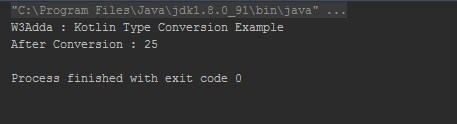
Example:-

Output:-

Kotlin Type Conversion


Kotlin Operators

Kotlin Operators

An operator is a special symbol that is used to carry out some specific operation on its operand. In Kotlin, we have rich set of built in operators to carry out different type of operations. There are operators for assignment, arithmetic operations, logical operations and comparison operations etc. Kotlin operators can be used with many types of variables or constants, but some of the operators are restricted to work on specific data types. Most operators are binary, meaning they take two operands, but a few are unary and only take one operand.

Type of operators in Kotlin

Kotlin supports the following types of operators –

  • Arithmetic Operators
  • Assignment Operators
  • Comparison (Relational) Operators
  • Logical Operators
  • Unary Operators
  • Bitwise Operators

Arithmetic Operators In Kotlin

Arithmetic Operators are used to perform arithmetic operations like addition, subtraction, multiplication, division, %modulus, exponent, etc.

Arithmetic operators in Kotlin
Operator Description Expression Translate to
+ Addition a+b a.plus(b)
- Subtraction a-b a.minus(b)
* Multiply a*b a.times(b)
/ Division a/b a.div(b)
% Modulus a%b a.rem(b)

Example:-

Output:-

Kotlin Arithmetic Operators

Assignment Operators In Kotlin

Assignment operators are used to assign value to a variable, you can assign a variable value or the result of an arithmetical expression.

Assignment operators in Kotlin
Operator Description Expression Convert to
+= add and assign a+=b a.plusAssign(b)
-= subtract and assign a-=b a.minusAssign(b)
*= multiply and assign a*=b a.timesAssign(b)
/= divide and assign a/=b a.divAssign(b)
%= mod and assign a%=b a.remAssign(b)

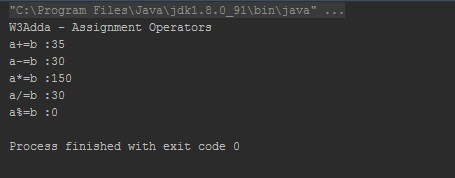
Example:-

Output:-

Kotlin Assignment Operators

Comparison (Relational) Operators In Kotlin

Comparison Operators are used evaluate a comparison between two operands. The result of a comparison operation is a Boolean value that can only be true or false. Comparison Operators are also referred as relational operators.

Here is full list of Relational operators available in Kotlin –

Relational operators in Kotlin
Operator Description Expression Translate to
> greater than a>b a.compateTo(b)>0
< Less than a<b a.compateTo(b)<0
>= greater than or equal to a>=b a.compateTo(b)>=0
<= less than or equal to a<=b a?.equals(b)?:(b===null)
== is equal to a==b a?.equals(b)?:(b===null)
!= not equal to a!=b !(a?.equals(b)?:(b===null))

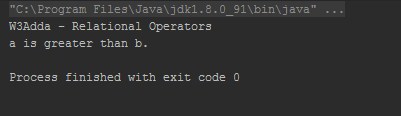
Example:-

Output:-

kotlin relational oprtators

Kotlin Logical Operators

Logical operators are used to combine expressions with conditional statements using logical (AND,OR,NOT) operators, which results in true or false.

There are 3 logical operators available in Kotlin.

Logical operators in Kotlin
Operator Description Expression Convert to
&& return true if all expression are true (a>b) && (a>c) (a>b) and (a>c)
|| return true if any expression are true (a>b) || (a>c) (a>b) or(a>c)
! return complement of expression !a a.not()

Example:-

Output:-

Kotlin Logical Operators

Unary Operators In Kotlin

The unary operators operate on a single operand, here is full list of kotlin unary operators.

Unary operators in Kotlin
Operator Description Expression Convert to
+ unary plus +a a.unaryPlus()
- unary minus -a a.unaryMinus()
++ increment by 1 ++a a.inc()
-- decrement by 1 --a a.dec()
! not !a a.not()

Example:-

Output:-

Kotlin Unary Operators

Bitwise operators in Kotlin

Bitwise operator are used to perform bit level operation over its operand.

Bitwise operators in Kotlin
Named Function Description Expression
shl (bits) signed shift left a.shl(b)
shr (bits) signed shift right a.shr(b)
ushr (bits) unsigned shift right a.ushr(b)
and (bits) bitwise and a.and(b)
or (bits) bitwise or a.or(b)
xor (bits) bitwise xor a.xor(b)
inv() bitwise inverse a.inv()

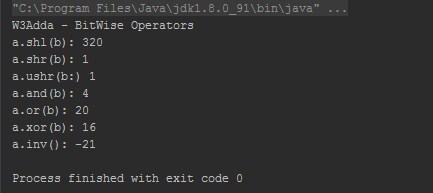
Example:-

Output:-

Kotlin Bitwise Operators

Kotlin in Operator

Kotlin in operator allows you to check whether an object belongs to a collection or not.

Kotlin in Operator
Operator Expression Translates to
in a in b b.contains(a)
!in a !in b !b.contains(a)

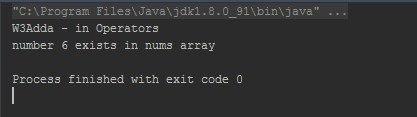
Example:-

Output:-

Kotlin in operator

Index access Operator

Index access operator allows you to access elements with specified index in an array or collection.

Kotlin Index access Operator
Expression Translated to
a[i] a.get(i)
a[i, n] a.get(i, n)
a[i1, i2, ..., in] a.get(i1, i2, ..., in)
a[i] = b a.set(i, b)
a[i, n] = b a.set(i, n, b)
a[i1, i2, ..., in] = b a.set(i1, i2, ..., in, b)

Example:-

Output:-

Kotlin Index Access Operator

Kotlin Invoke Operator

Kotlin Invoke Operator
Expression Translated to
a() a.invoke()
a(i) a.invoke(i)
a(i1, i2, ..., in) a.inkove(i1, i2, ..., in)
a[i] = b a.set(i, b)

Kotlin Data Types

Kotlin Data Types

Variables are used to represent reserved memory locations that is used to store values, when we create a variable we are a suppose to allocate some memory space for that variable. Every variable have data type associated to it, data type for a variable defines –

  • The amount of memory space allocated for variables.
  • A data type specifies the possible values for variables.
  • The operations that can be performed on variables.

In Kotlin, everything is an object, which means we can call member function and properties on any variable. Kotlin has following built-in Data Types –

  • Numbers
  • Characters
  • Booleans
  • Arrays
  • String

Kotlin Numbers:- The Number data type is used to hold the numeric values. Kotlin supports following numerical data types –

Type Size Description
Byte 8 8 bit Signed Integer (two’s complement)
Short 16 16 bit Signed Integer (two’s complement)
int 32 32 bit Signed Integer (two’s complement)
long 64 64 bit Signed Integer (two’s complement). They can also be represented in octal and hexadecimal
float 32 It can hold single precision 32 bit floating point value
Double 64 It can hold double precision 64 bit floating point value

Kotlin Characters:- The character data type is used to hold the single character. In Kotlin, Characters are represented by the type char. Character types cannot be treated as numbers directly. Character are declared using single quotes.

Example:-

Kotlin Boolean:- The Boolean data type is used to represent the truth values, which can be either True or False. Booleans are commonly used in decision making statements.

Example:-

Kotlin Arrays:- The array is collection of homogeneous elements placed in contiguous memory locations that can be accessed individually by adding an index or subscript to a unique identifier. In Kotlin, Arrays can be created using library function arrayOf() and Array class. Array class has set(), get () function and size property as well as some other useful member functions.

Creating Array using library function arrayOf()

In order to create an array using library function arrayOf(), you need to pass the item values to it as following –

Example:-

The individual elements of an array can be accessed using their index values (array[index]). Array index are always starts from zero.

Creating Array using Array() constructor

In Kotlin, an array can also be created using Array constructor. Array constructor takes following two parameters –

  1. Size of the array
  2. Function that returns the initial value of each array element given its index

Example:-

Kotlin String:- A string variable is used to hold series or sequence of characters – letters, numbers, and special characters. Strings are immutable.

Example:-

Types of String

Escaped String:- Escape String may contain escape characters like ‘\n’, ‘\t’, ‘\b’ etc, and declared within double quote (” “) as following –

Example:-

Raw String:- Raw string can contain multiple lines of text and it does not contain any escape character. Raw String is declared within triple quote (“”” “””) as following –

Example:-