Category Archives: Kotlin Tutorial

Kotlin Tutorial

Kotlin Constructor

Kotlin Constructor

A class in Kotlin can have a primary constructor(The header of class) and one or more secondary constructors. The primary constructor goes after the class name. The constructor is way to initialize class properties.

Kotlin Primary Constructor

Syntax :-

Here, block of code which is surrounded by parentheses is represents a primary constructor. It have two properties tutorial and rating (val article: String, var review: Int)

Example: Let’s get understand it by an example.

Output :- sdf

constructor-1

Primary Constructor with Initializer Blocks

The primary constructor can not contain code, it has constrained syntax. For initialization code we used initializer block with init keyword. Check below example for know more.

Output :- sdfsd

constructor-2

Kotlin Secondary Constructor

A class can contain one or more secondary constructor in Kotlin using constructor keyword. It is required when you required more than one constructor in Kotlin class.
When you need to extend a class which provides multiple constructors that initialize the class in different ways , the Secondary Constructor is used for this.

Creation of Secondary Constructor: Let’s see how you can create a secondary constructor in Kotlin.

Here, you can see in above code that SecondaryConstructorDemo1 is not has primary constructor.


Example: Let’s understand it by an example.

Output: The below image will be output of this code.

constructor-3

Kotlin Class and Objects

Kotlin Class and Objects

Kotlin Langauge supports both procedural programming and object-oriented programming. It supports procedural programming with the use of functions.

In object-oriented programming langauge we can divide a complex problems into smaller sets with the help of objects. Object has two characteristics: state and behavior.
Let’s take a real world example, Dogs have state(name,color,breed,hungry) and behavior(barking,fetching,wagging tail).

How to use Function:

Kotlin Class: Class is a group of object which have common properties. It is a blueprint of objects. It’s a logical entity .

Define a Class in Kotlin:

Example: Let’s get understand it by an example.

So here is the Name of Class User, The Property of class is isActive is a type of boolean(can be true or false), It have two member function that are Active() and inActive().

Visibility Modifiers: Kotlin provides a number of Visibility Modifiers that can be used in classes, objects, properties, member function etc. In Above example I have used private visibility modifiers for isActive Property , it means it can use only within the class.

There are four visibility modifiers that are:

1.private: This modifiers can access or visible only inside the class.

2.public: This modifiers can access or visible everywhere.

3.protected: This modifiers can access or visible to the class and its subclass.

4.internal: It is accessble inside the module.


How to use Object in Kotlin: The specification for the Object is defined when a class is defined, We need to create Objects for accessing members which are defined within the class. See How we can use it.

Here U1 and U2 are the two Objects of User class.


How to Access Member : Now let’s see how can we access the member functions, check below syntax.

U1.Active()

Second Way to access it.

U2.isActive = true


Complete Example : Now let’s see complete example of use of class, objects and modifiers in Kotlin. Check below code.

Output:The output of above code will print the user status using “printUserStatus” function. Will look like below image.

class-obj-1

Kotlin Recursion

Kotlin Recursion

Recursion is the process where a function calls itself, and the function which calls itself is know as recursive function.

Characteristics of a recursive function

  • A recursive function is a function which calls itself.
  • The speed of a recursive program is slower because of stack overheads.
  • A recursive function must have terminating conditions, and recursive expressions.

Advantages of Recursion

  • It requires few variables which make program clean.
  • It shorten the complex and nested code.

Disadvantages of Recursion

  • It is hard to debug recursive function.
  • It is tough to understand the logic of a recursive function.

Note :- Recursive function must have a valid terminating condition otherwise it leads to infinite loop.

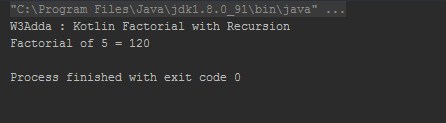
To understand how recursion works lets have one of the popular example of recursion. In this example we will calculate the factorial of n numbers. The factorial of n numbers is expressed as a series of repetitive multiplication as shown below:

Example 1:-

Example:-

Output:-

Kotlin Recursion

Suppose value of i=5, since i is not equal to 1, the statement:

f = i* factorial (i-1);

will be executed with i=5 i.e.

f = 5* factorial (5-1);

will be evaluated. As you can see this statement again calls factorial function with value i-1 which will return value:

4*factorial(4-1);

This recursive calling process continues until value of i is equal to 1 and when i is equal to 1 it returns 1 and execution of this function stops. We can review the series of recursive call as follow:

f = 5* factorial (5-1);

f = 5*4* factorial (4-1);

f = 5*4*3* factorial (3-1);

f = 5*4*3*2* factorial (2-1);

f = 5*4*3*2*1;

f = 120;

Kotlin Tail Recursion


Kotlin Named Argument

Kotlin Named Argument

Kotlin named arguments allow us to pass an argument/value for specific function parameter by specifying parameter name in function call. This way it resolve the issue of conflict in argument list when we want to pass selected parameter arguments.

Example:- function call with named argument

Output:-

Here, we are using named argument (n2=15) specifying that the n2 parameter in the function definition will take this value (doesn’t matter the position of the argument).

Kotlin Default Argument

Kotlin Function Argument

In Kotlin, we pass information in function call as its arguments and the function can either returns some value to the point it where it called from or returns nothing.

Kotlin Default Argument

Kotlin supports to assign default argument (parameter) values in a function definition, so when we call that function with no argument passed for a parameter then its default value assigned. When a function is called with argument, then these arguments is used as parameter values in function, but when a function is called or invoked without passing argument for any specific parameters than default parameter values been used as parameters value as per function definition.

Syntax:-

Example :- Function call with all arguments passed

Output:-

Example :- Function call with some arguments passed

Output:-

Example:- Function call with no arguments passed

Output:-


Kotlin inline functions

Kotlin inline functions

In Kotlin, high order functions allows you to pass functions as parameters as well as return functions. But these functions are stored as objects and have there own callbacks attached with subsequent memory allocations. The memory allocation for function objects and classes and virtual calls introduces run-time memory overhead.

Let’s check out a high order function code snippet below, and understand how these functions are passed as parameters internally and how they works internally .

Example 1:-

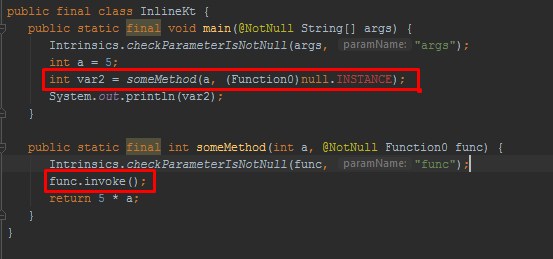
Here, someMethod is called with println as the parameter, this lambda expression (println) will further create an additional function call which results in further dynamic memory allocation.

Bytecode:- Let’s look at the bytecode of the above code by going to Tools-> Kotlin-> Show Bytecode.

kotlin inline function 1

Here, you would notice a chained method calls. This way if we call multiple functions as parameters each of them would further add up the method count thus it will introduces significant memory and performance overhead.

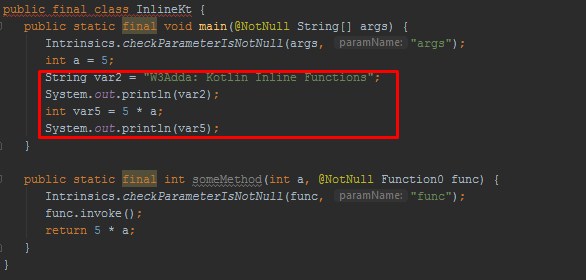
This memory overhead issue can be avoided by declaring the function inline. The inline annotation copies the function as well as function parameters in run-time at call site that reduces call overhead. An inline function tells the compiler to copy these functions and parameters to call site. A function can declared as inline by just adding inline keyword to the function as following –

Example 2:-

Bytecode:- Let’s look at the bytecode of the above code by going to Tools-> Kotlin-> Show Bytecode.


kotlin inline function 2

noinline

Inline Properties

Non-local returns

Reified type parameters

Kotlin function

Kotlin Function

Kotlin functions are one of the important part of any kotlin program. In Kotlin, function gives you way to wrap up the set of statements that means to perform any specific task and give it a name, so that it can be invoked later from any where in the program.

Functions makes it easy to divide the complete program into sub-units that perform a specific task for that program, this way it enhance the modular approach and increase the code re-usability of the program.

We pass information in function call as its parameter and the function can either returns some value to the point it where it called from or returns nothing.

Advantages of function

  • It enhance the modularity of the program.
  • It enhance the re usability.
  • It makes development easy as development can be shared in team.
  • It reduces the coupling.
  • It reduces duplication.

Type Of Function

  • Built in function
  • User defined functions

Kotlin Built In Function

Built in functions are the functions implicitly available in Kotlin Programming Language to perform some common and standard tasks that includes the functions for file access, mathematical computations, graphics, memory management etc.

Example:-

Here,
sqrt() is a built-in function that returns the square root of given number (Double value).
print() built-in function function which prints a given string to standard output stream.

Output:-

Kotlin User defined functions

User defined function are custom function defined by user it self to perform as custom task that is not available as built in, in this way user can define and write subprograms as functions to perform a task relevant to their programs.

Defining Function In Kotlin

A function must be defined prior to use, you can define a function following the syntax given below –

Syntax:-

Later, you can invoke or call this function as following –

Example:-

A simple function to add two numbers –

Output:-

Kotlin Function with parameter and return value

Like any other programming languages Kotlin functions can also takes parameter as arguments and can return value.

Syntax:-

Later, you can invoke or call this function as following –

Example:-

Output:-

Kotlin continue

Kotlin continue statement

The continue statement gives you way to skip over the current iteration of any loop. When a continue statement is encountered in the loop, the kotlin interpreter ignores rest of statements in the loop body for current iteration and returns the program execution to the very first statement in the loop body. It does not terminates the loop rather continues with the next iteration.

Syntax:-

Example:-

Output:-

As you can see when ctr == 5, continue statement is executed which causes the current iteration to end and the control moves on to the next iteration.

Kotlin Labeled continue

The standard unlabeled continue statement is used to skip the current iteration of nearest enclosing loop. In Kotlin, there is another form of continue (labeled continue ) statement is used to skip iteration of specified loop (can be outer loop). In Kotlin, Label is an identifier which is followed by @ sign, for example abc@, test@.

Example:-

Output:-

Here, when i == 2 expression is evaluated to true, continue@outerfor is executed which skips the current iteration of the enclosed loop and return control to the loop marked with label outerfor@.

Kotlin do…while Loop

Kotlin do…while Loop

The do…while statement will execute a block of code and then test the condition for next iteration and executes next only if condition is true, block of code executes at least once.

Syntax:-

Example:-

Let’s see a simple example of do-while loop printing “Hello World!” for 5 times.

Output:-

Kotlin break

Kotlin break statement

In Kotlin, break statement inside any loop gives you way to break or terminate the execution of loop containing it, and transfers the execution to the next statement following the loop. It is almost always used with if..else construct.

Syntax:-

Example:-

In this above program, the variable count is initialized as 0. Then a while loop is executed as long as the variable count is less than 10.

Inside the while loop, the count variable is incremented by 1 with each iteration (count = count + 1).

Next, we have an if statement that checks the variable count is equal to 5, if it return TRUE causes loop to break or terminate.

Within the loop there is a println() statement that will execute with each iteration of the while loop until the loop breaks.

Then, there is a final println() statement outside of the while loop.

When we run this code, our output will be as follows –

Output:-

Kotlin Labeled break

The standard unlabeled break statement is used to terminates the nearest enclosing loop. In Kotlin, there is another form of break (labeled break) statement is used to terminate specified loop (can be outer loop). In Kotlin, Label is an identifier which is followed by @ sign, for example abc@, test@.

Example:-

Output:-

Here, when i == 2 expression is evaluated to true, break@outer is executed which terminates the loop marked with label outer@.


Kotlin for Loop

Kotlin for Loop

The for loop takes a collection of data(ranges, arrays, collections, or anything that provides an iterator) and iterate through the items one at a time in sequence.

Syntax :-

For Loop to Iterate Through an Array

Example :-

Output :-

The array can also iterated through array indices (index) of array.

Example:-

Output:-

Alternatively, you can use the withIndex library function as following –

Example:-

Output:-

For loop Iterate Through a Range

Example:-

Output:-

Different Ways to Iterate Through a Range

Example:-

Output:-

For loop Iterate Through a String

Example:-

Output:-