Kotlin Operator Overloading
Kotlin allows us to provide implementation for predefined set of operators on our types. These operators have fixed procedure and fixed symbolic representation, like + or *. When you will use operator in kotlin so it’s corresponding member function is called.
Let’s see some operations.
Unary Operations:
| Expression | Translated to |
| +a | a.unaryPlus() |
| -a | a.unaryMinus() |
| !a | a.not() |
Increment and Decrement Operations:
| Expression | Translated to |
| a++ | a.inc() |
| a– | a.dec() |
Binary Operations:
| Expression | Translated to |
| a+b | a.plus(b) |
| a-b | a.minus(b) |
| a*b | a.times(b) |
| a/b | a.div(b) |
| a%b | a.rem(b), a.mod(b) (deprecated) |
| a..b | a.rangeTo(b) |
Example: Overloading + Operator: See below example which is using for plus operator.
|
1 2 3 4 5 6 7 8 9 10 11 12 13 14 15 16 17 |
fun main(args: Array<String>) { val point1 = OpOverloadingDemo(5, -7) val point2 = OpOverloadingDemo(6, 8) var sum = OpOverloadingDemo() sum = point1 + point2 println("W3Adda : The Sum is = (${sum.x}, ${sum.y})") } class OpOverloadingDemo(val x: Int = 0, val y: Int = 10) { // overloading plus function operator fun plus(p: OpOverloadingDemo) : OpOverloadingDemo { return OpOverloadingDemo(x + p.x, y + p.y) } } |
Output: The output of this code will be like below image.
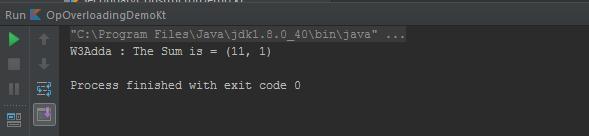
In above example you can see that plus() is declared with operator keyword which will tell to complier that + operator will be overloaded. According to Above tables Expression point1+point2 will translated to point1.plus(point2).
Example: –Operator Overloading: –operator means decrement under the hood. In this example we will explain overloading of — operator. According to table suppose The expression is –a so it will translated to a.dec() for compiler and will tell that this operator is overloading.
Below line
|
1 |
operator fun dec() = OpOverloadingDemo(--x, --y) |
is equivalent to
|
1 2 3 |
operator fun dec(): OpOverloadingDemo { return OpOverloadingDemo(--x, --y) } |
See below code.
|
1 2 3 4 5 6 7 8 9 10 |
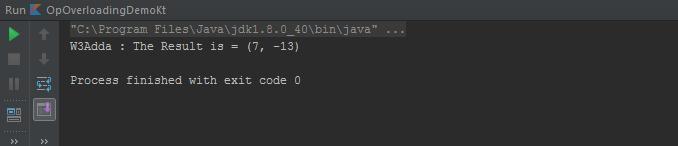
fun main(args: Array<String>) { var p1 = OpOverloadingDemo(8, -12) --p1 println("W3Adda : The Result is = (${p1.x}, ${p1.y})") } class OpOverloadingDemo(var x: Int = 0, var y: Int = 10) { operator fun dec() = OpOverloadingDemo(--x, --y) } |
Output: The output of above code will be.