Category Archives: Java Programs

Java Programs

Java program to break integer into digits

In this tutorial, we will learn to create a Java program to break integer into digits using Java programming.

Prerequisites

Before starting with this tutorial we assume that you are best aware of the following Java programming topics:

  • Java Operators.
  • Basic Input and Output function in Java.
  • Class and Object in Java.
  • Basic Java programming.
  • If-else statements in Java.
  • For loop in Java.
  • User Define functions.

Steps to break number into digit.

  1. In our Java program to break integer into digits using a while loop.
  2. first of all while loop will count the total digits in a number.
  3. And the second while loop will iterate the Integer
  4. and print each digit as an output.

Java program to break integer into digits.

In this program we would find digit value from a given integer whole number.first of all we  take a value from user and then break whole number into  digit.

Output

Number into Digit.

In the above program, we have first declared and initialized a set variables required in the program.

  • number= it will hold entered number.
  • rem=  it will hold the result.
  • temp= it will hold temporary number.
  • count= it will count digit value.

After that we take a number from user and find given number is a Magic number or not.

Here first while loop will count the total number of digits in a  given number.
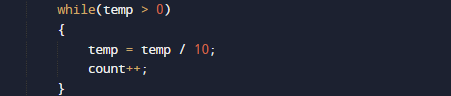
And second while loop will iterate the Integer and print each digit as an output.
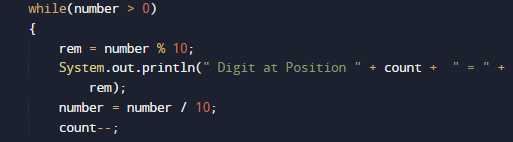
and Finally we will print the digit and place values as shown in image above.


Java Program to display prime numbers between 1 and 100 or 1 and n

In this tutorial, we will learn to create a Java Program to display prime numbers between 1 and 100 or 1 and n using Java programming.

Prerequisites

Before starting with this tutorial we assume that you are best aware of the following Java programming topics:

  • Java Operators.
  • Basic Input and Output function in Java.
  • Class and Object in Java.
  • Basic Java programming.
  • If-else statements in Java.
  • For loop in Java.
  • User Define functions

What is Prime Number?

A  number is called a Prime number if a number is divisible by 1 or itself only.
For example 2, 3, 5, 7, 11, 13, 17..are some prime numbers.

Java Program to display prime numbers between 1 and 100 or 1 and n

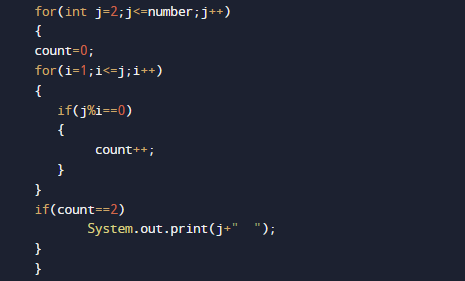
In this program we would  print the prime numbers between 1 and 100 .First of all we take the  value of N form user and find prime number from 1 to N.Let have a look at the code.

Output

Prime number From 1 – N.
Prime number From 1 – 50

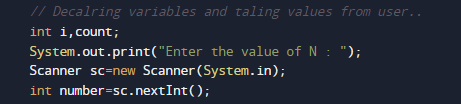
In the above program, we have first declared and initialized a set variables required in the program.

  • number= it will hold entered number.
  • count=  it will show number is prime or not 
  • i and j = for iteration.

After declaring variables we take a value from user and print prime number from 1 – N.

Algorithm

  • 1: START
  • 2: declare variables count =0, number, i=1,j=1.
  • 3: Take value of number from user
  • 4: SET j= 1
  • 5: SET count = 0
  • 6: if i%j = = 0 then count ++
  • 7: j = j + 1
  • 8: if count= 2 then print the value of i.
  • 9: number++.
  • 10: i = i +1
  • 11: END

Simply here we check each and every value form 1 to N and print only values those satisfied the logic of a prime number it means number which divisible by itself only are prime numbers..

and in that manner we print all prime number between 1 – n or 100.

Java Program to display first 100 prime numbers

In this tutorial, we will learn to create a Java Program to display first 100 prime numbers using Java programming.

Prerequisites

Before starting with this tutorial we assume that you are best aware of the following Java programming topics:

  • Java Operators.
  • Basic Input and Output function in Java.
  • Class and Object in Java.
  • Basic Java programming.
  • If-else statements in Java.
  • For loop in Java.
  • User Define functions

What is Prime Number?

A  number is called a Prime number if a number is divisible by 1 or itself only.
For example 2, 3, 5, 7, 11, 13, 17..are some prime numbers.

Java Program to display prime numbers between 1 and 100 or 1 and n

In this program we would  print the prime numbers between 1 and 100 .First of all we declare variables and then find prime number from 1 to 100.Let have a look at the code.

Output

Prime number From 1 – 100.

In the above program, we have first declared and initialized a set variables required in the program.

  • count=  it will show number is prime or not 
  • i and j = for iteration.

After declaring variables we take a value from user and print prime number from 1 – N.

Algorithm

  • 1: START
  • 2: declare variables count =0, i=1,j=1.
  • 3: SET j= 1
  • 4: SET count = 0
  • 5: if i%j = = 0 then count ++
  • 6: j = j + 1
  • 7: if count= 2 then print the value of i.
  • 8: i = i +1
  • 9: END

Simply here we check each and every value form 1 to 100 and print only values those satisfied the logic of a prime number it means number which divisible by itself only are prime numbers..

and in that manner we print all prime number lies between 1 -100 in  our program.

Java Program to print Floyd’s triangle

Java Program to print Floyd’s triangle.

In this tutorial, we will learn to create a Java Program to print Floyd’s triangle using Java programming.

Prerequisites:-

Before starting with this tutorial we assume that you are best aware of the following Java programming topics:

  • Operators in Java Programming.
  • Basic Input and Output function in Java Programming.
  • Basic Java programming.
  • For loop in Java Programming.

Floyd’s Triangle:-

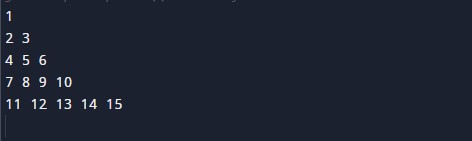
Floyd’s triangle is a right-angled triangle that contains mathematical numbers from 1 and goes up to the required point.

Printing a Floyd’s:-

The Java language is a very powerful programming language. In Java programming, we can perform many operations with the help of coding’s. Java is a very easy language to create any shape. In this program, we will learn to create Floyd’s triangle with the help of some code.

Algorithm:-

Program:-

To print a Floyd’s Triangle

Output:-

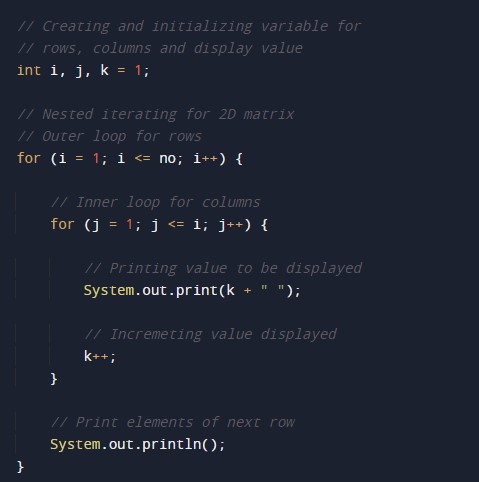
In the above program, we have first initialized the required variable.

  • i = it will hold the integer value to control parent for loop.
  • j = it will hold the integer value to control child for loop.
  • k = it will hold the integer value to control child for loop.
  • no = it will hold the integer value for the number of rows.

Taking input Number of rows

Nested For loop the body of the program

Printing Numbers

Java Program to Print 2D array

In this tutorial, we will learn to create a Java Program to Print 2D array using Java programming.

Prerequisites

Before starting with this tutorial we assume that you are best aware of the following Java programming topics:

  • Java Operators.
  • Basic Input and Output function in Java.
  • Class and Object in Java.
  • Basic Java programming.
  • If-else statements in Java.
  • For loop in Java.

What is 2D Array[]?

Multidimensional Arrays Or 2D array defined as in simple words as “array of arrays”.

For example:
The array int[][] a = new int[5][5] can store a total of (5*5) = 25 elements.

Java Program to Print 2D array

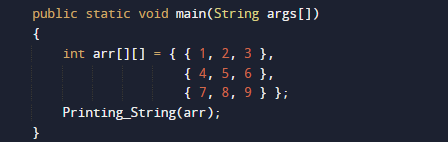
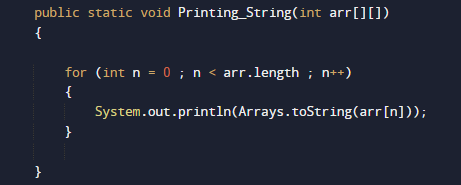
In this program we would simply print a “2d” array .first of we would declare variables and called a function to display all the value of array[].let have a look at the code

Output

In the above program, we have first declared and initialized a set variables required in the program.

  • arr[] = it will hold array values.
  • n= for iteration 

After declaring variables we pass the array to function Printing_String().


where we simply print  the array value using for loop.


Java Program to Print Odd and Even Numbers from an array

In this tutorial, we will learn to create a Java Program to Print Odd and Even Numbers from an array using java programming.

Prerequisites

Before starting with this tutorial, we assume that you are best aware of the following Java programming concepts:

  • Java Operators.
  • Basic Input and Output function in Java.
  • Class and Object in Java.
  • Basic Java programming.
  • If-else statements in Java.
  • For loop in Java.

What is Even and Odd Number.

A number which is  divisible by 2 is called even number (number%2==0) after dividing 2 remainder remain zero.
A number which is not divisible by 2 is called an odd number (number%2 !=0) after dividing 2 remainder remains.

Java Program to Print Odd and Even Numbers from an array

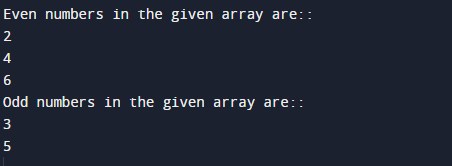
In this program we will find number in an array are even  or odd using if else statement and loop. We would first declared and initialized the required variables. Next,  we will find that number is even or odd.lets have a look at the code.

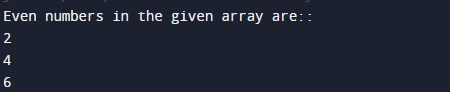
Output

Even and odd in an array.

In the above program, we have first declared and initialized a set variables required in the program.

  • arr= it will hold array values
  • i=  for iteration .

After declaring variables we initiate values in a an array[].

Algorithm

  1. Declare an array and an element in array[].
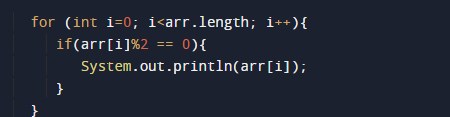
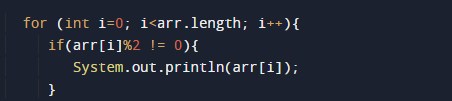
  2. within the loop find element even or odd applying condition separate for even a shown in image below.

  1. Print the even elements by checking the conditions using for loop.

  1. within the loop find element even or odd applying condition separate for odd a shown in image below.

this is the source code of the Java Program to Print the Odd & Even Numbers in an Array.

Java Program to Remove Duplicate Element in an array

In this tutorial, we will learn to create a Java Program to Remove Duplicate Element in an array using java programming.

Prerequisites

Before starting with this tutorial, we assume that you are best aware of the following Java programming concepts:

  • Java Operators.
  • Basic Input and Output function in Java.
  • Class and Object in Java.
  • Basic Java programming.
  • If-else statements in Java.
  • For loop in Java.

Java Program to Remove Duplicate Element in an array

In this program we will find duplicate element in an array if-else statement and loop. We would first declared and initialized the required variables. Next, we will find repeated  number in an array.lets have a look at the code.

Output

In the above program, we have first declared and initialized a set variables required in the program.

  • arr= it will hold array values
  • number and size=  it will hold length of an array.
  • i and j for iteration
  • temp = it will hold temporary value of an array.

After declaring variables we initiate values in  an array[].

and with the help length we find the length of an array.

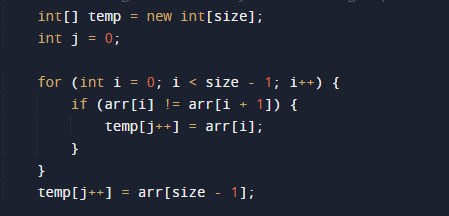
Now we will pass arr[] and length to remove() method where we remove duplicate values within the array[].

Steps to remove duplicate elements

  1. Create a temp array temp[] to store unique values of elements.
  2. travel through array and copy all the unique elements of arr[] to temp[]. and count  unique elements.
  3. Copy j elements from temp[] to arr[].

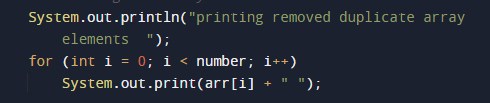
and finally print sorted array.

Java to Program Find Smallest Number in an array

In this tutorial, we will learn to create a Java to Program Find 2nd Smallest Number in an array using java programming.

Prerequisites

Before starting with this tutorial, we assume that you are best aware of the following Java programming concepts:

  • Java Operators.
  • Basic Input and Output function in Java.
  • Class and Object in Java.
  • Basic Java programming.
  • If-else statements in Java.
  • For loop in Java.

Java to Program Find  Smallest Number in an array

In this program we will find smallest element in an array using nested for loop. We would first declared and initialized the required variables. Next, we will find smallest number in an array. Lets have a look at the code.

Output

Smallest in an array

In the above program, we have first declared and initialized a set variables required in the program.

  • arr[]= it will hold array values
  • l=  it will hold length of an array.
  • i and j for iteration
  • temp = it will hold temporary value of an array.

After declaring variables we initiate values in  an array[]

with the help of length function we  will find the length of an array .

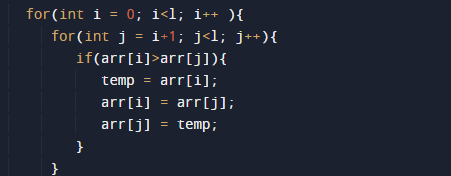
after that with the help or nested for loop we will find smallest element in array as shown in image below

Smallest in an array

  • Here first we assign first value of an array to variable temp.
  • Compare the first two elements of the array.
  • If the value of first element is greater than the second exchange them.
  • Then, compare 2 value and 3 value elements if the second element value is greater than the 3 value swap them.
  • Repeat this till the end of the array[].
  • and finally print smallest in an array.

Java Program to Find Largest Number in an array

In this tutorial, we will learn to create a Java Program to Find Largest Number in an array using java programming.

Prerequisites

Before starting with this tutorial, we assume that you are best aware of the following Java programming concepts:

  • Java Operators.
  • Basic Input and Output function in Java.
  • Class and Object in Java.
  • Basic Java programming.
  • If-else statements in Java.
  • For loop in Java.

Java Program to Find Largest Number in an array

In this program we will find smallest element in an array using nested for loop. We would first declared and initialized the required variables. Next, we will find smallest number in an array. Lets have a look at the code.

Output

Largest in an array

In the above program, we have first declared and initialized a set variables required in the program.

  • arr[]= it will hold array values
  • l=  it will hold length of an array.
  • i and j for iteration
  • temp = it will hold temporary value of an array.

After declaring variables we initiate values in  an array[]

with the help of length function we  will find the length of an array .

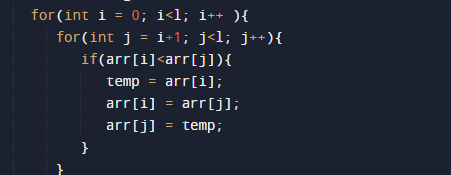
after that with the help or nested for loop we will find smallest element in array as shown in image below

Largest in an array

  • Here first we assign first value of an array to variable temp.
  • Compare the first two elements of the array.
  • If the value of first element is smaller than the second exchange them.
  • Then, compare 2 value and 3 value elements if the second element value is smaller than the 3 value swap them.
  • Repeat this till the end of the array[].
  • and finally print largest in an array.

Java Program to Find 2nd Largest Number in an array

In this tutorial, we will learn to create a Java Program to Find 2nd Largest Number in an array using java programming.

Prerequisites

Before starting with this tutorial, we assume that you are best aware of the following Java programming concepts:

  • Java Operators.
  • Basic Input and Output function in Java.
  • Class and Object in Java.
  • Basic Java programming.
  • If-else statements in Java.
  • For loop in Java.

Java Program to Find 2nd Largest Number in an array

In this program we will find smallest element in an array using nested for loop. We would first declared and initialized the required variables. Next, we will find smallest number in an array. Lets have a look at the code.

Output

2nd Large

In the above program, we have first declared and initialized a set variables required in the program.

  • a[]= it will hold array values
  • l=  it will hold length of an array.
  • i and j for iteration
  • temp = it will hold temporary value of an array.

After declaring variables we initiate values in  an array[]

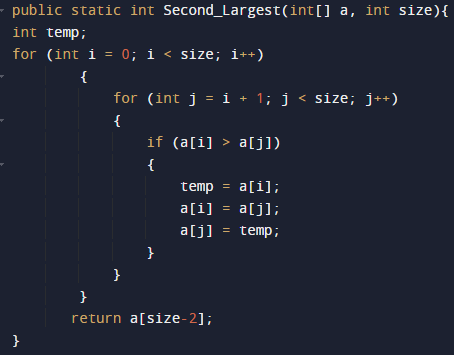
here we will call a function where we fin second greatest in an array[].

2nd Largest in an array

    • Compare the first two elements of the array
    • If the first element is greater than the second exchange them.
    • Then, compare 2nd and 3rd elements if the second element is greater than the 3rd swap them.
    • Repeat this till the end of the array.
    • and at last function return a[size-2];
    • which is the second largest in an array[].

and finally we will print the result it means the second largest in an  array[].

Java Program to Find 3rd Largest Number in an array

In this tutorial, we will learn to create a Java Program to Find 3rd Largest Number in an array using java programming.

Prerequisites

Before starting with this tutorial, we assume that you are best aware of the following Java programming concepts:

  • Java Operators.
  • Basic Input and Output function in Java.
  • Class and Object in Java.
  • Basic Java programming.
  • If-else statements in Java.
  • For loop in Java.

Java Program to Find 3rd Largest Number in an array

In this program we will find smallest element in an array using nested for loop. We would first declared and initialized the required variables. Next, we will find smallest number in an array. Lets have a look at the code.

Output

3rd Largest in an array[].

In the above program, we have first declared and initialized a set variables required in the program.

  • a[]= it will hold array values
  • l=  it will hold length of an array.
  • i and j for iteration
  • temp = it will hold temporary value of an array.

After declaring variables we initiate values in  an array[]

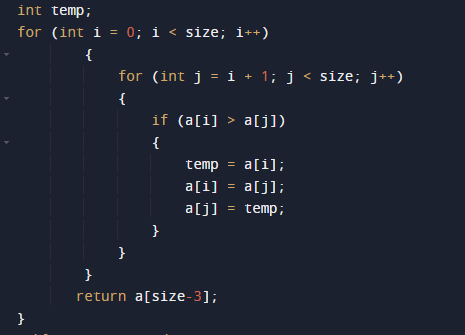
here we will call a function where we fin second greatest in an array[].

3rd Largest in an array

    • Compare the first two elements of the array
    • If the first element is greater than the second exchange them.
    • Then, compare 2nd and 3rd elements if the second element is greater than the 3rd swap them.
    • Repeat this till the end of the array.
    • and at last function return a[size-3];
    • which is the second largest in an array[].

and finally we will print the result it means the second largest in an  array[].

Java Program to sort the elements of an array in descending order

In this tutorial, we will learn to create a Java Program to sort the elements of an array in descending order using java programming.

Prerequisites

Before starting with this tutorial, we assume that you are best aware of the following Java programming concepts:

  • Java Operators.
  • Basic Input and Output function in Java.
  • Class and Object in Java.
  • Basic Java programming.
  • If-else statements in Java.
  • For loop in Java.

Sorting in a an array[]

Sorting elements means to arrange elements within the array in a certain specific order. either Ascending(increasing) or descending(decreasing) order.

Java Program to sort the elements of an array in ascending order

In this program we will take size of an array  and sort the elements of an array using nested for loop. We would first declared and initialized the required variables. Next, we will sort the elements in an array. Lets have a look at the code.

Output

Sorted elements in an array.

In the above program, we have first declared and initialized a set variables required in the program.

  • arr[]= it will hold array values
  • number =  it will hold length of an array.
  • i =  for iteration.
  • temp = it will hold temporary value of an array.

After declaring variables we initiate values in  an array[]

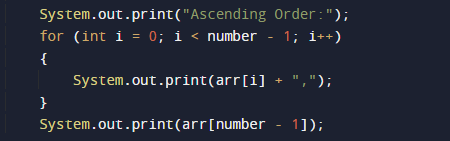
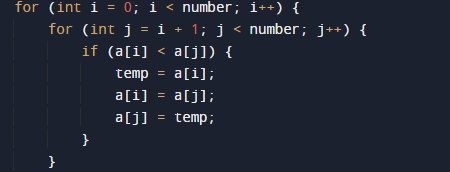
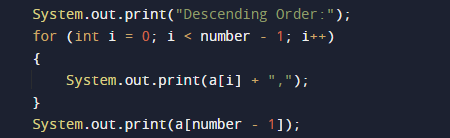
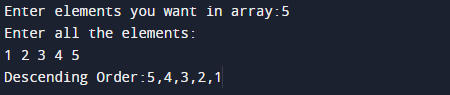
Elements will be sorted in Descending order .As shown in the image below.

Algorithm to sort array in descending order.

  1. Start the algo
  2. Declare an array[].
  3. Taking size and element of an array from user.
  4. Declared a temp variable to store the elements for swapping.

  1. Here first for loop will hold the elements and traverse through all the elements.

  1. Second for loop to compare with the remaining elements.
  2. Sort the elements by comparing.
  3. Display the updated array.
  4. Stop

The above program shows  sort an array in descending order using for loops .