
Java Program to print Floyd’s triangle.
In this tutorial, we will learn to create a Java Program to print Floyd’s triangle using Java programming.
Prerequisites:-
Before starting with this tutorial we assume that you are best aware of the following Java programming topics:
- Operators in Java Programming.
- Basic Input and Output function in Java Programming.
- Basic Java programming.
- For loop in Java Programming.
Floyd’s Triangle:-
Floyd’s triangle is a right-angled triangle that contains mathematical numbers from 1 and goes up to the required point.
Printing a Floyd’s:-
The Java language is a very powerful programming language. In Java programming, we can perform many operations with the help of coding’s. Java is a very easy language to create any shape. In this program, we will learn to create Floyd’s triangle with the help of some code.
Algorithm:-
|
1 2 3 4 5 6 7 8 9 10 11 12 13 14 15 16 17 |
STEP 1: START the program STEP 2: first declare the variables STEP 3: then start the parent for loop STEP 4: now make the child for loop STEP 5: now use child loop to start drawing the Floyd's STEP 6: Now this for loop will also execute under the parent for loop STEP 7: Print "\n" for changing the line before the increment of the main loop STEP 8: increment of the main for loop STEP 9: return the zero value for main function |
Program:-
To print a Floyd’s Triangle
|
1 2 3 4 5 6 7 8 9 10 11 12 13 14 15 16 17 18 19 20 21 22 23 24 25 26 27 28 29 30 31 32 33 34 35 36 37 38 |
// Java program to display Floyd's triangle // Importing Java libraries import java.util.*; // Main class class FlyTri { // Main driver method public static void main(String[] args) { // Declaring the variables for the program. int no,i,j,k; // No of rows to be printed no = 5; // Creating and initializing variable for // rows, columns and display value int i, j, k = 1; // Nested iterating for 2D matrix // Outer loop for rows for (i = 1; i <= no; i++) { // Inner loop for columns for (j = 1; j <= i; j++) { // Printing value to be displayed System.out.print(k + " "); // Incremeting value displayed k++; } // Print elements of next row System.out.println(); } } } |
Output:-
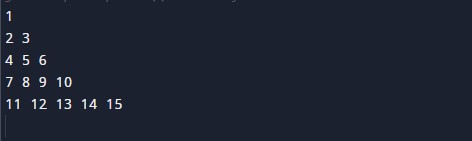
In the above program, we have first initialized the required variable.

- i = it will hold the integer value to control parent for loop.
- j = it will hold the integer value to control child for loop.
- k = it will hold the integer value to control child for loop.
- no = it will hold the integer value for the number of rows.
Taking input Number of rows

Nested For loop the body of the program
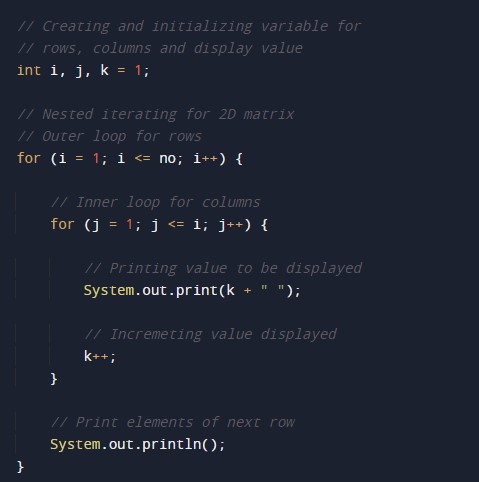
Printing Numbers
