Category Archives: Java Number Programs

Java Number Programs

ISBN Number Program In Java

In this tutorial, we will learn to create a Java Program to find ISBN Number Program In Java

Prerequisites

Before starting with this tutorial we assume that you are best aware of the following Java programming topics:

  • Java Operators.
  • Basic Input and Output function in Java.
  • Class and Object in Java.
  • Basic Java programming.
  • If-else statements in Java.
  • Function in java.

International Standard Book Number (ISBN) IN JAVA Program

In world every book has a number called ‘International Standard Book Number (ISBN).It is unique number. With the help of this number, we can easily  find any book in the  world. ISBN is  a 10 digit number. The number is legal if sum of  (1*digit1 + 2*digit2 + 3*digit3 + 4*digit4 + 5*digit5 + 6*digit6 + 7*digit7 + 8*digit8 + 9*digit9 + 10*digit10)  is divisible by sum%11==0 gives remainder Zero.

Let’s take a Number = 0306406152 the find sum
Sum = (0*1) + (3*2) + (0*3) + (6*4) + (4*5) + (0*6) + (6*7) + (1*8) + (5*9) + (2*10)
–“– = 0 + 6 + 0 + 24 + 20 + 0 + 42 + 8 + 45 + 20
Sum = 165, and 165 / 11 = 15. So 165 is divisible by 11 then the number is International Standard Book Number (ISBN).

Java Program to check the number is ISBN Number Program or not.

In this program we would find the given number is tech number first will take the input from the user and check whether it is Tech number or not. If it’s not then the program will show the output as it’s not a tech number.

Output

In the above program, we have first declared and initialized a set variables required in the program.

  • isbn_no = it will hold entered number.
  • c = 0 itr will count length.
  • i=  for iteration .
  • c= calculate the sum of number.

After that we take 10 digit number form user.
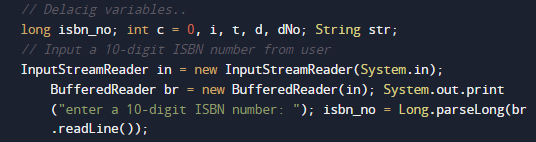
Then we check that  given number is a  10  digit number or not.

if not we we exit from program

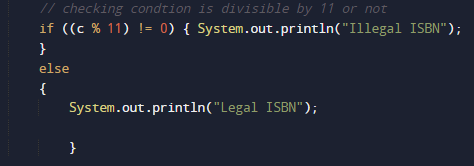
else we proceed the logic for ISbn number as shown in image below.
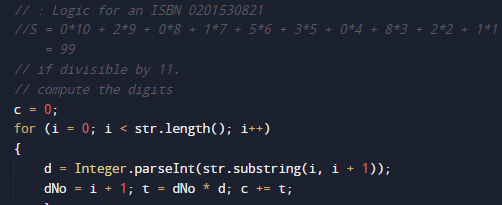
Find isbn by  multiplying each digit from left to right by 1, 2, 3,…….,10.

and at last we will check if number is completely divisible by 11 then it is  a leagal isbn number if not it is not a isbn number.
Program to check Twisted Prime Program in Java

In this tutorial, we will learn to create a Java Program to check Twisted Prime Program in Java.

Prerequisites

Before starting with this tutorial we assume that you are best aware of the following Java programming topics:

  • Java Operators.
  • Basic Input and Output function in Java.
  • Class and Object in Java.
  • Basic Java programming.
  • If-else statements in Java.
  • Function in java.

Twisted Prime Number

A given number  called  twisted prime number if it is a prime number and reverse of it also a prime number.

Some Examples of Twisted Prime number 2, 3, 5, 7, 11, 13, 17, 31, 37, 71, 73, 79.

Take a number : “97” is a prime number then
Twisted Prime Number “97” is a prime number
and its reverse “79” is also a prime number.

Program to check Twisted Prime Program in Java

In this program we would find the given number is twisted prime number or not , first will take the input from the user and check whether it is prime number or not. If it’s prime then we will twist the number and also check it is prime or not.

Output

Twisted Prime number

Not a prime number.

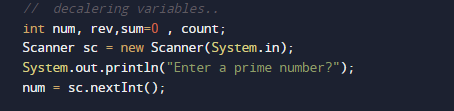
In the above program, we have first declared and initialized a set variables required in the program.

  • num = it will hold entered number.
  • rev = it  will hold reverse or a number
  • sum =  for adding values
  • count= counting the divisibility
  • i= For iteration.

After Declaring  variables we take a prime number from user.

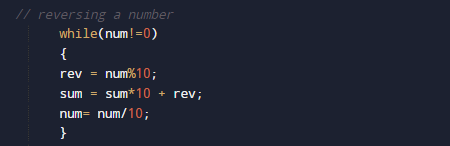
First of all we reveres the given number and then check the reverse number is also a prime number or not.

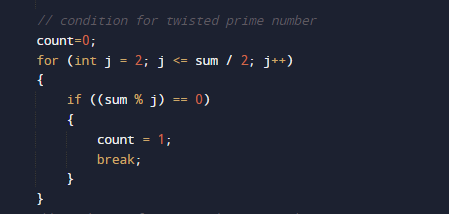
In above image we reversing a number then at last we will check the reverse number is also prime or not .

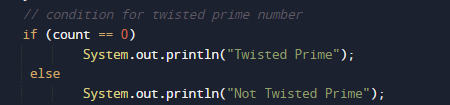
if the reverse number is also a prime then we can say the entered prime number is twisted prime number.

else it is not a twisted prime number.

Program to check Special Number Program in Java

In this tutorial, we will learn to create a Java Program to check Special Number Program in Java

Prerequisites

Before starting with this tutorial we assume that you are best aware of the following Java programming topics:

  • Java Operators.
  • Basic Input and Output function in Java.
  • Class and Object in Java.
  • Basic Java programming.
  • If-else statements in Java.
  • loops in java

Special Number in Java

Number said to special if the sum of  factorial of its digits is equal to the Given number.

Example: 145.
-> factor of 1! + factor of 4! + factor of  5!
-> 1 + 24 + 120.
-> 145.

So the number is a special number.
Program to check Special Number Program in Java

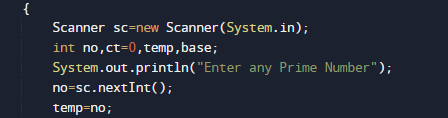
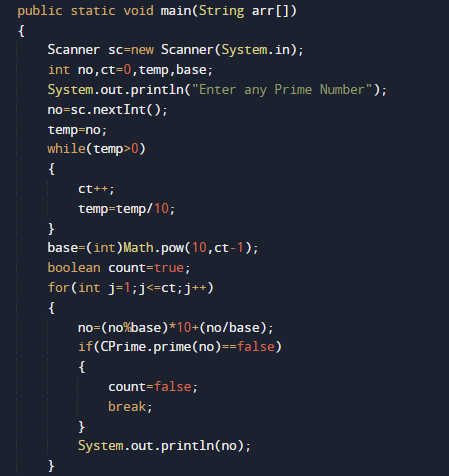
In this program we would find the given number is special number or not , first will take the input from the user and then we calculate  sum of factor of number gives number it self it is Special number. Let have a look at the code.
 

Output

Special Number.
Not a Special Number.
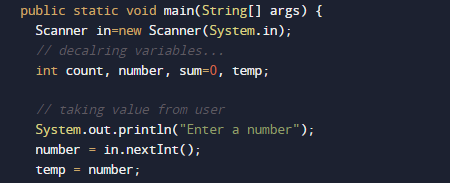
In the above program, we have first declared and initialized a set variables required in the program.

  • number = it will hold entered number.
  • temp = it  will hold temp the value of number.
  • sum =  for adding values
  • count= count will count size of a number
  • i= For iteration.

After Declaring values first we will take a number form user

and  pass number to temp variable where we break the number

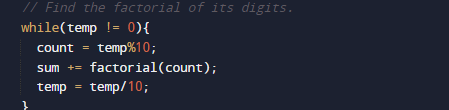
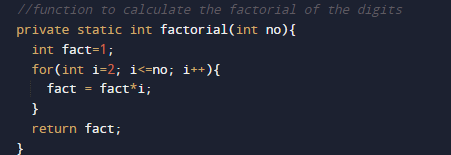
and find factor of its each digit and calculate sum of all digit.

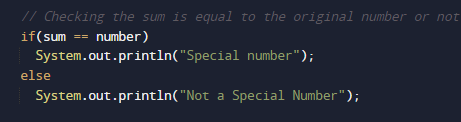
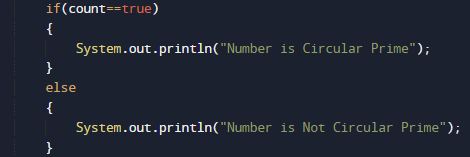
if sum of all digit is equal to the original number the given number is a Special Number

As shown in image if number equal to the sum of digit factor then it is  Special if not not a Special number.
Program to check Niven Number Program in Java

In this tutorial, we will learn to create a Java Program to check Niven Number Program in Java

Prerequisites

Before starting with this tutorial we assume that you are best aware of the following Java programming topics:

  • Java Operators.
  • Basic Input and Output function in Java.
  • Class and Object in Java.
  • Basic Java programming.
  • If-else statements in Java.
  • Function in java.

Harshad (Or Niven) Number

A Number is called a Harshad number if sum of the digits is divisible by the sum of its digits

For example:-> 18 is a Harshad number base of 10, because sum of the its digit  which is “(1 and 8) = 9″ (1 + 8 = 9), and 18 is divisible by 9 (18 % 9 == 0).

Program to check Niven Number Program in Java

In this program we would find the given number is Niven number first of all we will take the input from the user and check whether it is Niven number or not. If it’s not then the program will show the output as it’s not a Niven number.

Output

Niven number

Not a Niven number

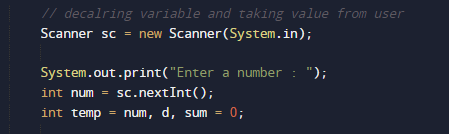
In the above program, we have first declared and initialized a set variables required in the program.

  • num= it will hold entered number.
  • temp = it will hold temp value
  • sum= for adding digit sum.
  • d=  it will hold digits of a number

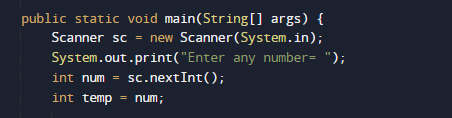
After declaring variables  we take a  number form user.

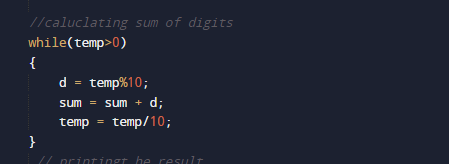
After that we add digit sum of a number.

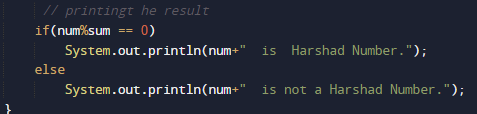
and then we divide the sum with original number to find it is a Niven number or not.

Niven number (or harshad number)if it is divisible by the sum of its digits .

Program to check Happy Number Program in Java

In this tutorial, we will learn to create a Java Program to check Happy Number Program in Java

Prerequisites

Before starting with this tutorial we assume that you are best aware of the following Java programming topics:

  • Java Operators.
  • Basic Input and Output function in Java.
  • Class and Object in Java.
  • Basic Java programming.
  • If-else statements in Java.
  • Function in java.

What is a happy number ?

A number is called a Happy Number when we replace the number by the sum of the squares of its digits, and repeat the process until the number reach to =”1″.

Program to check Happy Number Program in Java

In this program we would find the given number is a Happy number or not , first of all we will take the input from the user and check whether it is Happy number or not. If it’s not then the program will show the output as it’s not a happy number.

Output

Happy Number

Not a Happy Number

In the above program, we have first declared and initialized a set variables required in the program.

  • num,number= it will hold entered number.
  • temp = it will hold temp value
  • sum= for adding digit sum.
  • rem=  it will hold remainder of numbers.

After Declaring variables we will take a number form user to find given number is a happy number or not.

after taking values we will check given number is valid number or not.

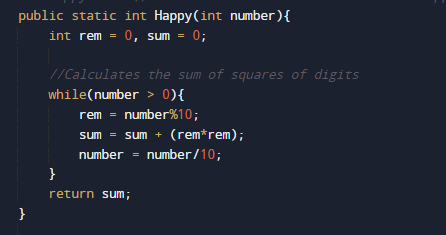
and the temp value to function Happy() where we iterate the number to its last value.

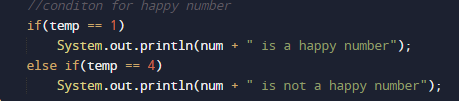
the function return the square of each digit present in number and finally at last we will check if the sum is equal to 1 it is a Happy number.

if it is not equal to “1” than it is not a happy number.

Program to check CoPrime Numbers Program in Java

In this tutorial, we will learn to create a Java Program to check CoPrime Numbers Program in Java

Prerequisites

Before starting with this tutorial, we assume that you are best aware of the following Java programming concepts:

  • Java Operators.
  • Basic Input and Output function in Java.
  • Class and Object in Java.
  • Basic Java programming.
  • If-else statements in Java.
  • For loop in Java.

What is Co-prime Number.

The numbers are said to be co-prime, if their GCD is “1”
So 13,14 and 15 are co-prime numbers.

Program to check CoPrime Numbers Program in Java

In this program we would find the given two number are co-prime or not first will take the input from the user and check they arr coprime or not. let have a look at the code

Output

Co-prime

Not a Co-prime

In the above program, we have first declared and initialized a set variables required in the program.

  • Num1,num2 = it will hold entered numbers
  • a=  for iteration.
  • c= for count.

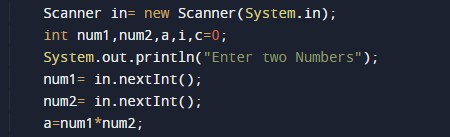
After declaring variables we take two values from user.

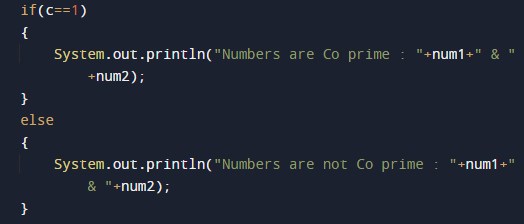
Co-prime numbers are the numbers whose common factor is  1 lets look at the example.

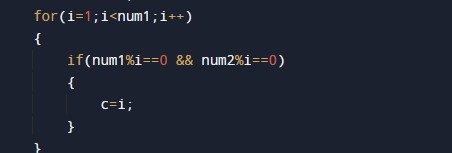
after that we find factors of given number

if number has common factor 1 then they are co-prime

if not they are not co-prime numbers.

Program to check Circular Prime Program in Java

In this tutorial, we will learn to create a Java Program to check Circular Prime Program in Java Java

Prerequisites

Before starting with this tutorial we assume that you are best aware of the following Java programming topics:

  • Java Operators.
  • Basic Input and Output function in Java.
  • Class and Object in Java.
  • Basic Java programming.
  • If-else statements in Java.
  • Function in java.

Circular Prime Number.

Prime number is called a circular prime if all its cyclic permutations digits,remains a prime number.
Examples:

Program to check Circular Prime Program in Java

In this program we would find the given number is a Circular Prime number or not , first of all we will take the input from the user and check whether it is Circular Prime number or not. Lets have a look at the code.

Output

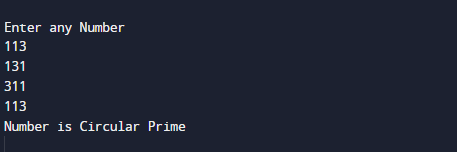
Circular prime number

Not a Circular prime number

In the above program, we have first declared and initialized a set variables required in the program.

  • no,num= it will hold entered number.
  • temp = it will hold temp value
  • sum= for adding digit sum.
  • count,ct=  it will hold flag value.
  • i,j=  for iteration.

After declaring variables first we take a prime number from user.

then we check all the possible combination of a given number and all are prime number or not.

Here we created a function prime with in the class Cprime where we checked each and every possible combination of given number and all are prime or not and if they are prime.

A Circular Prime number  is a prime number that remains prime under each every cyclic shifts of its digits.

Prime Number Up to N Terms Program in Java

In this tutorial, we will learn to create a Java Prime Number Up to N Terms Program in Java.

Prerequisites

Before starting with this tutorial we assume that you are best aware of the following java programming topics:

  • Java Operators.
  • Basic Input and Output
  • Class and Object.
  • Basic Java programming.
  • String.
  • User define Function.

What is a Prime Number?

A number is called a prime number if it fully divisible by the number itself or 1 only.

For example :->  7 is a prime number, it is fully divisible by 7 only between 2-7  and “1” only.

Prime Number Up to N Terms Program in Java

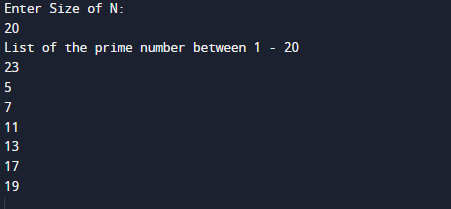
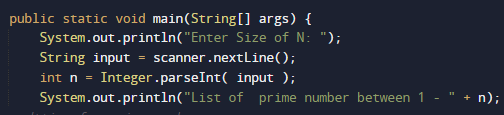
In this program we will find prime n umber between 1-N. We would first declared and initialized the required variables. Next, we would ask user to enter value of N. let have a look at Code.

Output

N Prime Number

In the above program, we have first declared and initialized a set variables required in the program.

  • n = it will hold entered N size.
  • number = For iteration till N.
  • p= for condition of prime.

After that we declare variables and taking value from user.

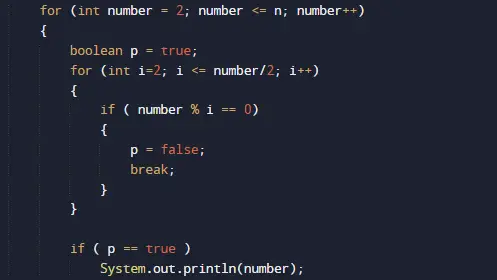
Then we check condition for prime between 2 to N.

Here we iterate loop form two to given number and check the condition for every number  that is prime or not and last we will print list of all prime number between 1 to N as shown in above image.

Program to check Amicable Numbers in Java

In this tutorial, we will learn to create a Java Program to check Amicable Numbers in Java using Java programming.

Prerequisites

Before starting with this tutorial we assume that you are best aware of the following Java programming topics:

  • Java Operators.
  • Basic Input and Output function in Java.
  • Class and Object in Java.
  • Basic Java programming.
  • If-else statements in Java.
  • For loop in Java.

What is Amicable Number?

Pairs of number said to be Amicable Numbers, if sum of divisors of first number equals to the second number.
Some of the Amicable Numbers are: (220, 284), (1184, 1210), (2620, 2924), (5020, 5564), (6232, 6368) etc…

let’s have an example of one Amicable Number.
Divisors of 220 are = “1, 2, 4, 5, 10, 11, 20, 22, 44, 55, 110” on adding them we get
(1+2+4+5+10+11+20+22+44+55+110)=284
Now we will check if the Divisors of 284 = 1, 2, 4, 5, 10, 11, 20, 22, 44, 55, 110
1+2+7+71+142=220.
So we can see clearly 220 and 284 are Amicable Numbers.

Program to check Amicable Numbers in Java

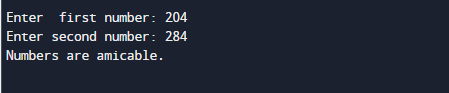
In this program , we will learn to create a Program to check Amicable Numbers.First we would declared and initialized the required variables. Next, we would prompt user to input the values. Later we will find that they are Amicable Number or not.

Output


In the above program, we have first declared and initialized a set variables required in the program.

  • no1= it will hold first entered number.
  • no2= it will hold second entered number.
  • sum1=  it will calculate first divisor sum.
  • sum2=  it will calculate second divisor sum.
  • i = for iteration.

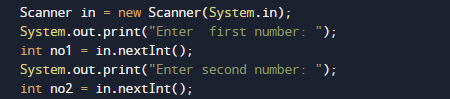
After that taking  values from user we will assigned the values in variable “no1” and “no2” respectively.

Now, we have two different values in variable “no1” and  in “no2” and  now with the modulus (%) operator we find all the divisor of numbers.

and for second number.

Steps for finding Amicable Number are as follow.

  1. Read and initialize numbers in variables (no1, no2) from the user.
  2. Find the divisor of  both the number (no1, no2) using for loop.
  3. Find the sum of divisors in  variables sum1 and in sum2.
  4. Checking if the sum of divisors of number no1 and no2 are equal to each other or not.

If equal, the numbers are Amicable.

Else, not Amicable.

So in that manner we will find the entered number are Amicable or Not.

Program to check Ugly Number in Java

In this tutorial, we will learn to create a Java Program to check Ugly Number in Java using Java programming.

Prerequisites

Before starting with this tutorial we assume that you are best aware of the following Java programming topics:

  • Java Operators.
  • Basic Input and Output function in Java.
  • Class and Object in Java.
  • Basic Java programming.
  • If-else statements in Java.
  • For loop in Java.
  • User define functions.

What is Ugly Numbers?

Ugly numbers is a number whose prime factors are “2, 3 or 5“. Some of the Ugly number are as  “1, 2, 3, 4, 5, 6, 8, 9, 10, 12, 15”. So the number after dividing gives factors either 2,3 or 5, are called Ugly number.

Program to check Ugly Number in Java

In this program , we will learn to create a Program to check Ugly Number.First we would declared and initialized the required variables. Next, we would prompt user to input the values. Later we will find that they the number is Ugly or not.

output

In the above program, we have first declared and initialized a set variables required in the program.

  • number= A number N to find the Nth Ugly Number.
  • no2= it will hold second entered number.
  • sum1=  it will calculate first divisor’s sum.
  • sum2=  it will calculate second divisor’s sum.
  • i = for iteration.

After that taking  values from user we will assigned these values in to variable “no1” and “no2” respectively.

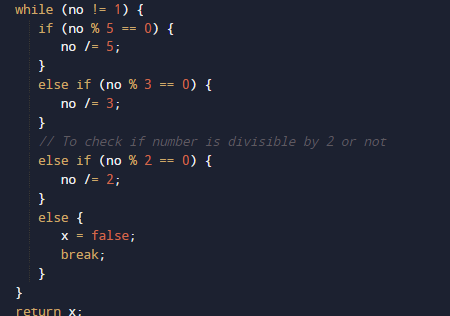
So what we are do here is that if any number has factor 2,3, or 5 if it has then the number is ugly and if number not have factors 2,3 or 5 then it is not ugly.Let’s take an example for that
Number is : 10
So Prime Factors of 10 is : 2 and 5.
Prime Factors contains only  2,3 or 5 : Here 10 is an Ugly number.

Number is : 11
So Prime Factors of 11 is : 1 and 11.
Prime Factors contains only  2,3 or 5 : Here 11 is not an Ugly number.

so here we have done same using java programming in image  below .

So finding that the number is Ugly or not, we divide the number by  2, 3, and 5. When the number gives remainder equivalent to  Zero,then it is an Ugly number. Otherwise, it is not an Ugly number.

Java Program to convert Number to Word

In this tutorial, we will learn to create a Java  Program to convert Number to Word.

Prerequisites

Before starting with this tutorial we assume that you are best aware of the following java programming topics:

  • Java Operators.
  • Basic Input and Output
  • Class and Object.
  • Basic Java programming.
  • String.
  • User define Function.

Java Program to convert Number to Word

In this program we will convert Number to Word. We would first declared and initialized the required variables. Next, we would ask user to enter a number. let have a look at Code.

Output

In the above program, we have first declared and initialized a set variables required in the program.

  • num = it will hold entered Number
  • word= it will hold word values.
  • unitarr[]= it will hold unit value of word.
  • tensarr[]=it will hold tense value of word.

After that we declare variables and taking value from user.

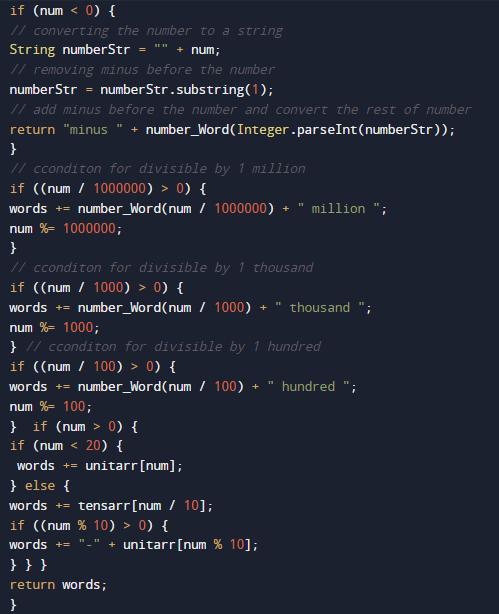
the following  code supports numbers up-to 9999 digits, i.e., numbers from 0 to 9999.

here we create arrays that break individual parts of a strings. One array is used for single digits (unitarr[]), one for numbers from 10 to 19,. etc (tensarr[]). and one for powers of 10. and multiple condition that number is >1000 ,>100 ans so on..as shoen in image below.

And finally we will print the characters or given numbers.

Program to check nth Prime Number In Java

In this tutorial, we will learn to create a Java Program to check nth Prime Number In Java.

Prerequisites

Before starting with this tutorial, we assume that you are best aware of the following Java programming concepts:

  • Java Operators.
  • Basic Input and Output function in Java.
  • Class and Object in Java.
  • Basic Java programming.
  • If-else statements in Java.
  • For loop in Java.

Prime Number.

A number is called a prime if it is divisible by 1 or itself only.

Example:=>  2, 3, 5, 7, 11 and etc…

except  2 all are odd numbers.

Program to check nth Prime Number In Java

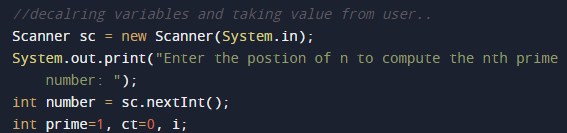
In this program we would find the nth number position prime number.first of we would take a value from user and find the nth position prime number.let have a look at the code.

Output

In the above program, we have first declared and initialized a set variables required in the program.

  • number = it will hold entered nth value number
  • prime= it wil hold value of prime number
  • i=  for iteration .
  • ct= calculate the count value

After declaring variables we take a nth value of from user.

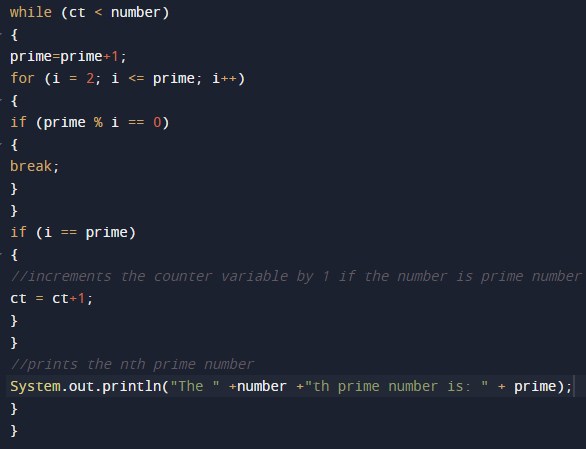
and we will find the nth position prime number as shown in image below.

Approach to find nth Prime number.

we will used the same approach to find the prime number as w use to do always.

Steps for finding Prime nth Prime number.

  • take an integer value (number) from the user.
  • In loop,we execute the condition (ct<number). At Initially, set value “ct=0”.
  • Increment the value “i” by 1.
  • Check if the variable “i” is prime number or not.
  • If true, increment the variable “ct” by “1”.
  • follow this approach till nth number.
  • and finally at last print the last prime number value.

Hope this help you.