Category Archives: Java Programs

Java Programs

ATM program In Java

In this tutorial, we will learn to create a Java Program of ATM program In Java programming.

Prerequisites

Before starting with this tutorial we assume that you are best aware of the following Java programming topics:

  • Java Operators.
  • Basic Input and Output function in Java.
  • Class and Object in Java.
  • Basic Java programming.
  • If-else statements in Java.
  • For loop in Java.

Here we Build a Java Program, to show how ATM Transaction takes place,here a User has to choose options which are displayed on the Screen.

Following  operations available in the ATM.

  1. Withdraw
  2. Deposit
  3. Check Balance
  4. Exit.

Create a ATM program In Java programming.

In this program , we will create a ATM Mechanism In Java, we can create an ATM program for representing ATM transaction we will use options related to withdraw  money, deposit, check  balance, and exit from transaction.Let look at the  code of this program.

Output

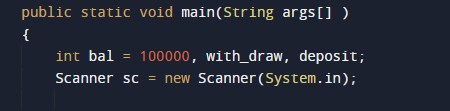
In the above program, we have first declared and initialized a set variables required in the program.

  • bal = it will hold balance amount.
  • with_draw= it wil hold value of prime number.
  • deposit= it will hold deposit.

After declaring variables we take a nth value of from user.
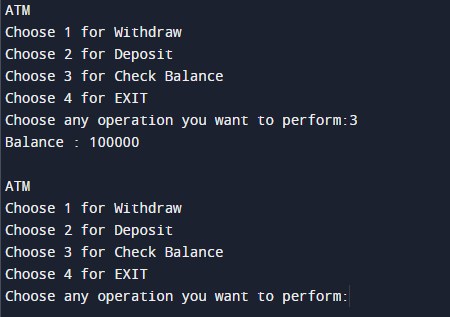
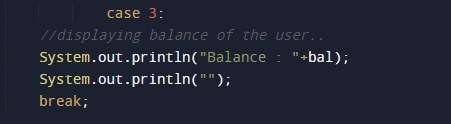
Now user will choose any one available options and input the number with.here we use different cases using switch case that have been provided to user like withdraw, deposit and check balance.As shown in the image suppose user choose the option 3 then the output of program is show balance.

and again ask user to input different value for perform different operations.

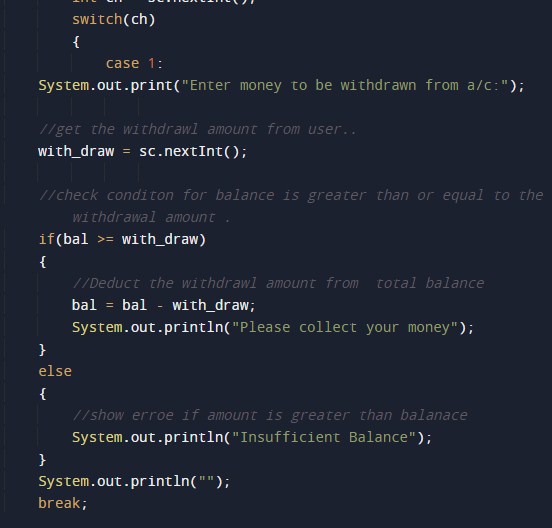
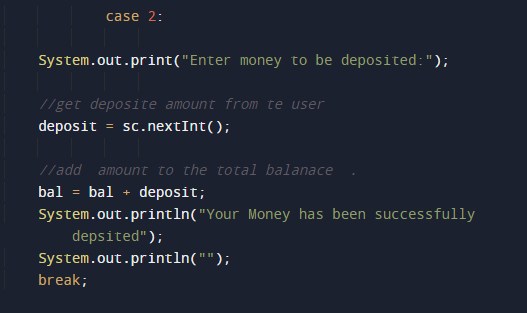
following are the switch case condition according to option for different case are as follow

case 1: for withdraw.
case 2: for Deposit
Case 3: for Check Balance.
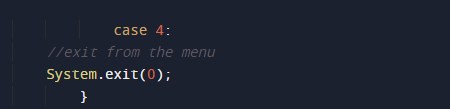
Case 4 : for exit
Approach to Check Balance

show the  balance amount in the screen.

Program to check Spy Number in Java

In this tutorial, we will learn to create a Java Program to check Spy Numbers in Java using Java programming.

Prerequisites

Before starting with this tutorial we assume that you are best aware of the following Java programming topics:

  • Java Operators.
  • Basic Input and Output function in Java.
  • Class and Object in Java.
  • Basic Java programming.
  • If-else statements in Java.
  • For loop in Java.

What is Spy Number in Java

A Number is called a Spy number if  sum(1+3+2=6) and product(1*3*6=6) of its digits are equal.

Example:-> Number “22”=> sum(2+2=4) and Product (2*2=4) then “22” is a Spy Number.

Program to check Spy Number in Java

In this program , we will find given number is a Spy number or not .First of all user will be prompted to enter Number and afterword we will find the given number is a Spy Number or not. Lets have look at the code.

Output

Spy number

Not a Spy number.

In the above program, we have first declared and initialized a set variables required in the program.

  • number = it will hold entered number.
  • copy = it will hold entered number copy.
  • multi  it will hold the result of multiplication of a number.
  • Sum=it will hold sum of digit.
  • Temp = it will old temp value of number.

Steps to Find Spy Number

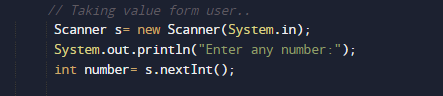
  1. take a value from user in (number).
  2. take variables sum and product to store value of digit sum and product .
  3. Initialize sum with 0 and product with 1.
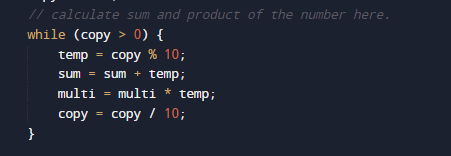
  4. Find the digit (copy%10) of a given number.
  5. Add digit to the variable sum=sum+temp;
  6. Multiply the digit with the multi= multi*temp;

  1. Divide the number (number) by 10 to removes the last digit.
  2. Repeat steps until the number  become 0(Zero).
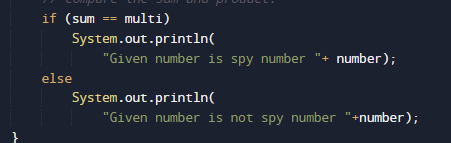
  3. at last check values of sum and product are same, then number is a spy number,

  1. else not a spy number.

Program to check Neon Number in Java

In this tutorial, we will learn to create a Java Program to check Neon Numbers in Java using Java programming.

Prerequisites

Before starting with this tutorial we assume that you are best aware of the following Java programming topics:

  • Java Operators.
  • Basic Input and Output function in Java.
  • Class and Object in Java.
  • Basic Java programming.
  • If-else statements in Java.
  • For loop in Java.

What is Neon Number

A number is called a neon number if the sum of digits of the square of the number is equal to the number itself

For example:->

Square of “9 is 9*9 gives =>   81. 
sum of digit of square : 8+1=9 (which gives the number it self).
So “9″ is a Neon Number.

Program to check Neon Number in Java

In this program , we will find given number is a Neon number or not .First of all user will be prompted to enter Number and afterword we will find the given number is a Neon Number or not. Lets have look at the code.

Output

Neon Number

Not a Neon Number

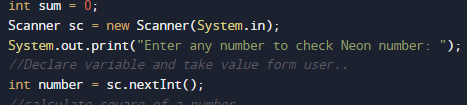
In the above program, we have first declared and initialized a set variables required in the program.

  • number = it will hold entered number.
  • sqr =  it will calculate Square of a number.
  • digit =  for finding digit of a number
  • sum= sum of digit.

After that we take a number from user and find Neon number.

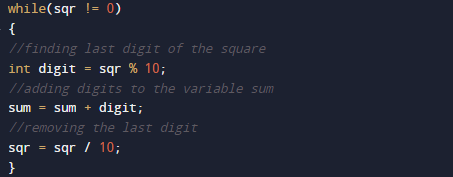
after that we will find square of digit and sum of square digit value as shown in image below.

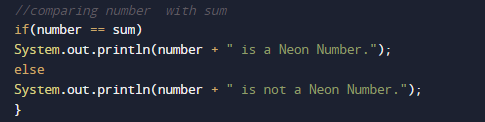
then we check if sum of square digit equals to number then given number is Neon number.

Program to check Keith Number in Java

In this tutorial, we will learn to create a Java Program to check Keith Numbers in Java using Java programming.

Prerequisites

Before starting with this tutorial we assume that you are best aware of the following Java programming topics:

  • Java Operators.
  • Basic Input and Output function in Java.
  • Class and Object in Java.
  • Basic Java programming.
  • If-else statements in Java.
  • For loop in Java.

What is Keith number in mathematics?

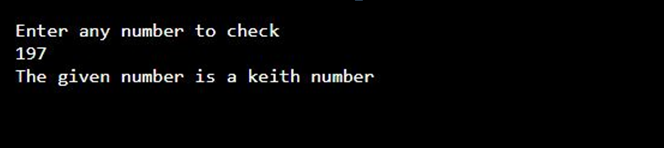
In mathematics a Keith numberKeith numbers are also called repfigit and it is a positive N-digit integer value  where  Number is greater than 9 such that if we create a series like – Fibonacci( Where each numbers/term in the following series is the sum of the n previous numbers/terms) and this series is formed by the sum of first n terms taken as the integervalue of the number N, then N itself occurs as a term in the series. i.e. 197 is a Keith number as it makes the series asfollows:

1, 9, 7,

1+9+7=17,

9+7+17=33,

7+17+33=57,

17+33+57=107,

33+57+107=197 ->(Keith).

Keith numbers are known as repfigit (repetitive fibonacci-like digit) numbers.

Here: –

N = number of digits of the term.

n = number of terms in the series.

Java Program to Find Keith Number

In this program we will find the number given by the user is a Keith number or not with the help of Java Program. We will first declare and initializethe required variables for the program. Next, we will prompt the user to input the value in integer format. Later we will check the given value is a Keith number or not.

Output

In the above program, we have first declared and initialized a set of variables required in the program.

  • no = it will hold entered length.
  • no1=  it will replicated value of no1 for digit calculation.
  • d=  it will hold the number of digits.

  • sum = it will hold the summation of no. of term terms.
  • arr[]=  is a array for holding all the terms of series.
  • i,j = will hold the numerical value to execute the loop.

Keith number is a term/entity which is repeated on a series when  of a number is break down into the respective digits and add to get the desired number again.

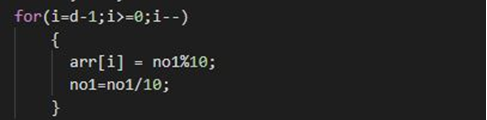
After that take valuesin to an array.

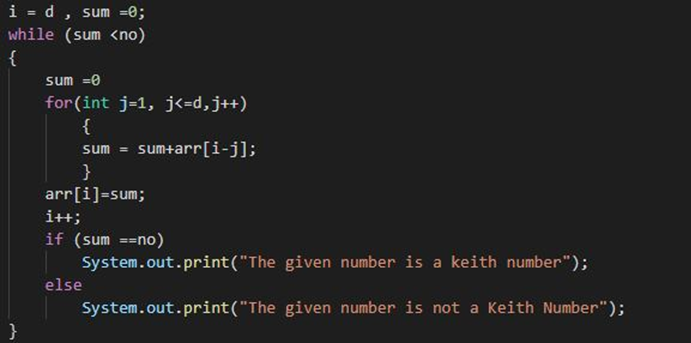
Calculating the Keith Number from array we made.

Program to check Fascinating Number in Java

In this tutorial, we will learn to create a Java Program to check Fascinating Numbers in Java using Java programming.

Prerequisites

Before starting with this tutorial we assume that you are best aware of the following Java programming topics:

  • Java Operators.
  • Basic Input and Output function in Java.
  • Class and Object in Java.
  • Basic Java programming.
  • If-else statements in Java.
  • For loop in Java.

What is Fascinating Number?

In Mathematics, any 3-digit number is said to be a fascinating when the base number is multiplied by 2 and 3 respectively and the outcome of the 2 multiplication are concatenated with base number and there is no repeated number in the concatenated number, i.e. from 1 to 9 all are occurred once in the number here. 0 are ignored in the final outcome number. If any number from 1 to 9 is repeated then that number is not a fascinating number


Java Program to check the number is fascinating number

In this program we would find the given number is fascinating number first will take the input from the user and check whether it is a3-digit number or not. If it’s not a 3-digit number then the program will be terminated. Then if the number is a 3-digit number then the program will continue and check the number. The fascinating number is a commonly asked question in coding tests of java.

For example, 192 to be checked

Then

192

192*2=384

192*3=576

“192” + “384” + “576” = 192384576

Here the above number doesn’t repeat any number hence it is a fascinating number.

Output


Program to check Tech Number in Java

In this tutorial, we will learn to create a Java Program to check Tech Numbers in Java using Java programming.

Prerequisites

Before starting with this tutorial we assume that you are best aware of the following Java programming topics:

  • Java Operators.
  • Basic Input and Output function in Java.
  • Class and Object in Java.
  • Basic Java programming.
  • If-else statements in Java.
  • For loop in Java.

What is Tech Number.

A number is called a Tech number if an even number digit split into two halves(1/2) then square of the sum of those halves(1/2) is equal to the original number.

Example :->3025 So split 3025 into two halves

  1. 30.
  2. 25.
    then = (30) +( 25)
    = 55
  3. =55*55.
  4. =3025
    So => 3025 is a tech number.

Program to check Tech Number in Java

In this program we would create a java program to find given number is a  Tech number or not .First will take the input from the user and check whether it is Tech number or not. If it’s not then the program will show the output as it’s not a tech number.

Output

Tech  Number

Not a Tech Number.

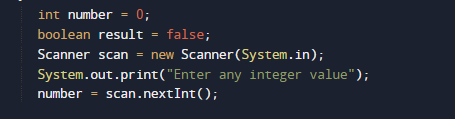
In the above program, we have first declared and initialized a set variables required in the program.

  • num,numberand no = it will hold entered number.
  • fH and Lh =  it will hold first half and last half of a number.
  • ct=  finding digit of a number.
  • sum= sum of digit.

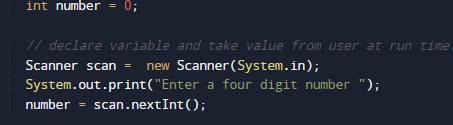
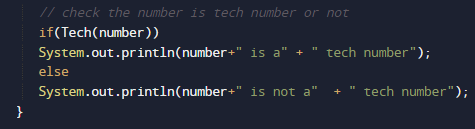
After that we take a number from user and find given number is a Tech number or not

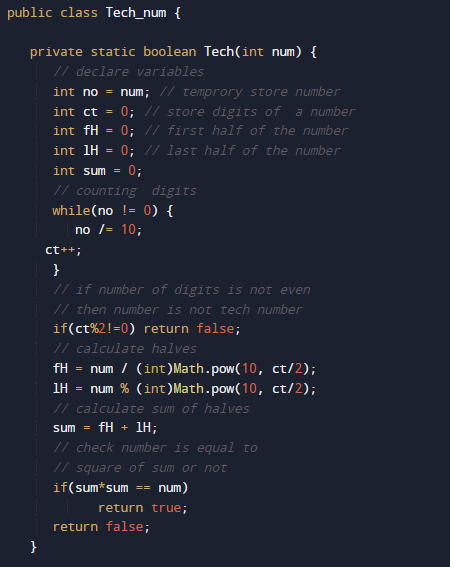
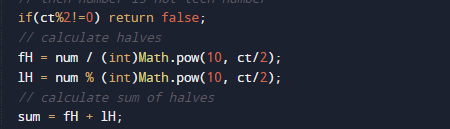
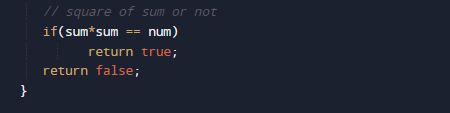
after taking values we will pass number to function Tech() where we check multiple conditions as shown in image below.

check entered number is a four digit number or not. if given number is a four digit nmber then we break number into two half first two in hF variable and second two in lF variable

and these two in variable sum where we find square of their addition.

and then compare square of sum equals to the given number

then number is a Tech number otherwise it is not a tech number.

Program to check Sunny Number in Java

In this tutorial, we will learn to create a Java Program to check Sunny Numbers in Java using Java programming.

Prerequisites

Before starting with this tutorial we assume that you are best aware of the following Java programming topics:

  • Java Operators.
  • Basic Input and Output function in Java.
  • Class and Object in Java.
  • Basic Java programming.
  • If-else statements in Java.
  • For loop in Java.

What is Sunny Number.

Sunny number is a number,if  next  number to a given number is a perfect square.

For Example=> 80 is a Sunny Number because 81 is a perfect square of 9.

Program to check Sunny Number in Java

In this program we would find given number is a Sunny number or not .first of we would take a value from user and find the Sunny number.let have a look at the code.

Output

Sunny Number.

Not a Sunny Number.

In the above program, we have first declared and initialized a set variables required in the program.

  • num,numberand= it will hold entered number.
  • result   it will hold result it means number is a sunny or not.

After that we take a number from user and find given number is a Sunny number or not

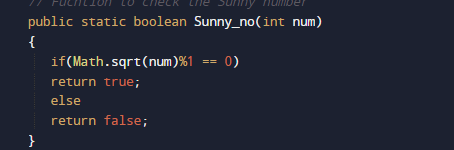
and pass this  number to Sunny_no() function where we check condition for sunny number or we cans say condition for Perfect square where we add one to the number to check it is Sunny Number or not.

Function return value true if number is Perfect square

else return false and we will store the return value in variable result.

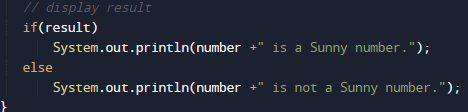
if value of result is true number is Sunny and if value of result if false number is not a Sunny number.

Program to check Peterson Number in Java

In this tutorial, we will learn to create a Java Program to check Peterson Numbers in Java using Java programming.

Prerequisites

Before starting with this tutorial we assume that you are best aware of the following Java programming topics:

  • Java Operators.
  • Basic Input and Output function in Java.
  • Class and Object in Java.
  • Basic Java programming.
  • If-else statements in Java.
  • For loop in Java.

What is Peterson Number in Java

A number is called Peterson Number if  sum of its factorials of each digit is equal to the sum of the number itself.

145 = 5! + 4! + 1!
145 = 120 + 24 +1
145 = 145

Explanation: factorial of
!5 = 5*4*3*2*1=120.
!4=4*3*2*1=24.
!1=1.
So sum of its factorial gives the number itself called Peterson.

Program to check Peterson Number in Java.

In this our program we will find given number is a Peterson number or not in using java. We would first declared and initialized the required variables. Next, we would prompt user to input the a number.Later we  find number is  Peterson number or not let’s have a look at the code.

Output

Peterson Number

Not a Peterson number

In the above program, we have first declared and initialized a set variables required in the program.

  • number= it will hold entered number.
  • sum= it will hold sum of digit
  • no = it will also hold value of number
  • lastdigit= last digit of a number.

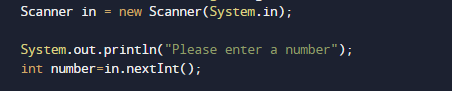
After declaring variables in the next statement user will be prompted to enter a value and  which will be assigned to variable ‘number’.

And after that we check condition for Peterson number if condition get satisfied it means the given number is Peterson number if not then it is not  Peterson number.

Logic Behind of Finding Peterson Number.

  • First we take and initialize a number  to (number).
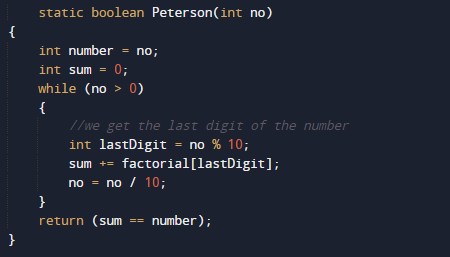
  • Find the last digit (last digit) of the given number by user.
  • Find the factorial of all the digits.
  • Add the factorial of all digits to (sum) variable as shown in image below.
  • Repeat steps until find all the factors of given number.
  • Compare sum with number if( sum==number). If they are equal, the given number is Peterson,

  • else not.


Program to check Automorphic Number in Java

In this tutorial, we will learn to create a Java Program to check Automorphic Numbers in Java using Java programming.

Prerequisites

Before starting with this tutorial we assume that you are best aware of the following Java programming topics:

  • Java Operators.
  • Basic Input and Output function in Java.
  • Class and Object in Java.
  • Basic Java programming.
  • If-else statements in Java.
  • For loop in Java.

What is an automorphic number?

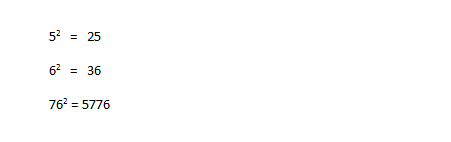
A number is called an automorphic number if square of the number ends with the same number itself as shown in example below.

Example. 5,6, 25, 76 etc  are automorphic numbers.

Program to check Automorphic Number in Java

In this our program we will find given number is a automorphic number or not in using java. We would first declared and initialized the required variables. Next, we would prompt user to input the a number.Later we  find number is automorphic  number or not let’s have a look at the code.

Output

Automorphic number

Not a Automorphic Number.

In the above program, we have first declared and initialized a set variables required in the program.

  • number= it will hold entered number.
  • temp= ti will actual copy of a number.
  • lastDigits=it will hold last digit of square of given number.
  • square=it will hols square of given number.

After declaring variables in the next statement user will be prompted to enter a value and  which will be assigned to variable ‘number’.

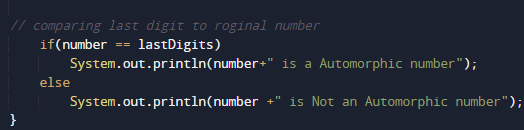
And after that we will find square of that value and after that we will find last two digits of given number and making the copy of original number as shown in picture below.

After that we will find last two digits of a number.

then check condition for Automorphic  number if condition get satisfied it means the given number is Automorphic  number if not then it is not  Automorphic number.

And finally we print the given number is Automorphic Number or not.

Program to check Unique Number In Java

In this tutorial, we will learn to create a Program to check Unique Number  in Java using Java programming.

Prerequisites

Before starting with this tutorial we assume that you are best aware of the following Java programming topics:

  • Java Operators.
  • Basic Input and Output function in Java.
  • Class and Object in Java.
  • Basic Java programming.
  • If-else statements in Java.
  • For loop in Java.

What is Unique Number.

The number is called a unique if there is no repeated digits in the given number.

For Example:=> 20, 56, 98 are Unique Number
But => “22,99,121,100” are not unique because they contain repeated digits in them.

Program to check Unique Number In Java

In this program we would find the given number is a Unique number or not .first of all we would take a value from user and find the Unique number.let have a look at the code.

Output

Unique Number

Not a Unique Number.

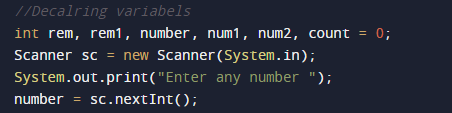
In the above program, we have first declared and initialized a set variables required in the program.

  • number= it will hold entered number.
  • num1,num2=it will hold temporary number.
  • count=   it will hold repetition number,
  • rem,rem1- it will hold last digit of a numbers.

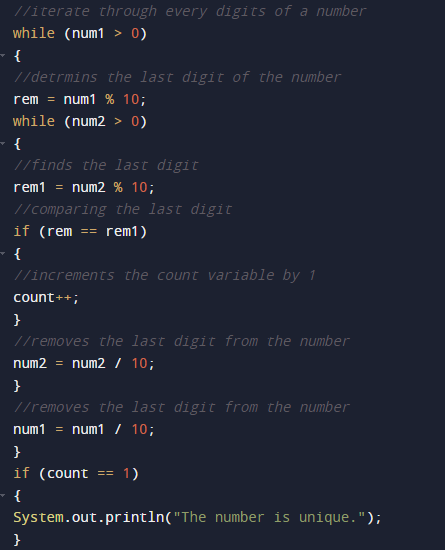
After that we take a number from user and find given number is a Unique number or not.

Steps to check given number is unique or not:

  1. take a value  from the user in number variable.
  2. Break digit and find the last digit o the number.
  3. Check each digit in number with the last digit.
  4. If the digit repeated more than one time, the number is not unique.
  5. Else, remove the last digit of the number.
  6. Repeat steps until the number becomes zero.

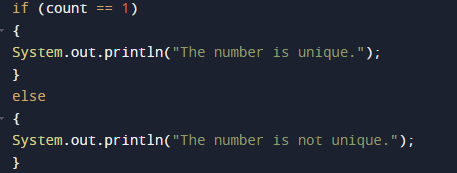
The number is called a unique if there is no repeated digits in the given number.

else it is not a unique number.

Program to check Nelson Number in Java

In this tutorial, we will learn to create a Java Program to check Nelson Numbers in Java using Java programming.

Prerequisites

Before starting with this tutorial we assume that you are best aware of the following Java programming topics:

  • Java Operators.
  • Basic Input and Output function in Java.
  • Class and Object in Java.
  • Basic Java programming.
  • If-else statements in Java.
  • For loop in Java.

What is Nelson Number

The number “111” is called “Nelson Number” after the name of sir “Admiral Nelson“,because he had only had “One Eye, One Arm, One Leg” at the end of his life.Double  of Nelson number called  Double Nelson (222), triple Nelson (333), and so on..

Program to check Nelson Number in Java

In this our program we will find given number is a Nelson number or not in using java programming. We would first declared and initialized the required variables. Next, we would prompt user to input the a number.Later we  find number is Nelson number or not let’s have a look at the code.

Output

Nelson number.

Not a nelson number.

In the above program, we have first declared and initialized a set variables required in the program.

  • number= it will hold entered number.

After declaring variables in the next statement user will be prompted to enter a value and  which will be assigned to variable ‘number’.

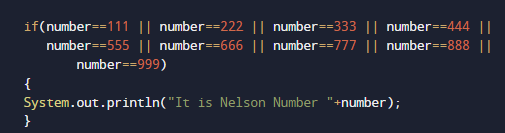
And after that we check condition for Nelson number if condition get satisfied it means the given number is Nelson number if not then it is not  Nelson number.

Condition for Nelson number.

If the above Condition satisfied the given number by user is a Nelson number.

If not then the given number is not a Nelson number.

Program to check Kaprekar Number In Java

In this tutorial, we will learn to create a Java Program to check Kaprekar Numbers in Java using Java programming.

Prerequisites

Before starting with this tutorial we assume that you are best aware of the following Java programming topics:

  • Java Operators.
  • Basic Input and Output function in Java.
  • Class and Object in Java.
  • Basic Java programming.
  • If-else statements in Java.
  • For loop in Java.

What is Kaprekar Number.

Capricorn or Kaprekar number is a number whose square is divided into two parts  and add the additions of parts is equal to the number.

Example of “kaprekar numbers”:- 45
The square of 45 = 2025
20 + 25 = 45, so 45 is a kaprekar number.

Program to check Kaprekar Number In Java

In this program we would find the given number is a Kaprekar or Capricorn number or not.first of all we would take a value from user and find the Capricorn number.let have a look at the code.

Output

Kaprekar Number.

Not a Kaprekar Number.

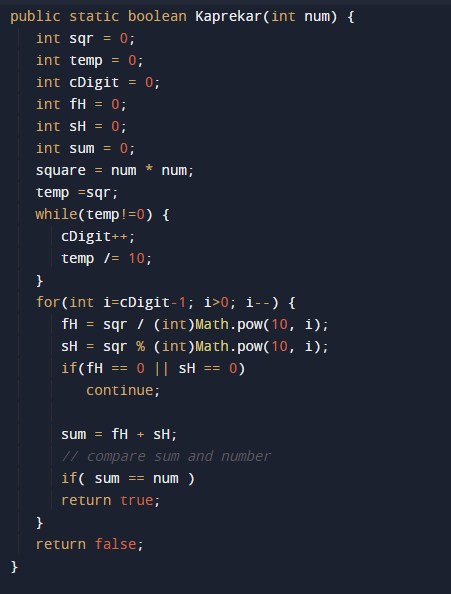
In the above program, we have first declared and initialized a set variables required in the program.

  • no= it will hold entered number.
  • temp=    it will hold temp the value of a number.
  • sqr= it wil hold square of  a number.
  • cDigit= it will count digit.
  • fH and sH= fH holds first half and sH holds Second half.
  • sum =it will hold sum of values.

After that we take a number from user and find given number is a Kaprekar number or not

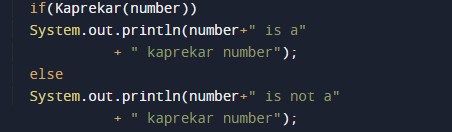
after getting a value from user we will pass the number to function if(Kaprekar(no)) where we will check condition for Kaprekar number that given number is Kaprekar  number or not.

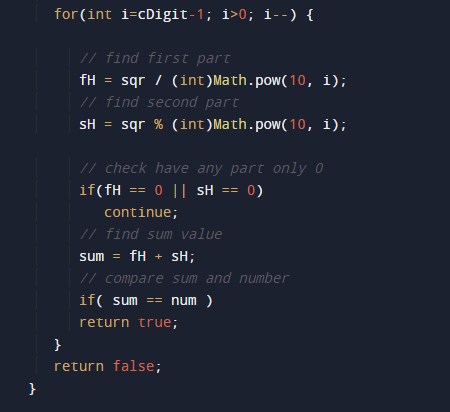
Procedure that check the given number is kaprekar number or not.

1) Take a number from user.
2) Find the square of a number.
3) Count all the digit of a squared number.
4) Iterator variable i start from digits of square – 1.
5) Ge first half, by dividing the square value by 10.
6) And second part as remainder value after dividing 10.
7) Check value of half’s if any part having only 0, if found skip the iteration if not.
8) Calculate sum of hF+sH.
9) Comparing sum and number,

if both are equal then function returns true and if not function returns False.

and finally we will print number is Kaprekar or not.