Category Archives: Java Programs

Java Programs

Program to check Xylem and Phloem Number In Java

In this tutorial, we will learn to create a Java Program to check Xylem and Phloem Number In Java using Java programming.

Prerequisites

Before starting with this tutorial we assume that you are best aware of the following Java programming topics:

  • Java Operators.
  • Basic Input and Output function in Java.
  • Class and Object in Java.
  • Basic Java programming.
  • If-else statements in Java.
  • For loop in Java.
  • User define functions.

Xylem and Phloem Number

A number will be called a xylem number if sum of its outermost number i.e (first and last) digits is equivalent to the sum of internal digit (except first and last) digits. If the sum of Outer digits is not equal to the sum of remaining internal digits, then the number is called phloem number.

Example:
12225: 1+5 = 6 and  2+2+2= 6  Xylem number
12235 : 1+5 = 6 and  2+2+3= 7 Phloem number.

Program to check Xylem and Phloem Number In Java

In this program we will create a program to check weather the number is Xylem or Phloem. We would first declared and initialized the required variables. Next, we would prompt user to input the two values . Later we will find that number is Xylem or Phloem Number In Java.

Output

Xylem Number

Phloem Number

In the above program, we have first declared and initialized a set variables required in the program.

  • number = number to hold given value.
  • temp =it will hold temporary the original number
  • OuterSum= this will hold sum of outer values.
  • InnerSum= It will sum of all internal values.

In the next statement user will prompted to enter a number which will be assigned to variable ‘number’. As shown in image below.
Logic to find Xylem and Phloem Number

  • taking and initialize a number to variable “number”.
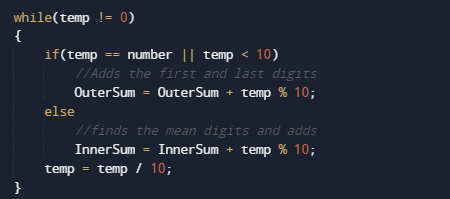
  • Then find the outermost digits of number from both side i.e (first and last).
  • Add the outer digits and store them in OuterSum.
  • And afterwords Find the sum of  internal Digits of number (all number except first and last) in InnerSum.
  • Compare both the sums(OuterSum,InnerSum).
    • If they are equal, the number is a Xylem Number
    • Else, the number is a Phloem number.

At last we will display the result if outer and inner sum are equal then the number is Xylem Number.

if not , the number is a Phloem number.

Program to check Strontio Number in Java

In this tutorial, we will learn to create a Java Program to check Strontio Number in Java using Java programming.

Prerequisites

Before starting with this tutorial we assume that you are best aware of the following Java programming topics:

  • Java Operators.
  • Basic Input and Output function in Java.
  • Class and Object in Java.
  • Basic Java programming.
  • If-else statements in Java.
  • For loop in Java.
  • User define functions.

What is Strontio numbers?

Strontio numbers is a four digits numbers which is whenever we multiply Strontio number with 2 it always gives the same digit at the hundreds and tens place.But the inputted number must be a four-digit number.

Example:
1221 = >  1221*2  => 2442 is a Strontio number.
1224 =>  1234*2  => 2468 Not a Strontio Number.

Program to check Strontio Number in Java

In this program we will check given number is Strontio Number or not. We would first declared and initialized the required variables. Next, we would prompt user to input the value. Later we will find Strontio Number.
Output

Strontio Number

Not a Strontio Number

In the above program, we have first declared and initialized a set variables required in the program.

  • num = it will hold entered number.

After that take a value of number from user and store that number into variable “num”.as shown in image below.

Now, the logic behind to be a strontio number is when we multiplied number by 2 it  gives same number in Tens and Hundreds place.Let have a look at the example

Example: 1223, 1223 × 2 = 2446, So  4 and 4 are in Ten’s and Hundreds Place the number is a Strontio Number.

After Comparing both remainder and quotient. If they are equal, the given number (num) is strontio, else is not a Strontio Number.
So we have seen in our program that  value at tens and  value at  hundreds place have the same digits. Hence, the given number 1223 is a strontio number. Similarly, we can check other numbers also that they are Strontio or not.

Program to check Smith Number in Java

In this tutorial, we will learn to create a Java Program to check Smith Number in Java using Java programming.

Prerequisites

Before starting with this tutorial we assume that you are best aware of the following Java programming topics:

  • Java Operators.
  • Basic Input and Output function in Java.
  • Class and Object in Java.
  • Basic Java programming.
  • If-else statements in Java.
  • For loop in Java.
  • User define functions.

What is Smith Number?

A Smith number is a composite number(that can be formed by multiplying two smaller positive integers) in which the sum of its digits is equal to the sum of the digits of all its prime factors exclude 1.

Example “22” is a Smith Number as the sum of the digits of 22 are :2+2=4 .The prime factors of 22 are: 2,11 ( sum = 2+1+1 = 4). so 22 is Smith number.

Program to check Smith Number in Java

In this program we will find given number is Smith Number or not. We would first declared and initialized the required variables. Next, we would prompt user to input the value. Later we will find Smith number.

Output

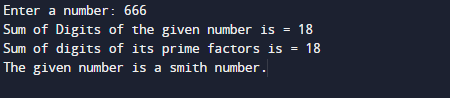
Smith Number

Not a Smith number.

In the above program, we have first declared and initialized a set variables required in the program.

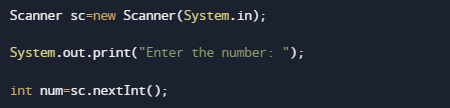
After that take a value of number from user and store that number into variable “number”.as shown in image below.

Logic to Find Smith Number

  • Take a number from user and initialize to variable.
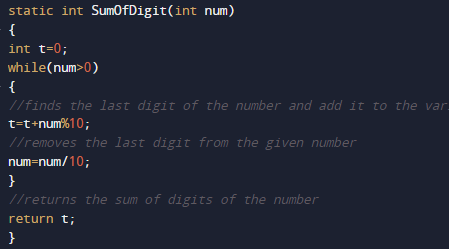
  • And then we find the sum of its digits using “SumOfDigit()” user define Function.

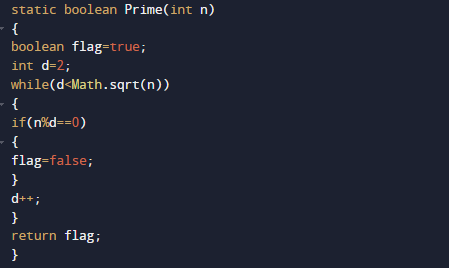
  • After that we will find prime factors of the given number in function Prime(int n).

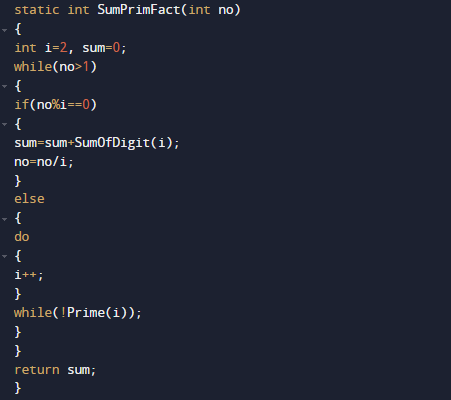
  • Now the sum of digits of its prime factors using “SumPrimFact(int no)”  .

  • At the end we Compare the sum of digits with the sum of digits of prime factors.

If both are equal, then entered  number is a smith.

else, not a smith number.

so in that fashion we find given number is Smith number or not.

Program to check Mystery Number in Java

In this tutorial, we will learn to create a Java Program to check Mystery Number in Java using Java programming.

Prerequisites

Before starting with this tutorial we assume that you are best aware of the following Java programming topics:

  • Java Operators.
  • Basic Input and Output function in Java.
  • Class and Object in Java.
  • Basic Java programming.
  • If-else statements in Java.
  • For loop in Java.
  • User define functions.

Mystery Number are Numbers

A mystery number is a number that lies between (22 to 198), i.e. 198>=N>=22.A number that can be expressed as the sum of two numbers and those two numbers should be the reverse of each other.

Example:  some the example of Mystery Number are:

132 = 93+39
154 = 68 + 86
176 = 79 + 97

Program to check Mystery Number in Java

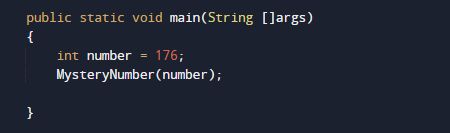
A number will be called a Mystery number if sum of two number and reverse of these two number must be same .We would first declared and initialized the required variables. Next, we would prompt user to input the value. Later we will find Mystery Number.

Output

Mystery Number 176.

In the above program, we have first declared and initialized a set variables required in the program.

Find Mystery Number

  • take a Number and initialize to number variable .
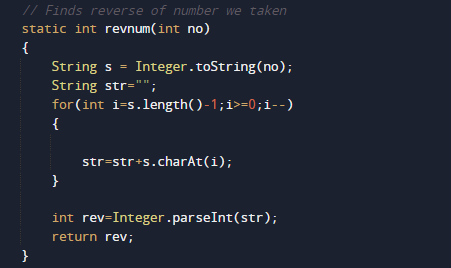
  • Then Convert the number into String.
  • And now reverse the String .
  • Again, convert string to integer ,as shown in the image below.

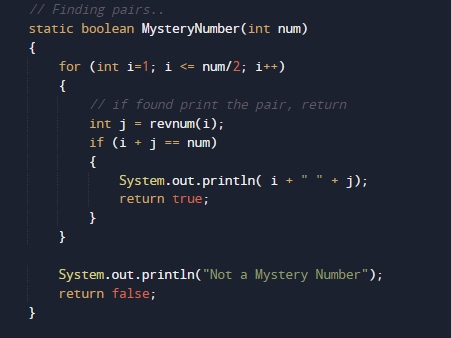
  • Find the pair of numbers.

  • Compare the sum with the given number.

If the sum and the given number are equal, the number is a mystery.


Else its not a mystery number.

We have implemented the above a Java program that checks if the given number is a mystery number or not.

Program to check Bouncy Number in Java

In this tutorial, we will learn to create a Java Program to check Bouncy Number in Java  using Java programming.

Prerequisites

Before starting with this tutorial we assume that you are best aware of the following Java programming topics:

  • Java Operators.
  • Basic Input and Output function in Java.
  • Class and Object in Java.
  • Basic Java programming. Basic Java programming.
  • If-else statements in Java.
  • For loop in Java.

Let’s understand first what is increasing and decreasing numbers before what is a Bouncy Number.

Increasing Number 

Increasing number are number their value increases from left-to-right and no digit in right is smaller to its left it is called an increasing number.

example 234.

Decreasing Number

Decreasing number are number their value decrees from left-to-right and no digit in right is greater to its left it is called an decreasing number.

example 654.

Bouncy Number

A positive integer that is nor in increasing and nor in decreasing order is called a “bouncy number”

example. 165349

Program to check Bouncy Number in Java

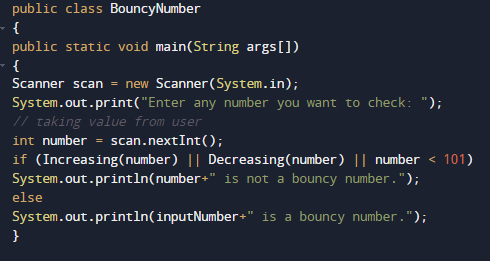
In this program we will learn to create a program to check Given number is Bouncy Number or not. We would first declared and initialized the required variables. Next, we would prompt user to input a number and later we will find it is bouncy or not.Lets gave a look at the program.

Output

Bouncy Number

Not a Bouncy Number

In the above program, we have first declared and initialized a set variables required in the program.

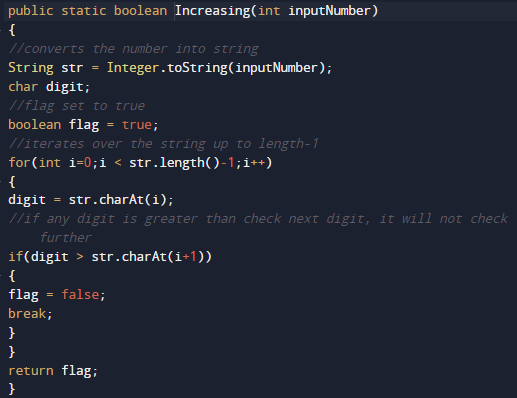
Declaring a  method Increasing(). It will checks the given number present in Increasing order or not.

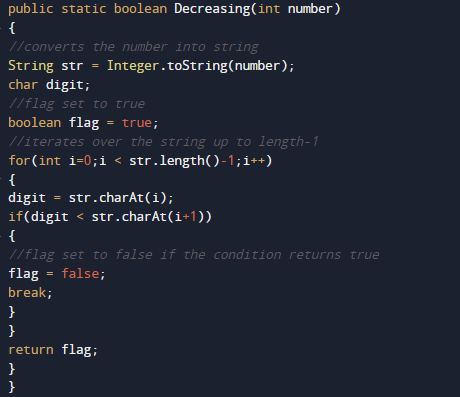
Similarly another method  named Decreasing()  it will gives a number in present in Decreasing order or not.

After that we check if number not in Increasing order or nor in decreasing order or less than < 101 if any condition became true then the number is nit Bouncy number else number is Bouncy number.

So we can say that given number is Bouncy or not.

Program to check Krishnamurthy Number In Java

In this tutorial, we will learn to create a Java Program to check Krishnamurthy Numbers in Java using Java programming.

Prerequisites

Before starting with this tutorial we assume that you are best aware of the following Java programming topics:

  • Java Operators.
  • Basic Input and Output function in Java.
  • Class and Object in Java.
  • Basic Java programming.
  • If-else statements in Java.
  • For loop in Java.

What is  Krishnamurthy Number?

A number is called a to be Krishnamurthy if sum  of  its factorial digits is equal to that number is a Krishnamurthy number.

Example:suppose a number 145 then factors of 145 are => 5! + 4! + !1 = 1 + 24 + 120 = 145. So 145 is a Krishnamurthy.

Program to check Krishnamurthy Number In Java

In this program we will find given number is a Krishnamurthy number or not in using java programming. We would first declared and initialized the required variables. Next, we would prompt user to input the a number.Later we  find number is Krishnamurthy number or not let’s have a look at the code.

Output

Krishnamurthy Number

Not a Krishnamurthy Number.

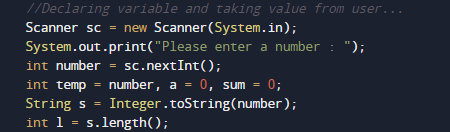
In the above program, we have first declared and initialized a set variables required in the program.

  • number= it will hold entered number.
  • temp= it will hold temporary original number.
  • sum= it will hold sum of values.
  • l= it will hold length of a number.

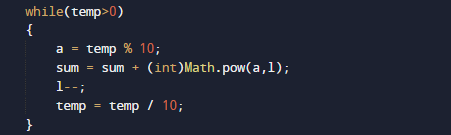
And after that we calculate the value Sum of its digits powered with their respective position is equal to the original number or not using Math.pow(a,l). inbuilt function.

So the given number called Krishnamurthy  if “sum of its digits powered with their respective position are equal” with the number.

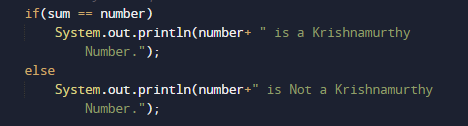
Number is Krishnamurthy if condition True if not then number is not a Krishnamurthynumber.

Program to check Evil Number In Java

In this tutorial, we will learn to create a Java Program to check Evil Numbers in Java using Java programming.

Prerequisites

Before starting with this tutorial we assume that you are best aware of the following Java programming topics:

  • Java Operators.
  • Basic Input and Output function in Java.
  • Class and Object in Java.
  • Basic Java programming.
  • If-else statements in Java.
  • For loop in Java.

What is Evil Number?

So a Number called an Evil number if it has an even number of 1’s and they are binary equivalent i.e in pair of 2,4 and so on…

Example: 15 is a Evil number because it has Binary Equivalent of 4 ones: 1111.

Program to check Evil Number In Java

In this  program we will find given number is a Evil number or not in using java programming.We would first declared and initialized the required variables. Next, we would prompt user to input the a number.Later we  find number is Evil number or not let’s have a look at the code.

Output

Evil Number.

Not a Evil Number.

In the above program, we have first declared and initialized a set variables required in the program.

  • number= it will hold entered number.
  • pow= it will provide power of 2 in binary.
  • bin= it will also hold binary result.
  • c= it will count 1 in binary value.

After declaring variables in the next statement user will be prompted to enter a value and  which will be assigned to variable ‘number’.

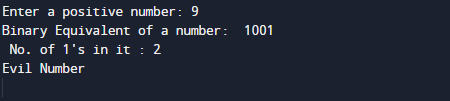
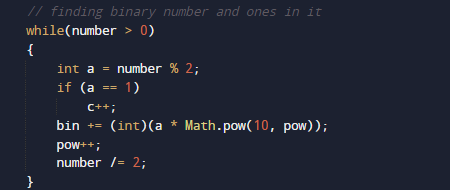
And after that we will find binary of a given number and number of one in binary digit of a number as shown in picture below.

then we will print the Binary value of number and number of one in it

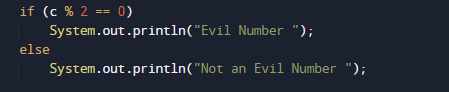
And finally we will check that if number of 1’s in it are present in even or odd.if even number is Evil if not number is not a evil number.

Program to check Duck Number In Java

In this tutorial, we will learn to create a Java Program to check Duck Numbers in Java using Java programming.

Prerequisites

Before starting with this tutorial we assume that you are best aware of the following Java programming topics:

  • Java Operators.
  • Basic Input and Output function in Java.
  • Class and Object in Java.
  • Basic Java programming.
  • If-else statements in Java.
  • For loop in Java.

What is a Duck Number?

Duck number is a special positive number that contains zero in within the number except starting are called a Duck number.

Example:

1202

Program to check Duck Number In Java

In this  program we will find given number is a Evil number or not in using java programming.We would first declared and initialized the required variables. Next, we would prompt user to input the a number.Later we  find number is Evil number or not let’s have a look at the code.

Output

Duck number

Not a Duck Number.

In the above program, we have first declared and initialized a set variables required in the program.

  • numToString  = it will hold entered number.
  • l= it will hold length of a string.
  • ch= it will charters of a string.
  • c= it will count zeros in numbers.

After declaring variables in the next statement user will be prompted to enter a value and  which will be assigned to variable ‘number’.

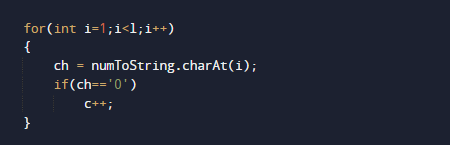
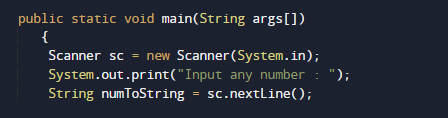
Here we will convert given number into string as shown in picture above after that we declare c,ch and l variables to hold value temporary l for length , c for number of zeros in number and ch for holding character of a string

after that with the help of while loop we search number of zeros in a string if zeros are present in string increase the counter  value of c to one(c++).

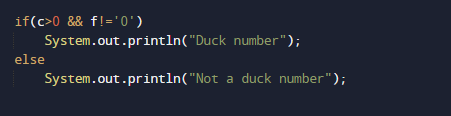
and finally we will check if if statement that the value of c is grater than zero and zero is not present at first location

if both condition satisfied then the number is Duck number and if not then it not a duck number.

Program to check Buzz Number In Java

In this tutorial, we will learn to create a Java Program to check Buzz Numbers in Java using Java programming.

Prerequisites

Before starting with this tutorial we assume that you are best aware of the following Java programming topics:

  • Java Operators.
  • Basic Input and Output function in Java.
  • Class and Object in Java.
  • Basic Java programming.
  • If-else statements in Java.
  • For loop in Java.

What is Buzz Number?

A Buzz number is a Special number that either ends with 7 or divisible by 7.

Example: Buzz Number

  • The number 14 is Buzz number because it is divisible by 7.
  • The number 17 is Buzz number because it ends with 7.
  • And  number 13 is not a Buzz number because it is neither end with 7 nor divisible by 7.

Program to check Buzz Number In Java

In this program we will find given number is a Buzz number or not in using java programming. We would first declared and initialized the required variables. Next, we would prompt user to input the a number.Later we  find number is Buzz number or not let’s have a look at the code.

Output

Buzz Number.

Not a Buzz Number

In the above program, we have first declared and initialized a set variables required in the program.

  • number= it will hold entered number.

After declaring variables in the next statement user will be prompted to enter a value and  which will be assigned to variable ‘number’.

Steps to find Buzz number.

  1. first take a number from user at run time.
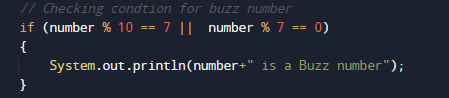
  2. then we going to find the last digit within the number and it is divisible by 7 or not. If at least one of condition satisfied then the given number is a “Buzz Number”.

Else print “number is not a buzz number”.

In other words, a number is called  Buzz if it ends with 7 or is divisible by 7.

Program to check Sphenic Number in Java

In this tutorial, we will learn to create a Java Program to check Sphenic Numbers in Java using Java programming.

Prerequisites

Before starting with this tutorial we assume that you are best aware of the following Java programming topics:

  • Java Operators.
  • Basic Input and Output function in Java.
  • Class and Object in Java.
  • Basic Java programming.
  • If-else statements in Java.
  • For loop in Java.

What is Sphenic Number ?

Sphenic numbers are numbers which have exactly 3 factors,and all are prime number.
Example :Some of the Sphenic Number are

Number => 30: has Factor’s 2,3,5 and product of 2*3*5= 30 So it is a Sphenic number.
and             42: has Factor’s 2,3,7 and product of 2*3*7= 42 So it is not  a Sphenic number.
15: has Factor’s 3,5 and product of 3*5= 15  So it is not a Sphenic number.
Number > 70: has Factor’s 1,7,10 and product of 1*7*10= 70  So it is a Sphenic number.

Program to check Sphenic Number in Java.

In this program we will find given number is a Sphenic number or not in using java programming. We would first declared and initialized the required variables. Next, we would prompt user to input  a number.Later we  find number is Sphenic number or not let’s have a look at the code.

Output

Sphenic Number

Not a Sphenic Number

In the above program, we have first declared and initialized a set variables required in the program.

  • number= it will hold entered number.

After declaring variables in the next statement user will be prompted to enter a value and  which will be assigned to variable ‘number’.

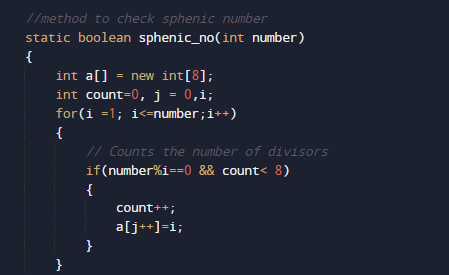
So, first of all we will try to find the number is having  three digits (except 1) are prime or not.and product of these number gives the number or not .

we can say that  number n is a sphenic if  n=a x b x c (a,b, and c are three distinct prime numbers and their product are n)

After all these condition we can say a number follow all this is a Sphenic number.

Program to check Emirp Number in Java

In this tutorial, we will learn to create a Java Program to check Emirp Numbers in Java using Java programming.

Prerequisites

Before starting with this tutorial we assume that you are best aware of the following Java programming topics:

  • Java Operators.
  • Basic Input and Output function in Java.
  • Class and Object in Java.
  • Basic Java programming.
  • If-else statements in Java.
  • For loop in Java.

What is Emirp Number?

A prime number 79 means that divisible by 1 and itself only. On overturn the number, we get a number 97 which is also a prime number. so we can say that number 79 and 97 both are prime numbers.

Example:

“17  = 71” both are Prime number so they are Emirp number

“19  = 91 ” Both are not Prime number so they are notEmirp number.

“79  = 97”  both are prime number so they are Emirp number.

Program to check Emirp Number in Java

In this our program we will find given number is a Emirp number or not in using java programming. We would first declared and initialized the required variables. Next, we would prompt user to input the a number.Later we  find number is Emirp  number or not let’s have a look at the code.

Output

Emirp Number.

Not a Emirp Number.

In the above program, we have first declared and initialized a set variables required in the program.

  • number= it will hold entered number.

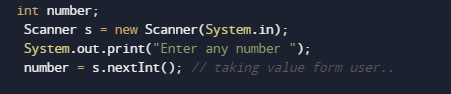
After declaring variables in the next statement user will be prompted to enter a value and  which will be assigned to variable ‘number’.

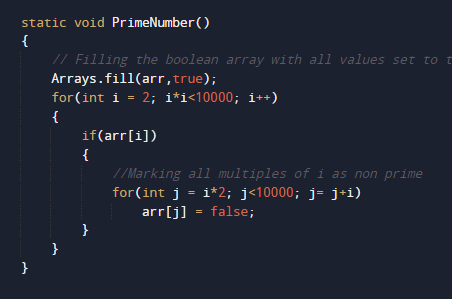
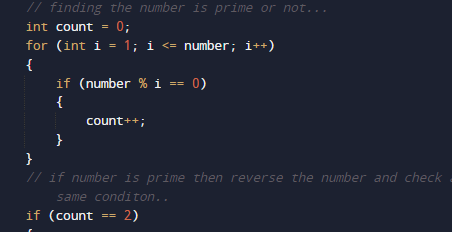
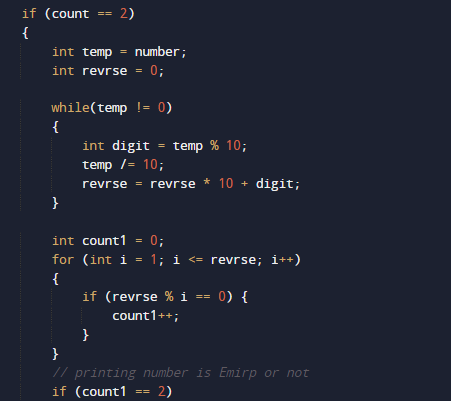
Logic to find Emirp Number

  • take a number form user and  initialize the number (number) to a variable
  • First of all find given number is number prime or not.

  • If not, break the execution and exit.

  • If number is a prime,then find the reverse (reverse ) of the given number (number).as shown in image below.

  • Now reverse  the number (reverse) is prime or not as shown above.

  • If not, print number (n) is not emirp.

Program to check Autobiographical Number in Java

In this tutorial, we will learn to create a Java Program to check Autobiographical Numbers in Java using Java programming.

Prerequisites

Before starting with this tutorial we assume that you are best aware of the following Java programming topics:

  • Java Operators.
  • Basic Input and Output function in Java.
  • Class and Object in Java.
  • Basic Java programming.
  • If-else statements in Java.
  • For loop in Java.

What is  Autobiographical Number

A number is called An autobiographical number if first digit counts how many zeroes are there in number,and second digit counts number of twos init, and so on. Basically, it counts the frequency of digits from 0 to 9.

Example: 1210 it has 1 zero, 2 ones, 1 two, and 0 threes.

Another way we can calculate autobiographical number find the sum of all digits (2+1+2+0+0) i.e.5, and after that counts the number of digits of the given number i.e. 5.if both are equal. Hence, the number 21200 is an autobiographical number.

Program to check Autobiographical Number in Java

In this our program we will find given number is a Autobiographical number or not in using java programming. We would first declared and initialized the required variables. Next, we would prompt user to input the a number.Later we  find number is Autobiographical number or not let’s have a look at the code.

Output

Autobiographical number

Not a Autobiographical number