Category Archives: Java Programs

Java Programs

Java Program to Convert Celsius to Fahrenheit

In this tutorial, we will learn to create a Java program that will Convert Celsius to Fahrenheit   using Java programming.

Prerequisites

Before starting with this tutorial we assume that you are best aware of the following Java programming topics:

  • Java Operators.
  • Basic Input and Output
  • Class and Object.
  • Basic Java programming.

What Is Temperature ?

Temperature is a quantity that measured the freezing and boiling point of Water. Which is measured in different scales in different regions like Celsius in India and Fahrenheit in European Countries.
In Celsius scale, the boiling point of water is 100°C, and the freezing point is at 0°C, while in the Fahrenheit scale the boiling point of water is 212°F and freezing point is at 32°F.

To convert values from Celsius  to Fahrenheit  we will use the following Formula:
f = (c * 9 / 5) + 32 where, F is temperature in Fahrenheit and C is temperature in Celsius.

Java Program to Convert Celsius to Fahrenheit

In this program we will convert temperature from Celsius to Fahrenheit . We would first declared and initialized the required variables. Next, we would prompt user to input the value in Celsius. Later we will Convert the values into Fahrenheit.

Output

Concept to find Centigrade to Fahrenheit.

First of all we will take the value Celsius Temperature in c.
Then using formula we calculate f = (c * 9 / 5) + 32.
Print  Fahrenheit.

In the above program, we have first declared and initialized a set variables required in the program.

  • f = it will hold Fahrenheit value.
  • c= it will hold Celsius value.

And  in the next statement user will be prompted to enter value in Celsius  and  which will be assigned to variable ‘c‘.

After that with the help of  formula we will convert the value in to Fahrenheit .

As you can see in our program, we first take value in Celsius  from user as input. Then convert the value of Celsius into Fahrenheit  using above conversion equation and print the Temperature in Fahrenheit .

Java Program to Convert Binary to HexaDecimal

In this tutorial, we will learn to create a Java program that will Convert Binary to Hexadecimal  using Java programming language.

Prerequisites

Before starting with this tutorial we assume that you are best aware of the following Java programming topics:

  • Java Operators.
  • Basic Input and Output
  • Class and Object.
  • Basic Java programming.
  • Loops.
  • Array.
  • User Define Functions

What Is Binary Number?

Number system where numbers are represented by using only two digits (0 and 1) with a base 2 is called a binary number system.

What Is Hexadecimal Number?

Hexadecimal number system is a  number system that has base as 16 i.e (hexa = 6 and deci = 10).Here  starting 10 value represent decimal number system and afterward start from A ,B to F in the hexadecimal system.Digits of the hexadecimal number system are 1, 2, 3, 4, 5, 6, 7, 8, 9, A, B, C, D, E, F.

Java Program to Convert Binary to Hexadecimal.

In this blog we will create a program that will Convert Binary  to Hexadecimal number system.We would first declared and initialized the required variables.Then we would prompt user to input value in Binary and then we convert into Hexadecimal.

Output

In the above program, we have first declared and initialized a set variables required in the program.

  • hexa = it will hold given binary number.
  • decimal=  User define function.
  • bianry= catch value passing through function calling.
  • i&j= for iteration.
  • Array.
  • rem= hold the remainder.

In the next statement user will be prompt to enter a Binary number which will be stored in variable binary.

Algorithm :

    1. First of all  we take a  binary number from user and convert into a decimal number.
    2. First of all we need to convert the given binary number to decimal number, we extract each digit using the remainder method by dividing by 10.Than by multiplying the number digit with increasing powers of 2(Two).

  1. Process will continues until we reach the last digit  in each iteration.
  2. After getting decimal number, just use for loop to get the desired output.

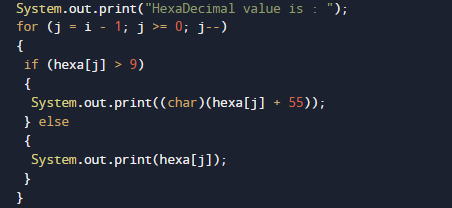
As you can see use above for loop to print required output.

Java Program to Calculate Average Using Arrays

In this tutorial, we will learn to create a Java program that will Calculate Average Using Arrays   using Java programming.

Prerequisites

Before starting with this tutorial we assume that you are best aware of the following Java programming topics:

  • Java Operators.
  • Basic Input and Output
  • Class and Object.
  • Basic Java programming.
  • Array.

What is array?

An array is  a derived Data type that holds a fixed number of values of a single Type. An Array is a collection variable elements  that can store multiple values in a single variable of same type.In Computer Science an array is a data structure, or simply an array, is a data structure consisting of a collection of elements.

Java Program to Calculate Average Using Arrays

In this program we will find average of an array elements. We would first declared and initialized the required variables. Next, we would prompt user to input elements of array .Later we add all the elements and find Average of Array elements.

Output

In the above program, we have first declared and initialized a set variables required in the program.

  • a[] = it will hold entered elements.
  • sum =hold sum of values.
  • i = for iteration.
  • avg= it will hold average of numbers.

First of all we initialize value in array.

After that we will find the length of an array. and value of sum is initialize to zero.

then using for loop we will add all the values of an array in variable sum .To calculate the Average we need to first calculate the sum of all elements in the array.

After that we will add elements of an array.Finally, we calculate the average.

Java Program to Check if An Array Contains a Given Value

In this tutorial, we will learn to create a Java program to Check if An Array Contains a Given Value using Java programming.

Prerequisites

Before starting with this tutorial we assume that you are best aware of the following Java programming topics:

  • Java Operators.
  • Basic Input and Output
  • Class and Object.
  • Basic Java programming.
  • if-else statements.
  • Nested if-else Statements.
  • Java Scanner class.

What is array?

An array is  a derived Data type that holds a fixed number of values of a single Type. An Array is a collection variable elements  that can store multiple values in a single variable of same type.In Computer Science,an array is a data structure, or simply an array, is a data structure consisting of a collection of elements.

Java Program to Check if An Array Contains a Given Value

In this our program we will create a program to Check if An Array Contains a Given Value . We would first declared and initialized the required variables. Next, we would prompt user to input values . Later in program we will to Check if An Array Contains a Given Value.

Output

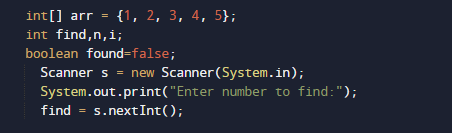
In the above program, we have first declared and initialized a set variables required in the program.

  • arr= it will hold array elements.
  • find= it will hold given value form user.
  • found= it will give us value is found or not.
  • i = for iteration.

And  in the next statement user will be prompted to enter two values and  which will be assigned to variable ‘find‘ .

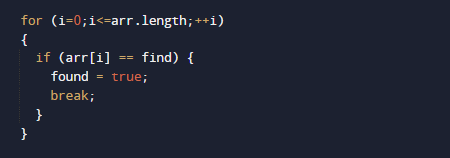
Now, here we use  for loop to iterate through all elements of arr[]  and check if  we find is equal to any element in array or not.

If value is find , we set the value of found variable to true and break the loop.

If not, we move on to the next values in loop. at the end we  print found the value or not .

Java Program to Find Largest and Smallest Number in an Array

In this tutorial, we will learn to create a Java program that will Find Largest and Smallest number in an array using Java programming.

Prerequisites

Before starting with this tutorial we assume that you are best aware of the following Java programming topics:

  • Operators.
  • looping statements.
  • Basic input/output.
  • Basic Java programming
  • For Loop.
  • Array.

What is array?

An Array is a collection variable elements  that can store multiple values in a single variable of same type.In Computer Science,an array is a data structure, or simply an array, is a data structure consisting of a collection of elements.

Java Program to Find Largest and Smallest Number in an Array

In this program we will Find Largest and smallest Array elements. First of all we declared and initialized the required variables. then we would prompt user to input elements of an Array Later we will find largest and Smallest element in an Array.

Output

In the above program, we have first declared and initialized a set variables required in the program.

  • num[] = it will hold entered elements.
  • large =it will hold largest Element.
  • small=it will hold smallest elements.
  • i= for iteration.

In our program, we will use 10 values in an array , after adding these values we will find the
smallest and largest elements of an array.
First of all we declare variables and initialize array with elements and  on variable small and large we will assign the first elements of an array.

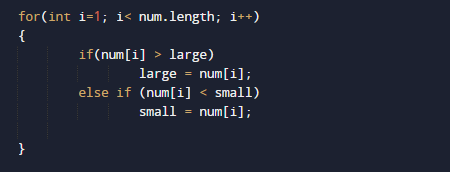
Next within the loop we will check each elements with the large and small variable,

Here we will compare each elements of an Array to large variable which hold the first value of an array , if any element of an array found greater than large  then the value we will swap that value to large. As shown in image below.

This process will continues same as above here we compare condition fro smallest where we check if value of small is greater than any elements of an array we replace that to small. As shown image below

At the end we have largest value in large variable and smallest in small variable.

then finally we will print the result at last as shown above.

Java Program to Sort Array Elements

In this tutorial, we will learn to create a Java program that will Sort Array Elements using Java programming.

Prerequisites

Before starting with this tutorial we assume that you are best aware of the following Java programming topics:

  • Java Operators.
  • Basic Input and Output
  • Class and Object.
  • Basic Java programming.
  • Array in Java.
  • Loops in Java.
  • Nested For loops.

What is array?

An Array is a collection variable (Data)Elements that can store multiple values in a single variable of same type.In Computer Science,an array is a data structure, or simply an array, is a data structure consisting of a collection of elements.

Sorting.

Sorting is a method in which we sort the given array in Ascending order such that elements will be arranged from smallest to largest.

Entered values->   5 , 1 ,  3 , 4 ,2.
Sorted values ->    1 , 2 , 3 , 4 , 5.
Here  you can see elements will be sorted in  a way that the smallest element will appear in First place here in this case which is  1. The biggest element will appear in Last which in this case is 5.

Java Program to Sort Array Elements.

In this program we will sort elements of an Array. We would first declared and initialized the required variables. then  we would prompt user to input elements of array .Later we sort  an Array elements in ascending order.

Output

the above program, we have first declared and initialized a set variables required in the program.

  • a[] = it will hold entered elements.
  • i and j= for iteration.
  • temp= it hold temporary values.

In our program, we initialize  5 values  in an array , after initialize these values we will sort the elements of an array.

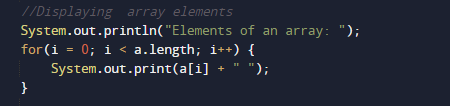
First we displayed the original value of an array.

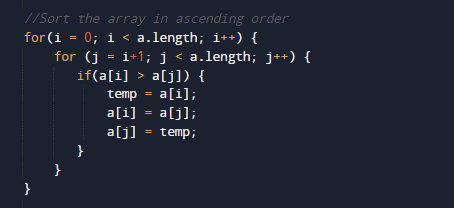
And after that we will use selection sort algorithm for sorting the elements of an array by repeatedly finding the minimum element from unsorted part and putting it at the beginning.

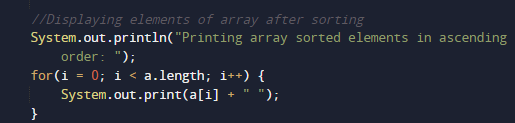
In every iteration sorted value is arranging in a[i] .At the end the value of sorted array will be printed.

In this tutorial, we have learnt to create a Java program that will Sort Array Elements in ascending order.

Java Program to Sort Elements in Lexicographical Order

In this tutorial, we will learn to create a Program that will  Sort Elements in Lexicographical Order using java programming.

Prerequisites

Before starting with this program  we assume that you are best aware of the following Java programming topics:

  • Java Operators.
  • Basic input/output.
  • Basic Java programming.
  • Array and Multidimensional Array.
  • Loops in java.
  • Nested For loop.
  • Class and object in java.

What is Lexicographical Order?.

In Mathematics, the terminology  lexicographic or lexicographical  order is a Alphabetical order or the Dictionary ordered,more generally “elements of a ordered set(ascending order(a-z))”.

What Is Array ?

An Array is a collection of similar data type containing  collection of elements (values or variables), each identified by one Array index value, Array is a data structure that  hold  collection of elements.

Java Program to Sort Elements in Lexicographical Order.

In this program we will sort elements in Lexicographical Order using nested for loop. We would first declared and initialized the required variables. Next, we would initializing array with elements after that we arrange Elements in Lexicographical Order.
Here we takes 4 elements and arrange them in lexicographical order using nested for loop.

Output

In the above program, we have first declared and initialized a set variables required in the program.

  • s = it will holds 4 elements.
  • temp= holds temporary values.
  • i and j= for iterations.

In this  program we will find Lexicographical Order of given elements .first of all in this statement  we will take 4 elements.

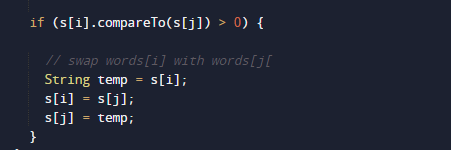
then we apply sorting method to arrange these elements in Lexicographical Order.

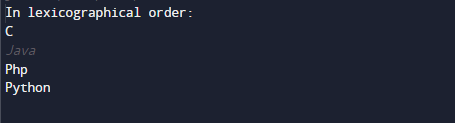
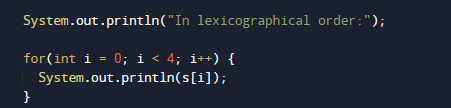
After arraigning elements in Lexicographical Order. then at last we will display the elements that we arranged in Ascending order.

Finally the result will be is in sorted or lexicographical order .
Java Program to Count the Number of Vowels and Consonants in a Sentence

In this tutorial, we will learn to create a Java Program that Count the Number of Vowels and Consonants in a Sentence using Java programming.

Prerequisites

Before starting with this tutorial we assume that you are best aware of the following Java programming topics:

  • Java Operators.
  • Basic Input and Output
  • Class and Object.
  • Basic Java programming.
  • if-else statements.
  • Java Scanner class.

What Is Vowel and consonant?

Vowel :=> Sound that allowing breath to flow out of mouth, without closing any part of the mouth is called as vowel.
Consonant:=> Sound  made by blocking air from flowing out of the mouth with the teeth or throat is called as Consonant.
Example:- As we know  that “A E I O U” are vowels. And renaming alphabets except these 5 vowels are called consonants.

Java Program to Count the Number of Vowels and Consonants in a Sentence

In this our program we will create a Program to Count the Number of Vowels and Consonants in a Sentence . We would first declared and initialized the required variables. Next, we would prompt user to input string . Later in program we will find Number of Vowels and Consonants in a Sentence.

Output

In the above program, we have first declared and initialized a set variables required in the program.

  • strng= it will hold string .
  • i= for itreation.
  • vowel= it will hold vowels counting.
  • conso= it will hold consonants counting.

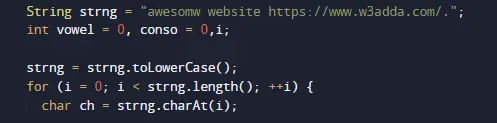
And  in the next statement we will convert into lower case  and break the string into character.

Then with the help of if-else statement we will check the string character is a vowel or consonant, using following logic.

Each character in a string is going to be check whether it’s a vowel or Consonant  we check it belongs to in vowel or consonant. if it vowel we will increment value of vowel and if it not we will increment value of consonant.

At the end in a  program we will show the number or vowel and Consonants present in a string are.

As shown in image above.

Java Program to Find the Frequency of Character in a String

In this tutorial, we will learn to create a Program that will Find the Frequency of Character in a String using java programming.

Prerequisites

Before starting with this program  we assume that you are best aware of the following Java programming topics:

  • Java Operators.
  • Basic input/output.
  • Basic Java programming.
  • Array and Multidimensional Array.
  • Loops in python.
  • String in python.
  • Nested For loop.
  • Class and object.

What Is frequency of occurrence of a character?

Frequency means  to find and count  given  character present in the string. i.e Total number of occurrence of a particular character in a given string.

Java Program to Find the Frequency of Character in a String

In this program we will find frequency of a given character will be calculated.First of all a string and a character to find the frequency of given character is to set.later we will find frequency of a given character in a string.

Output

In the above program, we have first declared and initialized a set variables required in the program.

  • s = it will hold given string.
  • ch = it will hold a finding character.
  • i=  for iteration.
  • freq= it will count total number of occurrence of a character.

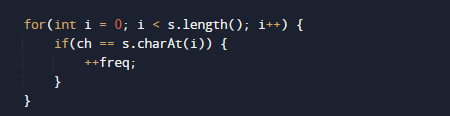
Values of string and a character will be assigned to variable ‘s’ and in ‘ch’ respectively. Now we will loop through the size of  a string using length() function . In each iteration we will compare string to given character to find the occurrence of a character and each matching condition we increase the counter value by  one as shown in below image.

This process  will continue until loop ends , and at last we will print the total number occurrence of a given character.

This is the process  of finding  the frequency of occurrence of a character in a String.

Java Program to Convert String to Date

In this tutorial, we will learn to create a Java program that will Convert String to date   using Java programming.

Prerequisites

Before starting with this tutorial we assume that you are best aware of the following java programming topics:

  • Java Operators.
  • Basic Input and Output
  • Class and Object.
  • Basic Java programming.
  • String.
  • User define Function.

How to convert String to Date in Java?

In this tutorial we will learn is “How to convert String value to Date value” using simple code changes and techniques. The best way is to convert String to Date in java using parse() method.

Java Program to Convert String to Date

In this program we will convert value of “String to Date” . We would first declared and initialized the required variables. Next, we would use inbuilt function to do our task. let have a look at Code.

Ouptut

In above program, we have used the inbuilt format that takes value in string format and returns the value in date format like this “2021-07-13” and returns 2021-07-13.

Java Date-Time API that gives as a  parse() methods that convert the String given value into the Date-Time value format.

Another way to  Convert String to Date

Let us see the  code to convert String to Date in java.

Output

So in this tutorial we have learn how to create a program of java that convert  the value is in string format to date format.
For that we use two different approaches to convert the value of string format to string.As shown in above .that its for this tutorial thank you for watching this blog..

Java Program to Check Whether Given String is a Palindrome

In this tutorial, we will learn to create a Java program that will check Given String is a Palindrome or Not using Java programming.

Prerequisites

Before starting with this tutorial we assume that you are best aware of the following java programming topics:

  • Java Operators.
  • Basic Input and Output
  • Class and Object.
  • Basic Java programming.
  • String.
  • User define Function.

What Is Palindrome of String?

A palindrome  occur’s when a String that reads the same way as backward and forward.

Example : dad , nayan , pop, abcba and  etc…

As you see above all the string either forward or backward  gives the same meaning are called as a Palindrome String.

Java Program to Check Whether Given String is a Palindrome

In this program we will Check Whether Given String is a Palindrome or not. We would first declared and initialized the required variables. Next, we would assign values to the variables . Later we will Find string is palindrome or not.

Output

Palindrome string….

Not a a Palindrome String..

In the above program, we have first declared and initialized a set variables required in the program.

  • s =it will hold given string.
  • revStr= it wil hold revese String.
  • i= for iteration.
  • strnglength = it will hold length of string.

In the first  statement we will assign string to  variable ‘s’.

after this with the help of length() function we find the length of entered string.

Now using loop in we reverse the string and after that we compare this string to original string

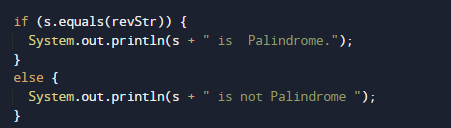
Now we will check  condition for palindrome of a string, which, when read in both forward and backward ways is the same.

If any above condition we checking, the original string to which we reverse and condition became true we will get Palindrome String  and  if condition falls we will get not a palindrome String

Java Program to Compare Two Strings

In this tutorial, we will learn to create a Java program that will Compare Two Strings using Java programming.

Prerequisites

Before starting with this tutorial we assume that you are best aware of the following Java programming topics:

  • Java Operators.
  • Basic Input and Output
  • Class and Object.
  • String.
  • Array.
  • Basic Java programming.

What is string in Java?

In Java language , String is an object that usually represents collection of character values like Characters{‘I’,’N’,’D’,’O’,’R’,’E’} = String{“INDORE”}. An Array is a collection of similar data type elements.

Java Program to Compare Two Strings

In this program we will compare two strings . We would first declared and initialized the required variables. Next, we would assign values to the variables . Later we will Compare string are equal or not.

Output

For Equal.

For not Equal.

In the above program, we have first declared and initialized a set variables required in the program.

  • strng1 = it will hold first String value.
  • strng2 = it will hold Second String value.

And  in the next statement we will compare these two string and if they are equal we print Equal in output and if they  are not equal we will print they are not  equal let have a look at the images below.

First we declare string first and second same as you can see in image below.

then we will check condition in if else statement that if string are equal then we will print equal

then in the next method we will add two different strings and then compare them

in that condition  if else returns false value then we will jump to else condition where we will print string are not equal

As shown in the image above that string are not equal so in this program we check that the given string in variable one and two are equal or not.