Category Archives: Java Programs

Java Programs

Java Program to Find Square Root of a Number

In this tutorial, we will learn to create a Java program to Find square Root of a number using Java programming.

Prerequisites

Before starting with this tutorial we assume that you are best aware of the following Java programming topics:

  • Java Operators.
  • Basic Input and Output
  • Class and Object.
  • Basic Java programming.
  • if-else statements.
  • Switch case.
  • Nested if-else Statements.
  • Java Scanner class.

What Is Square root?

Method of Finding “Square Root” is that numbers are multiplying by itself Twice “6 * 6= 36”. Where a square root of a number on getting multiplied by itself gives the original √36 = 6.
A square root of a number a is a number b such that =a.

Java Program to Find Square Root of a Number

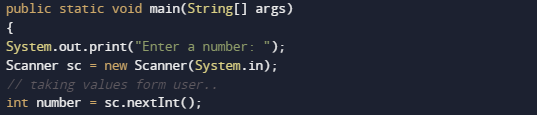
In this our program we will create a program to find “Square Root” of a given number . We would first declared and initialized the required variables. Next, we would prompt user to input value.Later in the program we will find square root.

Output

Square Root

In the above program, we have first declared and initialized a set variables required in the program.

  • number = it will hold  given number.
  • temp= it will hold temporary value of a number
  • sr= it will square root of a number.

We going to use the following formula to find the square root of a number.
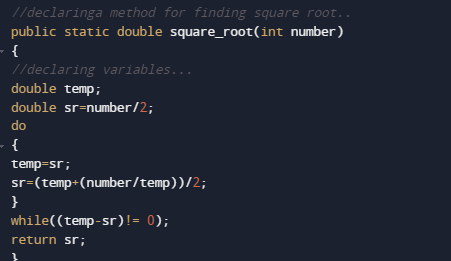
in our program we have created a method square_root(number), in this method we have written a equation for finding the square root of a number.and for equation we have used do while loop.function returns the square root of a given number to main method

Where we will print the required square root of a given number as shown in image.

Java Program to Find HCF of two numbers

Java Program to Find HCF of two numbers

In this tutorial, we will learn to create a Java program that will find the HCF of two numbers using Java programming.

Prerequisites

Before starting with this tutorial we assume that you are best aware of the following Java programming topics:

  • Operators in Java Programming.
  • Basic Input and Output function in Java Programming.
  • Basic Java programming.
  • While loop in Java programming.
  • Arithmetic operations in Java Programming.

Program Description:-

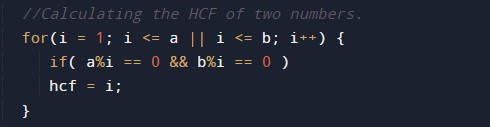
In Java programming, it is possible to take numerical input from the user and find HCF of two numbers with the help of a very small amount of code. The Java programming language has many types of predefined libraries which have support for the function in them with the help of these arithmetic expressions we can find the HCF. The program first takes the two numbers in input then it will find the HCF using the for loop and the conditional statements. At last, we will print the output HCF to the user.

With the help of this program, we can find HCF.

Here,

HCF:- Highest Common Factor.

Program to find HCF of two numbers:-


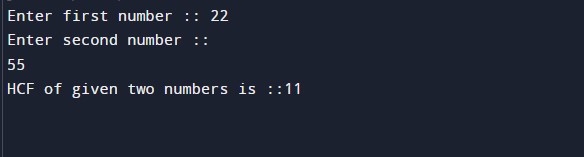
Output:-

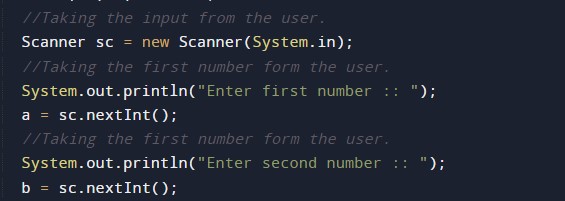
In the above program, we have first initialized the required variable.

  • a = it will hold the integer value1.
  • b = it will hold the integer value2.
  • t = it will hold the integer temporary value.
  • hcf = it will hold the integer value of calculated hcf.

Input number from the user.


Program Logic Code.

Printing output

Java Program to Find Students Grades using Switch Case

In this tutorial, we will learn to create a Java program to Find students Grade using Switch Case using Java programming.

Prerequisites

Before starting with this tutorial we assume that you are best aware of the following Java programming topics:

  • Java Operators.
  • Basic Input and Output
  • Class and Object.
  • Basic Java programming.
  • if-else statements.
  • Switch case.
  • Nested if-else Statements.
  • Java Scanner class.

Grade of a Student.

Here we are going to write a Java program to find out students grades using switch case statement. The Table shows the grading system.

       Score                 

                        Grade

       Grade >=90                                                  A
       Grade=80-89                                                  B
       Grade=70-79                                                   C
       Grade=60-69                                                    D
       Grade=50-59                                                     E
        Grade <50                                                      F


Java Program to Find Students Grades using Switch Case

In this our program we will create a program to find Student Grades using Switch Case. We would first declared and initialized the required variables. Next, we would prompt user to input value.Later in the program we will find Garde.

Output

Your Grade

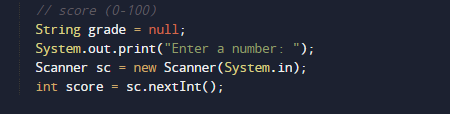
In the above program, we have first declared and initialized a set variables required in the program.

  • score =it will  holds value of score given by user.
  • Grade= it will provide grade of given score.

In the next statement user will be prompted to enter the score then we will find the Grade according to score given bye user.

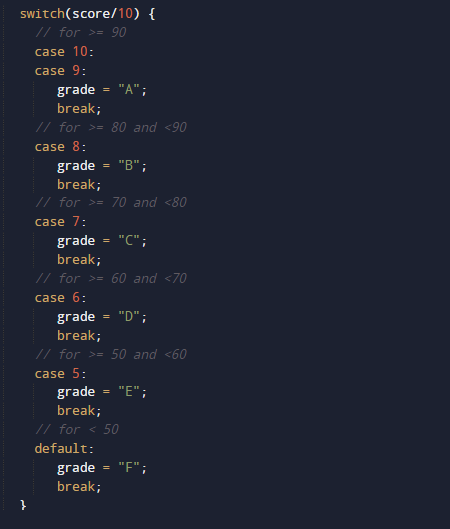
Now,we calculated the grade.Grades must be calculated based on following conditions.
Shown in above table using Switch Case as shown in image below.

In our program, we did not use the break statement. Whenever the condition is satisfied value is returned and the control came back to the main method. and according to return value we will print Grade to given score.

Java Program to Find exponents

In this tutorial, we will learn to create a Java Program to find Exponent using Java programming.

Prerequisites

Before starting with this tutorial we assume that you are best aware of the following Java programming topics:

  • Java Operators.
  • Basic Input and Output function in Java.
  • Class and Object in Java.
  • Basic Java programming.
  • If-else statements in Java.
  • For loop in Java.
  • In-built functions.

Exponent of a Number

Let’s take a value at  base : 2
Now take a value at exponent : 3
So power(Exponent) of any number is basen given as base*base*base (3-times). Here base is called base and 3 is called the exponent.

are some example of exponents.

Java Program to Find exponents

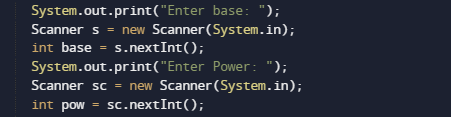
In this program we will find exponent of any given number by user using  loop. We would first declared and initialized the required variables. Next, we would prompt user to input the number and power of number .Then we will find the power of given number.

Output

Note : The above program works only if the Power is a positive integer (number).

In the above program, we have first declared and initialized a set variables required in the program.

  • base = it hold the value of base 
  • pow = it will hold the power.

Let see the logic behind the the program

  • Take value of  “base and exponents(Power)” from user, and put  it in two variables  base and pow respectively.

Here we will to use the “Math.pow(base, pow))” function which is define  in Java standard library.it will take two parameter as a arguments base and power and returns the exponent of value supply to it.

At last print the resultant output as shown in image above.

Create Simple Mortgage Calculator In Java

In this tutorial, we will learn to create a Java Program to Create Simple Mortgage Calculator using Java programming.

Prerequisites

Before starting with this tutorial we assume that you are best aware of the following Java programming topics:

  • Java Operators.
  • Basic Input and Output function in Java.
  • Class and Object in Java.
  • Basic Java programming.
  • If-else statements in Java.
  • For loop in Java.

Mortgage Payment

Know as the amount of money that you need to return to the person,where you have your property mortgaged.

Formula to calculate Mortgage is:

“M = P [{r(1+r)^n}/{(1+r)^n – 1}]”

where
M = Monthly payment
P = principal
r = rate
n = number of payments

Create Simple Mortgage Calculator In Java

In this our program we will create a simple Mortgage Calculator. We would first declared and initialized the required variables. Next, we would prompt user to input value.Later in the program we will find Mortgage.

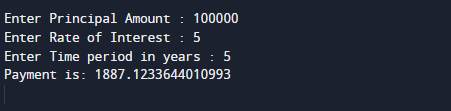
Output

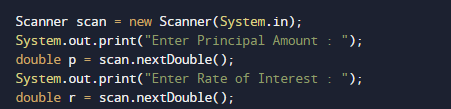
In the above program, we have first declared and initialized a set variables required in the program.

  • p = it will hold value of principal
  • r= it will hold value of rate
  • t= it will hold time in a year.
  • principal= calculate payment of month.

In the next statement user will be prompted to enter the values of p,r and and later we will fine mortgage.

Here we will to use following formula “principal= (p * r) / (1 – Math.pow(1 + r, -t))” and Math.pow() function which is define in Java standard library.it will take two parameter as a arguments p,r and t values supply to it.

After calculating Mortgage value will be stored in  variable principal.

Finally we will print the Mortgage of given values.

Java Program to Find Distance Between 2 Points

In this tutorial, we will learn to create a Java Program to Find Distance between 2 point using Java programming.

Prerequisites

Before starting with this tutorial we assume that you are best aware of the following Java programming topics:

  • Java Operators.
  • Basic Input and Output function in Java.
  • Class and Object in Java.
  • Basic Java programming.
  • If-else statements in Java.
  • For loop in Java.

Distance Between two Points

Using Pythagorean theorem to find the distance between two points (x1, y1) and (x2, y2), all we need are the coordinates in pairs and apply the formula.

Distance Formula:

Distance:- √((x2 – x1)2 + (y2 -y1)2).

Assume :=> We have two points A and B, with coordinates (x1, y1) and (x2, y2) respectively. So their distance  can be represented as AB and it can be calculated as.

The first point (A):- (x1, y1)
Second point (B):- (x2, y2)

Java Program to Find Distance Between 2 Points

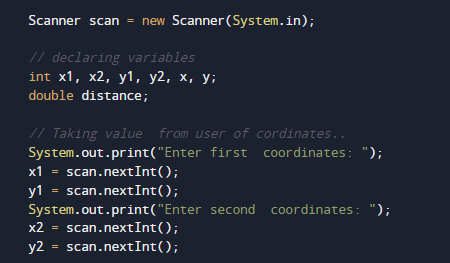
In this our program we will create a program to find Distance Between two points. We would first declared and initialized the required variables. Next, we would prompt user to input value.Later in the program we will find Distance between points.

Output

In the above program, we have first declared and initialized a set variables required in the program.

  • x1 = it will hold value of first coordinates
  • y1 = it will hold value of first coordinates
  • x2 = it will hold value of second coordinates
  • y2 = it will hold value of second coordinates
  • x= it will represent distance.

  • y= it will represent distance.

  • distance= it will display final result.

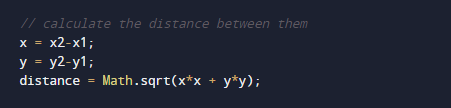
the Formula to find the distance between two points is:

To calculate the distance between two points “(x1,y1) and (x2,y2) or √ ( x )2+( y )2 . All you need is use the coordinates formula shown below.

Here we will to use following formula “ Math.sqrt(x*x+y*y))” and Math.sqrt() function which is define in Java standard library.it will take two parameter as a arguments x and y values supply to it.And in return gives the required output.

As shown in image above.

Java Program to swap two Numbers

Java Program to Swap two Numbers

In this tutorial, we will learn to create a Java program that will Swap Two Numbers in Java programming.

Prerequisites

Before starting with this tutorial, we assume that you are the best aware of the following Java programming topics:

  • Operators in Java Programming.
  • Basic Input and Output function in Java Programming.
  • Basic Java programming.
  • While loop in Java programming.

Program to Swap the Numbers:-

As we all know, Java is a very powerful language. With the help of the Java programming language, we can make many programs. We can perform many input-output operations using Java programming. In today’s tutorial, we take the input numbers from the user. Then we will swap the Numbers with the help of operators in the Java programming language.

With the help of this program, we can swap the Numbers.

Algorithm:-

Program to Swap to Numbers using a third variable:-

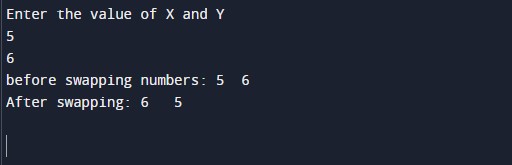
Output:-

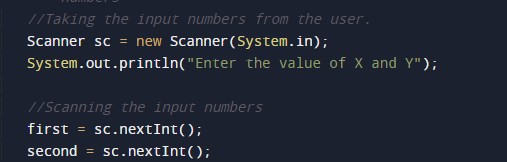
In the above program, we have first initialized the required variable.

  • first= it will hold the integer value.
  • second = it will hold the integer value.
  • flag = it will hold the integer value.

Taking the input number 1 and 2 from the user.

Swapping the numbers.
Printing the output numbers.

Java Program to Calculate Average of 3 Numbers

Java Program to Calculate Average of 3 Numbers

In this tutorial, we will learn to create a Java program that will Calculate the Average of 3 Numbers in Java programming.

Prerequisites

Before starting with this tutorial, we assume that you are the best aware of the following Java programming topics:

  • Operators in Java Programming.
  • Basic Input and Output function in Java Programming.
  • Basic Java programming.
  • Arithmetic operator in Java programming.

What is the average of the numbers?

The average of numbers in mathematics means that all the numbers are added and then the sum of all the numbers is divided by the total number of objects.

It means if there are 4 numbers as follows {2,4,6,8} then the average will be:-

average = 2+4+6+8/4

average = 5.

Algorithm:-

Program to Calculate the average of a Number

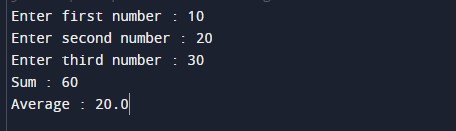
In this program, we will take three numbers in input from the user. Then we will add that number and store it in a variable as a sum. After that, we will divide the sum of those numbers by 3 to find the average. At last, we will print the average of 3 numbers.

With the help of this program, we can find the average of three numbers.

Program code:-

Output:-

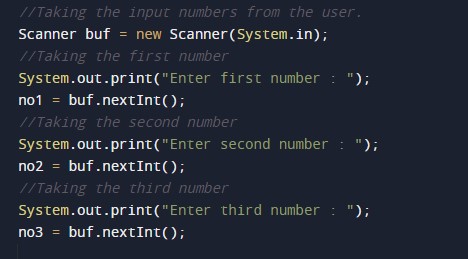
In the above program, we have first initialized the required variable.

  • no1 = it will hold the integer value.
  • no2  = it will hold the integer value.
  • no3  = it will hold the integer value.
  • sum = it will hold the integer value.
  • avg = it will hold the float value.

Taking input numbers from the user to for the average of two numbers.

Calculating the average of those numbers.

Printing output average for that given number.

Java Program to Calculate Average of Two Numbers

Java Program to Calculate Average of Two Numbers

In this tutorial, we will learn to create a Java program that will Calculate the Average of Two Numbers in Java programming.

Prerequisites

Before starting with this tutorial, we assume that you are the best aware of the following Java programming topics:

  • Operators in Java Programming.
  • Basic Input and Output function in Java Programming.
  • Basic Java programming.
  • Arithmetic operator in Java programming.

What is the average of the numbers?

The average of numbers in mathematics means that all the numbers are added and then the sum of all the numbers is divided by the total number of objects.

It means if there are 4 numbers as follows {2,4,6,8} then the average will be:-

average = 2+4+6+8/4

average = 5.

Algorithm:-

Program to Calculate the average of a Number

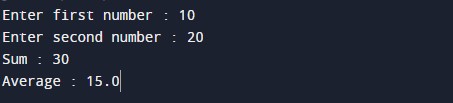
In this program, we will take two numbers in input from the user. Then we will add that number and store it in a variable. After that, we will divide the sum of those numbers by 2 to find the average. At last, we will print the average of two numbers.

With the help of this program, we can find the average of two numbers.

Program code:-

Output:-

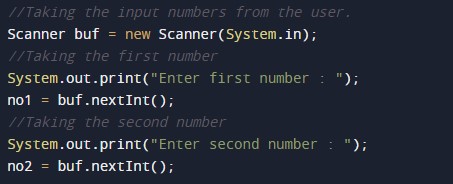
In the above program, we have first initialized the required variable.

  • no1 = it will hold the integer value.
  • no2  = it will hold the integer value.
  • sum = it will hold the integer value.
  • avg = it will hold the float value.

Taking input numbers from the user to for the average of two numbers.

Calculating the average of those numbers.

Printing output average for that given number.

Java Program to Get Current Date/Time

In this tutorial, we will learn to create a Java program that will Print Current Date/Time using Java programming.

Prerequisites

Before starting with this tutorial we assume that you are best aware of the following Java programming topics:

  • Java Operators.
  • Basic Input and Output
  • Class and Object.
  • Basic Java programming.
  • Array.
  • User Define Functions.
  • in-built library functions.

Getting Current Date and Time in Java.

There are so many ways to get current date and time in java. Java provides so many classes that can be used to get current date and time in java.Let’s have a look at some of them.

  1. java.time.Clock class.
  2. java.time.LocalDate class.
  3. java.time.format.DateTimeFormatter class.
  4. java.util.Date class.
  5. java.util.Calendar class.

Java Program to Get Current Date/Time

In this program we will create a program to find Current Date/Time. We would first declared and initialized the required variables.Later we add all the elements and find Current Date/Time.let’s have a look at the code

Output

In the above program, the current date and time is stored in variable current_date using Date() method.

Here how the above program code works:

Here  we use class called Date class which represents the current date and time in Greenwich Mean Time. We can Display time in Indian Standard time also by  adding 5 hours and 30 minutes .This class comes under the import java.util.* package of Java.

As you can see in our program we use in-built function to get Current Date and Time using Date() method which is define in import  java.util.*; package.

First we declare a variable current_date and with the Date() Method we get the current Date/time  of system. and simply

print Current date and time of system by default this function gives value in GMT(Greenwich Mean Time) we can show the value in Indian Standard Time by adding +5.30 in GMT to get Indian time.

Java Program to Print Invert Triangle

In this tutorial, we will learn to create a Java program that will Print Inverted Triangle using Java programming Language.

Prerequisites

Before starting with this tutorial we assume that you are best aware of the following Java programming topics:

  • Java Operators.
  • Basic Input and Output
  • Class and Object.
  • Basic Java programming.
  • Loops in Java.
  • Nested for loop in Java.

Invert Triangle of Star

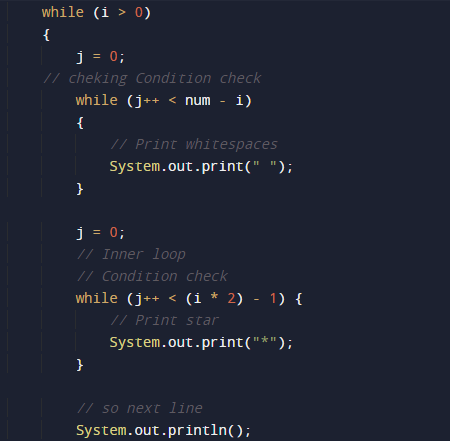
To print Inverted Triangle Star patterns in Java , we will use nested for loops. The outermost loop is responsible for the number of rows in star (*) of Inverted Triangle,whereas inner one  loop will print the required number of stars * in each row.

Java Program to Print Invert Triangle

In this program we will print Inverted Triangle of Star using nested “For” loop and a while loop. We would first declared and initialized the required variables. Then we will create the “Inverted Triangle” of Star using below program.Let’s have a look.

Output

Java Program to Print Invert Triangle

In the above program, we have first declared and initialized a set variables required in the program.

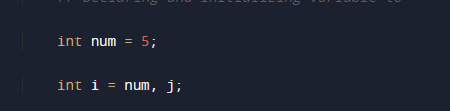
  • num = it will hold size or pyramid
  • i and j= it will use to iterate loops.

Now we going  to run loops

Outermost loop to iterate through a number of rows as initialize . Now,


Run an inner loop from 1 to ‘i-1’

As you can see in the image above ,and again run another inner loop from 1 to rows * 2 – (i × 2 – 1) that will print over desire output.

We had printed reverse pyramid star(*) pattern using the following methods.

Java Program to Convert Fahrenheit to Celsius

In this tutorial, we will learn to create a Java program that will Convert Fahrenheit to Celsius    using Java programming.

Prerequisites

Before starting with this tutorial we assume that you are best aware of the following c programming topics:

  • Java Operators.
  • Basic Input and Output
  • Class and Object.
  • Basic Java programming.
  • Looping statements.

What Is Temperature ?

Temperature is a quantity that is use to measure the freezing and the boiling point of water. Which is measured by different scales in different regions like Celsius and Fahrenheit.
In Celsius scale, the boiling point of water is 100°C, and the freezing point is at 0°C, while in the Fahrenheit scale the boiling point of water is 212°F and freezing point is at 32°F.

Java Program to Convert Fahrenheit to Celsius

In this program we will convert temperature from Fahrenheit to Celsius. We would first declared and initialized the required variables. Next, we would prompt user to input the value in Fahrenheit. Later we will Convert the values into Celsius.

To convert values from Fahrenheit to Celsius we will use following Formula:

C = (F – 32)*(5/9)where, F is temperature in Fahrenheit and C is temperature in Celsius.

Output

Java Program to Convert Fahrenheit to Celsius

Concept to find Fahrenheit to Centigrade.

First of all we will take the value in Fahrenheit temperature.
Then we will calculate c = 5 * (f – 32) / 9.
Print Celsius C.

In the above program, we have first declared and initialized a set variables required in the program.

  • f = it will hold Fahrenheit value.
  • c= it will hold Celsius value.

And  in the next statement user will be prompted to enter value in Fahrenheit and  which will be assigned to variable ‘f’.

After that with the formula we will convert the value of Fahrenheit to Celsius.

As you can see in above program, we first take value in Fahrenheit  as input from user. Then convert the value of Fahrenheit in to Celsius using above conversion equation and print the Temperature in Celsius.