Category Archives: Java Programs

Java Programs

Java Program to Calculate area of rectangle

In this tutorial, we will learn to create a Java program that will Calculate Area of Rectangle using Java programming.

Prerequisites

Before starting with this tutorial we assume that you are best aware of the following Java programming topics:

  • Java Operators.
  • Basic Input and Output
  • Class and Object.
  • Basic Java programming.

What is area of Rectangle?

Area of any Subject(Object) is the size of a surface covered by Subject, Which you can calculate by multiplying the lengthwidth  So Area of Rectangle (area) is the product of  length ‘L’ and width or breadth ‘B’. So, Area of Rectangle = (L × B) square units.

Java Program to Calculate area of rectangle

In this program , we will calculate Area of Rectangle of a given Length and Width .First of all user will be prompted to enter Length and Width and afterword passing these value to function to calculate Area of Rectangle.Lets have look at the program below.

Output

In the above program, we have first declared and initialized a set variables required in the program.

  • length = it will hold entered length.
  • width = it will hold entered width.
  • area=  it will hold the result i.e Area or Rectangle.

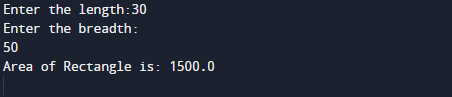
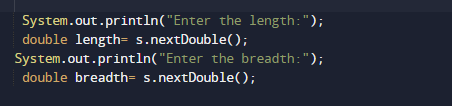
Area of a Rectangle is a product of its length and breadth. So,to calculate the area of a rectangle First we will get length and breadth of the rectangle from user.As shown n image below.
Now, we will calculate their product to get the area or rectangle.

After, calculating their multiplication returns us the area of rectangle or given length and width,

Finally we will print the area of rectangle of given values.


Java Program to Calculate the Area of a Circle

In this tutorial, we will learn to create a Java program that will Calculate Area of Cricle using Java programming.

Prerequisites

Before starting with this tutorial we assume that you are best aware of the following Java programming topics:

  • Java Operators.
  • Basic Input and Output function in Java.
  • Class and Object in Java.
  • Basic Java programming.

What is Area of Circle?

In Mathematics, the space occupied by the circle in a two-dimensional plane enclosed by a circle of radius r so area of circle is = (π r*r). where  π  is a Greek word that represents the constant ratio of the circumference of any circle which is  approx equal to 3.1416.

Java Program to Calculate the Area of a Circle

In this program , we will calculate Area of Circle of a given Radius .First of all user will be prompted to enter Radius and afterword passing these value to formula to calculate Area of Circle.

Output

In the above program, we have first declared and initialized a set variables required in the program.

  • radius = it will hold entered length.
  • area=  it will hold the result i.e Area or Circle.

Area of a Circle is a product  π (which is constant) and Multiplication of radius twice r*r  So,to calculate the area of a Circle.First we will Declare variables as shown in below image.

After that take value of radius from user .

And using known formula of area of circle which is (π r*r) where π is a constant and r is radius

here we use “pi” in place or symbol of “π” which is constant and calculate the area of  circle of  given radius by user.At the end we will calculate area of Circle and print the value area.

Java Program to Make a Simple Calculator Using switch case

In this tutorial, we will learn to create a Java program to make a simple Calculator using Switch case using Java programming.

Prerequisites

Before starting with this tutorial we assume that you are best aware of the following Java programming topics:

  • Java Operators.
  • Basic Input and Output
  • Class and Object.
  • Basic Java programming.
  • if-else statements.
  • Switch case.
  • Nested if-else Statements.
  • Java Scanner class.

What is calculator?

Calculator is a electronic device that is used to performing arithmetic operations on numbers.The Calculators  do  Addition, Subtraction,Multiplication, and Division… and function like that.

Java Program to Make a Simple Calculator Using switch case

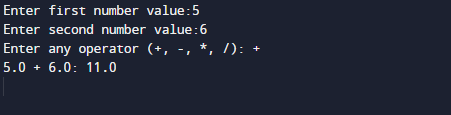
In this our program we will create a small calculator using switch case . We would first declared and initialized the required variables. Next, we would prompt user to input the two values . Later in the program we will ask a operator and values to perform that particular operation in our program.

Output

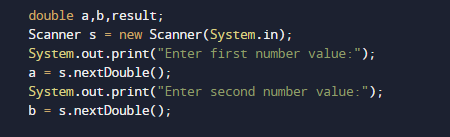
In the above program, we have first declared and initialized a set variables required in the program.

  • a= it will hold First value.
  • b= it will hold second value.
  • opt=it will hold operator value.

And  in the next statement user will be prompted to enter two values and  which will be assigned to variable ‘a‘ and ‘b‘ respectively.

And after taking the values form user we will ask to input symbol to perform following tasks.

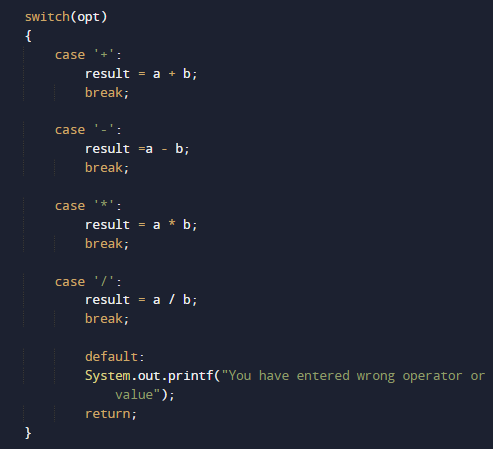
After taking both the values of variable and opt we will pass the value of opt to switch case to Calculate values

The above  statements compute the addition of two numbers and print the output.

Finally, with the break statement compiler ends the execution of program at switch statement.And we can perform different operation given different different operators and different values in our program as shown above in our program.

Java Program to Display Factors of a Number

In this tutorial, we will learn to create a Java program that will Display Factors of a Number   using Java programming.

Prerequisites

Before starting with this tutorial we assume that you are best aware of the following Java programming topics:

  • Java Operators.
  • Basic Input and Output
  • Class and Object.
  • Basic Java programming.
  • Java Loops.
  • If-else Statements.

What Is Factor of  a Number?

Factors:=>Factors of a number are that numbers that divide the number completely and remainder of divisor is equal to zero.
Example:- Let say the numbers= 1, 2, 3, 4, 6 and 12  divides the number 12 completely so they are called the factor of 12.

Java Program to Display Factors of a Number

In our program we will Find factors of a given Number.Firstly we declare required header file and variable and also initiates required values in variable. Next we take value from user and find all possible factors of a number.

Output

In our program  we will take a positive integer value from user by prompting user and with the help of loop and if else statement  we will displays all the positive factors of that number.

In the above program, we have first declared and initialized a set variables required in the program.

  • num = It will hols number given by user.
  • i= for iteration of loop and finding  factor.

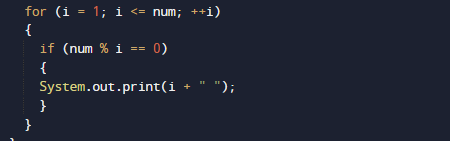
Logic behind finding factors of a given number is we that we run a for loop from 1 to number and within the loop increment the value of  by 1 in each iteration.
The loop structure of for loop should look like this.

Within the for loop  in each iteration we will check the condition for i is a factor of number or not. To find factor we use divisibility of number by using  modulo operator(%).

i.e. if( num % i == 0) then i is a factor of number .
If i is a factor of number then we will print the value of i.So we will get the required factors of given number repeatably repeating this process thought out the loop to get all the factors .

Java Program to Check Armstrong Number

In this tutorial, we will learn to create a Java program that will Check Armstrong Number   using Java programming.

Prerequisites

Before starting with this tutorial we assume that you are best aware of the following Java programming topics:

  • Java Operators.
  • Basic Input and Output
  • Class and Object.
  • Basic Java programming.
  • Loops.
  • If-else statement.

What Is Armstrong Number?

A number is called An Armstrong  is a number in which the sum of the cube of the individual digits in number  is equal to the number itself. For example 0, 1, 153, 370, 371 and 407 are the Armstrong numbers. Let’s try to understand why 153 is an Armstrong number.

407 = ((4*4*4)+(0*0*0)+(7*7*7) )

407 =( 64 + 0 + 343)

407 = 407 (So this is an Armstrong number.)

Similarly, Let’s take number 370 and understand why 370 is an Armstrong number.

370=(3*3*3+7*7*7+0*0*0)

370=(27+343+0)

370=370.(So this is a Armstrong number.)

Java Program to Check Armstrong Number

In this program we will find whether a given three digit number is Armstrong number or not using while loop. We would first declared and initialized the required variables. Next, we would prompt user to input a three digit number. Later we will find given no is Armstrong number or not.

Output

Armstrong Number..

Not a Armstrong Number.

In the above program, we have first declared and initialized a set variables required in the program.

  • no = take given number by user.
  • numb= to copy original no.
  • temp= for holding remainder
  • armno= for result.

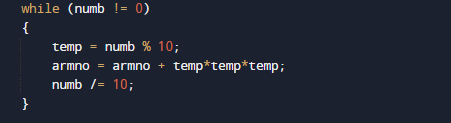
Here we created a program in which we find a three digit number is a Armstrong number or not. First we copy the original no to numb variable and then with the help of while loop iterate loop until we reach the last value or given no.

And in loop we break the number’s  last digit and multiply this number three time itself and store in armno variable and after that we break  numb to two digit no with (/) operator and copy the new two digit number in our armno variable and repeat this process to last number

then we compare the given number and armno is equal it to the given no if they are equal

then the number is Armstrong number else the given number is not a Armstrong number.

Java Program to Check Whether a Number is Prime or Not

In this tutorial, we will learn to create a Java program that will Check Whether a Number is Prime or not using Java programming.

Prerequisites

Before starting with this tutorial we assume that you are best aware of the following Java programming topics:

  • Java Operators.
  • Basic Input and Output
  • Class and Object.
  • Basic Java programming.
  • If-else Statements.
  • Loop in Java.

What Is Prime number?

Any positive Number which is bigger than 1 and it can only  divisible by itself and by 1 and it has maximum of factors is two is called as Prime number.Rather we can say that a prime number is a number which only divided by him or 1.

Example:->

primeno

Note : 2  is the only positive(even)  number and smallest integer prime number.

Java Program to Check Whether a Number is Prime or Not

In our program we will find that given number by user is Prime number or not using while loop.
Firstly we declare required header file and variable and also initiates required values in variable. Next we take value from user at run time and then after we will find that the given value is prime number or not.

Output

Prime Number

Not  a Prime Number

In the above program, we have first declared and initialized a set variables required in the program.

  • number = number to hold given value.
  • count = count for number divisibility occurrence.
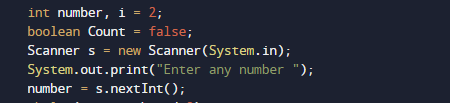
  • i= for iteration of a loop.

In the next statement user will prompted to enter a number which will be assigned to variable ‘number’. Now loop start from 2 to a given number.

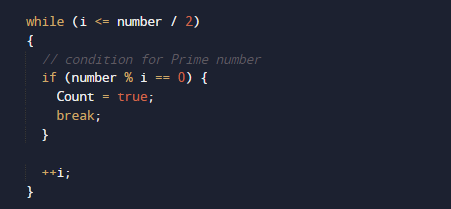
In ever while condition we will check ‘number’ is completely divisible by ‘i’ or not.

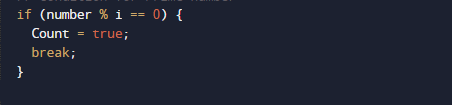
Then we check if number that divides completely we set Count Value to ‘true’.

or else the value of the value of count default is set to False

So , if given number is Prime after the end of loop the value of count=true

however if given number is not the value of count is false


So , we will check that if number is a prime number then the value of count must be true.

Java Program to Calculate the Sum of Natural Numbers

In this tutorial, we will learn to create a Java program that will Calculate the sum of Natural Number using Java programming.

Prerequisites

Before starting with this tutorial we assume that you are best aware of the following Java programming topics:

  • Java Operators.
  • Basic Input and Output
  • Class and Object.
  • Basic Java programming.
  • Loop in Java 
  • While loop For loops.

What Is Natural  Number?

Simply all the counting numbers  {1, 2,3.4…} are commonly called Natural numbers.Natural numbers  include all the positive integers from 1 to infinity.

Java Program to Calculate the Sum of Natural Numbers

In this program we will Create a Java program that will Calculate the sum of Natural Number.Firstly we declare required header file and variable and also initiates required values in variable. Next we take value from user at run time and then after we will find the sum of all natural number to given number.

Output


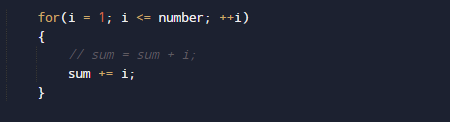
Our  program loops from 1 to the given (10) and adds all numbers to the variable Sum
sum=sum+i. and after calculating value we will print sum or all natural number.

In the above program, we have first declared and initialized a set variables required in the program.

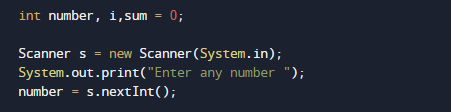
  • number=to take value from user.
  • i =For iteration.
  • sum = for counting sum of numbers.

I

In the above program, we have first declared and initialized a set variables required in the program. In our  program first we will take a value from user.After that we will start loop from 1 to given number.

Within the loop, we add all values in variable Sum .After calculating values  of all natural number between the given numbers natural number.

At last we will Print sum of the all Natural number between 1 to given number.

Java Program to Check Leap Year

In this tutorial, we will learn to create a Java program that will Check Leap Year using Java programming.

Prerequisites

Before starting with this tutorial we assume that you are best aware of the following Java programming topics:

  • Java Operators.
  • Basic Input and Output
  • Class and Object.
  • Basic Java programming.
  • If Else statements
  • Loops.

What is Leap Year?

Logic behind to check whether a year is leap or not is:
Logic of Leap Year:
If the given value is completely divisible by 4, 100 and 400 then it is a leap year.
If the given value is divisible by 4 but not  by 100 then it is a leap year.

Logic for  not a Leap Year:
If the given value is not divisible by 4 then it is not a leap year
If the given value is divisible by 4 and 100 but not divisible by 400 then it is not a leap year.

For example,

  • 1221 is not a leap year.
  • 2000 is a leap year.
  • 1890 is not  a leap year.

Java Program to Check Leap Year

In this program we will check condition for Leap year or not. We would first declared and initialized the required variables. Next, we would prompt user to input the value for Year. Later we will find entered year is leap year or not.

Output

Leap Year.

Not a Leap Year.

In our program, we have first declared and initialized a set variables required in the program.

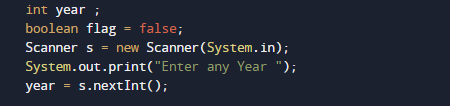
  • year =taking year value from user.
  • Flag= for holding true false value.

First of all  we declare variable and take a value from user to check whether a year is leap or not is

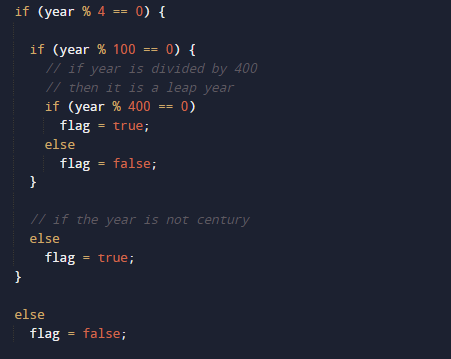
then we check if the given value is completely divisible by 4, 100 and 400 then it is a leap year.

If the given value is divisible by 4 but not  by 100 then it is a leap year. As shown in above .So this the logic behind of finding given year is a leap year or not.if value of flag is true then year is leap year

and is false than the given year is not.

Java Program to Find all Roots of a Quadratic Equation


In this tutorial, we will learn to create a Java program that will Find all Roots of a Quadratic Equation using Java programming.

Prerequisites

Before starting with this tutorial, we assume that you are the best aware of the following Java programming topics:

  • Operators in java programming.
  • Basic input/output in java programming.
  • Basic in java programming.
  • Inbuilt library functions in java programming.

What is a Quadratic Equation?

In particular, it is a second-degree polynomial equation, since it has the greatest power is two.In algebra said a quadratic polynomial, a polynomial of degree 2.

Java Program to Find All Roots of a Quadratic Equation

In this program, we will Find All Roots of a Quadratic Equation. First of all we declare and initialize the required variables. Next, we would prompt the user to input the values of a,b, and c then with the help of sqrt() function we will calculate the first and second root or equations.

Output

In the above program, we have first declared and initialized a set variables required in the program.

  • a,b,c = for holding coordinates
  • root1= shows first root.
  • root2= shows the second root.

In this program first of we prompted user to input values of a,b and c

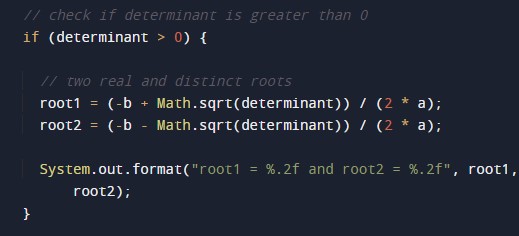
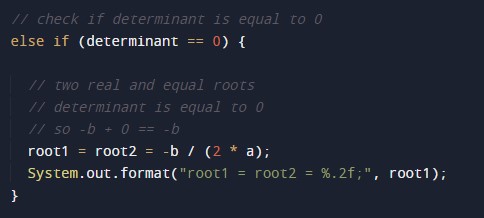
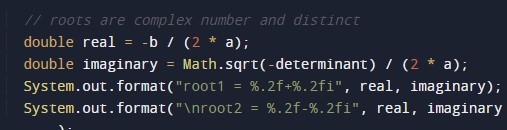
after getting the values of a,b and c and with the help of inbuilt function sqrt() and mathematical formula we know to calculate all Roots of a Quadratic Equation.

whose value define in math.h header file we going to find the Second Order Quadratic Equation.

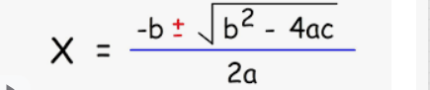
As we know the formula of Quadratic Equation. we will use formula to get first and second root of given coordinates using Java program.

Java Program to Find the Largest Among Three Numbers

In this tutorial, we will learn to create a Java program that will find largest among three numbers  using Java programming.

Prerequisites

Before starting with this tutorial we assume that you are best aware of the following Java programming topics:

  • Java Operators.
  • Basic Input and Output
  • Class and Object.
  • Basic Java programming.
  • If-else Statements.

In Our Program, we going to learn how to creating a program that find the largest element between three numbers. Using nested if-else Statement.

Java Program to Find the Largest Among Three Numbers

In this program we will find Largest among three .We would first declared and initialized the required variables. Next, we would prompt user to input three different values. Later we will find largest among them.

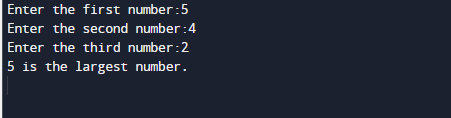
Output

In the above program, we have first declared and initialized a set variables required in the program.

  • a = it will hold First value.
  • b= it will hold second value.
  • c= it will hold third value.

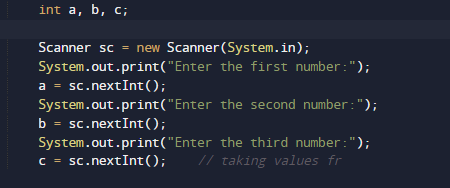
And  in the next statement user will be prompted to enter  different values  and  which will be assigned to variables a,b and c respectively.

Now we will check condition for greatest among three ,

If the above condition returns true value than the value in first variable is greatest among all the values.if it returns false value we will check  second condition for second variables

this statement give true means second has the greatest among all value them and if gives false value we will move to next statement where we check the reaming third variable to other two if it give true i.e the value in third is greatest

else provided values is either equal of false.

Java Program to Check Whether an Alphabet is Vowel or Consonant

Java Program to Check Whether an Alphabet is Vowel or Consonant

In this tutorial, we will learn to create a Java program that check whether the  entered alphabet by the user is a vowel or a consonant using Java programming.

Prerequisites

Before starting with this tutorial, we assume that you are the best aware of the following Java programming topics:

  • Operators in Java programming.
  • Condition statement in Java programming.
  • Logical operator in Java programming.
  • Basic input/output in Java programming.
  • Basic in Java programming.

What Is Vowel and consonant?

Vowel :=> Sound that allowing breath to flow out of mouth, without closing any part of the mouth is called as vowel.
Consonant:=> Sound  made by blocking air from flowing out of the mouth with the teeth or throat is called as Consonant.

Example

As we know A E I O U are called vowels. And renaming alphabets except these 5 vowels are called consonants.

Program to Check the given value is Vowel or consonant.

So here we creating a program in which we will find the given character is vowel or consonant.
As we know a,e,i,o,u are only vowel and rest are consonant.So simply we will check these and if given character belongs to them  then it is a vowel  and if not its consonant simple isn’t it .let’s have a look at program.

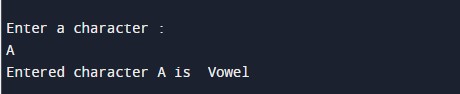
Output

Note: Here we assumes that the user will enter an alphabet. If not so then non-alphabetic character, it displays the character is neither a vowel nor a consonant.

In the above program, we have first declared a variables required in the program.

  • ch= hold given character.

First of all user prompted to enter any character which will be assign in ch variable.

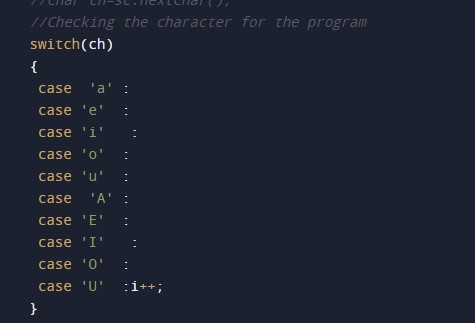
Then with the help of if-else statement we will check the inputted character is a vowel or consonant, using following logic

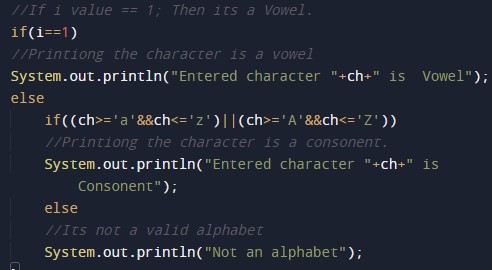
As user inputs any character we will check whether it’s a vowel both in lower-case and upper-case condition we check if  belongs to in vowel or consonant. if it is vowel we will show following message.If a character doesn’t belong to this condition then it is consonant ,

and if  doesn’t meet any of them vowel and consonant it might be a digit or a special symbol.

So in this tutorial we have learn to find given character is vowel or consonant.

Java Program to Generate Multiplication Table

Java Program to Generate Multiplication Table

In this tutorial, we will learn to create a Java program that will generate a Multiplication Table using Java programming.

Prerequisites

Before starting with this tutorial, we assume that you are the best aware of the following Java programming topics:

  • Operators in Java Programming.
  • Basic Input and Output function in Java Programming.
  • Basic Java programming.
  • Conditional Statements in Java programming.
  • Arithmetic operations in Java Programming.

Program that will generate the multiplication table:- 

In today’s program, we will take input in number format. Secondly, we will generate a Multiplication Table with the help of a small program. The numbers are the most useful terminology in any programming language. For number/arithmetic manipulation in Java programming, there are many predefined functions available.

With the help of this program, we can take input and will Generate the Multiplication Table.

Algorithm:-

Program:-

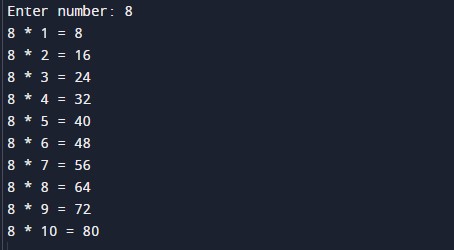
Output:-

In the above program, we have first initialized the required variable.

  • no = it will hold the input number value from the user.
  • i  = it will hold the integer value.

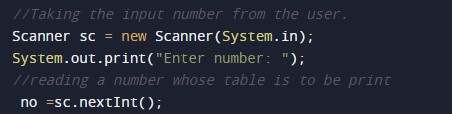
Taking input numbers from the user.

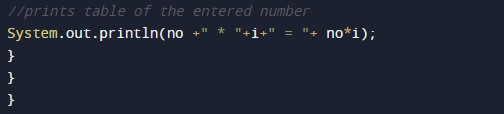
Calculating the table of given numbers using a for loop.