Category Archives: C++ Tutorial

C++ Variable Types

C++ Variable Types

In C++, every variable we declare has specific type associated with it, type of a variable allows us to determines the size of memory space required to store value, the range of values it can hold; and the set of operations that can be performed on it. Variables can also be categorized based on their data type.

In C++, we can have following basic types of variable –

int :- These type of variables are used to store whole numbers.

char :- These type of variables are used to store single character.

bool :- These type of variables are used to store the truth values, which can be either True or False.

double :- These type of variables are used to store numbers that contain a decimal component (Double-precision).

float :- These type of variables are used to store numbers that contain a decimal component (Single-precision)

C++ Variable Scope

C++ Variable Scope

What Is Variable Scope?

Scope defines the region of visibility or availability for a variable, out of which we can not reference that variable. In C++, variable declared inside main() function can not be accessed outside the main() function. Scope of a variable is limited to the curly braces containing it, if you try to access that variable outside those curly braces then you will get compilation error. In C++, variables can be of following two types based on their scope.

  • Global Variables
  • Local Variables

C++ Global Variable

Global variables can be accessed at any point throughout the program, and can be used in any function. There is single copy of the global variable is available. Global variables are defined outside of all the functions, usually on top of the main() function.

Example:-

Output:-

cpp_global_variable

C++ Local Variable

Variable declared inside a function or block of code are called local variables. They can be accessed only inside that function or block of code. Local variables are not available outside the function it is defined in.

Example:-

Output:-

cpp_local_variable

Note :- A program can have same name for local and global variables but local variable overrides the value.

C++ Variables

C++ Variables

What are Variables?

A Variable is an identifier used to refer to the memory location in computer memory that holds a value for that variable, this value can be changed during the execution of the program. When you create a variable in C++, this means you are allocating some space in the memory for that variable. The size of the memory block allocated and the type of the value it holds is completely dependent upon the type of variable.

Rules for naming a variable in C++

Constant and variable names cannot contain whitespace characters, mathematical symbols, arrows, private-use (or invalid) Unicode code points, or line- and box-drawing characters. Naming a variable in C++ Programming is an important task and must follow some rules, listed below –

  • Variable names can consist of letters and alphabets.
  • Keywords are not allowed to use as a variable name.
  • Blank spaces are not allowed in the variable name.
  • The first character of the variable should always be an alphabet and cannot be a digit.
  • Variable names are case sensitive i.e. UPPER and lower case are significant.
  • Special characters like #, $ are not allowed except the underscore.
  • Mathematical symbols, arrows, Unicode code points are not allowed.

Recommendation :- Variable name must be readable and should be relative to its purpose.

Declaring Variables In C++

In C++, variables must be declared before they are used. In C++, variables are declared using the data type followed by a variable name that you want to declare.

Syntax:-

or

Example:-

Here is an example of declaring an integer, which we’ve called counter. (Note the semicolon at the end of the line; that is how your compiler separates one program statement from another.)

This statement means we’re declaring some space for a variable called counter, which will be used to store integer data. Note that we must specify the type of data that a variable will store.

Declaring multiple variable

In C++, it is possible to declare multiple variables of same type in a single statement separated by commas, with a single type annotation as following-

Syntax:-

Example:

Variable assignment In C++

The assignment operator (=) is used to assign values to a variable, the operand in the left side of the assignment operator (=) indicates the name of the variable and the operand in the right side of the assignment operator (=) indicates the value to be stored in that variable.

Example:-

Output:-

Initializing Variable In C++

In C++, it is possible to declare and assign some initial value to a variable in single statement.

Syntax:-

Example:-

Multiple assignments In C++

In C++, it is possible assign multiple variables the same value in a single statement as following-

Example:-

C++ Identifiers

C++ Identifiers

In C++, an identifiers is a name given to program elements such as variables, array, class and functions etc. An identifier is a sequence of letters, digits, and underscores, the first character of which can not be a digit. Following rules must be kept in mind while naming an identifier.

  • The first character must be an alphabet (uppercase or lowercase) or can be an underscore.
  • An identifier can not start with a digit.
  • All succeeding characters must be alphabets or digits.
  • No special characters like !, @, #, $, % or punctuation symbols is allowed except the underscore”_”.
  • No two successive underscores are allowed.
  • Keywords can not be used as identifiers.

Note :- C++ is a case-sensitive programming language, which means “Abc” and “abc” are not the same.

C++ Keywords

C++ Keywords

In C++, there are is a set of reserved words that you cannot use as an identifier. These words are known as “reserved words” or “Keywords”. Keywords are standard identifiers and their functions is predefined by the compiler. We cannot use keywords as variable names, class names, or method names, or as any other identifier.

Below is list of available keywords in C++ programming Language –

asm else new this
auto enum operator throw
bool explicit private true
break export protected try
case extern public typedef
catch false register typeid
char float reinterpret_cast typename
class for return union
const friend short unsigned
const_cast goto signed using
continue if sizeof virtual
default inline static void
delete int static_cast volatile
do long struct wchar_t
double mutable switch while
dynamic_cast namespace template

In addition to above, following are also reserved words in C++

And bitor not_eq xor
and_eq compl or xor_eq
bitand not or_eq

C++ Operators

C++ Operators

An operator is a special symbol that is used to carry out some specific operation on its operand. In C++, we have rich set of built in operators to carry out different type of operations. There are operators for assignment, arithmetic operations, logical operations and comparison operations etc. Operators can be used with many types of variables or constants, but some of the operators are restricted to work on specific data types. Most operators are binary, meaning they take two operands, but a few are unary and only take one operand.

Type of operators in C++

In C++, we have following types of operators available –

  • Assignment Operators
  • Arithmetic Operators
  • Increment and Decrement Operators
  • Relational Operators
  • Logical Operators
  • Conditional Operators
  • Bitwise Operators
  • Special Operators

C++ Assignment Operators

Assignment operators are used to assign value to a variable, you can assign a variable value or the result of an arithmetical expression.

C++ Assignment operators
Operator Description Expression
= Assignment Operator
a=b
+= add and assign a+=b is equivalent to a=a+b
-= subtract and assign a-=b is equivalent to a=a-b
*= multiply and assign a*=b is equivalent to a=a*b
/= divide and assign a/=b is equivalent to a=a/b
%= mod and assign a%=b is equivalent to a=a%b
<<= Left shift AND assign a<<=5 is equivalent to a=a<<5
>>= Right shift AND assign a>>=5 is equivalent to a=a>>5
&= Bitwise AND assign a&=5 is equivalent to a=a&5
^= Bitwise exclusive OR and assign a^=5 is equivalent to a=a^5
|= Bitwise inclusive OR and assign a|=5 is equivalent to a=a|5

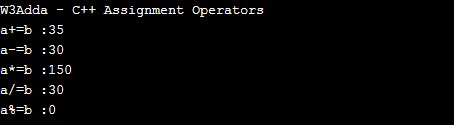
Example:-

Output:-

cpp_assignment_operators

C++ Arithmetic Operators

Arithmetic Operators are used to perform arithmetic operations like addition, subtraction, multiplication, division, %modulus, exponent, etc. Let variable a holds 20 and variable b holds 10, then −

C++ Arithmetic operators
Operator Name Description Example
+ Addition Addition of given operands
a+b returns 30
- Subtraction Subtraction of second operand from first a-b returns 10
* Multiply Multiplication of given operands a*b returns 200
/ Division Returns Quotient after division
a/b returns 2
% Modulus Returns Remainder after division a%b returns 0

Example:-

Output:-

cpp_arithmetic_operators

C++ Increment and Decrement Operators (post and pre)

In C ++, ++ and — are know as increment and decrement operators respectively. These are unary operators it means they works on single operand. ++ adds 1 to operand and — subtracts 1 to operand respectively. When ++ is used as prefix(like: ++i), ++i will increment the value of i and then return it but, if ++ is used as postfix(like: i++), operator will return the value of operand first and then only increment it.

Operator Example Description
++ [prefix] ++a The value of a after increment
++ [postfix] a++ The value of a before increment
— [prefix] –a The value of a after decrement
— [postfix] a– The value of a before decrement

C++ Comparison (Relational) Operators

Comparison Operators are used evaluate a comparison between two operands. The result of a comparison operation is a Boolean value that can only be true or false. Comparison Operators are also referred as relational operators.

Let variable a holds 20 and variable b holds 10, then −

C++ Relational operators
Operator Description Example
> greater than a>b returns TRUE
< Less than a<b returns FALSE
>= greater than or equal to a>=b returns TRUE
<= less than or equal to a<=b returns FALSE
== is equal to a==b returns FALSE
!= not equal to a!=b returns TRUE

Example:-

Output:-

cpp_relational_operators

C++ Logical Operators

Logical operators are used to combine expressions with conditional statements using logical (AND,OR,NOT) operators, which results in true or false. Let variable a holds true or 1 and variable b holds false or 0, then −

C++ Logical operators
Operator Name Description Example
&& Logical AND return true if all expression are true (a && b) returns false
|| Logical OR return true if any expression is true (a || b) returns true
! Logical NOT return complement of expression !a returns false

C++ Conditional operator ( ? : )

In C++, conditional operator is considered as short hand for if-else statement. Conditional operator is also called as “Ternary Operator”.

Syntax:

If condition is true the expression will return result1, if it is not it will return result2.

Example:-

Output:-

C++ Bitwise Operators

Bitwise operator are used to perform bit level operation over its operand.

Let A = 60; and B = 13;

Binary equivalent

A = 0011 1100

B = 0000 1101

Operator Meaning Example Description
& Binary AND (A & B) It returns 12 which is 0000 1100
| Binary OR (A | B) It returns 12 which is 0000 1100
^ Binary XOR (A ^ B) It returns 49 which is 0011 0001
~ Ones Complement (~A ) It returns -60 which is 1100 0011
<< shift left A << 2 It returns 240 which is 1111 0000
>> shift right A >> 2 It returns 15 which is 0000 1111

sizeof() Operator

It returns the size of its operand’s data type in bytes.

Example:

This will assign the value 1 to a because char is a one-byte long data type.

Comma operator ( , )

The comma operator (,) allows us to separate two or more expressions that are included where only one expression is expected. When the set of expressions has to be evaluated for a value, only the rightmost expression is considered.

For example, the following code:

  • first assign the value 3 to j
  • assign j+2 to variable i.

At the end, variable i would contain the value 5 while variable j would contain value 3.

AddressOf ( & )

Returns the address of an variable.

Example:

Pointer ( * )

Pointer to a variable.

Example:

C++ Operators Precedence

Operator precedence defines the order in which given mathematical expression is evaluated. When an expression includes multiple operators then each of the single part of given expression is evaluated in a certain order following some rules defined as per operator precedence. Operator with higher precedence is evaluated first and operator with lowest precedence is evaluated at last.

C++ Operator Associativity

Operators with same precedence follows operator associativity defined for its operator group. In C++, operators can either follow left-associative, right-associative or have no associativity. Operators with left-associative are evaluated from the left to right, operators with right-associative are evaluated from right to the left and operators with no associativity, does not follow any predefined order.

Following is C++ operator precedence table with their respective associativity –

Operator Precedence in C++ (Highest to Lowest)
Category Operator Associativity
Postfix () [] -> . ++ – – Left to right
Unary + – ! ~ ++ – – (type)* & sizeof Right to left
Multiplicative * / % Left to right
Additive + – Left to right
Shift << >> Left to right
Relational < <= > >= Left to right
Equality == != Left to right
Bitwise AND & Left to right
Bitwise XOR ^ Left to right
Bitwise OR | Left to right
Logical AND && Left to right
Logical OR || Left to right
Conditional ?: Right to left
Assignment = += -= *= /= %=>>= <<= &= ^= |= Right to left
Comma , Left to right

C++ Type Conversion

C++ Type Conversion

C++ is a strong-typed language, which mean have associated data type with a variable before it is being used in program. Type conversion is basically way to convert an expression of a given type into another type. When a variable is converted into a different type, the compiler basically treats the variable as of the new data type. In C++, there are two types of type conversion –

Type of Conversion

  • implicit conversion
  • explicit conversion

Implicit Conversion

In implicit or automatic conversion compiler will automatically change one type of data into another. For instance, if you assign an integer value to a floating-point variable, the compiler will insert code to convert the int to a float.

Example:-

Here value of 'a' has been promoted from short to int and we have not had to specify any type-casting operator. implicit conversions affect fundamental data types. Typecasting should always be used in right order (low to higher datatype).Typecasting in wrong places may result in loss of precision, which the compiler can signal with a warning. for example like for instance truncating a float when typecasting to an int.This can be avoided with an explicit conversion. Below is the right order for numerical conversion.

short int -> int -> unsigned int ->long int -> unsigned long int -> float -> double -> long double

Explicit Conversion

It allows you to make this type conversion explicit, or to force it when it wouldn’t normally happen.To perform type casting, put the desired type including modifiers (like double) inside parentheses to the left of the variable or constant you want to cast. In C++, there are two ways we can perform generic type casting –

Syntax 1:-

Example:-

Syntax 2:-

Example:-

C++ Type Casting

C++ Type Casting

C++ is a strong-typed language, which mean have associated data type with a variable before it is being used in program. Conversion of an expression of a given type into another type is called as type casting. Type Casting is a mechanism which enables a variable of one datatype to be converted to another datatype. When a variable is typecast into a different type, the compiler basically treats the variable as of the new data type.

Type of casting

  • implicit or automatic
  • explicit or given

Implicit Casting

In implicit or automatic casting compiler will automatically change one type of data into another. For instance, if you assign an integer value to a floating-point variable, the compiler will insert code to convert the int to a float.

Example:-

Here value of 'a' has been promoted from short to int and we have not had to specify any type-casting operator. implicit conversions affect fundamental data types. Typecasting should always be used in right order (low to higher datatype).Typecasting in wrong places may result in loss of precision, which the compiler can signal with a warning. for example like for instance truncating a float when typecasting to an int.This can be avoided with an explicit conversion. Below is the right order for numerical conversion.

short int -> int -> unsigned int ->long int -> unsigned long int -> float -> double -> long double

Explicit Casting

Casting allows you to make this type conversion explicit, or to force it when it wouldn’t normally happen.To perform type casting, put the desired type including modifiers (like double) inside parentheses to the left of the variable or constant you want to cast. In C++, there are two ways we can perform generic type casting –

Syntax 1:-

Example:-

Syntax 2:-

Example:-

In addition to traditional type-casting there are four other type casting operators available in C++, which can be specifically used when working with classes and objects.

dynamic_cast :- The dynamic_cast performs runt-ime type cast and ensure the validity of the result on cast. If the cast operation fails ,then the expression will evaluates to null value. The dynamic_cast is used with pointers and references to classes (or with void*).

Syntax:-

static_cast :- The static_cast alter the constness behavior of an object, either to be set or to be removed.

The static_cast operator performs casting of pointers to related classes. It can not only perform conversion from derived class to its base, but also from a base class to its derived.

Syntax:-

reinterpret_cast :- The reinterpret_cast cast a pointer to any other type of pointer. It can also perform casting from pointer to an integer type and vice versa.

Syntax:-

const_cast :- The static_cast alter the constness behavior of an object, either to be set or to be removed.

Syntax:-

C++ Data Types

C++ Data Types

Variables are used to represent reserved memory locations that is used to store values, when we create a variable we are a suppose to allocate some memory space for that variable. C++ is a statically typed programming language. This means that variables always have a specific type and that type cannot change. Every variable have data type associated to it, data type for a variable defines –

  • The amount of memory space allocated for variables.
  • A data type specifies the possible values for variables.
  • The operations that can be performed on variables.

C++ has following built-in data types –

  • Numbers
  • Boolean
  • Characters
  • Void

C++ Numbers:- The Number data type is used to hold the numeric values. C++ supports following numerical data types –

C++ int:- Integers are used to store whole numbers. C++ supports several integer types, varying internal sizes for storing signed and unsigned integers. Integers can be declared using int keyword.

Syntax:-

Example:-

Type Storage size Value range
int 2 or 4 bytes -32,768 to 32,767 or -2,147,483,648 to 2,147,483,647
unsigned int 2 or 4 bytes 0 to 65,535 or 0 to 4,294,967,295
short 2 bytes -32,768 to 32,767
unsigned short 2 bytes 0 to 65,535
long 4 bytes -2,147,483,648 to 2,147,483,647
unsigned long 4 bytes 0 to 4,294,967,295

C++ float:- A Float type is used to store numbers that contain a decimal component (real numbers). In C++, float is used to represent a 32-bit floating-point number and numbers with smaller decimal points. An uninitialized float has default value of 0.0. Float can be declared using float keyword.

Syntax:-

Example:-

Type Storage size Value range Precision
float 4 byte 1.2E-38 to 3.4E+38 6 decimal places

C++ double:- In C++, double is used to represent a 64-bit floating-point number and numbers with larger decimal points. An uninitialized double has default value of 0.0. Double can be declared using double keyword.

Syntax:-

Example:-

Type Storage size Value range Precision
double 8 byte 2.3E-308 to 1.7E+308 15 decimal places
long double 10 byte 3.4E-4932 to 1.1E+4932 19 decimal places

C++ Boolean:- The Boolean data type is used to represent the truth values, which can be either True or False. Boolean are commonly used in decision making statements. Boolean can be declared using bool keyword.

Syntax:-

Example:-

C++ Characters:- The character data type is used to hold the single literal. Character are declared char keyword.

Syntax:-

Example:-

Type Storage size Value range
char 1 byte -128 to 127 or 0 to 255
unsigned char 1 byte 0 to 255
signed char 1 byte -128 to 127

C++ void :- The void type means no values. It can not be used with variable declaration.It is usually used with function to specify its return type or its arguments.

Example:

User defined type declaration using typedef

In C++, you are allowed to create new data type. But it is usually created using existing data type with another identifier.This user defined data type identifier can later be used to declare variables. In short its purpose is to redefine the name of an existing data type.

Syntax:-

Example:-

Now we can use number identifier instead of int to declare integer variable.

Enum Data Type

This is an user defined data type having finite set of enumeration constants or aliases.

Syntax:-

Example:-

C++ Character Set

C++ Character Set

In C++, character set is a set of all valid characters that can be used in a C++ Program. Characters set is used to specify the characters or symbols recognized by the language. Character set is a set of all valid characters that can be used to form words, numbers and expression’s in source programs. The source character set is consist of the characters used for the source program text, while the execution character set is the set of characters used during the execution of the program. It is not necessary that source character set match and execution character set are same.

C++ character set, includes following characters –

Letters:- A-Z, a-z

The 26 lowercase Roman characters:

The 26 uppercase Roman characters:

Digits:- 0-9

The 10 decimal digits:

Special Symbols :- Space + – ∗ ⁄ ^ \ ( ) [ ] { } = != < > . ′ ″ $ , ; : % ! & _ # <= >= @

The graphic characters:

White Spaces :- Blank space, Horizontal tab (→), Carriage return (↵), Newline, Form feed

Space( ),Horizontal tab (\t) , Carriage return(\v), New line(\n) , form feed (\f)

Other Characters :- C++ can process any of the 256 ASCII characters as data or as literals.

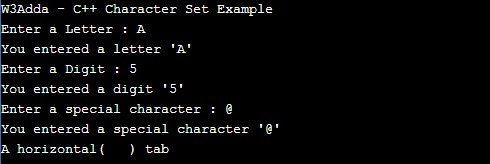
Example:-

Output:-

cpp_character_set_example

C++ Hello World Program

C++ Hello World Program

The “Hello world!” program is a simplest program that will display some text on the screen. The “Hello world!” program is a simple yet complete program for beginners that illustrates the basic syntax of any programming language. The “Hello world!” program gives you a way to test systems and programming environment. This tutorial will guide you through writing a basic “Hello, World” program in C++ Programming.

Step 1:- Create a file called “helloworld.cpp” using a text editor program of your choice. The .cpp file extension is used to specify a C++ Program file.

Step 2:- Let’s open the “helloworld.cpp” file that we created, and put the following line of code in it and save it.

Let’s understand each and every part of the above program.

1. Comments – This is comment statements being used to provide information about the program we created.

2. #include<iostream> – This is a preprocessor statement that tells the compiler to include iostream header file. This header file contains common input/output functions being used in our C++ Program.

3. using namespace std; – This statement is used to specify a common namespace for program entities. The namespace is like a common space where program elements such as classes, structures, functions and variables available. Here std is a namespace name, this tells the compiler to look into that particular region for all the variables, functions, etc.

4. int main() – It is the entry point of our program from where the program execution begins. It is main function of our program and the execution of program begins with this function. The integer (int) is the returns type of value being return by the main () function. In the above program it returns value zero(0) of integer type.

5. cout << “Hello World!”; – The cout is an object belongs to the iostream file and it used to output/display the content between double quotes to the screen.

6. return 0; – This is a return statement that returns value 0 from the main() function which indicates that the execution of main function is successful.

Step 3:- Now, compile and run above the C++ program

Once the program is executed it will print “Hello World!”.

Output:-


C++ Basic Syntax

C++ Basic Syntax

Comments in C++ Program

C++ Comments are a set of statements that are not executed by the C++ compiler. The use of comments makes it easy for humans to understand the source code. Usually comments gives you inside or explanation about the variable, method, class or any statement that exists in source code. The comment statements are ignored during the execution of the program.

C++ Single-line Comments:-

A ‘//’ (double forward slash) is used to specify a single line comment, which extends up to the newline character.

C++ Multi-line Comments:-

If you want to comment multiple lines then you can do it using /* and */, everything in between from /* to */ is ignored by the compiler-

C++ Tokens

In C++, a program is consists of various tokens. In C++, tokens are smallest individual units can either be a keyword, an identifier, a constant, a string literal, or a symbol. In C++, we have five types of tokens as following –

  • Keywords
  • Identifiers
  • Constants
  • Punctuators
  • Operators

C++ Punctuators

In C++, a punctuator is a token used to separate two individual tokens used in a c++ program. It is also called as separators. In C++, we have the brace { and }, parenthesis ( and ), and brackets [ and ], comma (,), semicolon (;), asterisk (*), colon (:), number sign #(hash) as punctuators.

C++ Semicolon

The semicolon is a statement terminator, that is each of the individual statement must be ended with a semicolon. In C++, it is mandatory to put a semicolon (;) at the end of each of the executable statement. Otherwise, the compiler will raise a syntax error.

Curly Braces In C++

In C++, an opening and closing curly braces is used to group all of the statements in a block.

Block in C++

Block is a set of statement grouped together inside opening and closing braces.

Example:-

C++ Special Characters

Character Name Description
// Double slash Marks the beginning of a comment.
# Pound sign Marks the beginning of a preprocessor directive.
< > Opening and closing brackets Encloses a filename when used with the #include directive.
( ) Opening and closing parentheses Used in naming a function, as in int main().
{ } Opening and closing braces Encloses a group of statements, such as the contents of a function.
” “ Opening and closing quotation marks Encloses a string of characters, such as a message that is to be printed on the screen.
; Semicolon Marks the end of a complete programming statement.

Whitespace in C++

Whitespace is a term used to refer all blanks, tabs, newline characters. Whitespace is used to separate one part of statement from another, whitespace is usually ignored by compiler.

Escape sequences in C++

Escape sequence is a special string comprise a backslash (\) followed by a letter or by a combination of digits used to control output on monitor. Escape sequences are typically used to represent actions such as newline,carriage returns,tab movements and non printing characters over the monitor. The following table lists the common ANSI escape sequences and their meaning.

Escape Sequence Represents
\a Bell (alert)
\b Backspace
\f Formfeed
\n New line
\r Carriage return
\t Horizontal tab
\v Vertical tab
\’ Single quotation mark
\ " Double quotation mark
\\ Backslash
\? Literal question mark
\ ooo ASCII character in octal notation
\x hh ASCII character in hexadecimal notation
\x hhhh Unicode character in hexadecimal notation if this escape sequence is used in a wide-character constant or a Unicode string literal.