Category Archives: C++ Tutorial

C++ if else if Statement

C++ if else if Statement

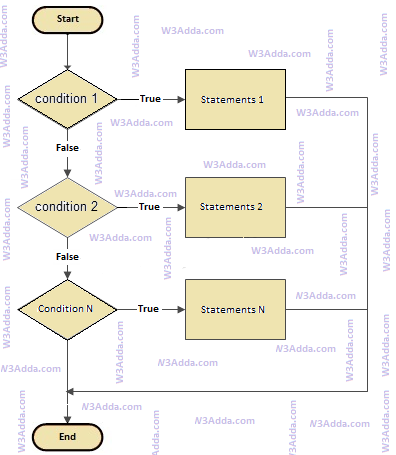
In C++, if..else..if statement allows us add alternative set of test conditions in if..else statement using else-if and single else statements for if condition. In such way if..else..if statement is used to select one among several blocks of code to be executed.

C++ if..else..if Statement Flow Diagram

cplusplus-if-else-if

cplusplus-if-else-if

Syntax:-

Example:-

Output:-

cpp_if_else_if_statement

C++ if else Statement

C++ if else Statement

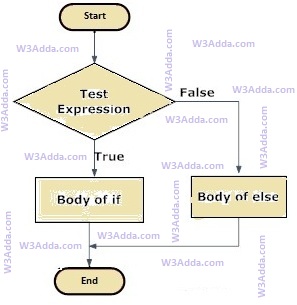
In C++, when we want to execute a block of code when if condition is true and another block of code when if condition is false, In such a case we use if…else statement.

C++ If…else Statement Flow Diagram

rust-if-else-flowchart

Syntax:-

Here, Condition is a Boolean expression that results in either True or False, if it results in True then statements inside if body are executed, if it results in False then statements inside else body are executed.

Example:-

Output:-

cpp_if_else_statement

C++ if Statement

C++ if Statement

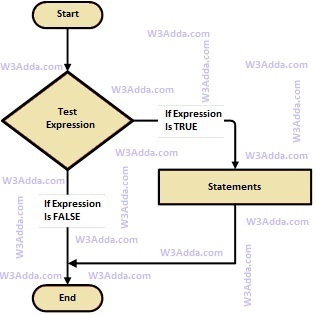
If statement allows a block of code to be executed only when a specified condition is true. An if statement evaluates a boolean expression followed by one or more statements. The given boolean expression results in a boolean value that can only be either true or false.

C++ If Statement Flow Diagram

swift-if-statement

cplusplus-if-statement

Syntax:-

Here, Condition is a Boolean expression that results in either True or False, if it results in True then statements inside if body are executed, if it results in False then execution is skipped from if body.

Example:-

Output:-

cpp_if_statement

C++ Decision Making Statements

C++ Decision Making Statements

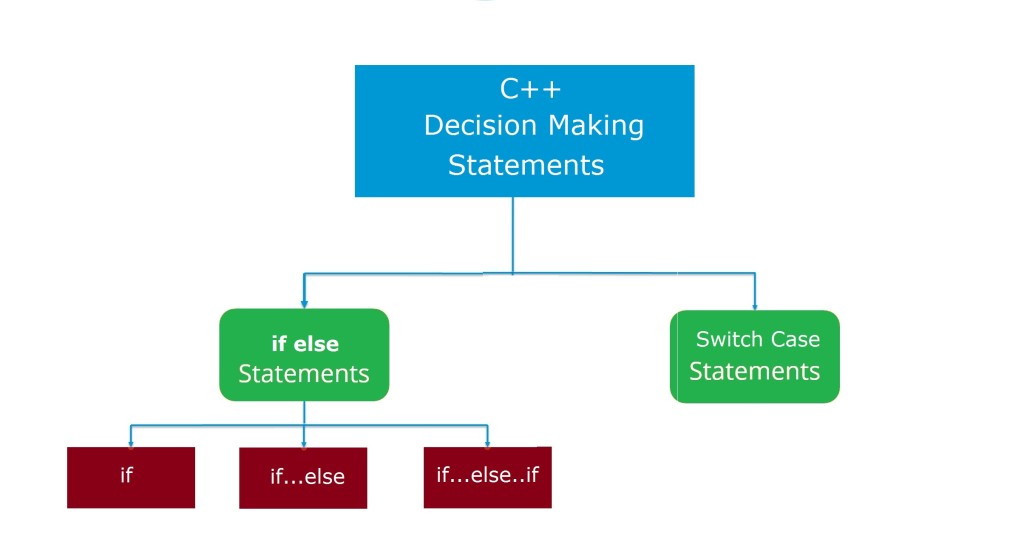
There are case where we want a a block of code to be executed when some condition is satisfied. In C++, we have rich set of Decision Making Statement that enable computer to decide which block of code to be execute based on some conditional choices. Decision making statement statements is also referred to as selection statements. Decision making statement evaluates single or multiple test expressions which results is “TRUE” or “FALSE”. The outcome of the test expression/condition helps to determine which block of statement(s) to executed if the condition is “TRUE” or “FALSE” otherwise.

In C++, we have following decision making statements –

cpp-decision-making-statements

C++ If Statement

If statement allows a block of code to be executed only when a specified condition is true. An if statement evaluates a boolean expression followed by one or more statements. The given boolean expression results in a boolean value that can only be either true or false.

Syntax:-

Here, Condition is a Boolean expression that results in either True or False, if it results in True then statements inside if body are executed, if it results in False then execution is skipped from if body.

C++ If Else Statement

In C++, when we want to execute a block of code when if condition is true and another block of code when if condition is false, In such a case we use if…else statement.

Syntax:-

Here, Condition is a Boolean expression that results in either True or False, if it results in True then statements inside if body are executed, if it results in False then statements inside else body are executed.

C++ If Else If Statement

When we want to add multiple condition checks in single if else statement then by using if else-if else statement we can easily add multiple conditions. In C++, if..else..if statement allows us add alternative set of test conditions in if..else statement using else-if and single else statements for if condition. In such way if..else..if statement is used to select one among several blocks of code to be executed.

Syntax:-

C++ Nested If Statement

In C++, when there is an if statement inside another if statement then it is known as nested if else. Nested if else can also be simplified using C++ Switch Case Statement.

Syntax:-

C++ Switch Case Statement

In C++, switch case statement is simplified form of the C++ Nested if else statement , it helps to avoid long chain of if..else if..else statements. A switch case statement evaluates an expression against multiple cases in order to identify the block of code to be executed.

Syntax:-

C++ Control Flow Statements

C++ Control Flow Statements

Control flow or flow of control is the order in which instructions, statements and function calls being executed or evaluated when a program is running. The control flow statements are also called as Flow Control Statements. In C++, statements inside your code are generally executed sequentially from top to bottom, in the order that they appear. It is not always the case your program statements to be executed straightforward one after another sequentially, you may require to execute or skip certain set of instructions based on condition, jump to another statements, or execute a set of statements repeatedly. In C++, control flow statements are used to alter, redirect, or to control the flow of program execution based on the application logic.

C++ Control Flow Statement Types

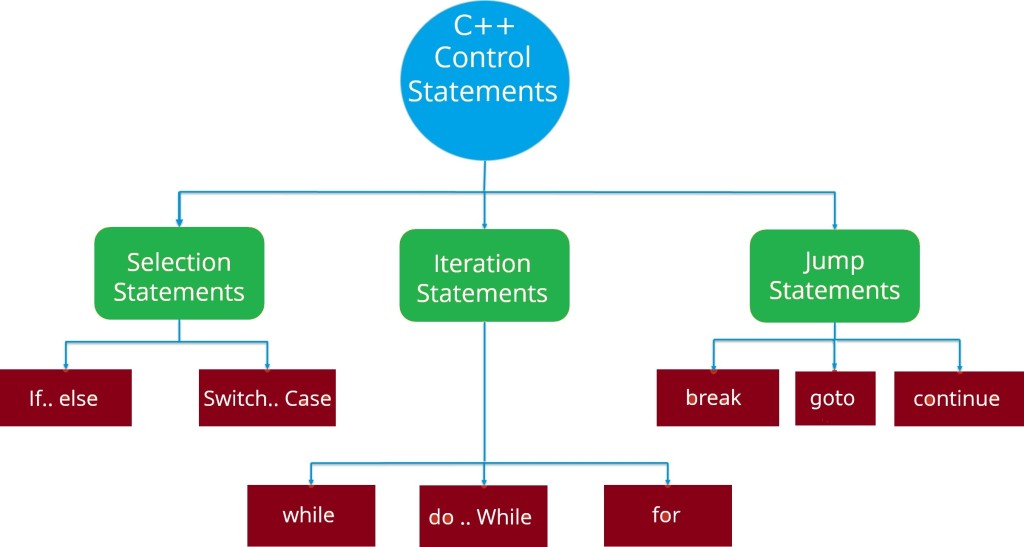
In C++, Control flow statements are mainly categorized in following types –

cpp-control-flow-statements

cpp-control-flow-statements

C++ Selection Statements

In C++, Selection statements allow you to control the flow of the program during run time on the basis of the outcome of an expression or state of a variable. Selection statements are also referred to as Decision making statements. Selection statements evaluates single or multiple test expressions which results in “TRUE” or “FALSE”. The outcome of the test expression/condition helps to determine which block of statement(s) to executed if the condition is “TRUE” or “FALSE” otherwise.

In C++, we have following selection statements –

C++ Iteration Statements

In C++, Iteration statements are used to execute the block of code repeatedly for a specified number of times or until it meets a specified condition. Iteration statements are commonly known as loops or looping statements.

In C++, we have following iteration statements available-

C++ Jump Statements

Jump statements are used to alter or transfer the control to other section or statements in your program from the current section.

In C++, we have following types of jump statements –


All of the above jump statements cause different types of jumps.

C++ Basic Input/Output

C++ Basic Input/Output

Input/Output operation is the way general purpose computer can communicate or interact to the outside world. In C++, I/O occurs in form of a data streams, which basically nothing other than a sequences of bytes. When bytes flow from a input device such as a keyboard, mouse, disk drive, or from a network to main memory, then this sequence of bytes is called as input stream and operation is called as input operation and if bytes flow from main memory to a output device like such as computer screen, a printer, a disk drive, or to a network , then this sequence of bytes is called as output stream and this operation is called as output operation. The C++, comes with an rich set of standard libraries for input/output operations. To perform any of the standard input and output operation we must have to include respective header files in our program.

In C++, we have following header files important for basic I/O operation –

Header File Function and Description
<iostream> It is used to define the cout, cin and cerr objects, which correspond to standard output stream, standard input stream and standard error stream, respectively.
<iomanip> It is used to declare services useful for performing formatted I/O, such as setprecision and setw.
<fstream> It is used to declare services for user-controlled file processing.

There are following standard streams are available to all c++ programs –

  • cin (standard input)
  • cout (standard output)
  • cerr (standard error)
  • clog (standard log)

C++ Standard Output Stream (cout)

The cout is basically a predefined object of ostream class. The cout object in conjunction with stream insertion operator (<<) allows us to send data to standard output device(screen).

Example:-

Output:-

C++ Standard Input Stream (cin)

The cin is basically a predefined object of istream class. The cin object in conjunction with stream extraction operator (>>) allows us to accept/extract data from standard input device(keyboard).

Example:-

Output:-

C++ Standard Error Stream (cerr)

The cerr is also a predefined object of ostream class. The cerr object in conjunction with stream insertion operator (<<) allows us to send un-buffered error messages to standard error device(screen).

Example:-

Output:-

C++ Standard Log Stream (clog)

The clog is also a predefined object of ostream class. The clog object in conjunction with stream insertion operator (<<) allows us to send buffered error messages to standard error device(screen) until the buffer is filled or until the buffer is flushed.

Example:-

Output:-


C++ Comments

C++ Comments

C++ Comments are a set of statements that are not executed by the C++ compiler. The use of comments makes it easy for humans to understand the source code. Usually comments gives you inside or explanation about the variable, method, class or any statement that exists in source code. The comment statements are ignored during the execution of the program.

C++ Single-line Comments:-

A ‘//’ (double forward slash) is used to specify a single line comment, which extends up to the newline character.

Output:-

C++ Multi-line Comments:-

If you want to comment multiple lines then you can do it using /* and */, everything in between from /* to */ is ignored by the compiler-

Output:-

C++ Constants

C++ Constants

Constants refers to immutable values. Constants are basically literals whose values cannot be modified or changed during the execution of program. Constant are also called as Literals. Constant must be initialized when declared as values cannot be assigned it to later. In C++, constants can be of following four basic types –

Integer Constants

An integer constant can only hold integer quantity which is a sequence of whole numbers or digits.

  • Integer constant can not have a decimal point or fractional part.
  • Blanks and commas are not allowed within an integer constant.
  • An integer constant can be either +ve or -ve.
  • The constant must lie within the range of the declared data type (including qualifiers long,short etc.).

An integer constant can be either Decimal, Hexa Decimal or Octal. A decimal integer constant consists of any combination of digits taken from the set 0 through 9. If the decimal constant contains two or more digits, the first digit can not be 0 (Zero).

Example:-

An octal integer constant is a combination of digits taken from the set 0 through 7. In octal representation first digit must be a 0(Zero), in order to identify the constant as an octal number.

Example:-

A hexadecimal integer constant must begin with either 0x or 0X. It can then be followed by any combination of digits taken from the set 0 through 9 and alphabets from A to F (either upper-case or lower-case are valid).

Example:-

Floating Point Constants

Floating point or real constants contains a decimal point or an exponent.

  • A real constant must have at least one digit each to the left and right of the decimal point.
  • It can be either +ve or -ve.
  • Commas and blank space are not allowed within a real constant.

A real constant can be represented in two forms: Factorial form or Exponential form. A real constant in a fractional form must have at least one digit each to the left and right of the decimal point.

Example:-

A floating-point in exponent form consists of a mantissa and an exponent.

Example:-

Character Constants

A character constant is a single character , enclosed in single quotation marks. It can be a single alphabet, a digit or a special symbol.Maximum length of a character constant is one character.

Example:-

String Constants

A string constant is sequence of characters enclosed in double quotes.It may contain letters, digits, special characters and blank space.

Example:-

Defining Constants In C++

In C++, constants can be created in following two ways –

  • Using #define preprocessor.
  • Using const keyword.

Note:- By convention constant names are always uppercase.

Define Constants Using #define Preprocessor

In C++, constants can be defined using #define preprocessor as following –

Syntax:-

Example:-

Output:-

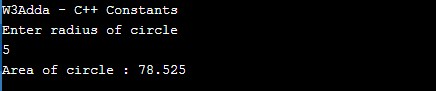
cpp_define_constants

Define Constants Using const Keyword

In C++, constants can be defined using const as following –

Syntax:-

Example:-

Output:-

cpp_define_constants

C++ Data Type Modifiers

C++ Data Type Modifiers

In C++, modifiers is used to modify or add special meaning to the base types. It is used as prefix to primitive data types to alter their predefined meaning.

In C++, we have following data type modifiers –

  • signed
  • unsigned
  • long
  • short

The modifiers can be used with primitive data types to make them more precise and to modify their range.

Integer Type Modifiers

The signed, unsigned, long, and short modifiers can be used with integer types. The signed and unsigned modifiers can also be used as prefix to long or short modifiers. For example, unsigned long int.

Type Approximate Size
(in byte)
Minimal Range
short 2 -32768 to 32767
unsigned short 2 0 to 65,535
signed short 2 same as short
int 2 -32768 to 32767
unsigned int 2 0 to 65,535
signed int 2 same as int
long 4 -2,147,483,648 to 2,147,483,647
unsigned long 4 0 to 4,294,967,295
signed long 4 same as long

Character Type Modifiers

The signed and unsigned modifiers can be applied to char type.

Type Approximate Size
(in bytes)
Minimal Range
char 1 -128 to 127
unsigned char 1 0 to 255
signed char 1 same as char

Float Type Modifiers

The long modifier can be applied to double type.

Type Approximate Size
(in bytes)
Minimal Range Digits of Precision
float 4 3.4 × 10-38 to 3.4 × 1038 – 1 7
double 8 1.7 × 10-308 to 1.7 × 10308 – 1 15
long double 10 3.4 × 10-4932 to 3.4 × 104932 – 1 19


Type Qualifiers in C++

In C++, type qualifiers are used to provide additional information about the variables.

Qualifier Meaning
const Objects of type const cannot be changed by your program during execution
restrict A pointer qualified by restrict is initially the only means by which the object it points to can be accessed. Only C99 adds a new type qualifier called restrict.
volatile The modifier volatile tells the compiler that a variable’s value may be changed in ways not explicitly specified by the program.

C++ Storage Classes

C++ Storage Classes

In C++, Storage Classes refers to the scope or visibility and the life time of the C++ Variable. Scope of the C++ Variable defines the availability of the variable in block of the C++ Program, and by life time of variable means how long variable will persist in the program.

Functions of storage class

  • It tell the location of the C++ Variable.
  • Sets the initial or default value of C++ Variable.
  • It defines the scope of the C++ Variable.
  • It defines the life time of C++ Variable.

Types of Storage Classes

In C++, we have following four type of storage classes –

  • Automatic(auto)
  • Register(register)
  • Static(static)
  • External(extern)
Storage Class Keyword Lifetime Visibility Initial Value
Automatic auto Function Block Local Garbage
Register register Function Block Local Garbage
Static static Whole Program Local Zero
External extern Whole Program Global Zero

Automatic Storage Class

It is the default storage class for local variables. Variables with auto storage class are declared at the beginning of a code block, and memory is allocated automatically as the program execution enters to a code block and frees up automatically on exiting from the code block. The scope of automatic variables is local to the block where the declared and are not accessible directly in the other block. Variable with automatic storage class can be declared using the auto keyword as following –

Syntax:

Example :

Register Storage Class

In C++, variables with register storage class are same as local variables to the code block but the are stored in CPU register instead of computer memory. Hence it enables the quick access of that variable. Maximum size of the variable is equal to register size and dependent upon the register size. Variable with register storage class can be declared using the register keyword as following –

Syntax:

Example:

Static Storage Class

It is default storage class for global variables.Static storage class can be used only if we want the value of a variable to persist between different function calls. In C++, variable declared with static storage class will keep its value retained for different function calls. Variable with static storage class can be declared using the static keyword as following –

Syntax:

Example:

Example Program:-

When we run the above C++ program, we will see the following output –

Output:-

External Storage Class

In C++, variable declared with extern storage class is said to be “Global Variables”, it means variables is accessible throughout the program till the end of program execution. External variables are declared outside the functions and can be invoked from and anywhere in a program. External variables can be accessed very fast as compared to any other storage classes. Variable with external storage class can be declared using the extern keyword as following –

Syntax:

Example:

C++ typedef

C++ typedef

In C++, typedef ( type definition ) is a keyword allows us to create an alias for existing data types. Once, we have created a type definition, then we can declare a variable using the alias we created. This alias is equivalent to the data type for which it is created. Remember that, in addition to the type definition or alias we are always free to use the original keyword to define variable of any data type.

Syntax:-

It is easy to create alias, put the typedef keyword followed by the existing type name and the new name for that type.

Example:-

Here, we have created the alias for integer data type as my_type, now my_type behaves same as an integer.

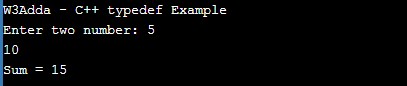
Example:-

Output:-

cpp_typedef_example

Advantages of typedef

  • It makes the program more portable.
  • typedef make complex declaration easier to understand.
  • It can make your code more clear
  • It can make your code easier to modify

typedef with a struct

Take a look at below structure declaration

As we can see we have to include keyword struct every time you declare a new variable, but if we use typedef then the declaration will as easy as below

this way typedef make your declaration simpler.

typedef with union

typedef with enum

C++ sizeof

C++ sizeof

In C++, the sizeof operator is used to determines the size of a variable or any data type. It is a compile-time operator which returns the size of variable or data type in
in bytes.

Syntax:-

Here, type include variables, constants, classes, structures, unions, or any other user defined data type.

Example:-

Output:-

Size of Variables

Example:-

Output:-

Size of Constant

Example:-

Output:-

Nested sizeof operator

Example:-

Output:-