Category Archives: C++ Tutorial

C++ Recursion

What Is Recursion?

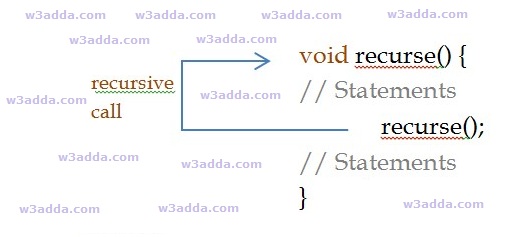
Recursion is the process where a function calls itself as its subroutine in order to solve a complex iterative task by dividing it into sub tasks. Any function which calls itself recursively is called recursive function, and the process of calling a function by itself is called recursion. Recursion leads to several number of iterative calls to the same function, however, it is important to have a base case to terminate the recursion.

Recursion is an efficient approach to solve a complex mathematical computation task by dividing it into sub tasks. This approach of solving a problem is called as Divide and Conquer. In programming, it allows programmers to divide a complex problem into sub tasks and to solve them individually to reach final solution.

Any problem that can be solved recursively, can also be solved iteratively but recursion is considered as more efficient method of programming as it requires the least amount of code to perform same complex task. Although recursion is not recommended for all problems, but it is best suited for some problems like sorting, searching, Inorder/Preorder/Postorder Tree Traversals, DFS of Graph algorithms. However, recursion must be implemented carefully, otherwise it may lead to an infinite loop if no base condition is met that will terminate the function.

Note :- Recursive function must have a valid terminating condition or base case, otherwise it will leads to an infinite loop.

How recursion works?

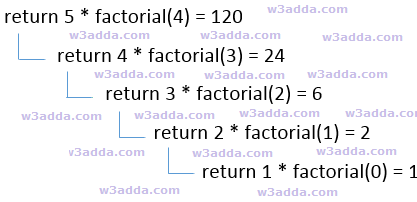
To understand how recursion works lets have one of the popular example of recursion. In this example we will calculate the factorial of n numbers. The factorial of n numbers is expressed as a series of repetitive multiplication as shown below:

Example :-

dsfsdf

cpp-recursion-flow-chart

Recursive Function

A recursive function is not much different from any other function, basically a function calling itself directly or indirectly is known as recursive function. A recursive function repeats itself several times, in order to compute or return final output. Recursive functions are quite common in computer programing as they allow programmers to write efficient programs with minimal code.

Characteristics of a recursive function

  • A recursive function is a function which calls itself.
  • The speed of a recursive program is slower because of stack overheads.
  • A recursive function must have terminating conditions or base case, and recursive expressions.

Below is general syntax of a recursive function –

Syntax:-

Example:-

cpp recursive function

Types of Recursion

Recursive function can be of following two types based on the way it call –

Direct Recursion :- When a function calls itself directly is called as direct recursive function and this type of recursion is said to be direct recursion.

Indirect Recursion :- When a function calls itself indirectly from other function then this function is called as indirect recursive and this type of recursion is said to be indirect recursion.

Memory Allocation In Recursion

Memory allocation for recursive function is no different from any other function. When a recursive function is called, it is allocated with a single memory block in a stack. This memory block holds up the required memory space for successful execution of the function and to hold all of the local, automatic and temporary variables. For each of the recursive call it pushes a separate stack frame in same manner. If a recursive function gets called 5 times, then there will 5 stack frames corresponding to each of the recursive call. When the recursive call ends, the new stack frame is discarded and function starts to return its value to the function in previous stack frame and then stack gets popped out in same order it was pushed and memory is de-allocated, this process continues till it reach to the final call. At the end recursion, it returns the final result value and finally the stack gets destroyed and memory is freed up. If the recursion fails to reach a base case, then the stack will rapidly be exhausted leading to Stack Overflow crash.

Advantages of Recursion

  • It requires few variables which make program clean.
  • It shorten the complex and nested code.

Disadvantages of Recursion

  • It is hard to debug recursive function.
  • It is tough to understand the logic of a recursive function.
  • It can cause infinite loop or unexpected results if not written correctly.
  • Recursive program has greater memory space requirements than iterative program.
  • Recursive programs are slower than non recursive programs.

Example:-

Factorial of a number using Recursion

Output:-

cpp_program_to_find_factorial_of_given_number_using_recursion

Suppose value of n=5, since n is greater than 1, the statement:

n* fact(n-1);

will be executed with n=5 i.e.

5* fact(5-1);

will be evaluated. As you can see this statement again calls factorial function with value n-1 which will return value:

4*fact(4-1);

This recursive calling process continues until value of n is equal to 1 and when n is equal to 1 it returns 1 and execution of this function stops. We can review the series of recursive call as follow:

f = 5* fact(5-1);

f = 5*4* fact(4-1);

f = 5*4*3* fact(3-1);

f = 5*4*3*2* fact(2-1);

f = 5*4*3*2*1;

f = 120;

What is tail recursion?

When a recursive function has its recursive call as last statement to be executed then this form of recursion is called as tail recursion and function is tail recursive. Tail recursive functions are considered better than non tail recursive functions as it can be optimized by compiler, since recursive call is the last statement, hence there is no need to keep track of function’s current state in stack frame.

Example:-

C++ Functions

C++ Functions

In C++, functions are one of the key building block of any C++ program. In C++, function gives you way to wrap up the set of statements to perform any specific task and give it a name, so that it can be invoked later from any where in the program. Functions makes it easy to divide the complete program into sub-units that perform a specific task for that program, this way it enhance the modular approach and increase the code re-usability of the program. We pass information in function call as its parameter and the function can either returns some value to the point it where it called from or returns nothing.

Advantages of function

  • It enhance the modularity of the program.
  • It enhance the re usability.
  • It makes development easy as development can be shared in team.
  • It reduces the coupling.
  • It reduces duplication.

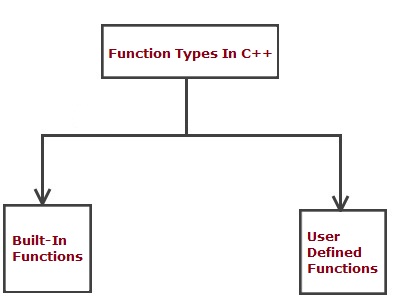
Type Of Function

  • Built in function
  • User defined functions

cpp_types_of_functions

C++ Built In Function

Built in functions are the functions implicitly available in C++ Programming Language to perform some common and standard tasks that includes the functions for file access, mathematical computations, graphics, memory management etc. Built in function can be accessed simply by including the relative header file using #include directive and at point of function call by just writing the function name, followed by an optional list of arguments.

Built-in functions are also known as library functions. We need not to declare and define these functions as they are already written in the C++ libraries such as iostream, cmath etc. We can directly call them when we need.

Example:-

Here we are using built-in function sqrt(x) that returns the square root of given number x (Double value). This function is declared in cmath header file so we have included the file in our program using #include directive.

Output:-

cpp_built_in_function_example

C++ User defined functions

User defined function are custom function defined by user it self to perform as custom task that is not available as built in, in this way user can define and write subprograms as functions to perform a task relevant to their programs. Function gives you way to wrap up the set of statements to perform any specific task and give it a name, so that it can be invoked later from any where in the program.

Function Declaration(Prototype)

A function must be defined prior to use inside main() function, otherwise this will show a compile time error as the main() function is unaware of this user-defined function, its argument list and the return type. In C++, when you define a function before the main() function in your program then it is not required to declare that function but if you are going to provide function definition after the main() function, then it is necessary to provide function prototype by declaring the function first, otherwise this will give compilation error.

Declaring a function In C++

In C++, you can declare a function using “function” keyword as following –

Syntax:-

Above is the general syntax to declare a function prototype, here

function :- It is keyword which is used to define a function.
return_type:- It represents return type of function.
func_name :- It is replaced with the name of the function.
parameter_list :- It represents the list of the parameters need to be passed when function call made.

Example:-

Defining Function

In function definition full body of function is provided. All of the statements that needs to be executed when function is invoked are written here in function body. A function must be defined prior to use, you can define a function as following –

Syntax:-

Example:-

Calling function

In C++, once a function is defined, later you can invoke or call this function in main() function body as following –

Syntax:-

Example:-

When a function is called, the control is transferred to the function body and the statements in function body are executed sequentially. When all of the statement inside function body is executed, the control again moved to the from where the function being invoked with the return value(if any).

Passing Arguments to Function

In C++, when a function is invoked it may be provided with some information as per the function prototype is called as argument (parameter).

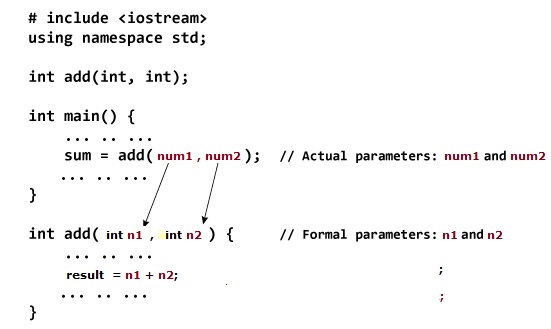
cpp_passing_arguments


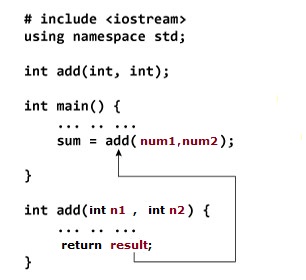
In the above example, we have two variables num1 and num2 to be passed to add() function when function being called. These arguments are referred to as actual arguments.Then, the variable n1 and n2 are initialized with the value of num1 and num2 respectively. Here, n1 and n2 are referred to as formal arguments.

Return Value from Function

Sometimes we may want a function to return some value to the point it where it is called from. In C++, there is return keyword allows a function to return value.

cpp_return_value_function

Syntax:-

Example:-

Complete Function In Action

Below is a C++ Program to add two numbers using function.

Example:-

When you run the above c++ program, you will see following output –

Output:-

cpp_user_defined_function

C++ goto statement

C++ goto statement

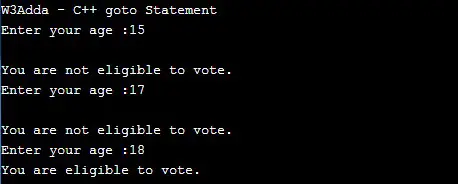
In C++, goto statement is used to alter the normal execution of a program and transfer control to a labeled statement in the same program. In a C++ program we can have multiple goto and label statements, the goto statement is followed by a label name. Label is an identifier, which can be any plain text and can be set anywhere in a C++ program above or below to goto statement. When a goto statement is encountered, compiler transfers the control to a label: specified with goto statement and begin execution from there.

Syntax:-

Program Structure:-

Example:-

Output:-

cpp_goto_statement_example

C++ Break statement

C++ Break Statement

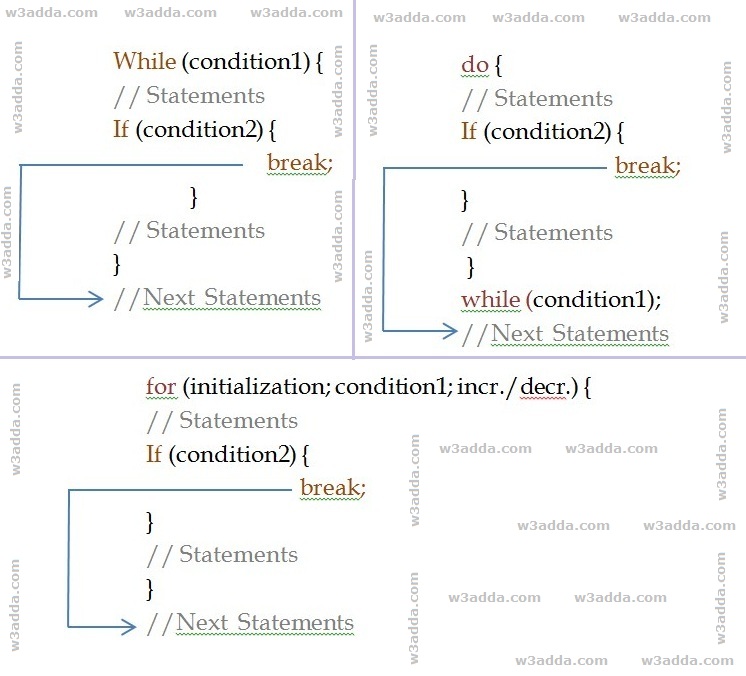
In C++, break statement inside any loop gives you way to break or terminate the execution of loop containing it, and transfers the execution to the next statement following the loop. It is almost always used with if..else construct.

C++ Break Statement Flow Diagram

cpp_break_statement_example

Syntax:-

Example:-

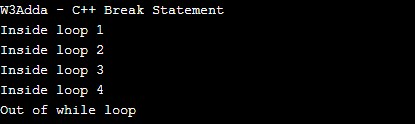
In this above program, the variable count is initialized as 0. Then a while loop is executed as long as the variable count is less than 10. Inside the while loop, the count variable is incremented by 1 with each iteration (count = count + 1). Next, we have an if statement that checks the variable count is equal to 5, if it return TRUE causes loop to break or terminate. Within the loop there is a cout statement that will execute with each iteration of the while loop until the loop breaks. Then, there is a final cout statement outside of the while loop.

When we run this code, our output will be as follows –

Output:-

cpp_break_statement

C++ Continue statement

C++ Continue Statement

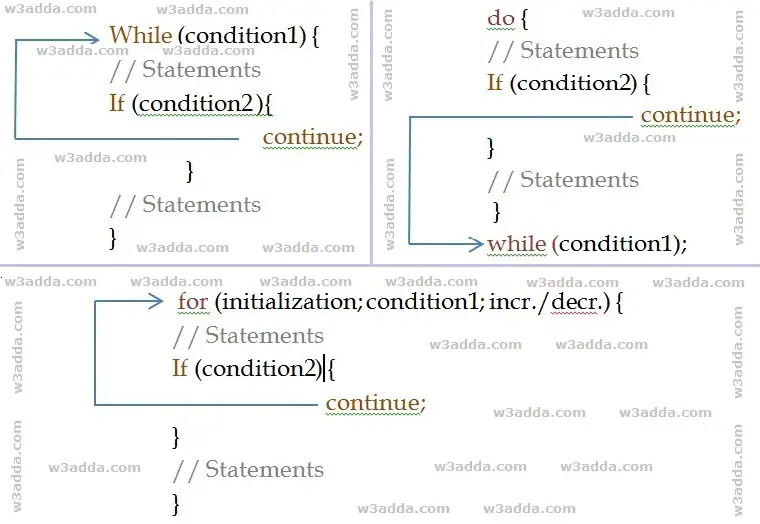
In C++, the continue statement gives you way to skip over the current iteration of any loop. When a continue statement is encountered in the loop, the rest of statements in the loop body for current iteration and returns the program execution to the very first statement in the loop body. It does not terminates the loop rather continues with the next iteration.

C++ Continue Statement Flow Diagram

cpp_continue_flow_diagram

Syntax:-

Example:-

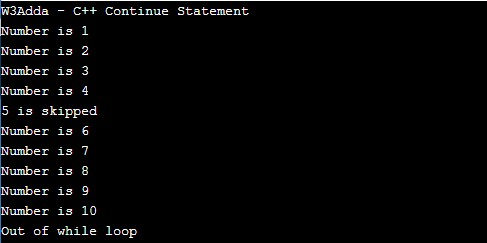
When we run the above C++ program, we will see following output –

Output:-

cpp_continue_statement_example

As you can see when ctr == 5, continue statement is executed which causes the current iteration to end and the control moves on to the next iteration.

C++ do while Loop

C++ do while Loop

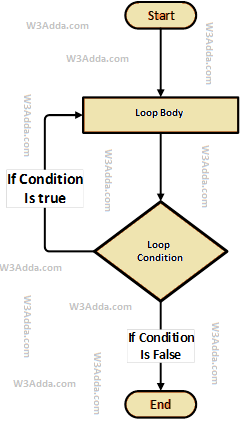
The do…while loop executes block of statements inside loop body first and then test the condition for next iteration and executes next only if condition is true. The do…while loop is much similar to C++ while loop with one major difference, in do…while loop block of statements inside loop body executes at least once.

C++ do while Loop Flow Diagram

swift-repeat-while-loop-flowchart-diagram

Syntax:-

Here, loop executes block of statements inside loop body first and then test the condition provided along with while keyword for next iteration and executes next only if condition is true. Condition is a Boolean expression that results in either True or False, if it results in True then statements inside loop body are executed and condition is evaluated again. This process is repeated until the condition is evaluated to False. If the condition results in False then loop is terminated and control is transferred to next statement.

Example:-

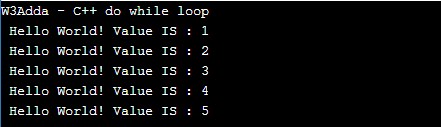
Here, we have initialized ctr and maxCtr to 1 and 5 respectively, in the next statement we have loop body inside the pair of curly brackets {} after do keyword, statements inside loop body are executed first then control is passed to the condition ctr <= maxCtr provided along with while keyword for next iteration. If the test condition returns True, then control is passed again to loop body for the next iteration. If the condition results in False then loop is terminated and control is transferred to next statement. Inside the loop body we have incremented the ctr value by one for each if the iteration. When we run the above c++ program, we see the following output –

Output:-

cpp_do_while_loop_example

C++ while Loop

C++ While Loop

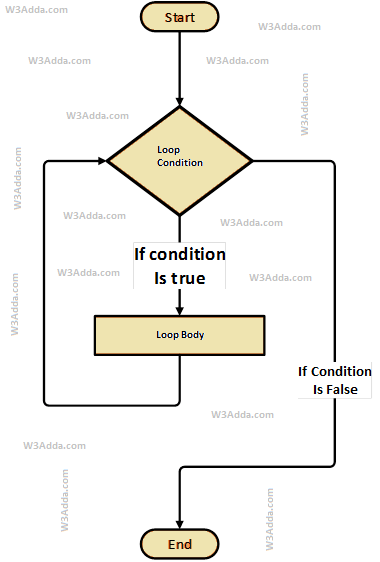
The while loop will execute a block of statement as long as a test expression is true. While loop is useful when the number of iterations can not be predicted beforehand. The while loop evaluates test expression at beginning of each pass.

C++ While Loop Flow Diagram

cpp-while-loop-flowchart-diagram

Syntax:-

Here, Condition is a Boolean expression that results in either True or False, if it results in True then statements inside loop body are executed and condition is evaluated again. This process is repeated until the condition is evaluated to False. If the condition results in False then execution is skipped from loop body and while loop is terminated.

Example:-

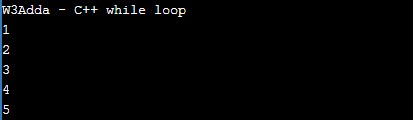
Here, we have initialized ctr and maxCtr to 1 and 5 respectively, in the next statement we have while loop, that checks the condition ctr <= maxCtr for each of the iteration. If the test condition returns True, the statements inside loop body are executed and if test condition returns False then the while loop is terminated. Inside the loop body we have incremented the ctr value by one for each if the iteration. When we run the above c++ program, we see the following output –

Output:-

cpp_while_loop_example

C++ for Loop

C++ for Loop

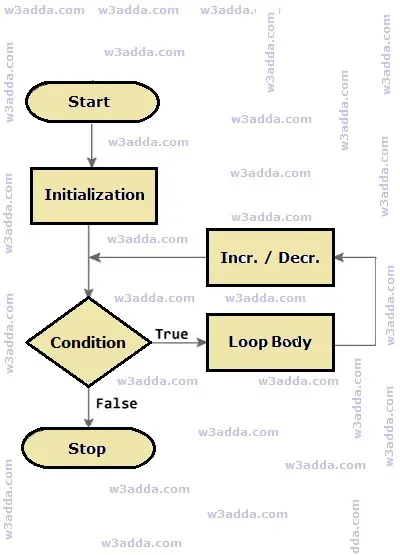
The for loop is used when we want to execute block of code known times. In C++, basic for loop is similar as it is in C. The for loop takes a variable as iterator and assign it with an initial value, and iterate through the loop body as long as the test condition is true. Once the loop statements are executed for current iteration, the iterator is updated with new value and if the test condition is still valid, we loop another time. When test condition return a false value, the for loop is ended.

Syntax :-

Above is the general syntax of a for loop. We just initialize iterator, check condition and then increment or decrement iterator value. The for loop has three components separated by semicolons.

initialization :- In this section is used to declare and initialize the loop iterator. This is the first statement to be executed and executed only once at the beginning.

condition :- Next, the test condition is evaluated before every iteration, and if it returns a true value then the loop body is executed for current iteration. If it returns a false value then loop is terminated and control jumps to the next statement just after the for loop.

incr/decr :- Once, the loop body is executed for current iteration then the incr/decr statement is executed to update the iterator value and if the test condition is evaluated again. If it returns a true value then the loop body is executed another time. If test condition returns a false value then loop is terminated and control jumps to the next statement just after the for loop.

C++ For Loop Flow Diagram

cpp-for-loop-flow-chart-diagram


Example:-

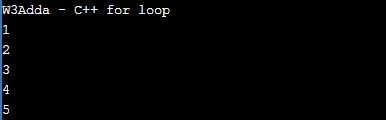
Here, we have initialized ctr with initial value of 1, in the next we checks the condition ctr <= 5 for each of the iteration. If the test condition returns True, the statements inside loop body are executed and if test condition returns False then the for loop is terminated. In incr/decr section we have incremented the ctr value by one for each if the iteration. When we run the above c++ program, we see the following output –

Output:-

cpp_for_loop

C++ Infinite For Loop

When a loop executes repeatedly and never stops, it said to be an infinite for loop. In C++, if we leave the “initialization”, “increment” and “condition” statement blank, then the for loop will becomes an infinite loop.

Syntax:-

Example :-

C++ Loops

C++ Loops

Loop statements are used to execute the block of code repeatedly for a specified number of times or until it meets a specified condition. Loop statement are very useful to iterate over collection/list of items or to perform a task for multiple times. In C++, we have following loop statements available-

C++ for Loop

The for loop is used when we want to execute block of code known times. In C++, basic for loop is similar as it is in C. The for loop takes a variable as iterator and assign it with an initial value, and iterate through the loop body as long as the test condition is true.

Syntax :-

Example:-

Output:-

cpp_for_loop

C++ While Loop

The while loop will execute a block of statement as long as a test expression is true.

Syntax:-

Example:-

Output:-

cpp_while_loop_example

C++ do…while Loop

The do…while statement executes loop statements and then test the condition for next iteration and executes next only if condition is true.

Syntax:-

Example:-

Output:-

cpp_do_while_loop_example

C++ Switch Case Statement

C++ Switch Case Statement

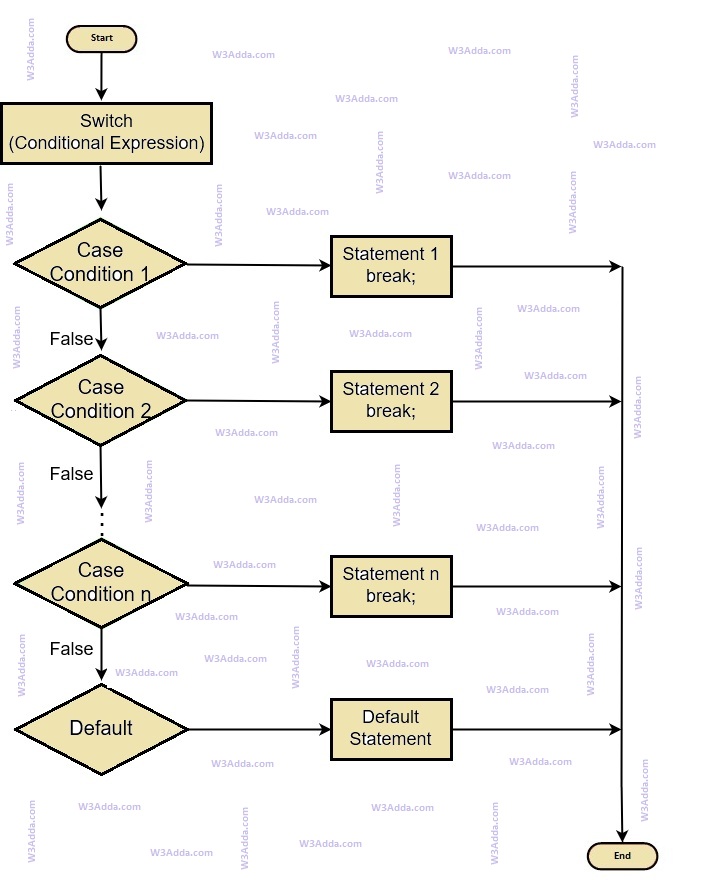
In C++, switch case statement is simplified form of the C++ Nested if else statement , it helps to avoid long chain of if..else if..else statements. A switch case statement evaluates an expression against multiple cases in order to identify the block of code to be executed.

C++ Switch Case Flow Diagram

cpp-switch-case-statement-flowchart

Syntax:-

Example:-

In the above program we have an integer constant dayOfWeek with initial value of 5, and we pass this variable as expression to following switch statement, value of dayOfWeek is tested with multiple cases to identify the block of code to be executed.

When we run the above c++ program, will see the following output –

Output:-

cpp_switch_case_statement


C++ Nested if else Statement

C++ Nested if else Statement

In C++, when there is an if statement inside another if statement then it is known as nested if else. Nested if else can also be simplified using C++ Switch Case Statement.

Syntax:-

Example:-

When we run the above C++ program, will see following output –

Output:-

cpp_nested_if_statement