
Tag Archives: laravel error

How To Fix No application encryption key has been specified error In Laravel

Fix No application encryption key has been specified error In Laravel

Sometime in laravel, when you created a fresh laravel project and trying to start development server you may encounter following error –
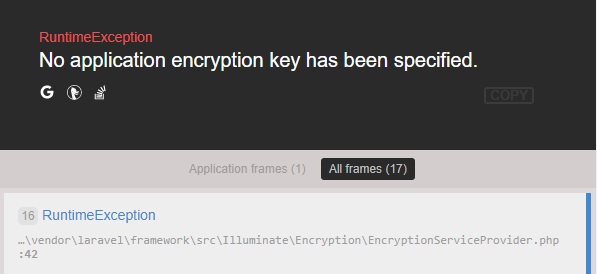
how to fix laravel RuntimeException No application encryption key has been specified

Fix:-

The easiest way to fix this error you need to set a key option in your config/app.php configuration file. You should use the following commands to generate this key and get the error fixed –

I hope this will fix the above error for you.
How to Fix Laravel Specified key was too long error

How to Fix Laravel Specified key was too long error

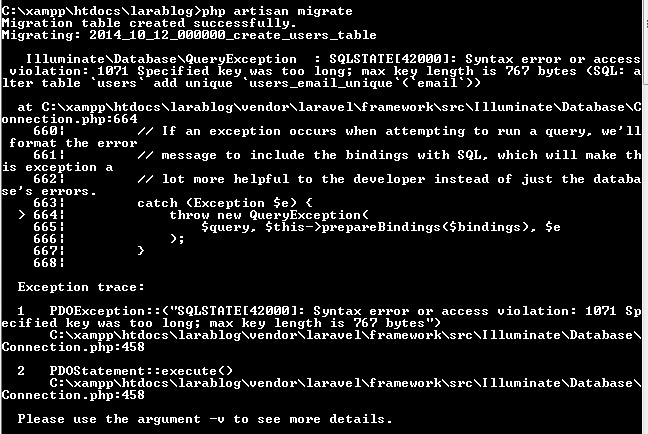
In Laravel, sometimes when we run the following command we get “Specified key was too long error” as shown in the below screenshot, in this tutorial I will show you how to fix the “Specified key was too long error” error.

laravel-crud-example-specified-key-too-long-error

Easiest way to fix error is to locate the file “app/Providers/AppServiceProvider”, and add following line of code to the top of the file

and inside the boot method set a default string length as given below –

So this is how my AppServiceProvider file looks like now –

Now delete tables created and run the following command again –

I hope this will fix “Specified key was too long error” error.