Category Archives: Struts2 Tutorial

struts2 tutorial

Struts 2 Configuration File

Struts 2 Configuration File

Struts2 Application contains some configuration files such as web.xml, struts.xml, strutsconfig.xml and struts.properties. Out of these files we can start working with web.xml and struts.xml files.Let’s understand about these files.

web.xml: This configuration file is from J2EE configuration file which is used to determines how elements of the HTTP will be processed by the container. This file is the standard deployment descriptor for the Web Application. It declares the filters and servlets used by the service. Below is the file example of web.xml, which we have used in our struts2 example.

From here you can also define that which will be your welcome file.

struts.xml

This is core configuration file for the framework which can initialize its own resources such as interceptors, Action classes, Results that can prepare views etc. Below is the example of struts2.xml file.

Description: Let’s understand this file,
1. DOCTYPE : All struts configuration file needs to have correct doctype as shown in above code i.e. “DOCTYPE struts PUBLIC”.

2.<struts>: This is the root tag element in which we can declare different packages using “<package>” tag.

3.<constant>: This tag is used for overrides any of the following properties defined in default.properties, as like I did
<constant name = “struts.devMode” value = “true” />.

4.<package>: This tag specifies a module. This tag is very useful when large project divided into different modules. There are some important attributes of package tag, let’s understand them

Attribute & Description:
a) name:
required field for this tag, This is unique identifier for the package.

  1. b) extends: By default we extends “struts-default”, extends keyword defines that which package does this package extend from.
  2. c) namespace: This attribute is an optional attribute of package. If there is no namespace is declare so by default it takes “/”.
  3. d) <action>: The action element is sub-element of Package. There some attributes defined in the action elements.
  • name: This is required attributes for defining name of the action.
  • class: This is an optional attribute of action tag. Here you can define your action class.
  • method: This is also an optional attribute of action tag. If you don’t define any method so by default it takes execute
  • <result>: This is sub-element of action tag, there are also some attributes are used in this element which are listed below.
  1. name: This is an optional attribute of result tag. If you are not using this attribute so by default it takes “success”.
  2. type: this is also an optional attribute of result tag. If not using this so dispatcher uses default result type.
 

Struts 2 Actions

Struts 2 Actions

Actions are the core component of Struts2 Web Application.When the user clicks on hyperlink or submit form action in Struts2 Web Application so the input is collected by the Controller and then Controller sends it to Java class which is called Actions. After the execution of Action the resources are selected to render the response. JSP, PDF , an Excel spreadsheet and a Java applet window are the resources which has been selected by the action. JSP is generally used as resources.
Each Url is mapped with a specific action, which is used to provides the processing logic which is necessary to service the request from the user.

Action Interface

Action interface provides us 5 Constant and one execute method, which are listed below

SUCCESS:- This constant is used to indicates that action execution is successful and a success result shown to user.
NONE :- This constant is used to indicates that action execution is successful but no result shown to user.
ERROR :- This constant is used to indicates that the action execution is failed and error message should be displayed to user.
INPUT :- This constant is used to represent that the validation is failed.
LOGIN :- This constant is used to represent that the user is not logged-in.
execute() :- This is the only one method of this interface, should be implemented overridden by the action class.

See below code of Action class, we have used this in previous article.

ActionSupport class: This class mostly used instead of Action because it is implemented by many interface such as Action, validateable, ValidationAware, TextProvider, LocaleProvider and Serializable.

Below is the code of Action Support class.

Struts 2 Example

Struts2 Example

In previous articles, We have learnt about struts2. In the struts2 architecture we have learnt that if we click on hyperlink or submit form action in Struts2 Web Application so the input is collected by the Controller and then Controller sends it to Java class which is called Actions. After the execution of Action the resources are selected to render the response. JSP, PDF , an Excel spreadsheet and a Java applet window are the resources which has been selected by the action. JSP is generally used as resources. Detailed about Action will be in Next Article.
Let’s understand struts2 by an example. Please follow the steps. This project is created in Netbeans IDE.

Step 1:-

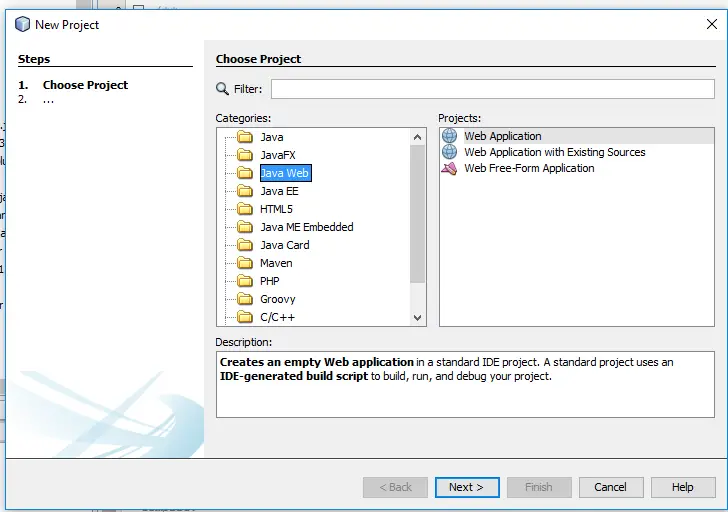
Create new project on click on File and then New Project and then select JavaWeb->Web Application like below image.

image001

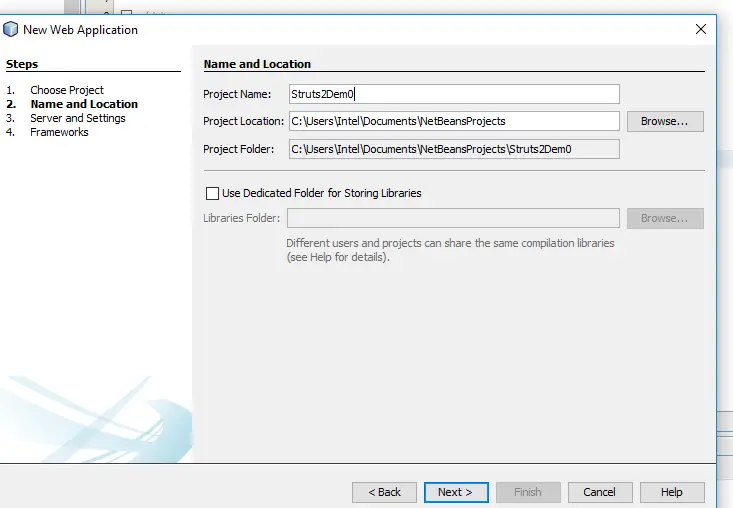
Step 2:- In this step enter your project name and then click on Next. Check below image.

image003

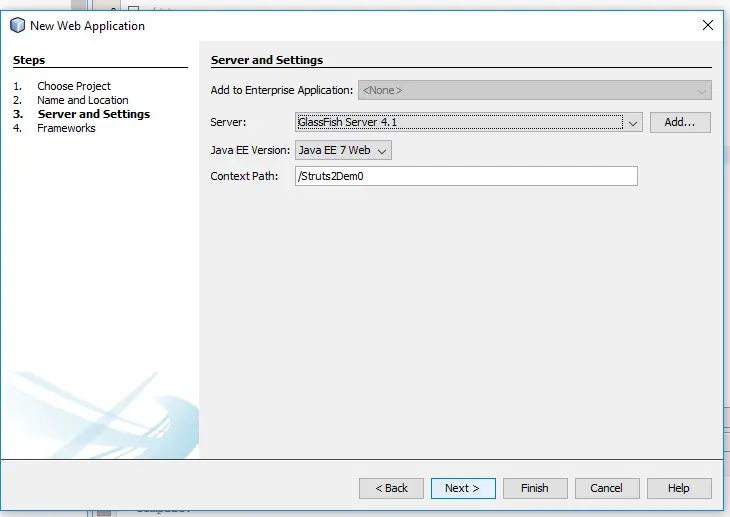
Step 3:- This step is used for selecting “Server and Settings”. I am using “GlassFish Server”, you can also use “apache tomcat server”. Check below image.

image005

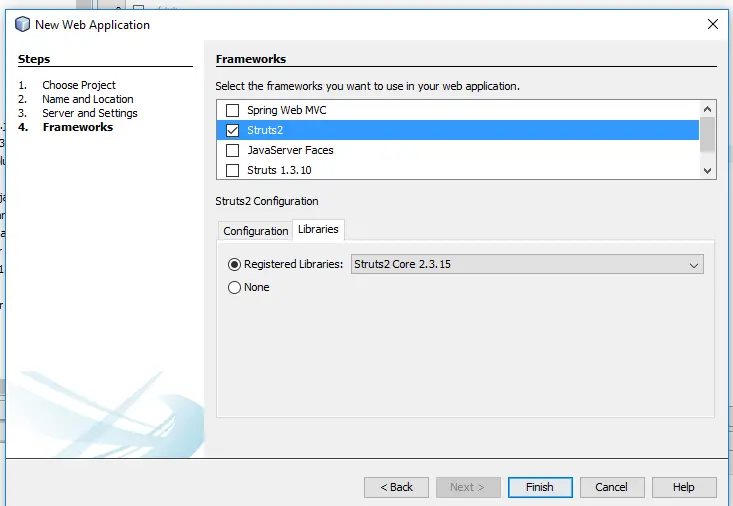
Step 4:- This is the step where we are going to select our framework , I hope you are gone through with previous article in which we have explained that how can we add struts2 in Netbeans, if not please follow instruction of previous article first. Check below image for this step.

image007

On finishing you will be done with project creation. Now let’s do some coding part.

Requirement: Below are listed files which are required for this example.

1. HelloWorldAction.java
2. index.jsp.
3. HelloWorld.jsp
4. struts.xml
5. web.xml

HelloWorldAction.java

This is our Action class which respond to a user action, as we know that Action class is the key to Struts2 application and most of the logics are implemented in this class. So Let’s create this class. Below is our action class which is very simple, here we have used only getter and setter method for the “name” property, there is also an execute method which return string message. Check below class.

index.jsp

This is our welcome page from where we will going to perform action. Here on click of submit button action will perform which call specific method of the “HelloWorldAction” class. Check below code.

HelloWorld.jsp

This page will present final message , and will be called by Struts2 Framework when predefined action will happen. In “struts.xml” file we have done with mapping of this class which will be showing in next step. For this page check below code.

struts.xml

This is our configuration file which is created automatically when you create a project. Here we have done with mapping of our action. Check below code for this. Here we can see that when action will be “welcome” and result will be “success” from “HelloWorldAction” class So “HelloWorld.jsp” will be called.

web.xml

This is our another configuration file in which we will update our welcome file. Like below code.

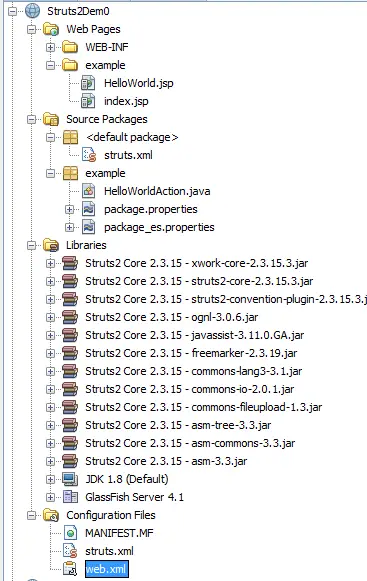
below is the structure of this project.

image009

Output :-

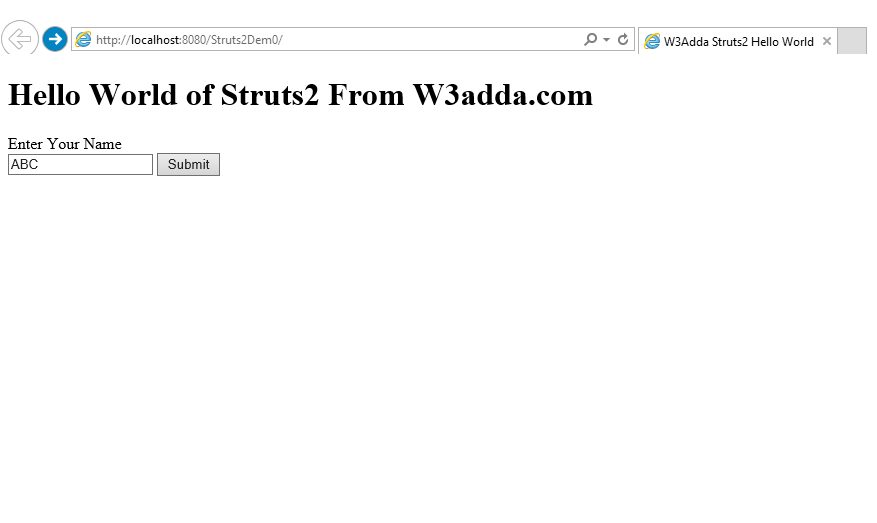
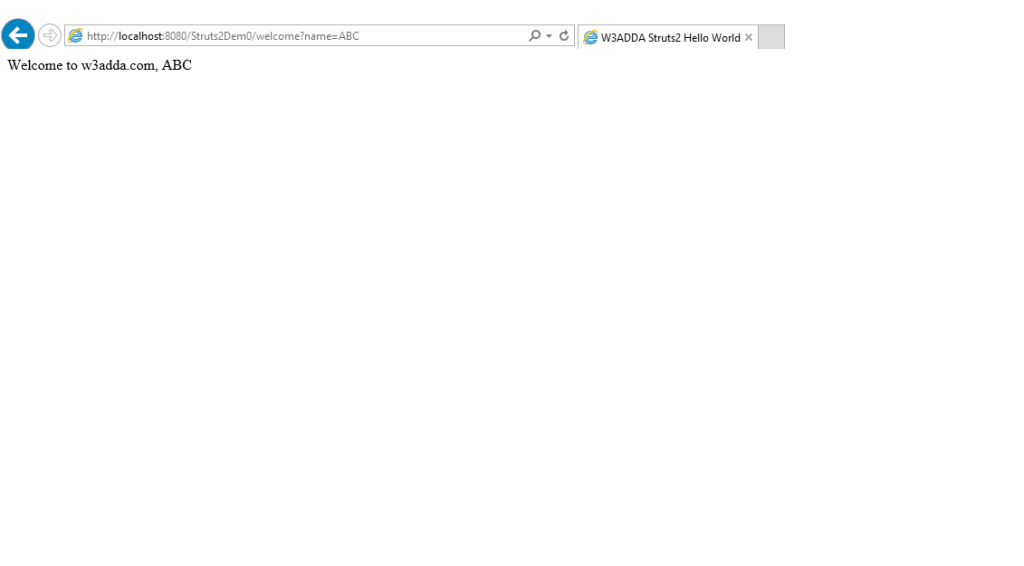
We are done with our coding part now simply run your project. You will get output like below Images.

image011

Enter the Name and click on Submit button, after submitting the name above image will be next output.

image013

Struts 2 Architecture and Flow

Struts 2 Architecture and Flow

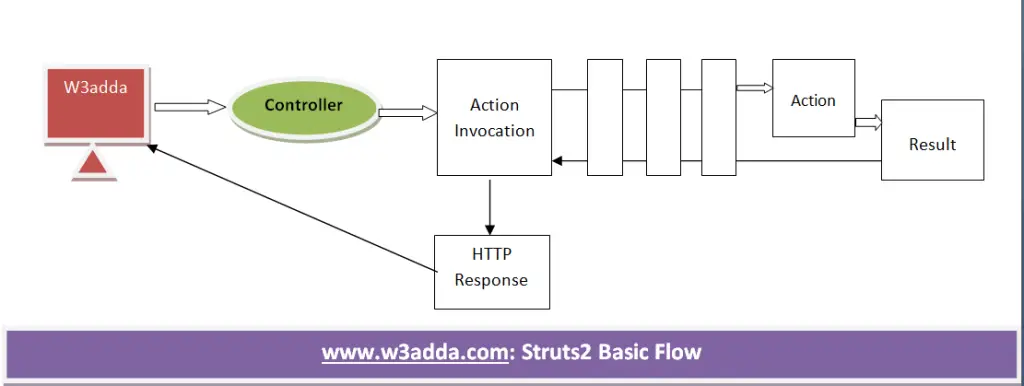
The flow and architecture combined many component like controller, ActionProxy, ActionMapper, Configuration Manager , Action Invocation, Inerceptor, Action, Result etc.

The below is basic flow of struts2.

image001


Let’s understand the flow of struts2 Application.

Step 1: In this step user sends a request for the action.

Step 2: This is the step where controller invokes the Action Invocation.

Step 3: Here Action Invocation invokes each interceptors and action.

Step 4: This is the step where result is generated

Step 5: In this step the result sent back to the Action Invocation.

Step 6: Here Http Response is generated .

Step 7: This is final step in which response is sent to USER.

Struts 2 OGNL

Struts 2 OGNL

OGNL is the Object Graph Navigation Langauge.It is an expression language for getting and setting properties of Java Objects, plus other extras like list project and selection and lambda expressions. For getting and setting properties you can use same expression.
The Struts2 framework sets the OGNL context to be our ActionContext, and the value stack to be the OGNL root object.

Accessing the Action Property: We can directly access the action property like below code.

Where postalcode is the property key

Accessing Non ActionContext Object : Other (non-root) objects in the ActionContext can be rendered use the # notation. Like below code.

or

or

The ActionContext is also exposed to Action classes via a static method, like below code:

Attributes which are not support dynamic content for them you can also put expressions, like below:

Struts 2 ActionInvocation

Struts 2 ActionInvocation

ActionInvocation holds the Interceptors and the action instance, it represents the execution state of an Action. This interface extends Serializable interface, syntax is below:

Syntax:-

ActionInvocation Methods

There are some useful methods of this interface are listed below.

1.Object getAction(): This method is used to get the Action which is associated with this interface.

2.ActionContext getInvocationContext(): This method is used to get the ActionContext associated with the ActionInvocation.

3.ActionProxy getProxy(): This method is used to get the ActionProxy holding this ActionInvocation.

4.Result getResult(): This method returns the Instance of Result.

5.ValueStack getStack(): This method is used to get the ValueStack associated with this ActionInvocation.

6.void setResultCode(String resultCode): This method is used to set the Result code.

7.String getResultCode(): This method returns the ResultCode from this ActionInvocation

Struts 2 ActionContext

Struts 2 ActionContext

The ActionContext is the context in which an Action is executed. This is a container of objects an action needs for execution like session, parameters, locale, etc.

The value stored in ActionContext are unique per thread so the ActionContext is thread local. ActionContext class is child of an Object class and implements Serializable interface.

Syntax:-

By the calling of getContext() method of ActionContext class we can get reference of ActionContext.

Struts 2 ActionContext Methods

There are some useful methods which are listed below

1.Object get(String key): This method is used to returns a value that is stored in current ActionContext using the value’s key.

2.String getName(): This method returns the Name of the current Action and return type will be String.

3.static ActionContext getContext(): This method is used to returns the ActionContext reference.

4.Container setContainer(Container cont): This method is used to sets the container

5.Container getContainer(): This method is used to get the container.

6.void put(String key, Object value): This method is used to stores a value in current ActionContext.

7.void setValueStack(ValueStack stack): This method is used to sets the OGNL value stack.

8.void setSession(Map<String,Object> session): This method is used to sets a map of action session values.

9.void setParameters(HttpParameters params): This method is used to sets the action parameters

10.void setLocale(Locale locale): This method is used to sets the Locale for the current action

Struts 2 Adding Plugin

In this article we are going to add Struts2 Plugin in NetBeans IDE. Follow the below Steps

Step 1:- First we have to download struts2 from netbeans site. Below is the link from where you can download .

image001

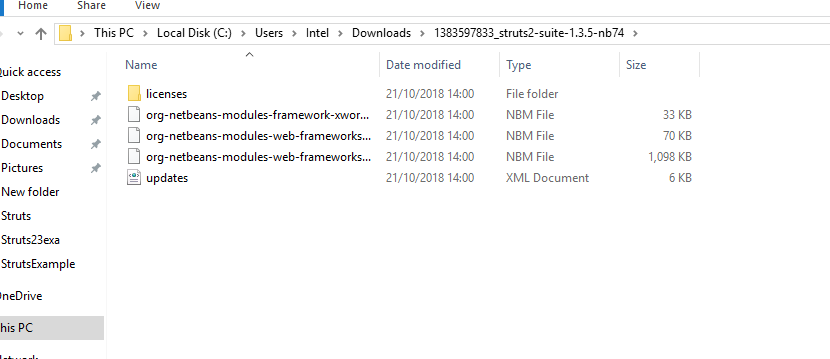
Step 2:- In this step we will have to extract this zip file like below image.

image003

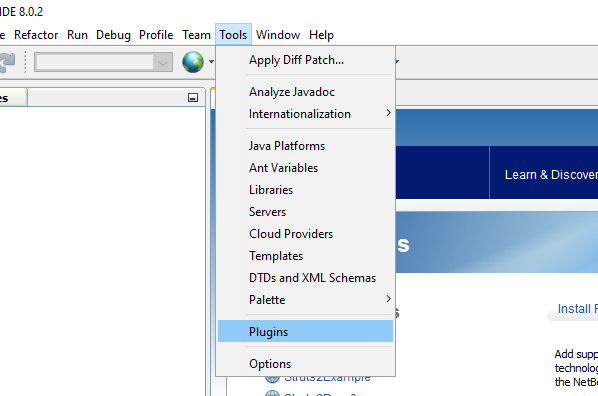
Step 3:- Start Your NetBeans, and go to Tools->Plugins Like below image.

image005


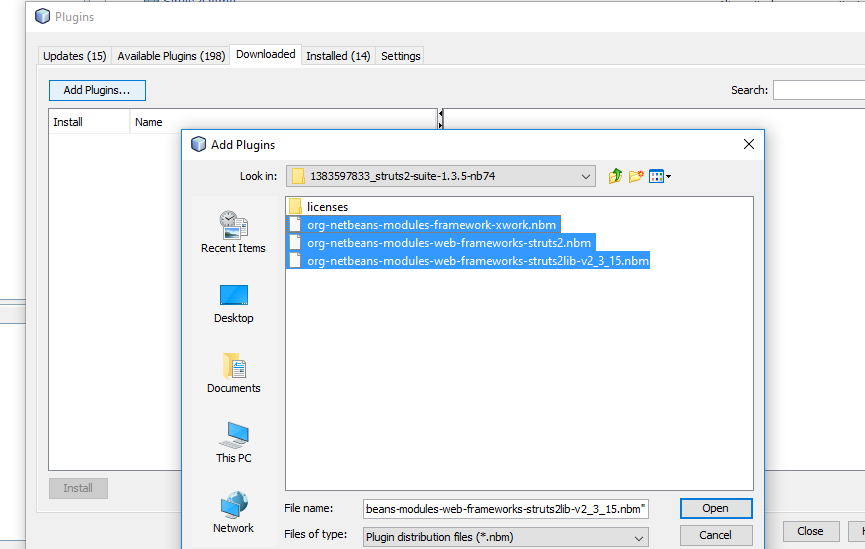
Step 4:- After clicking Plugins, Go to download and then click on “Add Plugins…” , find the path where you have extracted that zip file and then select files like below image and click on Open.

image007

Step 5:- In this step you will get list of downloaded plugins, simply check all and click on install like below image.

image009

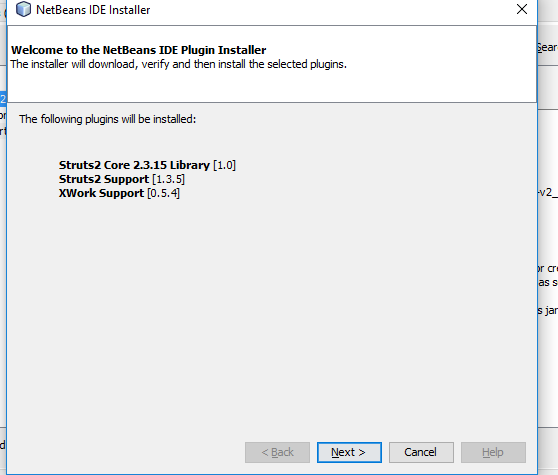
Step 6:- In this step , this will inform you that these are the plugins which are going to install, simply click on “Next” to proceed.

image011

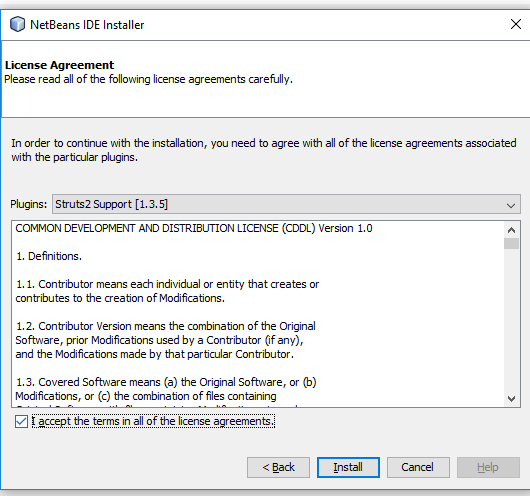
Step 7:- Last step for installing , this step will ask you to accept the “License Agreement”, check the condition and click on “Install”. Check below image.

image013

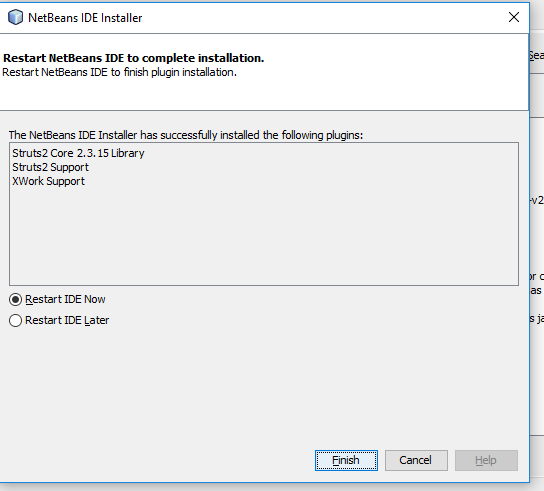
Step 8:- After installing All Plugins, Next step will ask you for “Restart IDE Now” or “Later” , Please restart it so that it can make changes.

image015

Step 9:- This is our last step in which you can check our installed plugins. Check below image and also your IDE.

image017

We are done with installing Struts2 plugin in our IDE. Now We will create HelloWorld Project in our next article.

Struts 2 Interceptors

Struts2 Interceptors

The task which are executed by the Struts2 framework before and after an Action is executed are done by Interceptors. These are standard Java Classes which are included in the Struts2 core jar. Interceptors are responsible for the request processing. Interceptors are mostly used in Validation, Exception Handling, internationalization etc.

Default Interceptors

Some of mostly used Struts2 Default Interceptors are listed below, have a look on that.

alias: This interceptor is used to convert similar parameter that have different names between request.

checkbox:
This interceptor is used to detect unchecked checkboxes in the form.
cookie: This interceptor is used to adding a cookie in current action.
conversionError: This interceptor is used to add conversation error to the action’s field errors.
createSesssion: This interceptor is used to creates HttpSession if there is no session available.

clearSession: This interceptor is used to clear the existing session.

validation: This interceptor is used to provides validation support for actions.

token: This interceptor checks the action for a valid token to prevent duplicate form submission.

i18n: This interceptor provides the support of internationalization and localization.

exception: This is used for mapping exception to a result.

fileUpload: This interceptor is used for file uploading in Struts2 .

timer: This interceptor used to provides time of the action takes to execute.

ServletConfig: This interceptors provides the action with access to servlet-based information.

scope: This interceptor is used to store the action state in the session or application scope.

debugging: This interceptor is used for debugging.

params: This interceptor is used to sets the request parameters on the action.

perpare: This is typically used to do pre-processing work like setup database connection.