
React Native Hello World Application
We will start learning React Native by creating a simple “Hello world!” application. The “Hello world!” application is a simple yet complete example for beginners that illustrates the basics of React native. The “Hello world!” application will also gives you a way to test systems and development environment. This tutorial will guide you through writing a simple “Hello World!” application in React Native.
In order to start with this tutorial, you must have React Native and React Native CLI installed, so if you don’t have it installed, follow React Native Installation to have it installed.
Installing React Native CLI
To start quickly, you must have installed the React Native CLI utility which lets you setup your project quickly. Let’s open the terminal and use the following command to get React Native CLI installed.
|
1 |
npm install -g react-native-cli |
Create Hello World Project with React Native
Step 1:- Start your Android Emulator and make it live to view the output.
Step 2:- Let’s open the terminal and switch to the project folder and type the following command to initialize a HelloWorld application.
|
1 |
react-native init HelloWorld |
Step 3:- Now, switch to the newly created project directory and run the following command to start the server and launch application on your preferred device/emulator. Since I want to launch it on an Android Device I will use the following command.
|
1 |
react-native run-android |
If you are on a Mac device and you can use following command.
|
1 |
react-native run-ios |
Since you are running any of the above command for the first time, it takes some time for the app show up in an emulator. If everything runs successfully, you will see the following out in your emulator.
Output 1:-
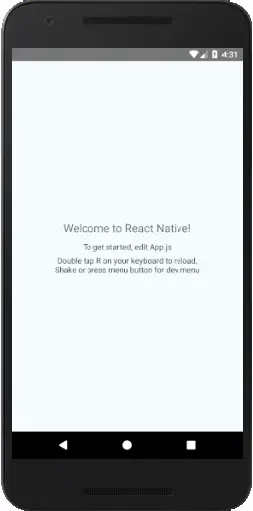
Step 4:- Now, when you go to the project folder you will see the following directory structure.
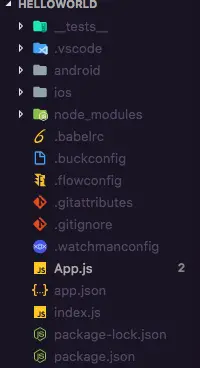
Step 5:- Lets open App.js file in editor of your choice, you will see following lines of code in it.
|
1 2 3 4 5 6 7 8 9 10 11 12 13 14 15 16 17 18 19 20 21 22 23 24 25 26 27 28 29 30 31 32 33 34 35 36 37 38 39 40 41 |
import React, {Component} from 'react'; import {Platform, StyleSheet, Text, View} from 'react-native'; const instructions = Platform.select({ ios: 'Press Cmd+R to reload,\n' + 'Cmd+D or shake for dev menu', android: 'Double tap R on your keyboard to reload,\n' + 'Shake or press menu button for dev menu', }); type Props = {}; export default class App extends Component<Props> { render() { return ( <View style={styles.container}> <Text style={styles.welcome}>Welcome to React Native!</Text> <Text style={styles.instructions}>To get started, edit App.js</Text> <Text style={styles.instructions}>{instructions}</Text> </View> ); } } const styles = StyleSheet.create({ container: { flex: 1, justifyContent: 'center', alignItems: 'center', backgroundColor: '#F5FCFF', }, welcome: { fontSize: 20, textAlign: 'center', margin: 10, }, instructions: { textAlign: 'center', color: '#333333', marginBottom: 5, }, }); |
Step 6:- Now, replace the lines of code in App.js file with following lines of code.
|
1 2 3 4 5 6 7 8 9 10 11 12 13 14 |
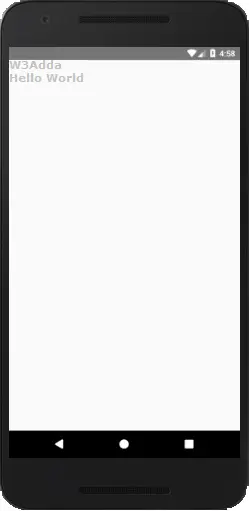
import React, {Component} from 'react'; import {Platform, StyleSheet, Text, View} from 'react-native'; type Props = {}; export default class App extends Component<Props> { render() { return ( <View> <Text>W3Adda</Text> <Text>Hello World</Text> </View> ); } } |
Now, save the file and on reload of application you will see following output –
Output 2:-
Step 7:- Now, we will add some styling to text. Replace the lines of code in App.js file we just updated with following lines of code.
|
1 2 3 4 5 6 7 8 9 10 11 12 13 14 15 16 17 18 19 20 21 |
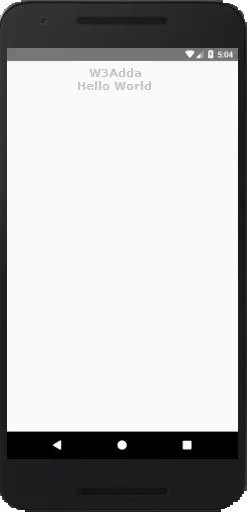
import React, {Component} from 'react'; import {Platform, StyleSheet, Text, View} from 'react-native'; type Props = {}; export default class App extends Component<Props> { render() { return ( <View> <Text style={styles.welcome}>W3Adda</Text> <Text style={styles.welcome}>Hello World</Text> </View> ); } } const styles = StyleSheet.create({ welcome: { fontSize: 20, textAlign: 'center', margin: 10, } }); |
Now, save the file and on reload of application you will see following output –
Output 3:-
Lets understand the App.js code line by line –
import React, {Component} from ‘react’:- This is an import statement that imports required component module from the react library and then assign it to React variable.
const instruction: sets to display the platform-specific message.
export default class App extends Component: It defines the default App class that extend the React Component.
render(): It is a function that returns a React element.
return(): This returns the result of layout and UI components.
View: It is the root element container that is used for building the UI.
Text: React element used for displaying text.
style: This is used define a stylesheet or styling classes for components.
styles: It is used to for styling an individual components.
{styles.instructions}>{instructions}:
const styles = StyleSheet.create({}): The StyleSheet class creates the style object that controls the layout and styling of components.