Category Archives: Java Programs

Java Programs

Java Program to make a calculator using switch case

In this tutorial, we will learn to create a Java Program to make calculator using switch case in Java using Java programming.

Prerequisites

Before starting with this tutorial we assume that you are best aware of the following Java programming topics

  • Java Operators.
  • Basic Input and Output function in Java.
  • Class and Object in Java.
  • Basic Java programming.
  • If-else statements in Java.
  • For loop in Java.
  • Scanner class.
  • Basic inbuilt unctions.

What is calculator?

Calculator is a portable electronic machine used to perform calculations,basic arithmetic  mathematics.

Like : arithmetic continuations “( +,-,*/,%)”.

Java Program to make a calculator using switch case

In our program we will make a calculator using switch case in java programming. We would first declared and initialized the required variables. Next, we would prompt user to input the two values and a symbol for calculating values .Lets have a look at the code.

Output

Switch case Calculator.

In the above program, we have first declared and initialized a set variables required in the program.

  • a= it will hold First value.
  • b= it will hold second value.
  • op=it will hold operator value.

And in the next statement user will be prompted to enter two values and  which will be assigned to variable ‘a‘ and ‘b‘ respectively.
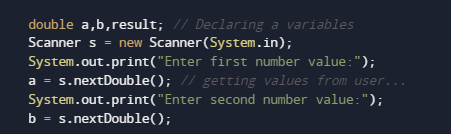
And after taking the values of a and b we will ask user to input symbol to perform calculation

After taking all the  values and sign in op we will pass the value of op to switch case condition Calculate values of a operation pass to switch case.
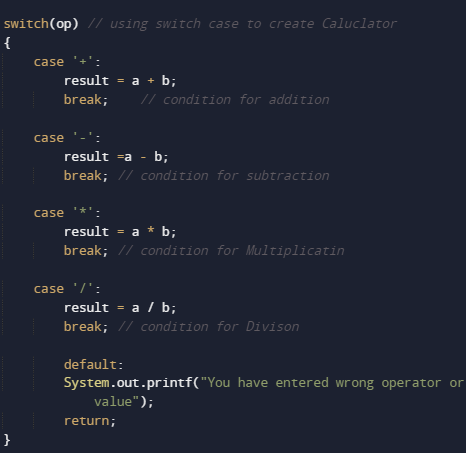
The above switch case compute the Multiplication of two numbers and print the output.

And  with the break statement  compiler ends the switch statement and operation given different different operators can be performed.
Java Program to find quotient and remainder

In this tutorial, we will learn to create a Java Program to find Quotient and Remainder in Java using Java programming.
Prerequisites

Before starting with this tutorial we assume that you are best aware of the following Java programming topics:

  • Java Operators.
  • Basic Input and Output function in Java.
  • Class and Object in Java.
  • Basic Java programming.
  • If-else statements in Java.
  • For loop in Java.

Quotient and  Remainder

For find the Quotient:
we will use “/” operator.
For that we must divided by divisor  “dividend/divisor”.
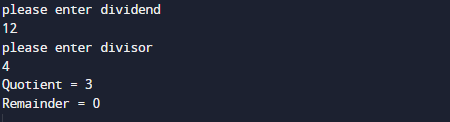
Example:=> 12/4 =3 gives 3
For find the Remainder:
Same as to find the remainder we use “%”operator.
the dividend is divided by the divisor and the remainder  returned by the “%” modules operator.
Example:=> 12%4 =0 gives 0.

Java Program to find quotient and remainder

In this program we will learn to create a Program to find Quotient and Remainder .We would first declared and initialized the required variables. Next, we would prompt user to input dividend and Divisor . Later in program we will find quotient and remainder.

Output

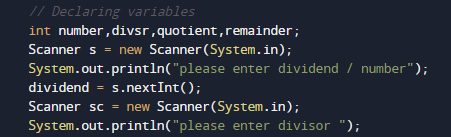
In the above program, we have first declared and initialized a set variables required in the program.

  • number= it will hold Dividend
  • divsr= it will hold divisor.
  • quotient= it will hold Quotient value.
  • remainder= it will hold Remainder.

After declaring variables we going to  take value of Dividend and Divisor form user as shown in picture below.

After taking all the values,Now we will calculate Both Quotient and Remainder
First of all we calculate the Quotient for finding quotient we simply divide dividend by divisor using “/” operator.

then we calculate the Remainder for finding remainder we simply divide dividend by divisor using “%” operator.

At last will  print the return value by performing the operations as shown below.

Java Program to calculate simple interest

In this tutorial, we will learn to create a Java Program to calculate simple interest  using java programming.

Prerequisites

Before starting with this tutorial, we assume that you are best aware of the following Java programming concepts:

  • Java Operators.
  • Basic Input and Output function in Java.
  • Class and Object in Java.
  • Basic Java programming.
  • If-else statements in Java.
  • For loop in Java.

What is Simple Interest?

Simple Interest is a method used in Banking , Business and in economic sectors to calculate the interest charges on loans. Formula to calculate Simple interest

Formula:=>

  1. Simple Interest = (P × R × T)/100
  2. Where P = Principal Amount, R = Rate per Annum, T = Time (years)

where:

P is Principal amount.
R is rate per annum.
T is time in years.

Algorithm

  • Define variables as  Principal(P), Interest(i) and Time of loans in year(t).
  • Use in the formula.
  • Print the Simple Interest.

Java Program to calculate simple interest

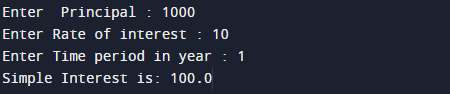
In this program we will find simple interest of given principal rate and time using  java programming. We would first declared and initialized the required variables. Next, we will find simple interest. Lets have a look at the code.

Output

Simple Interest.

In the above program, we have first declared and initialized a set variables required in the program.

  • p= it will hold value of principal.
  • r= it will hold value of interest.
  • t =it will hold value of time in year.
  • si= it will hold value of simple interest.

After declaring variables we initiate values in  variables.

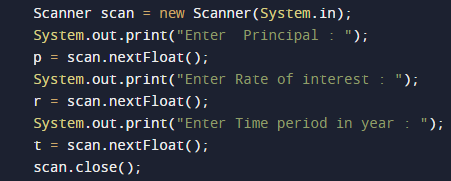
now take all the values of Principal rate and time.

after getting all the values we will calculate simple interest using the below  formula.

Now print the simple intereset

Java Program to check whether input character is vowel or consonant

In this tutorial, we will learn to create a Java Program to check Input Numbers is vowel or consonant in Java using Java programming.

Prerequisites

Before starting with this tutorial we assume that you are best aware of the following Java programming topics:

  • Java Operators.
  • Basic Input and Output function in Java.
  • Class and Object in Java.
  • Basic Java programming.
  • If-else statements in Java.
  • For loop in Java.

Vowel 

A vowel is a letter that speak with an open sound without closing any part of the mouth is called as vowel.
Example : a,e,i,o,u.

Consonant

A consonant is a speech sound that is not a vowel.
Example:- As we know a,e,i,o,,u are called vowels. And renaming are called consonants.

Java Program to check whether input character is vowel or consonant

In this program we will learn to create a Program that checks weather input character is Vowels and Consonants .We would first declared and initialized the required variables. Next, we would prompt user to input a character. Later in program we will find inputted character is Vowels or Consonants .

Output

Vowel

Consonant

In the above program, we have first declared and initialized a set variables required in the program.

  • ch= it will hold given character.

And in the next statement we will ask user to input Character as shown in picture below.

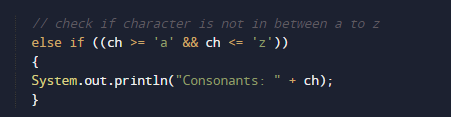
After taking value from user with the help of “if-else” statement we will check the inputted character is a vowel or consonant, using following logic.

Logic For Vowel.

For Consonant.

Note : Inputted value by user must be a Character.

Java Program to Multiply two Numbers

Java Program to Multiply Two Numbers

In this tutorial, we will learn to create a Java program that will Multiply Two Numbers in Java programming.

Prerequisites

Before starting with this tutorial, we assume that you are the best aware of the following Java programming topics:

  • Operators in Java Programming.
  • Basic Input and Output function in Java Programming.
  • Basic Java Programming.
  • Arithmetic operations in java programming.

Program to Multiply Two Numbers:-

In today’s tutorial, we will create a program that will multiply the two numbers using the concepts of java programming. First, we will take the two numbers in input from the user. Then we will multiply the two numbers from the code. At last, we will print the output of the program.

With the help of this program, we can take input and Multiply Two Numbers.

Algorithm to multiply the numbers:-

Program to Multiply Two Numbers:-

Output:-

In the above program, we have first initialized the required variable.

  • no1 = it will hold the input number value from the user.
  • no2 = it will hold the input number value from the user.
  • Multiply = it will hold the sum value of the numbers.

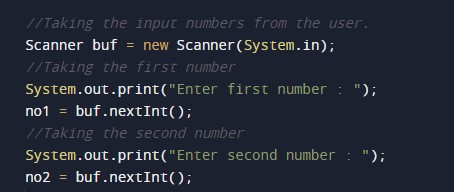
Taking input numbers from the user.

Calculating the multiply of two numbers.

Printing the output.


Java Program to add two complex numbers

Java Program to add two complex numbers

In this tutorial, we will learn to create a Java program that will add two Complex Numbers using Java programming.

Prerequisites.

Before starting with this tutorial, we assume that you are the best aware of the following java programming topics:

  • Operators in Java Programming.
  • Basic Input and Output function in Java Programming.
  • Basic Java programming.
  • While loop in Java programming.

What is a Complex Number?

A number is said to be a complex number if it is in the form of x+yi, where x and are real numbers, and i is an indeterminate satisfying the condition i2 = −1.

For example, 2 + 3i

Algorithm:-

Program to add two Complex Numbers:-

In this program, we will first declare the values of the variables. Then we will add two numbers using the functions in java. At last, we will print the output of the program to the user using a print function.

Program:-

Output:-

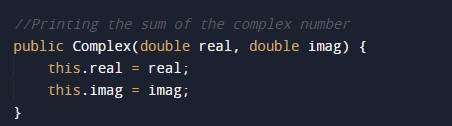
In the above program, we have first initialized the required variable.

  • temp = it will hold the complex value.
  • real = it will hold the float value.
  • img = it will hold the integer value.

Taking the input integer number and exponent from the user.

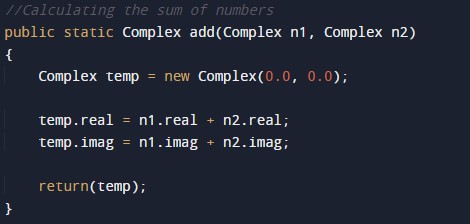
Calculating the complex numbers.
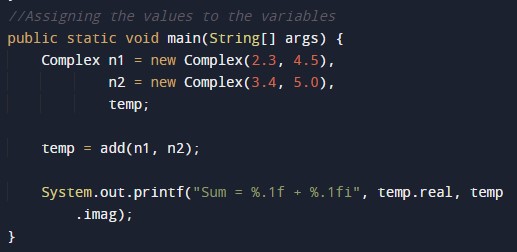
Printing the output numbers.

Java Program to add two binary numbers

In this tutorial, we will learn to create a Java Program to Add two Binary Numbers in Java using Java programming.

Prerequisites

Before starting with this tutorial we assume that you are best aware of the following Java programming topics:

  • Java Operators.
  • Basic Input and Output function in Java.
  • Class and Object in Java.
  • Basic Java programming.
  • If-else statements in Java.
  • For loop in Java.
  • inbuilt Function

Binary Number System.

A Number system in which  numbers are represented by using only two digits (0 and 1) with a base 2 is called a binary number system.

Binary addition.

For Binary addition you must remember the following  rules
The four rules of binary addition are:

  • 0 + 0 = 0
  • 0 + 1 = 1
  • 1 + 0 = 1
  • 1 + 1 =10.

Just look at the table how we add values in Binary are shown.

       x  

             y

                                 x+y

           0                     0                                                           0
           0                     1                                                          1
          1                     0                                                          1
          1                     1                                                          0      (where 1 is carried over)

Java Program to add two binary numbers

In this program we will learn to add two binary numbers.First of all we declare required variable and also initiates required values in variable. Next we take value from user at run time and then after we will add two binary given by user.

Output

In the above program, we have first declared and initialized a set variables required in the program.

  • no1 = it will hold first given binary number.
  • no2= it will hold second Binary number.
  • sum= it will hold sum of numbers.
  • rem= ot will hold reminder of values.

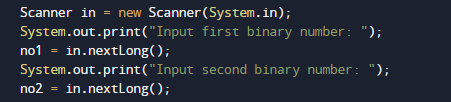
First of all we declared and initialized set of variables required in the program. Then we will take a value from user at run time as shown in image below.

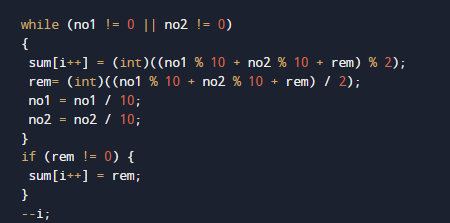
After taking all the values for user we will perform Binary Addition using the following formula.

With in the while loop first of all we check the given number are greater than zero and after that with all the four rule we add two given number by user as shown below.

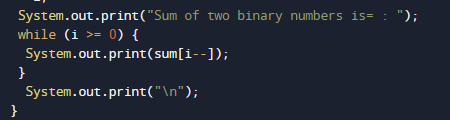
User enter the two binary numbers that we add bit by bit using while loop and storing the result in sum.

And finally we will print the result.

Java Program to Calculate Future Investment Value

In this tutorial, we will learn to create a Java Program to Calculate Future Investment value in Java using Java programming.

Prerequisites

Before starting with this tutorial we assume that you are best aware of the following Java programming topics:

  • Java Operators.
  • Basic Input and Output function in Java.
  • Class and Object in Java.
  • Basic Java programming.
  • If-else statements in Java.
  • For loop in Java.

Investment

investing means buying an asset, or money put in a bank to get an interest in it in the future in other words investment is a process of allocating money in expectation of a benefit/return in the Future.

Java Program to Calculate Future Investment Value

In our program, we will learn to calculate the Future investment value of a given Money. Firstly we declare the required variable and also initiate the required values in the variable. Next, we take value from the user at run time, and then after we will Calculate Future Investment value.

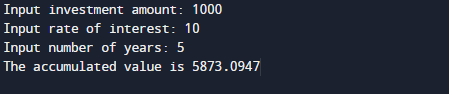
Output

Investment.

In the above program, we have first declared and initialized a set of variables required in the program.

  • amount= it will hold the entered value of amount
  • rate= it will hold the entered value of rate
  • year= it will give the value of the year.
  • Investment= it will give the value of the accumulated  Price.

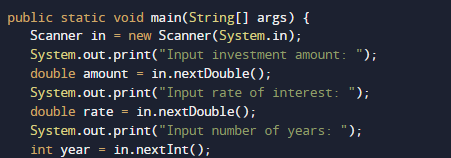
First of all, we declared and initialized the set of variables required in the program. Then we will take a value from the user at run time as shown in the image below.

After taking all the values for user we will calculate the future investment using the following formula.

And finally with the help of above formula we will print the required estimation value of a invested amount.

Java Program to Find Ncr and Npr

In this tutorial, we will learn to create a Java Program to Find Ncr and Npr using Java programming.

Prerequisites

Before starting with this tutorial we assume that you are best aware of the following Java programming topics:

  • Java Operators.
  • Basic Input and Output function in Java.
  • Class and Object in Java.
  • Basic Java programming.
  • If-else statements in Java.
  • For loop in Java.

Permutation:

Permutation is the process of arranging the elements in sequence of all the members of given set into a particular sequence or order.

Example: Set A of elements (1 & 2) can be arranged into 2 ways such as in increasing {1,2,} and in decreasing order {2,1}.

Combination:

Combination is the process of arranging elements in a set as many combination as possible of any particular set.

Example: We have set of 3 elements from set A with members (1, 2 & 3) we can create 3 possibilities or combination they are {1,2}, {2,3} and {1,3}.

Java Program to Find Ncr and Npr

In this program we will learn to create a program that will find Ncr and Npr of a given  numbers. Firstly we declare required variable and also initiates required values in variable. Next we take value from user at run time and then after we will finf Ncr and Npr of a given numbers.

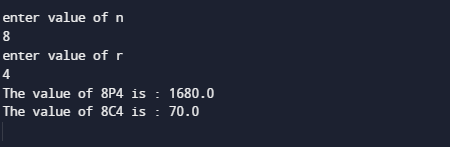
Output

In the above program, we have first declared and initialized a set variables required in the program.

  • N= it will hold entered value of n
  • R = it will hold entered value of r
  • per = it will give value of permutation.
  • com= it will give value of Combination.

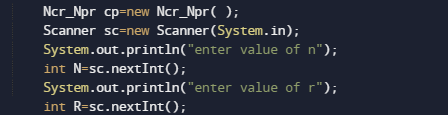
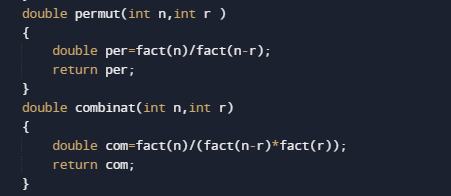
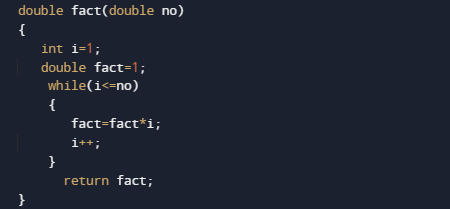
First of all we declared and initialized set of required variables in the program.Then take a value from user at run time.Afterword we pass the given values to function named cp.permutation(n,r) it calls the permut() method and permut() method calls the fact() method and prints all the permutations of numbers.

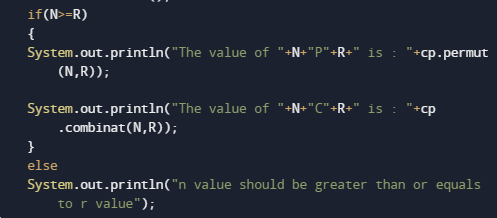
cp.combinat(n,r) it will calls the combinat() method and combinat() method calls the fact()

method and prints all the Combinations.this process will keep on repeating until the condition if(n>=r) became false.

And at last we will print all the value or Permutation and Combination.

Java Program to Calculate Average Marks

In this tutorial, we will learn to create a Java Program to Calculate Average marks  using Java programming.

Prerequisites

Before starting with this tutorial we assume that you are best aware of the following Java programming topics:

  • Java Operators.
  • Basic Input and Output function in Java.
  • Class and Object in Java.
  • Basic Java programming.
  • If-else statements in Java.
  • For loop in Java.

Average

Average can be find by adding the numbers(let say we have 5 number then average is “1+2+3+4+5/5”),and then dividing the total by the total number size (5).

In mathematics, an average is called a “mean” = (sum of values)/number of items.

Java Program to Calculate Average Marks

In our program we will create a program that will Calculate Average of Marks. Firstly we declare required variable and also initiates required values in variable. Next we take values from user at run time and then after we will find the average of Marks.

Output

In the above program, we have first declared and initialized a set variables required in the program.

  • mark= it will hold entered numbers.
  • sum = it will hold sum of values.
  • avg = it will hold average of numbers.

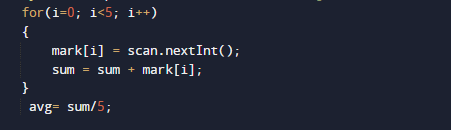
After that we will takes values from user in variable mark[].

And after we will add values taken from user sum=sum+mark[i] and find the average of marks in avg (sum/avg) variable as shown in image below.

And finally we print the result i.e sum of all values and average of given values. The above Program is compile and executed, it will produce the following output:

Java Program to Calculate CGPA

In this tutorial, we will learn to create a Java Program to Calculate CGPA using Java programming.

Prerequisites

Before starting with this tutorial we assume that you are best aware of the following Java programming topics:

  • Java Operators.
  • Basic Input and Output function in Java.
  • Class and Object in Java.
  • Basic Java programming.
  • If-else statements in Java.
  • For loop in Java.

CGPA(Cumulative Grade Point Average)

Cumulative Grade Point Average (CGPA) is a tool used to evaluate your academic performance.
For conversion of CGPA to percentage, the CGPA must be multiplied with 9.5.

Example. if your score in Cgpa is 9.7 ,then in “%”, it will be 9.7×9.5=92.1%.

Java Program to Calculate CGPA

In this program we will learn to create a program that will Calculate CGPA and Percentage from CGPA. Firstly we declare required variable and also initiates required values in variable. Next we take value from user at run time and then after we will find CGPA and Percentage from CGPA .Lets have a look at the program.

Output

In the above program, we have first declared and initialized a set of variables required in the program.

  • number= it will hold size of number.
  • marks= it will hold given marks.
  • sum= it wil hold sum of values.
  • cgpa= it will give value result in cgpa.

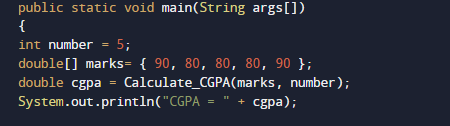
First of all we declared and initialized set of variables required in the program. Then we will take a value and pass this value to function Calculate_CGPA(marks,number).

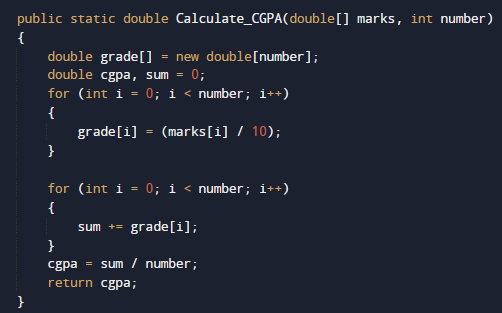
With in the Function we will Calculate both the answer in CGPA and also in percentage.

And return the result back to main function where we print the value in CGPA and in Percentage.

To get value form CGPA just simply multiply with 9.5 as shown in above picture.

Java Program to Calculate Batting Average

In this tutorial, we will learn to create a Java Program to Calculate Batting Average using Java programming.

Prerequisites

Before starting with this tutorial we assume that you are best aware of the following Java programming topics:

  • Java Operators.
  • Basic Input and Output function in Java.
  • Class and Object in Java.
  • Basic Java programming. Basic Java programming.
  • If-else statements in Java.
  • For loop in Java.

Batting Average.

By taking three values ” runsmatches, and number of not-out” represent number of runs scored and innings played by the batsman and number of times remained Not Out. respectively.For calculating Batting Average

“Average= Run score/number of dismissals.”

where : number of dismissals = number of innings -number of innings remained not out.

Java Program to Calculate Batting Average

In this program we will to create a program to calculate Bating Average using java program. We would first declared and initialized the required variables. Next, we would prompt user to input the values.Later we find Batting average. 

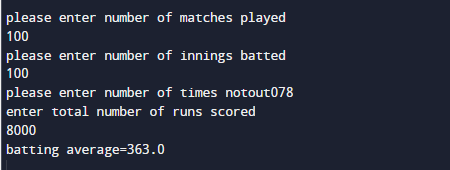
Output

Batting Average.

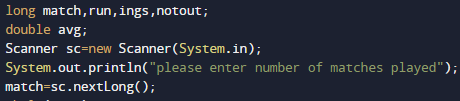
In the above program, we have first declared and initialized a set variables required in the program.

  • match = it will hold entered match
  • run   =  it will hold entered runs
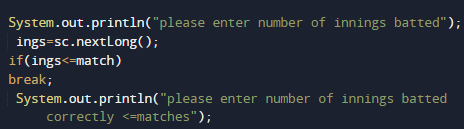
  • ings  = it will hold entered innings.
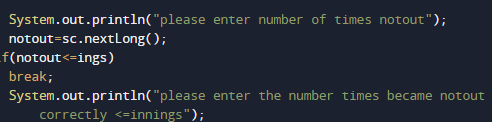
  • notout= it will hold total number of not-out.

And in the next statement user will be prompted to enter  different values  and  which will be assigned to variables “match,run , notout , ings” respectevely.

Matches:

Innings:

Not-out

Runs:

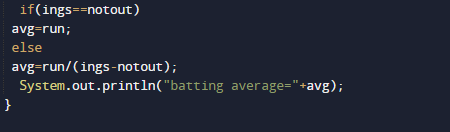
After taking all the values,Now we will calculate Bating average.
First we calculate the number of dismissals,that’s equal to matches – notout.
Batting Average, equal to runs/ (matches – notout).

At last we will Print the calculated Bating average.