Category Archives: Java Programs

Java Programs

Java Program to Print Name Of Day

Java Program to Print Name Of Day

In this tutorial, we will learn to create a Java program that will Print Name Of Day using Java programming.

Prerequisites

Before starting with this tutorial, we assume that you are the best aware of the following Java programming topics:

  • Operators in Java Programming.
  • Basic Input and Output function in Java Programming.
  • Basic Java programming.
  • Conditional Statements in Java programming.
  • Arithmetic operations in Java Programming.

Algorithm:-

Find the Day Name of a Week:-

In today’s program, we will take the input day in a range between 1 to 7 from the user. Then we will pass that variable to the conditional statements to find the name of days. At last, we will print the resulting name of the day to the user.

With the help of the below program, we can find the name of the day in a week.

Program Code:-

Output:-

In the above program, we have first initialized the required variable.

  • wd = it will hold the integer value for the input.

Taking the input day from the user.

Finding the name of the day in a week using conditional statements.
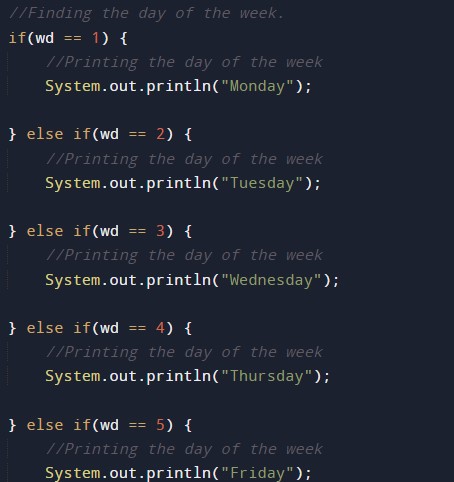
Printing the output of the program.


Java program to find Voting Age Program in Java

In this tutorial, we will learn to create a Java Program to check Voting age  in Java using Java programming.

Prerequisites

Before starting with this tutorial we assume that you are best aware of the following Java programming topics:

  • Java Operators.
  • Basic Input and Output function in Java.
  • Class and Object in Java.
  • Basic Java programming.
  • If-else statements in Java.
  • For loop in Java.
  • Scanner class.
  • Basic inbuilt functions.

Voting

Voting is a technique for a group of people for finding a opinion on something or making a collective decision,such as a meeting or an electorate vote .

Java program to find Voting Age Program in Java

In this program we will find voting age  using if-else statement  in java programming. We would first declared and initialized the required variables. Next, we would prompt user to input the age value .Later we calculate the age is valid for vote or not let’s have a look at the code.

Output

Valid condition.

Not valid condition.

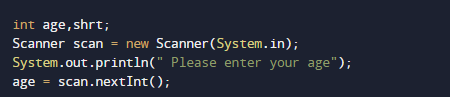
In the above program, we have first declared and initialized a set variables required in the program.

  • age= it will hold entered age by user
  • shrt= it will hold value person short by how much.

After declaring variables in the next statement user will be prompted to enter a value and  which will be assigned to variable ‘age’.

And after that we calculate the value given age by user is valid for voting or not firstly check condition for valid voting if the given age is grater than 18 or equal to 18 ( age>=18) then it valid age.

Here what we have considered that age of given by user is eligible to vote if he attains age of 18 and more .

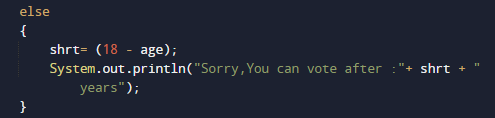
If age of person is  not eligible to vote then we going to calculate the years after person can vote as shown in image above.

So in our program we calculate the age or person is eligible for vote or not.

Passing Division Program in Java

In this tutorial, we will learn to create a Java to Program Find Passing Division Program in Java using java programming.

Prerequisites

Before starting with this tutorial, we assume that you are best aware of the following Java programming concepts:

  • Java Operators.
  • Basic Input and Output function in Java.
  • Class and Object in Java.
  • Basic Java programming.
  • If-else statements in Java.
  • For loop in Java.

How to Calculate percentage?

Percent is one out of one hundred parts, i.e., A ratio of the parts out of 100. Symbol of a percent is “%”.

Example :->


Passing Division Program in Java

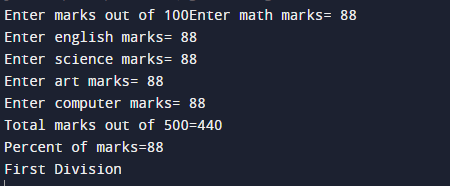
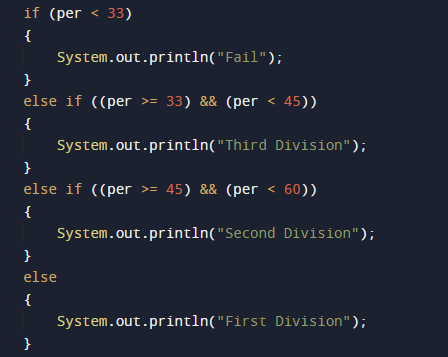
In this program we will find Passing Division number provided by user. first will take the input from the user and then calculate passing percentage of a user. Lets have look at the Code.

Output

Division:=>

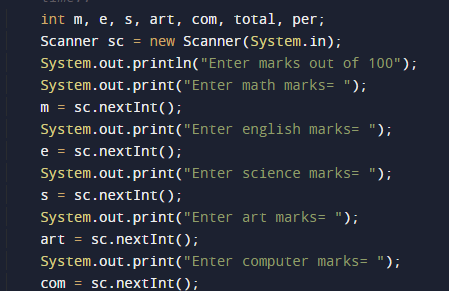
In the above program, we have first declared and initialized a set variables required in the program.

  • m = it will hold entered math’s number.
  • e = it will hold entered English number.
  • s = it will hold entered science number.
  • art = it will hold entered art  number.
  • com = it will hold entered computer number.
  • total= it will hold total of all subject.
  • per =it will hold percentage  of a student.

After that we take 5 subjects values form user.

and then after that we add all values in variable total and

then after find percentage

and finally we will print the percentage according to inputted values.

Java Program to check Equal Number in Java

In this tutorial, we will learn to create a Java Program to check Equal Numbers in Java using java programming.

Prerequisites

Before starting with this tutorial, we assume that you are best aware of the following Java programming concepts:

  • Java Operators.
  • Basic Input and Output function in Java.
  • Class and Object in Java.
  • Basic Java programming.
  • If-else statements in Java.

How do you equal a number in Java?

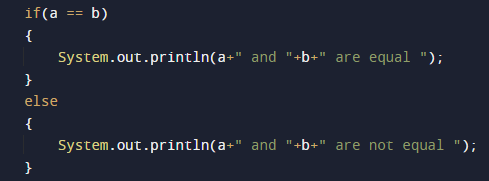
How to compare integer values are equal or not in Java, we can use either == (operator) or we can simply subtract these two values and values becomes zero means given number are equal. Both are used to compare two values. We can also use the equal() method to find numbers are equal or not.
Example How to check whether they are equal or not, use equal to (== )operator.
a == b

Example2 How to check whether they are equal or not, use the equal to ( )operator.
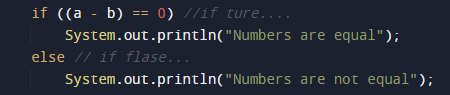
if(a -b==0)they are equal other wise they are not equal..

Java Program to check Equal Number in Java

In this program, we will take two values from the user and print numbers are an equal or not the smallest element in an array using a nested for loop. We would first declare and initialized the required variables. Next, we will find the smallest number in an array. Let’s have a look at the code.

Using relational operator equal to (==) in java program..

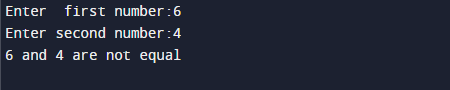
Output

Equal

Not Equal

using arithmetic operator equal to(-) in java program..

Output

Equal

Not Equal

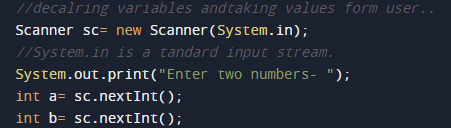
In the above program, we have first declared and initialized a set variables required in the program.

  • a= it will hold value of first variable.
  • b= it will hold value of second variable.
  • i and j for iteration
  • temp = it will hold temporary value of an array.

After declaring variables we initiate values and take value from user at run time.

then with the help of relational and arithmetic operator we will find given integer are equal or not.

using arithmetic operator equal to(-) in java program..

Using relational operator equal to (==) in java program..

and finally we will print the results…

Duplicate Words in String Program in Java

In this tutorial, we will learn to create a Duplicate Words in String Program in Java using java programming.

Prerequisites

Before starting with this tutorial, we assume that you are best aware of the following Java programming concepts:

  • Java Operators.
  • Basic Input and Output function in Java.
  • Class and Object in Java.
  • Basic Java programming.
  • If-else statements in Java.
  • For loop in Java.

Duplicate Words in a String

Here we need to find out the duplicate words present in a string and display those words.

Example string = ” Hi, welcome to W3adda hi”

Output: “Hi”

Duplicate Words in String Program in Java

Output

Duplicate Word

In the above program, we have first declared and initialized a set of variables required in the program.

  • str= it will hold the string
  • length=  it will hold the length of a string
  • i = for iteration
  • wd = it will hold the duplicate words

After declaring variables we initiate values in str .

after initiating string in the variable str first of all we convert into lower case.

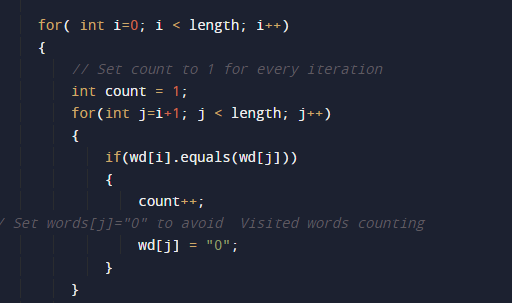
then we split a string into words by using the split() method.

then we count the length of a string

and within the loop we find duplicate word present in a string as shown mage below

And finally, we will print the duplicate values within the string.

Increment Decrement Operators Program in Java

In this tutorial, we will learn to create a Increment Decrement Operators Program in Java using   java programming.

Prerequisites

Before starting with this tutorial, we assume that you are best aware of the following Java programming concepts:

  • Java Operators.
  • Basic Input and Output function in Java.
  • Class and Object in Java.
  • Basic Java programming.
  • If-else statements in Java.
  • For loop in Java.

Increment ++ and Decrement — Operator?

Operator “++” increases the value of a variable by 1 it means if value of a variable is “a=5” then “a++” gives as a=6;
Similarly, Decrement operator “–“ decreases the value of a variable by 1 it means  if “a=5” then “a–“ gives as a=4;
Both operators are unary operators. These operators  work on a single operand, that’s why they are called as unary operators.

Increment Decrement Operators Program in Java

In this program we will define Increment Decrement Operators .We would first declared and initialized the required variables. Next, we will define Increment Decrement Operators . Lets have a look at the code

Post Increment operator ++

Output

Post Decrement operator —

Output

Pre Increment operator ++

If we use “++” operator as  prefix  => ++var, then value of var is incremented by 1 then it returns  value.

Output

Pre Decrement operator —

If we use “–“ operator as  prefix  => —var, then value of var is decremented by 1 then it returns  value.

Output

Java Program to calculate Marks Average

Java Program to calculate Marks Average

In this tutorial, we will learn to create a Java program that will calculate Marks Average using Java programming.

Prerequisites

Before starting with this tutorial, we assume that you are the best aware of the following Java programming topics:

  • Operators in Java Programming.
  • Basic Input and Output function in Java Programming.
  • Basic Java programming.
  • Arithmetic operations in Java Programming.

What is a percentage of numbers?

The percentage of all the marks is calculated by adding the total marks. And then we will divide it by the maximum marks and multiplied by 100.

What is the average of numbers?

The average of numbers in mathematics means that all the numbers are added and then the sum of all the numbers is divided by the total number of objects.

It means if there are 5 subject marks as follows {60,60,60,80,70} then the average will be:-

average = 60+60+60+80+70/5

average = 60.

Algorithm:-

Program to calculate Average of marks.

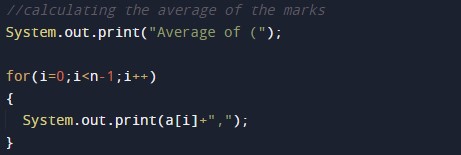
In this program, we will first take the marks of all five subjects from the user. And then we will add them to find the total marks. Now the total will be divided by the number of subjects to find the average.  Then the total will divide by maximum marks by 5. Last, we will print the output average marks.

Example using the below program.

Program Code:-


Output:-

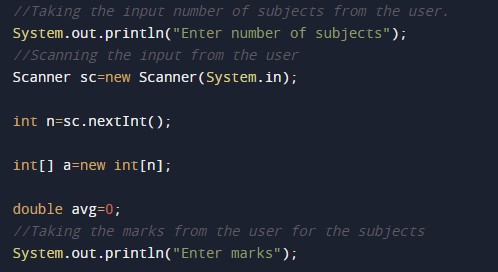
In the above program, we have first initialized the required variable.

  • i = it will hold the integer value.
  • average = it will hold the float value.
  • a = it will hold the integer value.

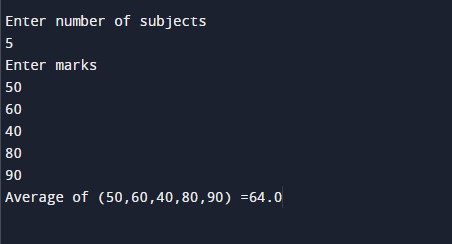
Input number of subjects and the marks from the user.

Program Logic Code.

Printing output.

Variables Initialization Program in Java

In this tutorial, we will learn to create a Java to Program Variables Initialization Program in Java using java programming.

Prerequisites

Before starting this tutorial, we assume that you are the best aware of the following Java programming concepts.

  • Java Operators.
  • Basic Input and Output function in Java.
  • Class and Object in Java.
  • Basic Java programming.

Variables Initialization in Java

Just like other programming languages, we can declare and initiate variables in Java, here is the syntax and example of how we can declare a variable and initiate values of a variable.

“Data_Type => variable_name”
variable_name=value;
int a= 10;

Variables Initialization Program in Java

In this program, we will find the smallest element in an array using a nested for loop. We would first declare and initialized the required variables. Next, we will find the smallest number in an array. Let’s have a look at the code.

Output

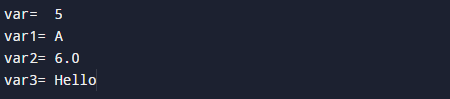
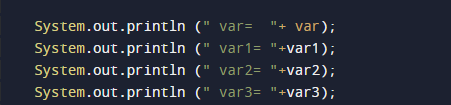
Printing the values of variables

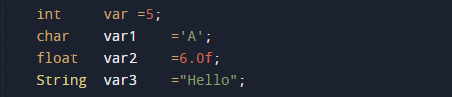
In the above program, we have first declared and initialized a set of variables required in the program.

  • var    = it will hold integer value.
  • var1 = it will hold character value.
  • var2 = it will hold float value.
  • var3 = it will hold string value.

After declaring variables we initiate values in variables.

Now we will print the values of the variables.

What is the difference between Declaration vs. Initialization?

Declaration:=>

The process of Declaration is by defining the variable along with its type and name.
Example:=> we are declaring a variable named var variable.
int var;

Initialization:=>

here we assign a value to a variable as shown below
Example: Var = 10;

Java Program to Get IP Address

Java Program to Get IP Address

In this tutorial, we will learn to create a Java program that will get the IP address of the computer using Java programming.

Prerequisites

Before starting with this tutorial, we assume that you are the best aware of the following Java programming topics:

  • Operators in Java Programming.
  • Basic Input and Output function in Java Programming.
  • Basic Java programming.
  • Header Libraries and their usage.

Get IP address

In Java programming, it is possible to take or fetch the ip address from the computer and convert it into words or can display in words with the help of a very small amount of code. The Java language has many types of header libraries which has supported function in them, with the help of these files the programming is easy.

Algorithm:-

Program:-

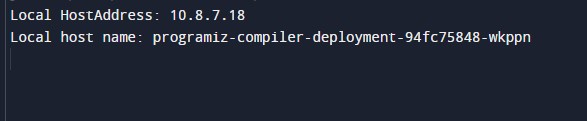
Output:-

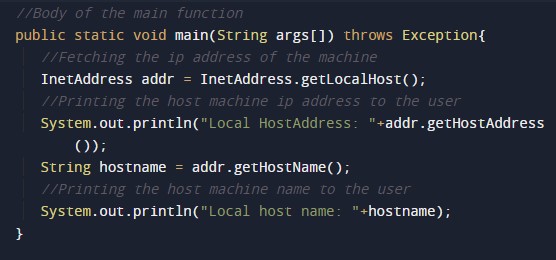
In the above program, we have first initialized the required variable.

  • addr = it will hold the ip address of the machine on the network.
  • hostname = it will hold the host name of the machine on the network.

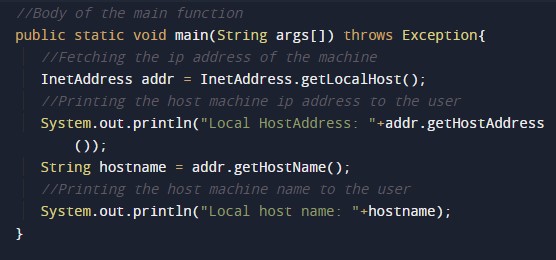
Including the packages files required for the program.

First we will retrieving the ip address of the machine on the network.

Body of the Main function of the program.
Printing the ip address of the machine.

Printing the host name of the machine.

Java Program to Reverse a String using Recursion

Java Program to Reverse a String using Recursion

In this tutorial, we will learn to create a Java program that will reverse a string Using Recursion in Java programming.

Prerequisites

Before starting with this tutorial, we assume that you are the best aware of the following Java programming topics:

  • Operators in Java Programming.
  • Usage of Conditional statements in Java Programming.
  • Basic Input and Output function in Java Programming.
  • Basic Java programming.

What is Recursion? Reverse a Sentence Using it?

The recursion means a function or program that repeats itself until the condition is satisfied. The recursion repeats the program execution in a controlled format. Today we will reverse a sentence using the recursion.

Algorithm:-

In this program of recursion, we will take the input string from the user and store it in the string variable. Then will use that string variable in a user-defined function. At last, we will reverse that string using a recursion program.

With the help of the below, code, we will reverse a string Using Recursion.

Program Code:-

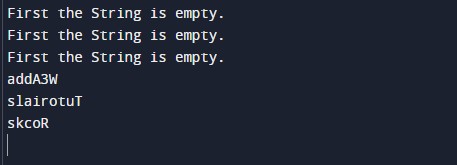
Output:-

In the above program, we have first initialized the required variable.

  • ResultantString1 = it will hold the string value for the program.

  • ResultantString2 = it will hold the string value for the program.

  • ResultantString3 = it will hold the string value for the program.

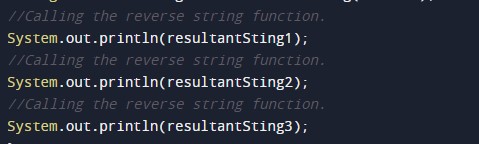
Calling the reverse string function.

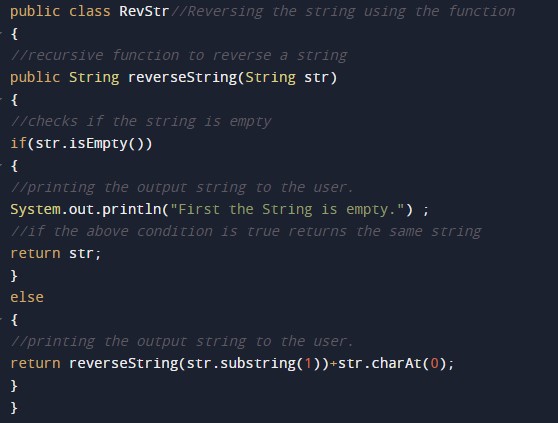
Body of the Reverse string function.

Printing the output of the program reversed string.

Java Program to check Palindrome string using Recursion

Java Program to check Palindrome string using Recursion

In this tutorial, we will learn to create a Java program that will check Palindrome string using Recursion using Java programming.

Prerequisites

Before starting with this tutorial, we assume that you are the best aware of the following Java programming topics:

  • Operators in Java Programming.
  • Basic Input and Output function in Java Programming.
  • Basic Java programming.
  • For loop in Java programming.
  • Conditional Statements in Java programming.
  • Arithmetic operations in Java Programming.

What is a palindrome string/number?

The Palindrome string/number means a string/number that is the same when we read it from forward and reverse.

For Example 1:- AddA is a palindrome string that is the same when we write it in reverse order, 1221

Example 2:- 1221 this is a palindrome number that is the same when we write it in reverse order, 1221.

Example 3:- 123 this is not a palindrome number, it is not the same when we write it in reverse order, 321.

Algorithm:-

Program to Check Whether a String is Palindrome or Not:-

To check whether a number is a Palindrome string or not. In today’s Java program, we will write code for checking. First, we will take a string of input from the user. Then we will pass it into the program to Check Whether a String is Palindrome or Not.

With the help of the below program, we can Check the Palindrome string or Not.

Program  Code:-

Output:-

In the above program, we have first initialized the required variable.

  • strg = it will hold the string value of the input for the program.
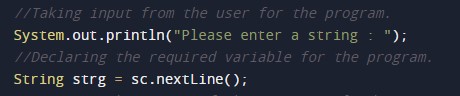
Input message for the user for the string value.

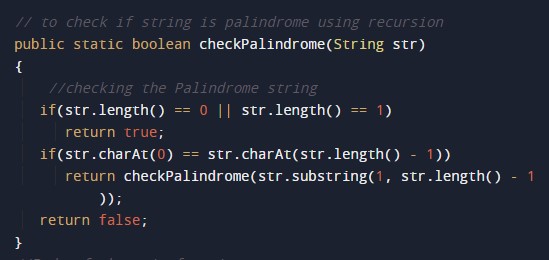
Program Logic Code to check the string is palindrome or not.

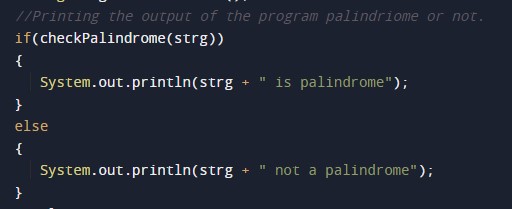
Printing output Palindrome number or not.

Java Program to perform Arithmetic Operation using Method Overloading

Java Program to perform Arithmetic Operation using Method Overloading

In this tutorial, we will learn to create a Java program that will perform Arithmetic operations using Method Overloading in Java programming.

Prerequisites

Before starting with this tutorial, we assume that you are the best aware of the following Java programming topics:

  • Operators in Java Programming.
  • Basic Input and Output function in Java Programming.
  • Basic Java Programming.
  • Arithmetic operations in java programming.

Program to Description-:-

In today’s tutorial, we will create a program that will perform Arithmetic operations on the two numbers using the concepts method overloading. First, we will take input numbers from the user. We will use the arithmetic operators, in java, for calculations. Then we will print the output of different overloaded functions to the user. First, an addition function goes under the execution, then the overloaded method goes under execution. 

With the help of this program, we can take input and perform the arithmetic operations.

Algorithm:-

Program to Code:-

Output:-

In the above program, we have first initialized the required variable.

  • a= it will hold the number value for the program.

  • b = it will hold the number value for the program.
  • sum = it will hold the sum value of the numbers.
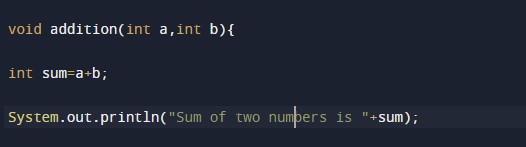
Adding with the first method of overloading.

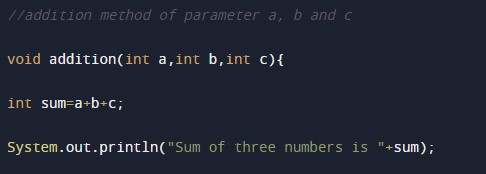
Adding with the second method of overloading for three numbers.

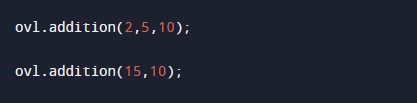
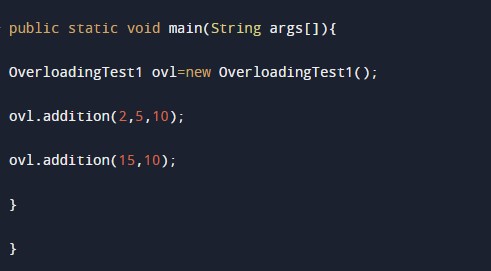
Calling the functions and printing the output to the user.