Category Archives: Java Number Programs

Java Number Programs

Java Program to display alternate prime numbers

In this tutorial, we will learn to create a Java Program to display alternate prime numbers using Java programming.

Prerequisites

Before starting with this tutorial we assume that you are best aware of the following Java programming topics:

  • Java Operators.
  • Basic Input and Output function in Java.
  • Class and Object in Java.
  • Basic Java programming.
  • If-else statements in Java.
  • For loop in Java.

Prime Number:

A prime number is a number such that is either divides by 1 or itself(Number itself).

For example, 2, 3, 5, 7,11,13 and etc. are prime numbers.

Java Program to display alternate prime numbers

In this program we would find alternate Prime number Between given number .first of we would take a value from user and find display alternate prime numbers, Let’s have a look at the code.

Output

Alternate Prime number between given number are

In the above program, we have first declared and initialized a set variables required in the program.

  • number= it will hold entered number.
  • count =   it will count number is  prime or not.
  • temp =  it print prime number with in the given range.
  • n        = for iteration.

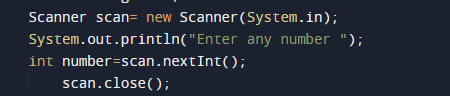
After that we take a number from user we will print prime number between the given range.

now we will pass the given range to function Alt_Prime(number) where we find prime number between given range.
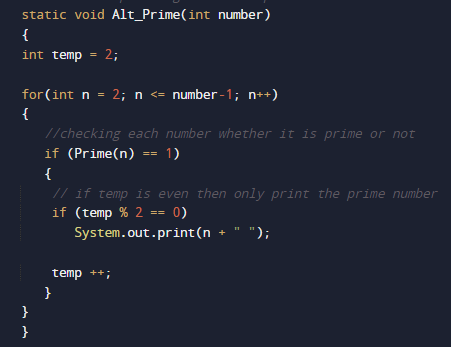
with in the function we will call function named with Prime() where we calculate Prime numbers.
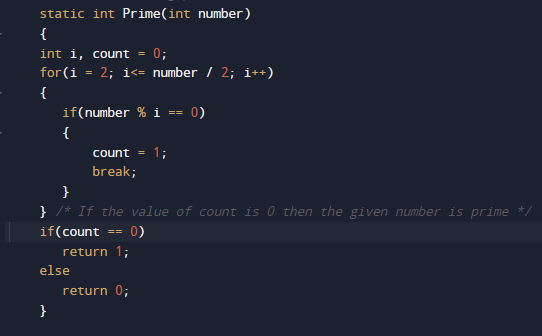
This  function find Prime number within the range and returns true to Alt_Prime() function .

where we print Prime numbers.

Java Program to find largest of three numbers using ternary operator

In this tutorial, we will learn to create Java Program to find largest of three numbers using ternary operator using Java programming.

Prerequisites

Before starting with this tutorial we assume that you are best aware of the following Java programming topics:

  • Java Operators.
  • Basic Input and Output function in Java.
  • Class and Object in Java.
  • Basic Java programming.
  • If-else statements in Java.
  • For loop in Java.

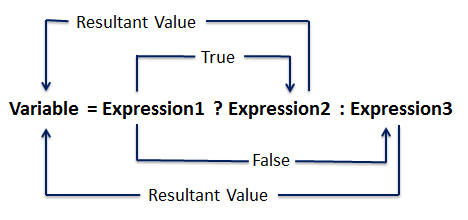
Ternary Operator Syntax :

The use of a ternary operator in our program decreases the number of lines of code and increases performance .

Syntax of ternary Operator.

variable = condition ? expression1 : expression2 ;

Java Program to find largest of three numbers using ternary operator

In this program we would find largest of three numbers using ternary operator . First of we would take three values from user and find the find largest of three numbers using ternary operator. Let’s have a look at the code.

Output

Greatest among three.

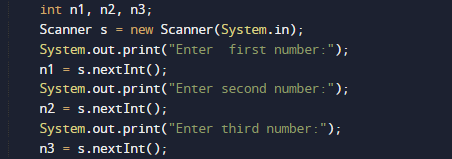
In the above program, we have first declared and initialized a set variables required in the program.

  • n1,n2 and n3 = it will hold entered numbers.
  • grt=  it will hold result in it

After that we take a numbers from user and find greatest among three using ternary operator.

after taking values from users we use ternary operator to calculate greatest among three


Boolean result= Condition ? true value : false value; it returns the Boolean value(true/false).
Logic behind the above expression is explained.

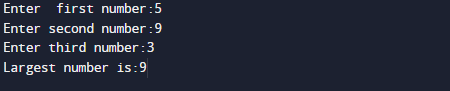
And finally we will print the result as shown in above image.

Java Program to find smallest of three numbers using ternary operator

In this tutorial, we will learn to create Java Program to find smallest  of three numbers using ternary operator using Java programming.

Prerequisites

Before starting with this tutorial we assume that you are best aware of the following Java programming topics:

  • Java Operators.
  • Basic Input and Output function in Java.
  • Class and Object in Java.
  • Basic Java programming.
  • If-else statements in Java.
  • For loop in Java.

Ternary Operator Syntax :

The use of a ternary operator in our program decreases the number of lines of code and increases performance .

Syntax of ternary Operator.

variable = condition ? expression1 : expression2 ;

Java Program to find smallest of three numbers using ternary operator

In this program we would find smallest of three numbers using ternary operator . First of we would take three values from user and find the find smallest of three numbers using ternary operator. Let’s have a look at the code.

Output

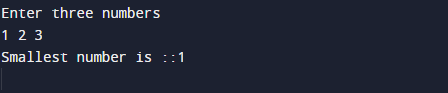
Smallest among three.

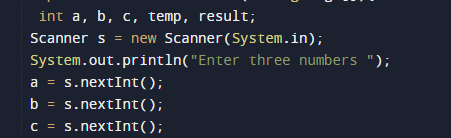
In the above program, we have first declared and initialized a set variables required in the program.

  • a,b and c = it will hold entered numbers.
  • result=  it will hold result in it.
  • temp = it will hold temporary answer.

After that we take three numbers from user and find smallest among three using ternary operator.

after taking values from users we use ternary operator to calculate smallest among three

Boolean result= Condition ? true value : false value; it returns the Boolean value(true/false).
Logic behind the above expression is explained.

And finally we print the result as shown in the image below.

So here the example  of finding smallest among three using ternary operator.

Java Program to swap two numbers using bitwise operator

In this tutorial, we will learn to create a Java Program to swap two numbers using bitwise operator using Java programming.

Prerequisites

Before starting with this tutorial we assume that you are best aware of the following Java programming topics:

  • Java Operators.
  • Basic Input and Output function in Java.
  • Class and Object in Java.
  • Basic Java programming.
  • If-else statements in Java.
  • For loop in Java.

What is Bitwise Operator.

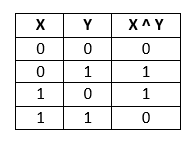
Bitwise operator XOR is used to swap two numbers. It’s symbol is  (^). It checks bits of two operands and returns “false” or “0″ if they are equal and returns “true or 1″ if they are not equal. The truth table of  XOR operator is as follows:

x = 5, y = 6
x = x ^ y -> x =11
y = x ^ y -> y = 5
x = x ^ y -> x = 6

Java Program to swap two numbers using bitwise operator

In this program we would swap two values using bitwise Operator .first of we would take a values from user and then swap them using bitwise Operator. Let’s have a look at Code.

Output

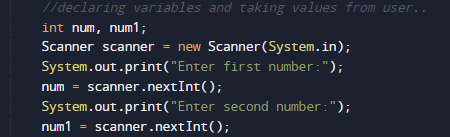
In the above program, we have first declared and initialized a set variables required in the program.

  • no,number= it will hold entered number.
  • Sum=   it will hold result of calculation.

After that we take a numbers from user and we will swap value using bitwise operator.

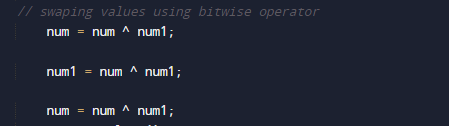
  • First of all we find binary equivalent of given variables.( num and num1).
  • Find num = num ^ num1.
  • Again, find  num1 = num ^ num1.
  • Find num^num1  and store it in num
  • i.e. num = num ^ num1.
  • Numbers are swapped now.

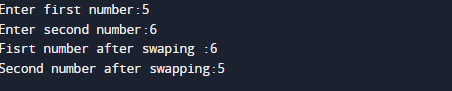
As shown in image values of number are being swapped using Bitwise operator.

and then finally we will print swapped values of numbers.

Java Program to find Largest of three numbers

In this tutorial, we will learn to create Java Program to find Largest of three numbers using Java programming.

Prerequisites

Before starting with this tutorial we assume that you are best aware of the following Java programming topics:

  • Java Operators.
  • Basic Input and Output function in Java.
  • Class and Object in Java.
  • Basic Java programming.
  • If-else statements in Java.

If statement

It consists a condition, followed by statement if condition true statement executed if not statement will not executed.

Syntax
if (Condition)
{
Statement;
}

If-else statement

Test the condition. If condition true execute statement otherwise jump to else block and executed the statement.

Syntax:
if(condition)
{
code if condition is true;
}
else
{
code if condition is false;
}

Java Program to find Largest of three numbers.

In this program we would find Largest of three numbers using Nested if-else statement . First of we would take three values from user and find the find smallest of three numbers . Let’s have a look at the code.

Output

In the above program, we have first declared and initialized a set variables required in the program.

  • n1,n2 and n3 = it will hold entered numbers.

After that we take three numbers from user and find greatest among three using logical operator.

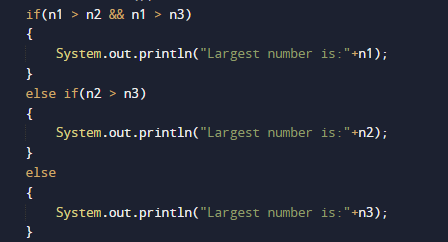
After taking values from users we use logical operator and nested if else statement to calculate largest among three.

Then, we will find the greatest among  using if else statement.

  • First of all we will check n1 is greater to both n2 and n3 ,then n1 is the greatest Else.
  • Else n2 is greater n3 then n2 is the greatest.
  • Else n3 is the greatest.

And finally we print the result as shown in the image below.

Java Program to find GCD of two numbers

In this tutorial, we will learn to create a Java Program to find GCD of two numbers using Java programming.

Prerequisites

Before starting with this tutorial we assume that you are best aware of the following Java programming topics:

  • Java Operators.
  • Basic Input and Output function in Java.
  • Class and Object in Java.
  • Basic Java programming.
  • If-else statements in Java.
  • For loop in Java.

What Is GCD?

GCD(Greatest Common Divisor) or HCF (Highest Common Factor) . When  we finding the factor of two numbers, Highest Common Factor of  numbers is the Largest factor that divides these two numbers. The greatest factor found from the common factors is called the HCF. It is also called the Greatest common factor.

Methods of Greatest Common Factor.

  • Note all the factors of two number.
  • Fetch the common factors.

Example: Find HCF 12 and 8.
Factors of 12=> 1, 2, 3, 4, 6, 12.
Factors of 8=> 1, 2, 4, 8
Common Factors: 1, 2, 4
Greatest Common Factor: 4
Then HCF of 12 and 8 is = >4.

Java Program to find GCD of two numbers

In this program we will find GCD of two given number using  loops. We would first declared and initialized the required variables. Next, we would prompt user to input two numbers.Later we will find the GCD of given number.

Output

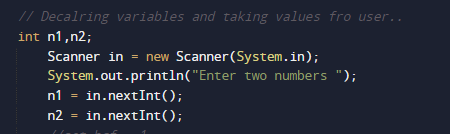
In the above program, we have first declared and initialized a set variables required in the program.

  • n1 =It will hold first number given by user.
  • n2 =It will hold second number given by user.
  • Hcf= it will hold Greatest common divisor.

After that we take a numbers from user and find greatest common divisor between them.

Here, we take two numbers from user whose HCF are to be found are stored in n1 and n2 respectively.

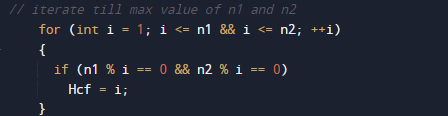
Here loop will be executed until i is less than both “n1 & n2” in that way all number between 1 and smallest of two are iterated to find HCF.

If both first  and second number are divisible by i,Hcf is set to the particular number. This will continue until we finds the largest number (HCF) which divides both First and second number without any  remainder as shown in image above.

And Finally we will Print Hcf of both the number.

Java Program to generate Random Number

In this tutorial, we will learn to create a Java Program to generate Random Number using Java programming.

Prerequisites

Before starting with this tutorial we assume that you are best aware of the following Java programming topics:

  • Java Operators.
  • Basic Input and Output function in Java.
  • Class and Object in Java.
  • Basic Java programming.
  • If-else statements in Java.
  • For loop in Java.

What is Random Number?

Random numbers use choose a random in a large set of numbers and selects a number using the mathematical algorithm permutation and combination.

Java Program to generate Random Number

In this program we would find a random number using builtin function in java .first of al we initiate required variables and function and then we will print random  on screen using builtin in function .let have a look at the code

Printing Random value using Math.random() function ;

Output

in the above program we are printing random number using random.math() Built in function().

this is how Math.random() function work.

Printing Random value using Java.util.Random class.

Output

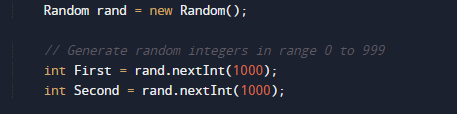
in the above program we are printing random number Java.util.Random class.
first of all we create an instance of this class and then invoke methods such as nextInt() to generate random number.

this is how random class works.

There is one another method to generate random number using java.util.concurrent.ThreadLocalRandom class with the help of this class we also generate random number in a java program.

Java Program to check if a number is Positive or Negative

In this tutorial, we will learn to create a Java Program to check if a number is Positive or Negative using Java programming.

Prerequisites

Before starting with this tutorial we assume that you are best aware of the following Java programming topics:

  • Java Operators.
  • Basic Input and Output function in Java.
  • Class and Object in Java.
  • Basic Java programming.
  • If-else statements in Java.
  • For loop in Java.

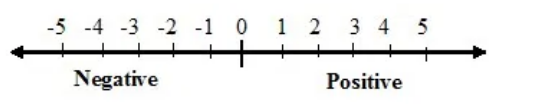
What is Positive and Negative Number.

A number which is  greater than zero it is a positive number (Number>0).
else number which is  less  than zero it is negative number (Number<0).
A number which is  equivalent  to zero it is Not positive nor negative  number (Number==0).

Java Program to check if a number is Positive or Negative

In this program we will find whether a number is positive, negative or zero series using if else statement. We would first declared and initialized the required variables. Next, we would prompt user to input any number. Later we will find that number is positive,negative or zero.

Output

Positive Number

Negative Number

Zero

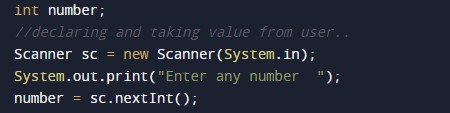
In the above program, we have first declared and initialized a set variables required in the program.

  • number =It will hold number given by user.

After that we take a numbers from user and find that a number is positive ,negative or Zero.

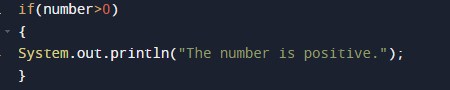
after that we check if number is greater than zero it means number is a positive number as shown in image below.

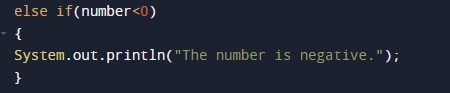
if condition falls compiler move to next statement that is if number is less than zero than it is negative number.

else number is Zero .

Java Program to print Armstrong numbers between a given range

In this tutorial, we will learn to create a Java Program to print Armstrong numbers between a given range using Java programming.

Prerequisites

Before starting with this tutorial we assume that you are best aware of the following Java programming topics:

  • Java Operators.
  • Basic Input and Output function in Java.
  • Class and Object in Java.
  • Basic Java programming.
  • If-else statements in Java.
  • For loop in Java.

What is Armstrong number.

A number is said to  be an Armstrong number if the given number equals to the sum of the cubes of individual digits said to be Armstrong number

Example, 153 is a Armstrong Number.
153 = (1)3 + (5)3 + (3)3.
=> 153 = 1 + 125 + 27
153 = 153

Java Program to print Armstrong numbers between a given range

In this program we would find the Armstrong number between Given Range .First of all we take range from initial point to final point form user and find the Armstrong number with in a range.let have a look at the code.

Output

Armstrong Number

When No Armstrong Number Found  

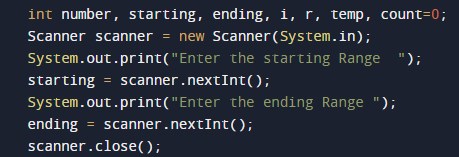
In the above program, we have first declared and initialized a set variables required in the program.

  • Starting = it will hold entered starting range.
  • Ending = it wil hold entered last value with in the range.
  • i=  for itertion.
  • temp and r= it will hold temporary values.
  • count=it will tell us number is Armstrong number or not.

After declaring variables we take range from user and find Armstrong number between number.

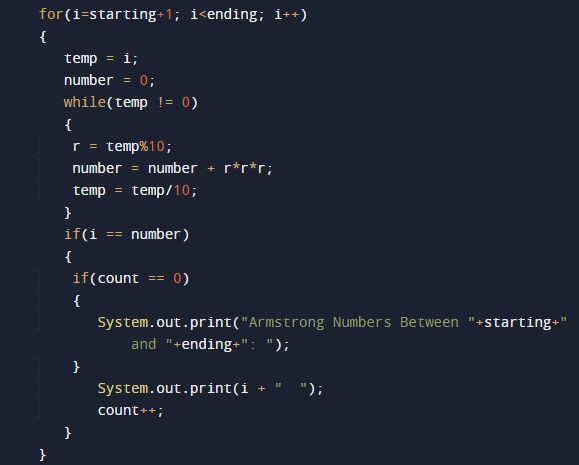
Algorithm

1.Take ranges to find Armstrong
2. Assign  values to the variables.
3. Break the digits of Armstrong numbers.
4. Then find the cubevalue of Digits.
5. then by adding all cubevalues together to check Armstrong number
6. Save the values in  variable number.
7. If number is equals to Armstrong number show Armstrong Number

all the process show in below image..

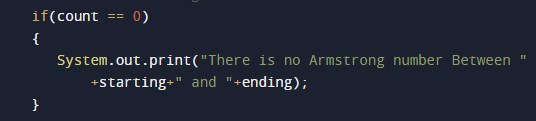
if now Armstrong number found within the range print.

Java Program to find square root of a number without sqrt method

In this tutorial, we will learn to create a Java Program to find square root of a number without sqrt method using Java programming.

Prerequisites

Before starting with this tutorial we assume that you are best aware of the following Java programming topics:

  • Java Operators.
  • Basic Input and Output function in Java.
  • Class and Object in Java.
  • Basic Java programming.
  • If-else statements in Java.
  • For loop in Java.
  • User Define functions

What is square root?

Square root  of number that we multiply the number by itself to get the original number.Rather we can say that  “square root of a number” is the value of power 1/2 of that number.

It is  symbolized by‘√ ‘.
Square root of 625 = 25.

We are going to use following Formula to find the square root of a number.

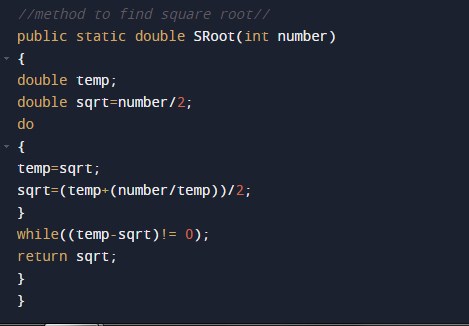
sqrt=(sqrt_num+(number/sqrt_num))/2;

where sqrt_num is agiven number by user…

Java Program to find square root of a number without sqrt method

In this program we would find the Square root  of a given number .First of all we take a vaue form user and find the Square root of a number.Let have a look at the code.

Output

Square root of a number.

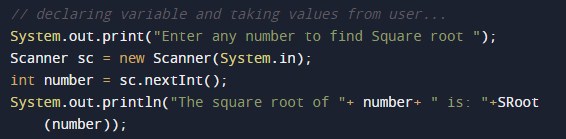
In the above program, we have first declared and initialized a set variables required in the program.

  • number= it will hold entered number.
  • temp = it will hold temporary number.
  • sqrt=  it will hold the result.

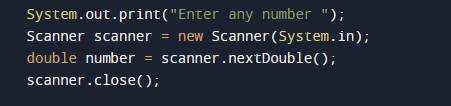
After declaring variables we take a value from user and find Square root of a number..

after getting value from user we pass this value to a method named Sroot(number) where we calculate Square root of  a number.

this function calculates square root and return the square root a provided number and we will print the result.

Java Program to check if a given number is perfect square

In this tutorial, we will learn to create a Java Program to check if a given number is perfect square using Java programming.

Prerequisites

Before starting with this tutorial we assume that you are best aware of the following Java programming topics:

  • Java Operators.
  • Basic Input and Output function in Java.
  • Class and Object in Java.
  • Basic Java programming.
  • If-else statements in Java.
  • For loop in Java.
  • User Define functions


What is perfect square.

A number that can be expressed as the square of a number .in other word it is the product of number with itself.

 9 is a perfect square number, since it equals 3² =3*3=9.

 Java Program to check if a given number is perfect square.

In this program we would find the Perfect Square  of a given number .First of all we take a value form user and find the Perfect Square of a number.Let have a look at the code.

Output

Perfect number

Not  a Perfect Number

In the above program, we have first declared and initialized a set variables required in the program.

  • number= it will hold entered number.
  • sqrt=  it will hold the result.

After declaring variables we take a value from user and find Perfect Square  of a number..

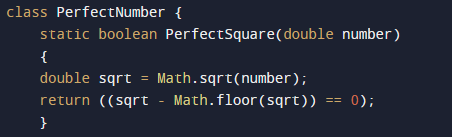
after taking value from user add to variable  number and pass the number to function PerfectSquare(number) where we check condition for prefect square as shown in the image below.

this function calculate perfect square using math.sqrt() method to find perfect square of  a number .

here value of a given number is true then if statement will executed if not else statement will be  executed

Java Program to check Prime Number

In this tutorial, we will learn to create a Java Program to check Prime Number using Java programming.

Prerequisites

Before starting with this tutorial we assume that you are best aware of the following Java programming topics:

  • Java Operators.
  • Basic Input and Output function in Java.
  • Class and Object in Java.
  • Basic Java programming.
  • If-else statements in Java.
  • For loop in Java.
  • User Define functions

What is Prime Number?

A  number is called a Prime number if a number is divisible by 1 or itself only.

For example 2, 3, 5, 7, 11, 13, 17..are some prime numbers.

Java Program to check Prime Number

In this program we would find the given number is a Prime Number or not .First of all we take a value form user and find the number is prime or not.Let have a look at the code.

Output

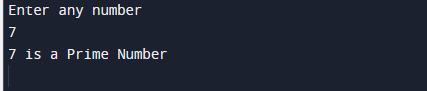
Prime number

Not a Prime number.

In the above program, we have first declared and initialized a set variables required in the program.

  • number= it will hold entered number.
  • temp = it will hold temporary number.
  • flag=  it will hold the result.
  • i = for iteration

After declaring variables we take a value from user and find number is prime or not.

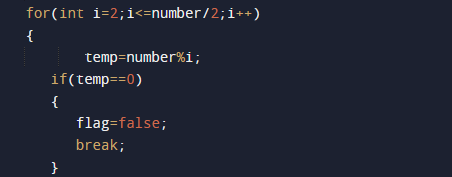
with in loop we will find that given number is prime or not where we divide number from 2 to number if number divide by it self only value of flag variable remain true

else set to false it means number is not a prime number

so in this blog we have find the given number is a prime number or not.