Category Archives: Go Language Tutorial

Go Language Tutorial

Go Loops

Go Loops

Loop statements are used to execute the block of code repeatedly for a specified number of times or until it meets a specified condition. Loop statement are very useful when we want to perform same task for multiple times. In Go Programming we have following loops –

  • Go For loop
  • Go Nested loop

Go Loop Control Statements

In Go, you have loop control statements that can be used to alter or control the flow of loop execution based on specified conditions. In Go we have following loop control statements –

  • break Statement
  • Continue Statement
  • goto Statement

Go Decision Making

Go Decision Making Statements

There are case where we want a a block of code to be executed when some condition is satisfied. In Go, we have Decision Making Statement that enable computer to decide which block of code to be execute based on some conditional choices. Decision making statement statements is also referred to as selection statements.

Decision making statement evaluates single or multiple test expressions which results is “TRUE” or “FALSE”. The outcome of the test expression/condition helps to determine which block of statement(s) to executed if the condition is “TRUE” or “FALSE” otherwise.

In Go, we have following types of decision making statements –

Go Decision Making Statements
Statement Description
if Statements Block of statement executed only when specified test expression is true.
if else Statements When we want to execute some block of code if a condition is true and another block of code if a condition is false, In such a case we use if….else statement.
Nested If Statements When there is an if statement inside another if statement then it is known as nested if else.
Switch Statement A switch statement evaluates an expression against multiple cases in order to identify the block of code to be executed.
Select Statement It allows to chooses among possible send or receive operations. It looks similar to “switch” statement but is used for communication operations.

Go Constants

Go Constants

Constants refers to immutable values. Constants are basically literals whose values cannot be modified or changed during the execution of program. The Constants are created in the same way you create variables but instead of using the var keyword we use the const keyword and by convention constant names are always uppercase.

Syntax :-

Here, <constant_name> can be replaced with constant name.

Example :-

Go Escape Sequence

Escape sequence is a special string comprise a backslash (\) followed by a letter or by a combination of digits used to control output on monitor. Escape sequences are typically used to represent actions such as newline,carriage returns,tab movements and non printing characters over the monitor. The following table lists the common ANSI escape sequences and their meaning.

Escape sequence Meaning
\\ \ character
\’ ‘ character
\” ” character
\? ? character
\a Alert or bell
\b Backspace
\f Form feed
\n Newline
\r Carriage return
\t Horizontal tab
\v Vertical tab
\ooo Octal number of one to three digits
\xhh . . . Hexadecimal number of one or more digits

Go Operators

Go Operators

An operator is a special symbol that is used to carry out some specific operation on its operand. In Go Programming, we have rich set of built in operators to carry out different type of operations. There are operators for assignment, arithmetic operations, logical operations and comparison operations etc. Go Programming operators can be used with many types of variables or constants, but some of the operators are restricted to work on specific data types. Most operators are binary, meaning they take two operands, but a few are unary and only take one operand.

Type of operators in Go Programming

Go supports the following types of operators –

  • Arithmetic Operators
  • Assignment Operators
  • Comparison (Relational) Operators
  • Logical Operators
  • Bitwise Operators

Go Arithmetic Operators

Arithmetic Operators are used to perform arithmetic operations like addition, subtraction, multiplication, division, %modulus, exponent, etc.

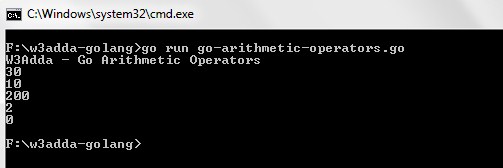
Let variable a holds 20 and variable b holds 10, then −

Go Arithmetic operators
Operator Name Description Example
+ Addition Addition of given operands
a+b returns 30
- Subtraction Subtraction of second operand from first a-b returns 10
* Multiply Multiplication of given operands a*b returns 200
/ Division Returns Quotient after division
a/b returns 2
% Modulus Returns Remainder after division a%b returns 0

Example:-

Output:-

go-arithmetic-operators-1

Go Assignment Operators

Assignment operators are used to assign value to a variable, you can assign a variable value or the result of an arithmetical expression.


Go Assignment operators
Operator Description Expression
= Assignment Operator
a=b
+= add and assign a+=b is equivalent to a=a+b
-= subtract and assign a-=b is equivalent to a=a-b
*= multiply and assign a*=b is equivalent to a=a*b
/= divide and assign a/=b is equivalent to a=a/b
%= mod and assign a%=b is equivalent to a=a%b
<<= Left shift AND assign a<<=5 is equivalent to a=a<<5
>>= Right shift AND assign a>>=5 is equivalent to a=a>>5
&= Bitwise AND assign a&=5 is equivalent to a=a&5
^= Bitwise exclusive OR and assign a^=5 is equivalent to a=a^5
|= Bitwise inclusive OR and assign a|=5 is equivalent to a=a|5

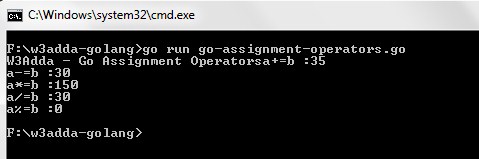
Example:-

Output:-

go-assignment-operators

Go Comparison (Relational) Operators

Comparison Operators are used evaluate a comparison between two operands. The result of a comparison operation is a Boolean value that can only be true or false. Comparison Operators are also referred as relational operators.

Let variable a holds 20 and variable b holds 10, then −

Go Relational operators
Operator Description Example
> greater than a>b returns TRUE
< Less than a<b returns FALSE
>= greater than or equal to a>=b returns TRUE
<= less than or equal to a<=b returns FALSE
== is equal to a==b returns FALSE
!= not equal to a!=b returns TRUE

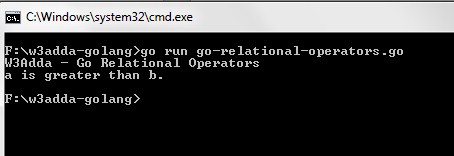
Example:-

Output:-

go-relational-operators

Go Logical Operators

Logical operators are used to combine expressions with conditional statements using logical (AND,OR,NOT) operators, which results in true or false.

Let variable a holds true or 1 and variable b holds false or 0, then −

Go Logical operators
Operator Name Description Example
&& Logical AND return true if all expression are true (a && b) returns false
|| Logical OR return true if any expression is true (a || b) returns true
! Logical NOT return complement of expression !a returns false

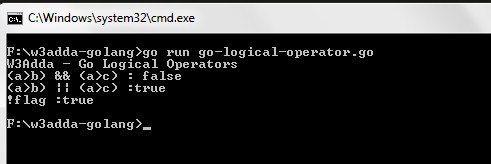
Example:-

Output:-

go-logical-operator-1

Go Bitwise Operators

Bitwise operator are used to perform bit level operation over its operand.The bitwise logical and shift operators are only applicable to integers.


Go bitwise operators
Operator Description
& bitwise AND
| bitwise OR
^ bitwise XOR
&^ bit clear (AND NOT)

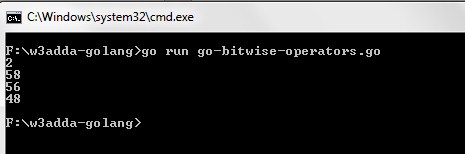
Example:-

Output:-

go-bitwise-operators

Other Operators

Other Miscellaneous operators in Go
Operator Name Description
& Address of &a generates a pointer to a
* Pointer to *a denotes the variable pointed to by a
<- Receive Operator <-ch is the value received from channel ch

String concatenation Operator

In Go, strings can be concatenated using the + operator or the += assignment operator.


Go Variables

Go Variables

Variables are used to represent reserved memory locations that is used to store values, when we create a variable we are a suppose to allocate some memory space for that variable. Go is a statically typed programming language. This means that variables always have a specific type associated with it and that cannot be change. Data type for a variable specifies following-

  • The amount of memory space allocated for variables.
  • A data type specifies the possible values for variables.
  • The operations that can be performed on variables.

Syntax :-

Below is syntax to declare a variable in GoLang –

or

Example :-

Output :-

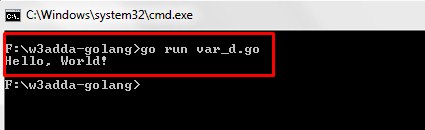
Screenshot_823


Go Data Types

Go Data Types

Variables are used to represent reserved memory locations that is used to store values, when we create a variable we are a suppose to allocate some memory space for that variable. Go is a statically typed programming language. This means that variables always have a specific type and that type cannot change. Every variable have data type associated to it, data type for a variable defines –

  • The amount of memory space allocated for variables.
  • A data type specifies the possible values for variables.
  • The operations that can be performed on variables.

Go comes with following built-in data types –

  • Numbers
  • Boolean
  • String

Golang Numbers:- The Number data type is used to hold the numeric values. Go supports following numerical data types –

Integer:- Integers are used to store whole numbers. Go supports several integer types, varying internal sizes for storing signed and unsigned integers.

Signed Integers
Type Size Description Range
int8 8 bits 8 bit Signed Integer (two’s complement) -128 to 127
int16 16 bits 16 bit Signed Integer (two’s complement) -215 to 215 -1
int32 32 bits 32 bit Signed Integer (two’s complement) -231 to 231 -1
int64 64 bits 64 bit Signed Integer (two’s complement). They can also be represented in octal and hexadecimal -263 to 263 -1
int Platform dependent Signed integers of at least 32-bit in size, not equivalent to int32. It is 32 bits wide on a 32-bit system and 64-bits wide on a 64-bit system. Platform dependent
Unsigned Integers
Type Size Description Range
uint8 8 bits 8 bit Unsigned Integer 0 to 127
uint16 16 bits 16 bit Unsigned Integer 0 to 216 -1
uint32 32 bits 32 bit Unsigned Integer 0 to 232 -1
uint64 64 bits 64 bit Unsigned Integer 0 to 264 -1
uint Platform dependent Unsigned integers of at least 32-bit in size, not equivalent to int32. It is 32 bits wide on a 32-bit system and 64-bits wide on a 64-bit system. Platform dependent

Its better to use int data type unless you have a specific reason to use the sized or unsigned integer types. Uninitialized, integral types have a default value of 0. In Golang, octal numbers can be declared using 0 prefix and hexadecimal numbers using the 0x prefix.

Other Integer Types :-

Other Integer Types
Type Description
byte It is alias for and equivalent to uint8
rune It is alias for and equivalent to int32, used to represent characters.
uintptr It is used to hold memory address pointers

Golang do not supports a char data type, instead It have byte and rune to represent character values.This helps to distinguish characters from integer values.

Both byte and rune data types are basically holds integers, the byte data type is represented with a ASCII value while the rune data type is represented with Unicode value encoded in UTF-8 format.

For example, a byte variable with value ‘a’ is converted to the integers its ASCII equivalent 97.Similarly, a rune variable with a unicode value ‘♥’ is converted to the its corresponding unicode equivalent U+2665, here U+ stands for unicode and the numbers are hexadecimal, which is essentially an integer.

Example:-

Output:-

other-int

Golang Float:- A Float type is used to store numbers that contain a decimal component (real numbers). Go supports float32 and float64 represented with 32-bit and 64-bit in memory respectively. An uninitialized float has default value of 0 and . An untyped floating point values is considered as float64. So in cases of an untyped floating point variable declaration with an initial value without specifying a type explicitly, the compiler will automatically assign float64 type to it.

Example:-

Complex Numbers:- Go supports two additional types for representing complex numbers (numbers with imaginary parts) complex64 and complex128. Each of the type uses float32 and float64 respectively, to represent their real and imaginary parts.

Example:- Complex number can be defined as following –

Here, untyped complex number if inferred as ‘complex128’.

Golang Boolean:- The Boolean data type is used to represent the truth values, which can be either True or False. Boolean are commonly used in decision making statements.

Example:-

Output:-

Golang String:- A string variable is used to hold series or sequence of characters – letters, numbers, and special characters. Strings are immutable. Strings can either be declared using double quotes “Hello World” or back ticks Hello World.

Example:-

The difference between these is that double quoted strings cannot contain newlines and they allow escape sequences. For example \n gets replaced with a newline and \t gets replaced with a tab character.

Raw strings are enclosed within back ticks and can span multiple lines, but escape characters don’t have any special meaning to it.

Go Program Structure

Go Program Structure

Like any other programming language Go language have specification available for program structure, every Go program is consist of following building blocks –

  • Documentations block
  • Preprocessor Statements
  • The main ( ) function
  • Local Variable Declarations
  • Program statements
  • User defined functions

Example:-

Documentations Block

Documentation block is the header of any Go program structure which is mainly consist of set of comments, that is used to provide the information about the program written like name of a program, utility of program, date of creation, date of last modification ,author name, licensing or copyrights information and any other information that programmer wish to put for the references.

Example:-

Package Declaration

Here we define the package name in which this program would included. Go program runs in packages, so it is required to define a package. Every package has a name and path associated with it.

Preprocessor Statements

This is the section where we define all the pre-processor statements. The “import” pre-processor statements tells the compiler to import required packages prior to compilation of any Go program.

The main ( ) function

This is the most vital part of each and every Go program, it is mandatory for Go program to have main ( ) function. The Go program execution starts with main ( ) function. Go program can not be executed without the main function.

Local Variable Declarations

In this section we declare all the variable that will be used in main ( ) function.

Statements and Expressions

This is the section where we place our main logic of the program which included the executable statements, that tell the computer to perform a specification action.Program statement can be an input-output statements, arithmetic statements, control statements, simple assignment statements and any other statements and it also includes comments that are enclosed within /* and */ .

User defined functions

This is where we put all the user defined sub-program or custom functions created to perform a specific task and called inside the main ( ) function.

Go Hello World

Go Hello World Program

The “Hello world!” program is a simplest program that will display some text on the screen. The “Hello world!” program is a simple yet complete program for beginners that illustrates the basic syntax of any programming language. The “Hello world!” program gives you a way to test systems and programming environment.

This tutorial will guide you through writing a basic “Hello, World” program in Go Programming Language.

Prerequisites

Before starting with this tutorial we assume that you already have Go installed (If you do not have Go installed then install it before you get started) as well as a local programming environment set up on your computer.

Step 1:- Create a file called “hello_world.go” using a text editor program of your choice. The .go file extension is used to specify Go language file.

Step 2:- Let’s open the “hello_world.go” file that we created, and put the following line of code in it and save it.

The Println() is a function that tells Go to display or output the content inside the parentheses.

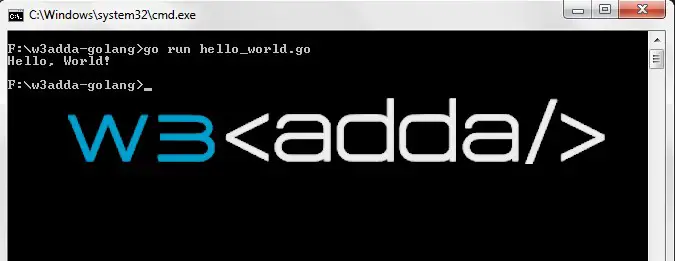
Step 3:- Now, open terminal or command prompt and switch to the folder where our “hello_world.go” file is saved. Run the program by typing the following command –

Once the program is executed it will print “Hello, World!”.

Output:-

golang hello world

Go Installation

Go Installation

Installing Go Language In Windows

In order to setup Go Programming development environment you need to have Go installed, so if you don’t have it installed, check the following instruction to get Go Language installed. If you’ve already have installed Go Language in your system, you can skip this part.

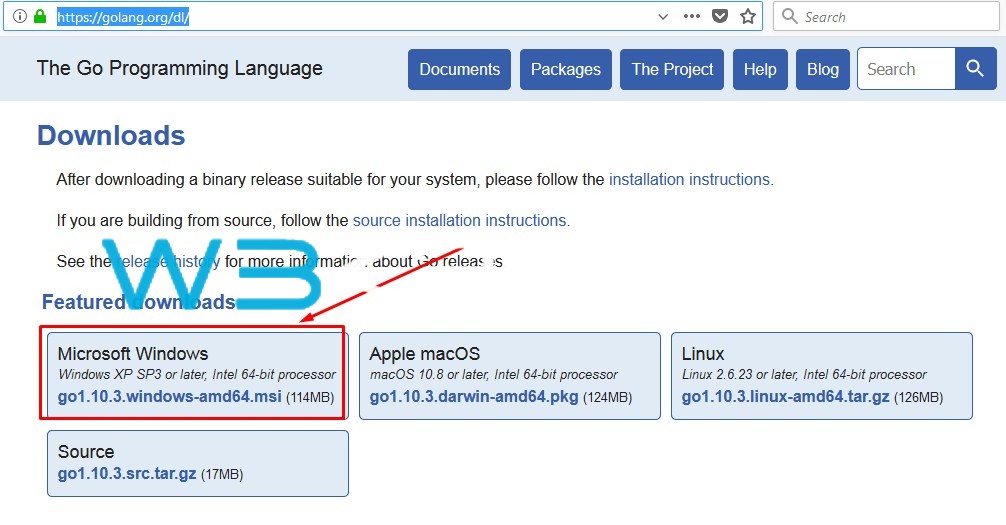
Step 1:- Download the Go Language Setup from the official Go Language website, link given below –

Go Language Installation Windows 1

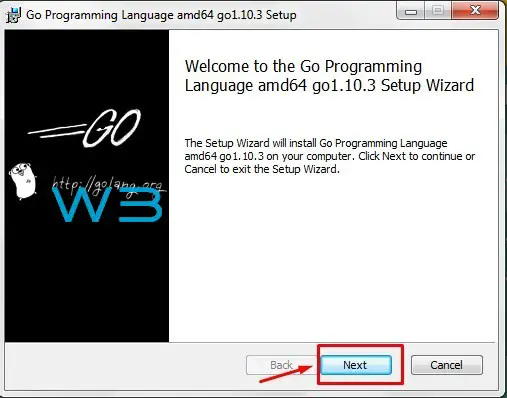
Step 2:- Run the installer (the .msi file you downloaded in the previous step.)

Go Language Installation 1

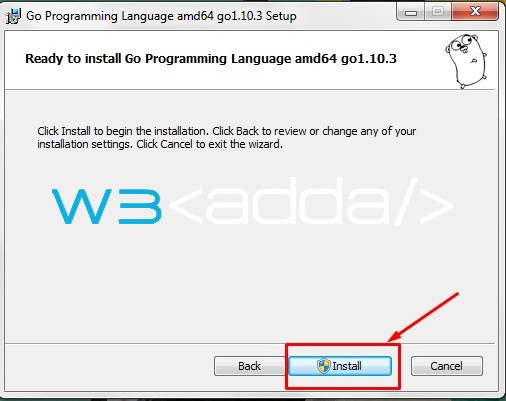
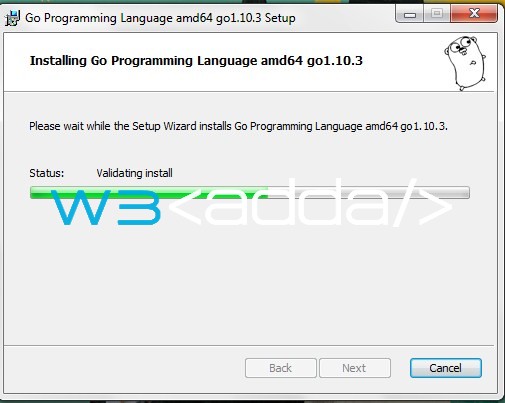
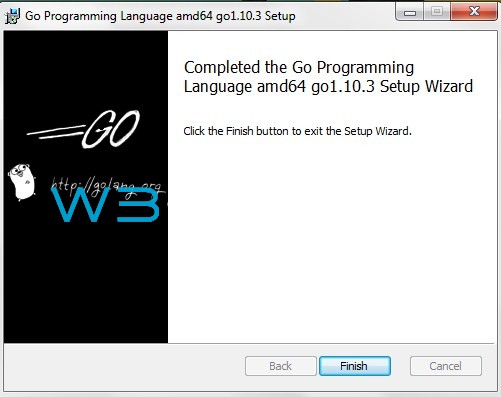
Step 3:- Follow the installation wizard to install Go.

Go Language Installation 2

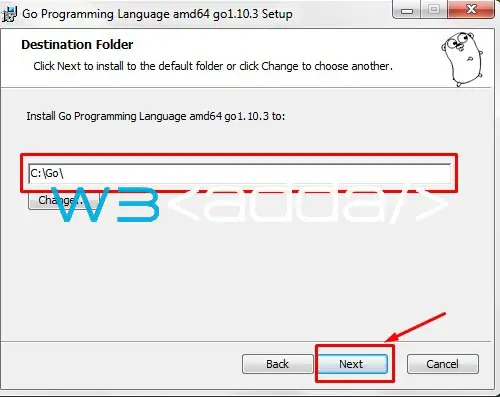
Step 4:- Select the Installation path and click next.

Screenshot_3 Screenshot_4 Screenshot_5 Screenshot_6

Step 5:- Now, lets open the terminal and run the following command in order to verify the Go Language installation.

Go language installation 7

Go Language Installation In Mac OS using HomeBrew

Step 1:- Enter the following command to get a list of updated programs.

Step 2:- Now begin installation, by just typing following command.


if you get some error like failed with exit-2 or something like that, then you have to update/upgrade first using following commands –

Step 3:- Set Path for Go

If all process finish, then you need to set Go PATH to your .bashrc or .zshrc

Step 3:- Now, lets open the terminal and run the following command in order to verify the Go Language installation.

Go Installation in Ubuntu

Step 1:- GoLang is available on official package repository of Ubuntu, you need to update the package repository of your Ubuntu with the following command.

Step 2:- Now you can install GoLang from the official repository of Ubuntu, by just typing following command.

Step 3:- Now, lets open the terminal and run the following command in order to verify the Go Language installation.