Go Variadic Functions
Go Variadic Functions
Leave a reply

Go Variadic Functions
Go Scope Rules
Go Functions
Go Type Casting
Go Comments are a set of statements that are not executed by the Go compiler and interpreter. The use of comments makes it easy for humans to understand the source code.Usually comments gives you inside or explanation about the variable, method, class or any statement that exists in source code. The comment statements are ignored during the execution of the program.
Go Single-line Comments:-
A ‘//’ (double forward slash) is used to specify a single line comment, which extends up to the newline character.
|
1 2 3 4 5 6 |
package main import "fmt" func main() { // It prints Hello World fmt.Println("Hello, World!") } |
Output:-
|
1 |
Hello World! |
Go Multi-line Comments:-
If you want to comment multiple lines then you can do it using /* and */, everything in between from /* to */ is ignored by the compiler–
|
1 2 3 4 5 6 7 |
package main import "fmt" func main() { /* It prints Hello World! */ fmt.Println("Hello, World!") } |
Output:-
|
1 |
Hello World! |
The continue statement gives you way to skip over the current iteration of any loop. When a continue statement is encountered in the loop, the Go interpreter ignores rest of statements in the loop body for current iteration and returns the program execution to the very first statement in the loop body. It does not terminates the loop rather continues with the next iteration.
Syntax:-
|
1 2 3 4 5 6 7 |
for <condition1> { // loop body if (condition2) { continue } // loop body } |
Example:-
|
1 2 3 4 5 6 7 8 9 10 11 12 13 14 15 16 17 18 19 20 21 22 |
package main import "fmt" func main() { var ctr = 0 fmt.Println("W3Adda - Go continue statement.") for ctr < 10 { ctr++ if (ctr == 5) { println("5 is skipped") continue println("This won't be printed too.") } fmt.Printf("Number is %d\n", ctr) } fmt.Println("Out of loop") } |
Output:-
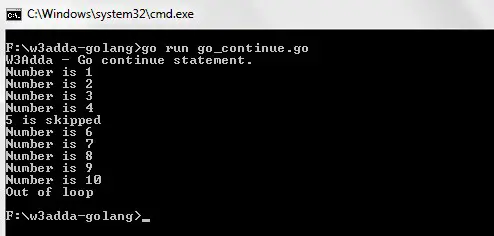
As you can see when ctr == 5, continue statement is executed which causes the current iteration to end and the control moves on to the next iteration.
The standard unlabeled continue statement is used to skip the current iteration of nearest enclosing loop. In GoLang, there is another form of continue (labeled continue ) statement is used to skip iteration of specified loop (can be outer loop). In Golang, Label is an identifier which is followed by colon (:) sign, for example abc:, test:.
Example:-
|
1 2 3 4 5 6 7 8 9 10 11 12 13 14 15 16 17 18 19 20 21 22 23 24 25 26 27 28 |
package main import "fmt" func main() { var i = 0 var j = 0 fmt.Println("W3Adda - Go continue statement.") outerfor: for i < 3 { j = 0 i++ for j < 3 { j++ fmt.Printf("i is %d and j is %d\n",i,j) if(i == 2){ fmt.Println("I am Skipped") continue outerfor } fmt.Println("I am Printed") } } } |
Output:-
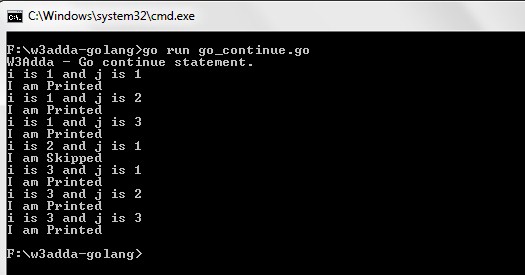
Here, when i == 2 expression is evaluated to true, continue outerfor is executed which skips the current iteration of the enclosed loop and return control to the loop marked with label outerfor:
In Go, break statement gives you way to break or terminate the execution of innermost “for”, “switch”, or “select” statement that containing it, and transfers the execution to the next statement following it.
Example:-
|
1 2 3 4 5 6 7 8 9 10 11 12 13 14 15 16 17 |
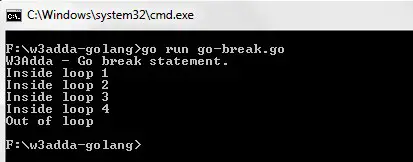
package main import "fmt" func main() { var count = 0 fmt.Println("W3Adda - Go break statement.") for count <= 10 { count++ if (count == 5) { break } fmt.Printf("Inside loop %d\n", count) } fmt.Println("Out of loop") } |
In this above program, the variable count is initialized as 0. Then a for loop is executed as long as the variable count is less than 10.
Inside the while loop, the count variable is incremented by 1 with each iteration (count = count + 1).
Next, we have an if statement that checks the variable count is equal to 5, if it return TRUE causes loop to break or terminate.
Within the loop there is a printf() statement that will execute with each iteration of the for loop until the loop breaks.
Then, there is a final println() statement outside of the for loop.
When we run this code, our output will be as follows –
Output:-
The standard unlabeled break statement is used to terminates the nearest enclosing statement. In GoLang, there is another form of break (labeled break) statement is used to terminate specified “for”, “switch”, or “select” statement. In GoLang, Label is an identifier which is followed by a colon (:) sign, for example abc:, test:.
Example:-
|
1 2 3 4 5 6 7 8 9 10 11 12 13 14 15 16 17 18 19 20 |
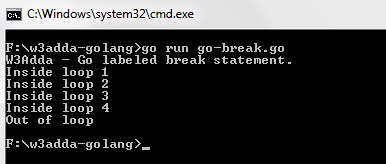
package main import "fmt" func main() { var count = 0 fmt.Println("W3Adda - Go labeled break statement.") outer: for count <= 10 { count++ if (count == 5) { break outer } fmt.Printf("Inside loop %d\n", count) } fmt.Println("Out of loop") } |
Here, when count == 5 expression is evaluated to true, break outer is executed which terminates the loop marked with label outer:.
Output:-
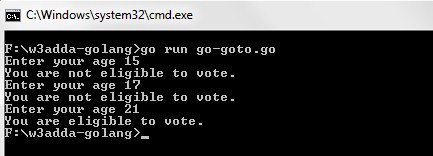
In GoLang, goto statement is used to alter the normal execution of a program and transfer control to a labeled statement in the same program. The label is an identifier, it can be any plain text and can be set anywhere in the Go program above or below to goto statement. When a goto statement is encountered, compiler transfers the control to a label: and begin execution from there.
Syntax:-
|
1 2 3 4 |
goto label .. . label: |
Example:-
|
1 2 3 4 5 6 7 8 9 10 11 12 13 14 |
package main import "fmt" func main() { var age int election: fmt.Print("Enter your age ") fmt.Scanln(&age) if (age <= 17) { fmt.Print("You are not eligible to vote.\n") goto election } else { fmt.Print("You are eligible to vote.") } } |
Output:-
In GoLang, for loop with a “range” clause iterates through every element in an array, slice, string, map, or values received on a channel. A range keyword is used to iterate over slices, arrays, strings, maps or channels.
Synatx:-
|
1 2 3 |
for key, value := range collection { //block of statements } |
here, individual keys and values are held in the corresponding variable and key or value can be omitted if one or the other is not needed using ‘_’
Example:-
|
1 2 3 4 5 6 7 8 9 10 11 |
package main import "fmt" func main() { langs := []string{"Go", "C", "C++", "Java"} fmt.Println("W3Adda - Go For Each Loop.") for i,s := range langs{ fmt.Println(i, s) } } |
Output:-

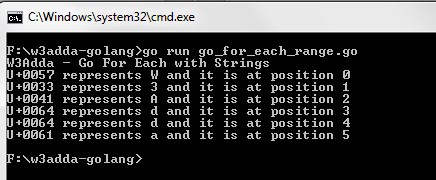
For a string, the for loop iterates over each characters’s Unicode code points. The first value is the starting byte index of the rune and the second the rune itself.
Example:-
|
1 2 3 4 5 6 7 8 9 10 |
package main import "fmt" func main() { fmt.Println("W3Adda - Go For Each with Strings") for i,s := range "W3Adda"{ fmt.Printf("%U represents %c and it is at position %d\n", s, s, i) } } |
Output:-
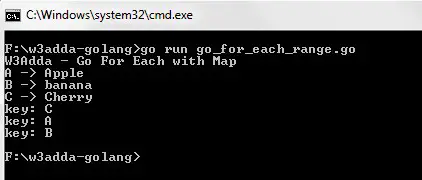
In GoLang, range on map iterates over key/value pairs. It can also iterate over just the keys of a map.
Example:-
|
1 2 3 4 5 6 7 8 9 10 11 12 13 14 15 |
package main import "fmt" func main() { fmt.Println("W3Adda - Go For Each with Map") fruits := map[string]string{"A": "Apple", "B": "banana", "C": "Cherry"} for key, value := range fruits { fmt.Printf("%s -> %s\n", key, value) } for key := range fruits { fmt.Println("key:", key) } } |
Output:-
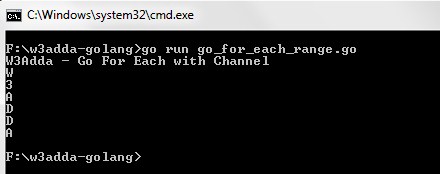
For channel, it iterates over values sent on the channel until closed.
Example:-
|
1 2 3 4 5 6 7 8 9 10 11 12 13 14 15 16 17 18 19 20 |
package main import "fmt" func main() { fmt.Println("W3Adda - Go For Each with Channel") ch := make(chan string) go func() { ch <- "W" ch <- "3" ch <- "A" ch <- "D" ch <- "D" ch <- "A" close(ch) }() for n := range ch { fmt.Println(n) } } |
Output:-
The for loop is used when we want to execute block of code known times. In Go, basic for loop is similar as it is in C or Java, except that the ( ) are gone (they are not even optional) and the { } are required.
In Go, for loop can be used in following forms –
Syntax :-
|
1 2 3 |
for initialization; condition; increment { // loop body } |
| Property | Description |
|---|---|
| initialization | Sets a counter variable |
| condition | It test the each loop iteration for a condition. If it returns TRUE, the loop continues. If it returns FALSE, the loop ends. |
| increment | Increment counter variable |
Example:-
|
1 2 3 4 5 6 7 8 9 10 11 |
package main import "fmt" func main() { sum := 0 fmt.Println("W3Adda - Go For loop.") for i := 1; i < 5; i++ { sum += i } fmt.Println(sum) } |
Output:-
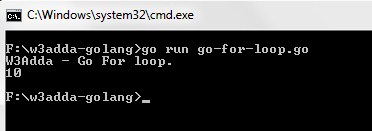
In GoLang, if we remove the “initialization” and “increment” statement, then the Go for loop behaves like a while loop as in other programming languages.
Example:-
|
1 2 3 4 5 6 7 8 9 10 11 |
package main import "fmt" func main() { power := 1 fmt.Println("W3Adda - Go For loop as while loop.") for power < 5 { power *= 2 } fmt.Println(power) } |
Output:-
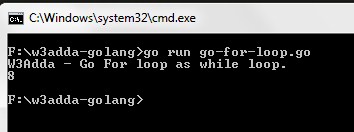
In GoLang, if we further remove the “condition”, then the Go for loop turns into an infinite loop.
Syntax:-
|
1 2 3 |
for { // do something in a loop forever } |
Example:-
|
1 2 3 4 5 6 7 8 9 10 11 12 |
package main import "fmt" func main() { power := 1 fmt.Println("W3Adda - Go For loop as infinite loop.") sum := 0 for { sum++ // repeated forever } fmt.Println(sum) // unreachable } |
The switch statement is simplified form of the nested if … else if statement , it avoids long chain of if..else if..else statements. A switch statement evaluates an expression against multiple cases in order to identify the block of code to be executed.
Syntax:-
|
1 2 3 4 5 6 7 8 9 10 11 |
switch <expression>{ case <val1>: //Block of code to be executed if expression = val1; case <val2>: //Block of code to be executed if expression = val2; default: //Optional //Block of code to be executed //if expression is different //from both val1 and val2; } |
Example:-
|
1 2 3 4 5 6 7 8 9 10 11 12 13 14 15 16 17 18 19 20 21 22 23 24 25 26 |
package main import "fmt" func main() { var dayOfWeek = 5 fmt.Println("W3Adda - Go switch statement.") switch dayOfWeek { case 1: fmt.Println("Today is Monday.") case 2: fmt.Println("Today is Tuesday.") case 3: fmt.Println("Today is Wednesday.") case 4: fmt.Println("Today is Thursday.") case 5: fmt.Println("Today is Friday.") case 6: fmt.Println("Today is Saturday.") case 7: fmt.Println("Today is Sunday.") default: fmt.Println("Invalid Weekday.") } } |
Output:-
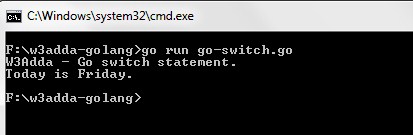
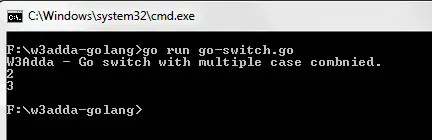
In Go, you can have multiple values in a single case statement separated with comma (,) as following –
Example :-
|
1 2 3 4 5 6 7 8 9 10 11 12 13 14 15 16 |
package main import "fmt" func main() { var dayOfWeek = 5 fmt.Println("W3Adda - Go switch with multiple case combnied.") switch dayOfWeek { case 1, 2, 3, 4, 5: fmt.Println("It's a Weekday.") case 6, 7: fmt.Println("Its Weekend.") default: fmt.Println("Invalid Day") } } |
Output:-
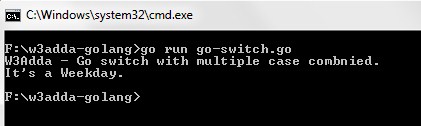
In switch statement a fallthrough statement allows to execute all the following statements after a match found.
Example:-
|
1 2 3 4 5 6 7 8 9 10 11 12 13 14 15 16 17 18 |
package main import "fmt" func main() { var x = 2 fmt.Println("W3Adda - Go switch with fallthrough.") switch x { case 1: fmt.Println("1") fallthrough case 2: fmt.Println("2") fallthrough case 3: fmt.Println("3") } } |
Output:-
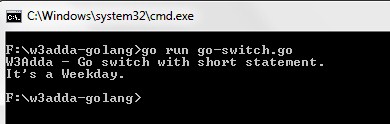
In Go, a switch statement can also contain a short declaration statement like the If statement before the conditional expression as following –
Example:-
|
1 2 3 4 5 6 7 8 9 10 11 12 13 14 15 |
package main import "fmt" func main() { fmt.Println("W3Adda - Go switch with short statement.") switch dayOfWeek := 5; dayOfWeek { case 1, 2, 3, 4, 5: fmt.Println("It's a Weekday.") case 6, 7: fmt.Println("Its Weekend.") default: fmt.Println("Invalid Day") } } |
Output:-
Syntax:-
|
1 2 3 4 5 6 |
switch { case <boolean_expression_2>: //do something case <boolean_expression_2>: //do something } |
Example:-
|
1 2 3 4 5 6 7 8 9 10 11 12 13 14 15 16 17 |
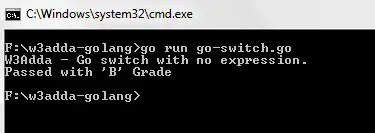
package main import "fmt" func main() { var marks = 55 fmt.Println("W3Adda - Go switch with no expression.") switch { case marks > 60: fmt.Println("Passed with 'A' Grade") case marks < 60 && marks >=50: fmt.Println("Passed with 'B' Grade") case marks < 50 && marks >= 35: fmt.Println("Passed with 'C' Grade") default: fmt.Println("You're Fail") } } |
Output:-
Note:- In Go, a break statement can be used to inside your matched case to exit the switch statement.
If statement allows a block of code to be executed only when a specified condition is true. An if statement evaluates a boolean expression followed by one or more statements. The given boolean expression results in a boolean value that can only be true or false.
Syntax:-
|
1 2 3 |
if(condation){ // statement(s) to be executed when condition is true } |
Here, you can omit the parentheses () but the curly braces {} are mandatory.
Example:-
|
1 2 3 4 5 6 7 8 9 10 |
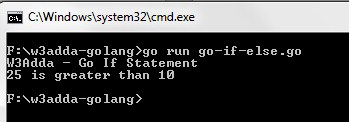
package main import "fmt" func main() { var x = 25 fmt.Println("W3Adda - Go If Statement") if(x > 10) { fmt.Printf("%d is greater than 10\n", x) } } |
Output:-
Multiple test expressions can also be combined using && (AND) and || (OR) operators as following –
|
1 2 3 4 |
var age = 24 if age >= 18 && age <= 30 { fmt.Println("I am Young.") } |
When we want to execute some block of code if a condition is true and another block of code if a condition is false, In such a case we use if….else statement.
Syntax:-
|
1 2 3 4 5 6 |
if (condition) { // statement(s) to be executed when condition is true } else { // statement(s) to be executed when condition is false } |
Example:-
|
1 2 3 4 5 6 7 8 9 10 11 12 13 14 |
package main import "fmt" func main() { var a = 10 var b = 20 fmt.Println("W3Adda - Go If...else Statement") if (a > b) { fmt.Printf("a is greater than b") } else { fmt.Printf("b is greater than a") } } |
Output:-
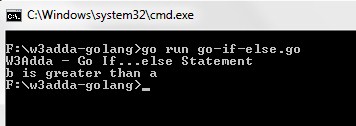
The if..else..if Ladder statement is used to select one of among several blocks of code to be executed.
Example:-
|
1 2 3 4 5 6 7 8 9 10 11 12 13 14 15 16 |
package main import "fmt" func main() { var a = 10 var b = 10 fmt.Println("W3Adda - Go Ladder If...else Statement") if (a > b) { fmt.Printf("a is greater than b") } else if(a == b){ fmt.Printf("a and b are equal") } else{ fmt.Printf("b is greater than a") } } |
Output:-
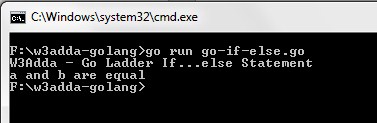
When there is an if statement inside another if statement then it is known as nested if else.
Example:-
|
1 2 3 4 5 6 7 8 9 10 11 12 13 14 15 16 17 18 |
package main import "fmt" func main() { var a = 25 fmt.Println("W3Adda - Go Nested If Statement") if (a < 100) { if (a < 50) { fmt.Println("a is less than 50") } if (a >= 50) { fmt.Println("a is greater than 50") } } } |
Output:-
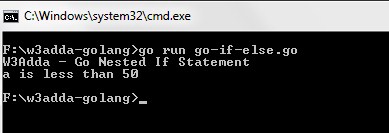
In Go, the conditional expression can be preceded by a simple statement, which is executes before the conditional expression is evaluated, and if it is a declaration statement then the variable declared in the statement will only be available inside the if block and it’s else or else-if sections.
Example:-
|
1 2 3 4 5 6 7 8 9 10 11 12 13 14 |
package main import "fmt" func main() { fmt.Println("W3Adda - Go If Statement with short statement.") if x := 10; x%2 == 0 { fmt.Printf("%d is even\n", x) } else { fmt.Printf("%d is odd\n", x) } } |
Output:-
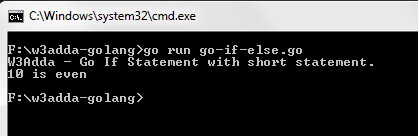
Note:- Use of parentheses in case of short statement results in a syntax error.