Category Archives: Dart Tutorial

Dart Tutorial

Dart Constructors

Dart Constructors

Constructor is a special method that is used to initialize an object when it is created. Constructor is called automatically when an object is instantiated; it is mainly used to set initial values for instance variables. The constructor has the same name as of class it belongs to. Constructor is syntactically similar to a instance method; but constructors have no explicit return type. It is not mandatory to write a constructor for a class. All classes have its own default constructor, if you don’t create any constructor for a class, the compiler will automatically creates a default constructor every class by assigning the default values to the member variables. But if you define your own constructor, the default constructor will be ignored.

Example:-

Lets say we have class by the name Employee, we will create object for Employee class as below –

This will invoke the default constructor of the Employee class.

Creating Constructors In Dart

A constructor has same name as that of the class, and doesn’t return any value. Suppose if we have class Test, then the constructors name should also be Test.

Syntax:-

There are two important rules to be kept in mind while creating a constructor.

  • The Constructor name should be the same name as the class name. Suppose if we have class Test, then the constructors name should also be Test.
  • The Constructor cannot have a explicit return type

Example:-

Output:-

Types of Constructors

There are following type of Constructors in Dart, they are

  • Default Constructor (or) no-arg Constructor
  • Parameterized Constructor
  • Named Constructor

Default Constructor (or) no-arg constructor

As the name specifies the constructor that has no parameter is known as default constructor. If you don’t create any constructor for a class, the compiler will automatically creates a default constructor(with no arguments) for the class. And if we create a constructor with no-arguments or arguments then the compiler will not create a default constructor. Default constructor provides the default values to the member variables.

Syntax:-

Example:-

Output:-

dart_default_constructor_with_no_arguments

Parameterized Constructor

Constructors can also take parameters, which is used to initialize instance variables. Most often, we will need a constructor that accepts one or more parameters. A constructor that accepts parameters is known as parameterized constructor. If we want to initialize instance variables with own values, then we are required to use a parameterized constructor.

Syntax:-

Example:-

Output:-

dart_parameterized _constructor_with_parameters

Named constructors

In Dart, named constructors allows a class to define multiple constructors.

Syntax:-

Example:-

Output:-

dart_named_constructor

Dart Object

Dart Object

Dart is an object oriented programming language. Everything in Dart is associated with classes and objects, along with its attributes and methods. A Class is like a blueprint for creating objects. An object is an variable (or instance) of a class; objects have the behaviors of their class. An object has a state and behavior associated with it. The state of an object is stored in fields (variables), while methods (functions) represents the object’s behavior. An object is created from a template known as class.

Creating Class Objects In Dart

Once a class has been defined, we can create instance or objects of that class which has access to class fields and function. In Dart, an object of a class can be created using new keyword followed by the class name. Below is general syntax to declare an object of a class.

Syntax:-

Here, objectName and ClassName is replaced with actual object name and the class name respectively. The <constructor_arguments> should be passed values if the class constructor is parameterized.

Example:-

Employee Class

Let’s create an object of the class Employee we have created –

Accessing Instance Variable and Functions

In Dart, once we have got an instance of a class created, we can access properties and method of that class using property/method name separated by a dot (.) operator after the instance name as following –

Syntax for Property:-

Syntax for Method:-

Example:-

Output:-

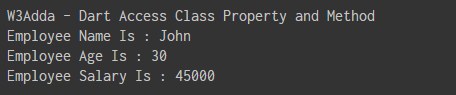
dart_accessing_class_variables_functions

Dart Classes

Dart Classes

Dart is an object-oriented programming language; and supports the concepts of class, object, interfaces, inheritance, mixins, and abstract classes etc. In Dart, a class can be defined as a blueprint or prototype of associated objects. Class is a wrapper that binds/encapsulates the data and methods together; which can be later accessed by objects of that class. We can think of a class as user-defined data type, that describes the behavior and characteristics shared by all of its instances. Once a class has been defined, we can create instance or objects of that class which has access to class properties and methods.

Declaring a Class In Dart

In Dart, a class can be defined using the class keyword followed by the class name; and the class body enclosed by a pair of curly braces ({}).

Syntax:-

Here, ClassName is replaced with the actual class name then in between the curly brackets {} we provide class definition. A class definition includes associated fields, constructors, getters, setters and methods.

Note:- As per the naming convention rules for identifiers; the class name should capitalize the first letter of each word (including the first word), and use no separators.

Example:-

The example declares a class Employee. The class has a three fielda named empName, empAge and empSalary . The showEmpInfo() is a simple function that prints the value of the class fields.

Creating Class Objects In Dart

Once a class has been defined, we can create instance or objects of that class which has access to class fields and function. In Dart, an object of a class can be created using new keyword followed by the class name. Below is general syntax to declare an object of a class.

Syntax:-

Here, objectName and ClassName is replaced with actual object name and the class name respectively. The <constructor_arguments> should be passed values if the class constructor is parameterized.

Example:-

Let’s create an object of the class Employee we have created above –

Accessing Instance Variable and Functions

In Dart, once we have got an instance of a class created, we can access properties and method of that class using property/method name separated by a dot (.) operator after the instance name as following –

Syntax for Property:-

Syntax for Method:-

Example:-

Output:-

dart_accessing_class_variables_functions

Dart Recursion

What Is Recursion?

Recursion is the process where a function calls itself as its subroutine in order to solve a complex iterative task by dividing it into sub tasks. Any function which calls itself recursively is called recursive function, and the process of calling a function by itself is called recursion. Recursion leads to several number of iterative calls to the same function, however, it is important to have a base case to terminate the recursion.

Recursion is an efficient approach to solve a complex mathematical computation task by dividing it into sub tasks. This approach of solving a problem is called as Divide and Conquer.

Any problem that can be solved recursively, can also be solved iteratively but recursion is considered as more efficient method of programming as it requires the least amount of code to perform same complex task. Although recursion is not recommended for all problems, but it is best suited for some problems like sorting, searching, Inorder/Preorder/Postorder Tree Traversals, DFS of Graph algorithms. However, recursion must be implemented carefully, otherwise it may lead to an infinite loop if no base condition is met that will terminate the function.

Note :- Recursive function must have a valid terminating condition or base case, otherwise it will leads to an infinite loop.

How recursion works?

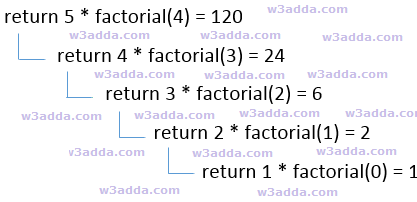
To understand how recursion works lets have one of the popular example of recursion. In this example we will calculate the factorial of n numbers. The factorial of n numbers is expressed as a series of repetitive multiplication as shown below:

Example :-

dsfsdf

cpp-recursion-flow-chart

Dart Recursive Function

A recursive function is not much different from any other function, basically a function calling itself directly or indirectly is known as recursive function. A recursive function repeats itself several times, in order to compute or return final output. Recursive functions are quite common in computer programing as they allow programmers to write efficient programs with minimal code.

Characteristics of a Recursive function

  • A recursive function is a function which calls itself.
  • The speed of a recursive program is slower because of stack overheads.
  • A recursive function must have terminating conditions or base case, and recursive expressions.

Below is general syntax of a recursive function –

Syntax:-

Example:-

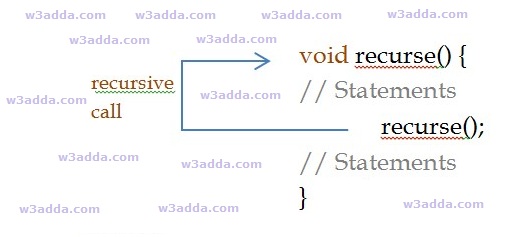
cpp recursive function

Dart Factorial Program Using Recursion

Example:-

Output:-

dart_factorial_program_using_recursion

Dart Return Values

Dart Return Values

Sometimes we may want a function to return some value to the point it where it is called from. In Dart, there is return keyword allows a function to return value. The return statement is optional, if not specified the function returns null. There can be only one return statement in a function.

Syntax:-

Dart Function With Return Value

Syntax:-

func_name :- It is replaced with the name of the function.
return_type :- It represents return_type of the function. The return_type can be any valid data type. The data type of the value returned must match the return type of the function.

Example:-

Output:-

dart_function_with_return_statement

Dart main() Function

Dart main() Function

This is the most vital part of each and every Dart program, it is mandatory for every Dart program to have a top-level main() function definition. There can be only one main() function in Dart program. It serves as the entry point for every Dart program or app; the execution of a Dart program or application starts with the main() function. The Dart program can not be executed without the main() function. The main() function is responsible for the execution of all the user defined statement, functions and library functions. The main() function further structured into variable declaration, function declaration and user defined executable statements. The main() function returns void and can have an optional List<String> parameter as arguments. Below is the general syntax of a typical main() function.

Syntax:-

Example:-

Output:-

dart_main_function_example_program

Dart Anonymous Functions

Dart Anonymous Functions

In Dart, most of the functions we have seen are named functions; we can also create nameless function knows as anonymous function, lambda or closure. An anonymous function is like named function but they do not have name associated with it. An anonymous function can have zero or more parameters with optional type annotations.

An anonymous functions consists of self-contained blocks of code and that can passed around in our code as a function parameters. In Dart, we can assign an anonymous function to constants or variables, later we can access or retrieve the value of closure based on our requirements.

Syntax:-

Example:-

The above example defines an anonymous function with an untyped parameter, item. The function, invoked for each item in the list, prints a string that includes the value at the specified index. When we run the above Dart program, we will see following output.

Output:-

dart_anonymous_function_example

Dart Default Parameter Values

Dart Default Parameter Values

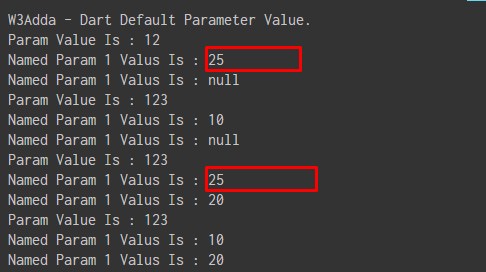
In Dart, we can assign default parameter values in a function definition, so when we call that function with no argument passed for a parameter then its default value assigned. When a function is called with argument, then these arguments is used as parameter values in function, but when a function is called or invoked without passing argument for any specific parameters than default parameter values been used as parameters value as per function definition.

Syntax:-

Optional Parameters with Default Values

Syntax:-

For Optional Positional Parameters

Syntax:-

For Optional Named Parameters

Example:-

Output:-

dart_default_parameter_values

Dart Optional Parameters

Dart Optional Parameters

In Dart, we are can set any parameter as optional; which allows function with optional parameter (if any) to be called/executed even if the values for those parameters is being not provided. A parameter can be set as optional by appending a question mark along with its name. Optional parameters are declared after the required parameters of a function. There are two types of optional parameter in Dart functions –

Optional Positional Parameter

Optional positional parameters can be specified by having individual parameter separated by commas and enclosed within square brackets ([]). Calling a function having optional positional parameters defined may specify a variable number of arguments.

Syntax:-

Example:-

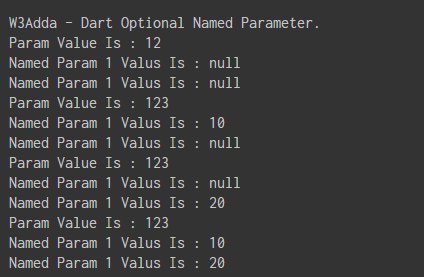
Output:-

dart_optional_positional_parameters

Optional named parameter

Named positional parameters can be specified by having individual parameter name separated by commas and enclosed within curly brackets ({ }).

Syntax:-

Calling a function having optional named parameters, the individual parameter’s name must be specified while the value is being passed. Names are specified using parameter:value.The sequence of passing the parameter(s) does not matter.

Syntax:-

Example:-

Output:-

dart_optional_named_parameters

Dart Functions

Dart Functions

Function gives you way to wrap up the set of statements that means to perform any specific task and give it a name, so that it can be invoked later from any where in the program. Functions makes it easy to divide the complete program into sub-units that perform a specific task for that program, this way it enhance the modular approach and increase the code re-usability of the program. We pass information in function call as its parameter and the function can either returns some value to the point it where it called from or returns nothing.

Advantages of function

  • It enhance the modularity of the program.
  • It enhance the re usability.
  • It makes development easy as development can be shared in team.
  • It reduces the coupling.
  • It reduces duplication.

Defining a function In Dart

A function must be defined prior to use otherwise this will show a compile time error as the main() function is unaware of the function, its argument list and the return type. Call to the function cannot be made unless it is defined. Below is the general syntax of a Dart function. In Dart, function is defined by providing name of the function with list of parameters and return type if any. Below is the general syntax of a Dart function.

Syntax:-

Above is the general syntax of a Dart function With Parameters and Return Value, here

func_name :- It is replaced with the name of the function.
parameter_list :- It represents the list of the parameters need to be passed when function call made.
return_type :- It represents return_type of the function. The return_type can be any valid data type. The data type of the value returned must match the return type of the function. The void keyword can be used to represent no return value.

Example:-

Calling function In Dart

In Dart, once a function is defined, later you can invoke or call this function inside main() function body. A function can be invoked simply by its name with argument list if any.

Syntax:-

Example 1:-

When a function is called, the control is transferred to the function body and the statements in function body are executed sequentially. When all of the statement inside function body is executed, the control again moved to the point from where the function being invoked with the return value(if any).

Dart Passing Arguments to Function

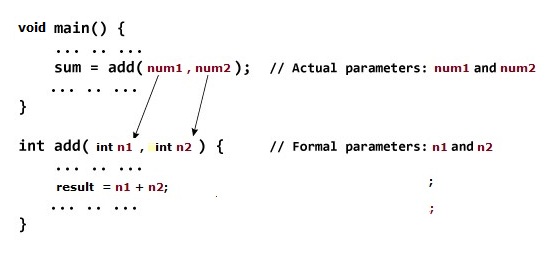
In Dart, when a function is invoked it may be provided with some information as per the function prototype is called as argument (parameter). The number of values passed and the data type of the value passed must match the number of parameters and the data type of the parameter defined during its declaration . Otherwise, the compiler throws an error.

dart-passing-arguments-function

In the above example, we have two variables num1 and num2 to be passed to add() function when function being called. These arguments are referred to as actual arguments.Then, the variable n1 and n2 are initialized with the value of num1 and num2 respectively. Here, n1 and n2 are referred to as formal arguments.

Return Value from Function

Sometimes we may want a function to return some value to the point it where it is called from. In Dart, there is return keyword allows a function to return value. The return statement is optional, if not specified the function returns null. There can be only one return statement in a function.

dart-return-value

Syntax:-

Example:-

Complete Function In Action

Let’s put together complete code; to add two numbers using function in a Dart Program.

Example:-

Output:-

dart_function_to_add_two_numbers_using_function

Dart Function With No Parameters and Return Value

Syntax:-

Above is the general syntax of a Dart function With No Parameters and Return Value, here

func_name :- It is replaced with the name of the function.
return_type :- It represents return_type of the function. The return_type can be any valid data type. The data type of the value returned must match the return type of the function.

Example:-

Output:-

dart_function_with_return_statement

Dart function without Parameters and Without Return value

Syntax:-

Or

void :- It is used to represent no return value.
fun_name :- It is replaced with the name of the function .
Example:-

When run the above Dart Program, we see the output as following –

Output:-

dart_defining_function_example

Dart Assert Statement

Dart Assert Statement

The assert statement is a useful debugging tool, is used for testing boolean conditions. An assert statement disrupt normal execution if a boolean condition is false. If the boolean expression is true, then the code continues to execute normally. If assert statement results in false, then execution ends with an AssertionError.

Syntax:-

Example:-

Note :- Assert statements have no effect in production mode; it is used in development mode only.

Enable Assert

if you’re executing a dart file via command line, you need to enable asserts as follows –

Assert with Message

To attach a message to an assert statement, pass a string as the second argument.

Syntax:-

The first argument is an expression that evaluates to a boolean value. If the expression’s value is true, the assertion succeeds and execution continues. If it’s false, an exception is thrown with the message provided.

Dart Continue statement

Dart Continue Statement

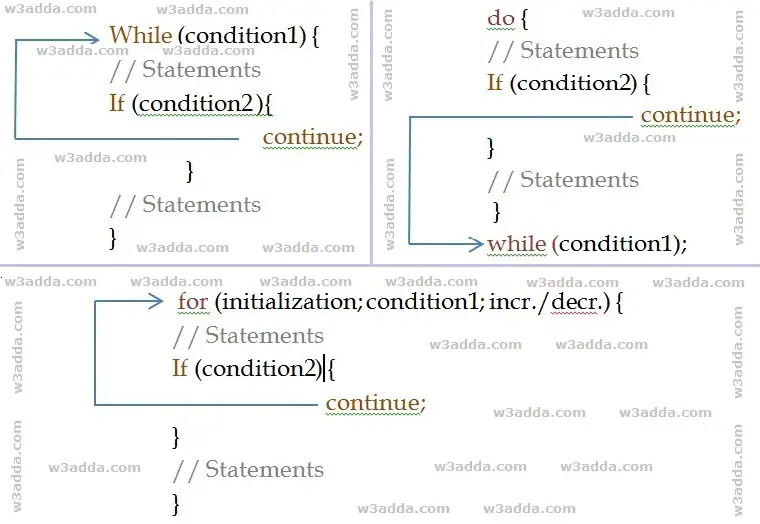
The continue statement gives you way to skip over the current iteration of any loop. When a continue statement is encountered in the loop, the rest of statements in the loop body for current iteration and returns the program execution to the very first statement in the loop body. It does not terminates the loop rather continues with the next iteration.

Dart Continue Statement Flow Diagram

dart_continue_flow_diagram

Syntax:-

Example:-

When we run the above Dart program, we will see following output –

Output:-

dart_continue_statement_example

As you can see when ctr == 5, continue statement is executed which causes the current iteration to end and the control moves on to the next iteration.