AngularJS User Registration Login Authentication Example
User authentication is very common in modern web application. User authentication is a security mechanism that is used to identify whether a user is someone who he claimed to be and to restrict unauthorized access to member only areas in a web application. In this tutorial we’ll show you how to create simple user registration and login system using angularjs. In our previous articles we have demonstrated you how to create simple user login in angularjs and how to create simple user registration in angularjs.
In this tutorial, we’ll guide you through the complete process of creating a user registration system where users can create an account by providing username, email and password, login and logout using Angularjs. We’ll also show you how you can make some pages accessible only to logged-in users. In this tutorial we will first create user registration form in angularjs, and then we’ll create user authentication or login form in angularjs, as well as a welcome page and a logout script.
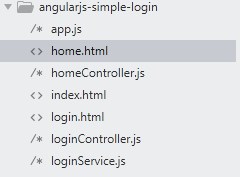
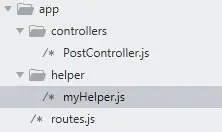
Project’s Directory Structure :-
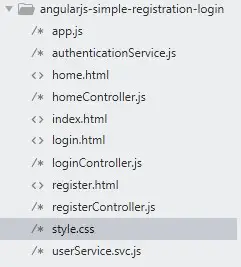
AngularJS Application Layout
Before starting with this tutorial we will create base layout i.e. index.html file where all our application views will be loaded. Let’s create index.html file and put the following code in it –
index.html
|
1 2 3 4 5 6 7 8 9 10 11 12 13 14 15 16 17 18 19 20 21 22 23 24 25 26 27 28 29 |
<!DOCTYPE html> <html ng-app="app"> <head> <meta charset="utf-8" /> <title>AngularJS User Registration Login Example - W3Adda</title> <link rel="stylesheet" href="//netdna.bootstrapcdn.com/bootstrap/3.1.1/css/bootstrap.min.css" /> <link rel="stylesheet" href="style.css"> </head> <body> <div class="jumbotron"> <div class="container"> <div class="header">AngularJS User Registration Login Example - W3Adda</div> <div class="col-sm-8 col-sm-offset-2"> <div ng-view></div> </div> </div> </div> <script src="//code.jquery.com/jquery-3.1.1.min.js"></script> <script src="//code.angularjs.org/1.6.9/angular.min.js"></script> <script src="//code.angularjs.org/1.6.9/angular-route.min.js"></script> <script src="//code.angularjs.org/1.6.9/angular-cookies.min.js"></script> <script src="app.js"></script> <script src="homeController.js"></script> <script src="loginController.js"></script> <script src="registerController.js"></script> <script src="userService.svc.js"></script> <script src="authenticationService.js"></script> </body> </html> |
AngularJS Application
Every angular application starts from creating a angular module. Module is a container that holds the different parts of your application such as controllers, service, etc. In this step we will create a main javascript file app.js that will hold all the required configuration to run an angularjs application. We will also configure application routes in this file using AngularJS UI Router module. Let’s create app.js file and put the following code in it –
app.js
|
1 2 3 4 5 6 7 8 9 10 11 12 13 14 15 16 17 18 19 20 21 22 23 24 25 26 27 28 29 30 31 32 |
( function () { 'use strict'; angular .module('app', ['ngRoute', 'ngCookies']) .config(config) .run(run); config.$inject = ['$routeProvider', '$locationProvider']; function config($routeProvider, $locationProvider) { $routeProvider .when('/', { controller: 'LoginController', templateUrl: 'login.html', controllerAs: 'vm' }) .when('/home', { controller: 'HomeController', templateUrl: 'home.html', controllerAs: 'vm', }) .when('/register', { controller: 'RegisterController', templateUrl: 'register.html', controllerAs: 'vm' }) .otherwise({ redirectTo: '/login' }); } run.$inject = ['$rootScope']; function run(){ console.clear(); } })(); |
The app variable is initialized as angular module, notice that we have used ng-app directive in index.html file to bind the angular application to a container in base layout file. Now, we have created an app module and added ngRoute and ngCookies module for application routing and for storing user information in cookies. Here, we are using $routeProvider in config() function to configure our application routing. In routing configuration, every route you specify have a template file and a controller attached to it.
AngularJS Template and Controller
As you can see in routing configuration, every route you specify have a template and controller attached to it. Angularjs Template file holds all html that is being used to display route specific page. The angularjs controller hold the actual business logic attached with the route. In this step we will create separate template and controller files for user registration, login and home page respectively.
User Registration :-
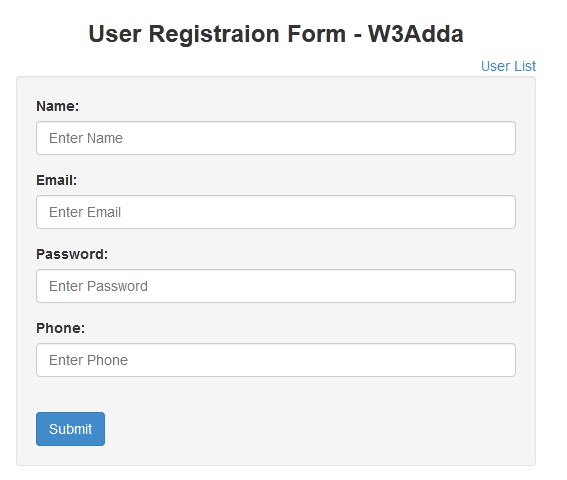
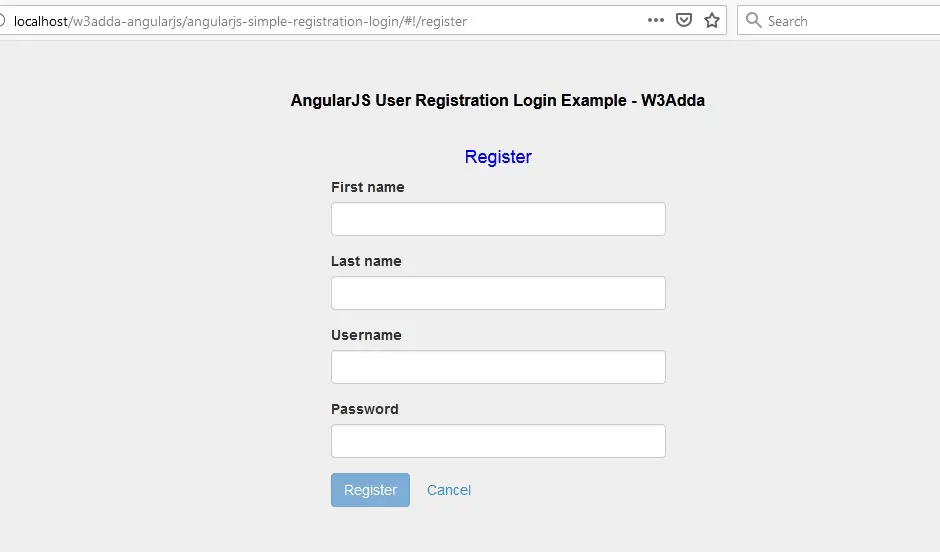
In this step we’ll create a registration form that allows users to create a new account by filling out a web form. User Registration form will have First Name, Last Name, Username and Password along with Register and Cancel buttons. Let’s create a register.html file in your project’s root directory and put the following code in it –
register.html
|
1 2 3 4 5 6 7 8 9 10 11 12 13 14 15 16 17 18 19 20 21 22 23 24 25 26 27 28 29 30 |
<div class="col-md-6 col-md-offset-3"> <h4 style="text-align:center;color:blue">Register</h4> <form name="form" ng-submit="vm.register()" role="form"> <div class="form-group" ng-class="{ 'has-error': form.firstName.$dirty && form.firstName.$error.required }"> <label for="username">First name</label> <input type="text" name="firstName" id="firstName" class="form-control" ng-model="vm.user.firstName" required /> <span ng-show="form.firstName.$dirty && form.firstName.$error.required" class="help-block">First name is required</span> </div> <div class="form-group" ng-class="{ 'has-error': form.lastName.$dirty && form.lastName.$error.required }"> <label for="username">Last name</label> <input type="text" name="lastName" id="Text1" class="form-control" ng-model="vm.user.lastName" required /> <span ng-show="form.lastName.$dirty && form.lastName.$error.required" class="help-block">Last name is required</span> </div> <div class="form-group" ng-class="{ 'has-error': form.username.$dirty && form.username.$error.required }"> <label for="username">Username</label> <input type="text" name="username" id="username" class="form-control" ng-model="vm.user.username" required /> <span ng-show="form.username.$dirty && form.username.$error.required" class="help-block">Username is required</span> </div> <div class="form-group" ng-class="{ 'has-error': form.password.$dirty && form.password.$error.required }"> <label for="password">Password</label> <input type="password" name="password" id="password" class="form-control" ng-model="vm.user.password" required /> <span ng-show="form.password.$dirty && form.password.$error.required" class="help-block">Password is required</span> </div> <div class="form-actions"> <button type="submit" ng-disabled="form.$invalid || vm.dataLoading" class="btn btn-primary">Register</button> <img ng-if="vm.dataLoading" src="data:image/gif;base64,R0lGODlhEAAQAPIAAP///wAAAMLCwkJCQgA" /> <!-- truncated line --> <a href="#!/" class="btn btn-link">Cancel</a> </div> </form> </div> |
Now, we’ll create registerController.js file and define our registration controller. Let’s create registerController.js file and put the following code in it –
registerController.js
|
1 2 3 4 5 6 7 8 9 10 11 12 13 14 15 16 17 18 19 20 21 22 23 24 25 26 |
//registerController.js (function () { 'use strict'; angular .module('app') .controller('RegisterController', RegisterController); RegisterController.$inject = ['UserService', '$location']; function RegisterController(UserService, $location) { var vm = this; vm.dataLoading = false; vm.register = register; function register() { vm.dataLoading = true; UserService.create(vm.user) .then(function (response) { if (response.success) { alert('Registration successful'); $location.path('/'); } else { alert(response.message); vm.dataLoading = false; } }); } } })(); |
Here, register() function is invoked when Register button is clicked. The register() function takes the user input and pass it to create() function in UserService. UserService will process the user input and respond back with either success or failure.
User Login :-
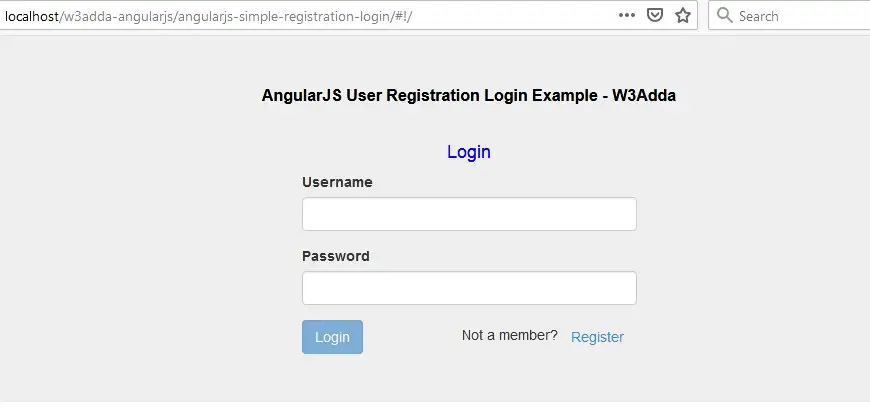
In this step we’ll create a simple login form having two input fields ( UserName and Password) along with a login button. Here, user will input their username and password and submit the login form using login button. As the login form is submitted it will call login() function from our login controller(loginController.js) which will further use Authentication Service(AuthenticationService.js) to authenticate user. if the user is authenticated successfully they will be redirected to a user home page using $location service. If authentication fails, the user is notified with an error message.
login.html
In this step we’ll create a simple login form that allows users login using their username and password. Let’s create a login.html file in your project’s root directory and put the following code in it –
|
1 2 3 4 5 6 7 8 9 10 11 12 13 14 15 16 17 18 19 20 21 |
<!--login.html--> <div class="col-md-6 col-md-offset-3"> <h4 style="text-align:center;color:blue">Login</h4> <form name="form" ng-submit="vm.login()" role="form"> <div class="form-group" ng-class="{ 'has-error': form.username.$dirty && form.username.$error.required }"> <label for="username">Username</label> <input type="text" name="username" id="username" class="form-control" ng-model="vm.username" required /> <span ng-show="form.username.$dirty && form.username.$error.required" class="help-block">Username is required</span> </div> <div class="form-group" ng-class="{ 'has-error': form.password.$dirty && form.password.$error.required }"> <label for="password">Password</label> <input type="password" name="password" id="password" class="form-control" ng-model="vm.password" required /> <span ng-show="form.password.$dirty && form.password.$error.required" class="help-block">Password is required</span> </div> <div class="form-actions" layout="row"> <button type="submit" ng-disabled="form.$invalid || vm.dataLoading" class="btn btn-primary">Login</button> <img ng-if="vm.dataLoading" src="data:image/gif;base64,R0lGODlhEAAQAPIAAP///" /> <!-- truncated line --> <span style="float:right">Not a member?<a href="#!/register" class="btn btn-link">Register</a></span> </div> </form> </div> |
Now, we’ll create loginController.js file and define our login controller. Let’s create loginController.js file and put the following code in it –
loginController.js
|
1 2 3 4 5 6 7 8 9 10 11 12 13 14 15 16 17 18 19 20 21 22 23 24 25 26 27 28 29 |
//loginController.js (function () { 'use strict'; angular .module('app') .controller('LoginController', LoginController); LoginController.$inject = ['$location','AuthenticationService']; function LoginController( $location, AuthenticationService) { var vm = this; vm.login = login; (function initController() { // reset login status AuthenticationService.ClearCredentials(); })(); function login() { console.log("login method executing"); vm.dataLoading = true; AuthenticationService.Login(vm.username, vm.password, function (response) { if (response.success) { AuthenticationService.SetCredentials(vm.username, vm.password); $location.path('/home'); } else { alert(response.message); vm.dataLoading = false; } }); } } })(); |
User Home :-
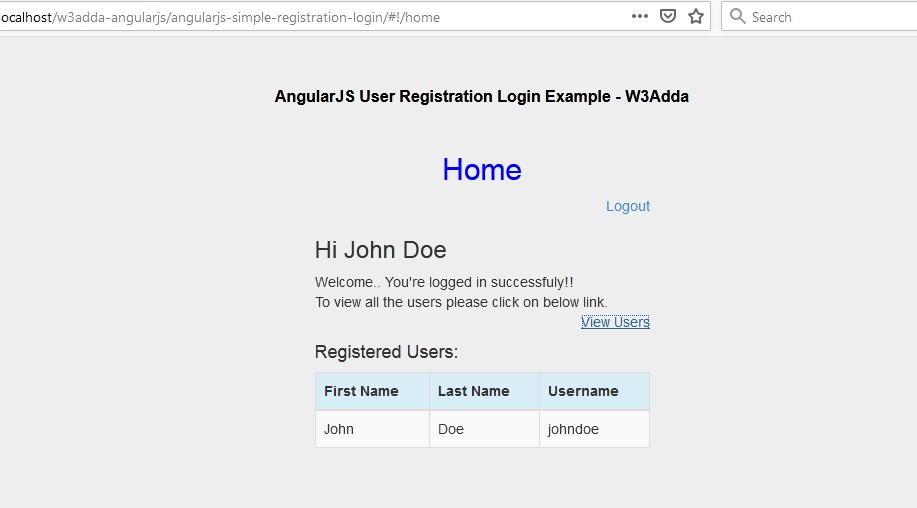
Once a user is successfully logged in the home page (home.html) will be loaded. Here, we have simple welcome message along with a list of registered users. Let’s create a home.html file in your project’s root directory and put the following code in it –
home.html
|
1 2 3 4 5 6 7 8 9 10 11 12 13 14 15 16 17 18 19 20 21 22 23 24 25 26 27 28 29 30 |
<!--home.html--> <div class="col-md-6 col-md-offset-3"> <h2 style="text-align:center;color:blue">Home</h2> <div align="right"><a href="#!/">Logout</a></div> <h3>Hi {{vm.currentUser.firstName + " " + vm.currentUser.lastName}}</h3> <div>Welcome.. You're logged in successfuly!! <br/>To view all the users please click on below link.</div> <div align="right"> <a href="" ng-click="vm.showUsers = !vm.showUsers">View Users</a> </div> <div ng-if="vm.showUsers"> <h4>Registered Users:</h4> <table class = "table table-striped table-bordered table-hover"> <thead> <tr class = "info"> <th>First Name</th> <th>Last Name</th> <th>Username</th> </tr> </thead> <tbody> <tr ng-repeat = "user in vm.allUsers track by $index"> <td>{{ user.firstName }}</td> <td>{{ user.lastName }}</td> <td>{{ user.username }}</td> </tr> </tbody> </table> </div> </div> |
Now, we’ll create homeController.js file and define our home page controller. Let’s create homeController.js file and put the following code in it –
homeController.js
|
1 2 3 4 5 6 7 8 9 10 11 12 13 14 15 16 17 18 19 20 21 22 23 24 25 26 27 28 29 30 |
(function () { 'use strict'; angular .module('app') .controller('HomeController', HomeController); HomeController.$inject = ['UserService', '$rootScope']; function HomeController(UserService, $rootScope) { var vm = this; vm.showUsers = false; vm.currentUser = null; vm.allUsers = []; initController(); function initController() { loadCurrentUser(); loadAllUsers(); } function loadCurrentUser() { UserService.getByUsername($rootScope.globals.currentUser.username) .then(function (user) { vm.currentUser = user; }); } function loadAllUsers() { UserService.get() .then(function (users) { vm.allUsers = users; }); } } })(); |
This will have loadCurrentUser() and loadAllUsers() functions to display currently logged in user details and to to display a list of all the registered users.
AngularJS Services
In this step, we will define angualrjs service for user authentication and to store and fetch user information form local storage.
Authentication Service :-
Here, we will create a authentication service(authenticationService.js) that will be used to authenticate user with login credentials provided and to set and clear user credentials from angularjs rootScope object. Let’s create authenticationService.js file and put the following code in it –
authenticationService.js
|
1 2 3 4 5 6 7 8 9 10 11 12 13 14 15 16 17 18 19 20 21 22 23 24 25 26 27 28 29 30 31 32 33 34 35 36 37 38 39 40 41 42 43 44 45 46 47 48 49 50 51 52 53 54 55 56 57 58 59 60 61 62 63 64 65 66 67 68 69 70 71 72 73 74 75 76 77 78 79 80 81 82 83 84 85 86 87 88 89 90 91 92 93 94 95 96 97 98 99 100 101 102 103 104 105 106 107 108 109 110 111 112 113 114 115 116 117 118 119 120 121 122 |
//authenticationService.js (function () { 'use strict'; angular .module('app') .factory('AuthenticationService', AuthenticationService); AuthenticationService.$inject = ['$http', '$cookies', '$rootScope', '$timeout', 'UserService']; function AuthenticationService($http, $cookies, $rootScope, $timeout, UserService) { var service = {}; service.Login = Login; service.SetCredentials = SetCredentials; service.ClearCredentials = ClearCredentials; return service; function Login(username, password, callback) { /* Dummy authentication for testing, uses $timeout to simulate api call ----------------------------------------------*/ $timeout(function () { var response; UserService.getByUsername(username) .then(function (user) { if (user !== null && user.password === password) { response = { success: true }; } else { response = { success: false, message: 'Username or password is incorrect' }; } callback(response); }); }, 1000); /* Use this for real authentication ----------------------------------------------*/ //$http.post('/api/authenticate', { username: username, password: password }) // .success(function (response) { // callback(response); // }); } function SetCredentials(username, password) { var authdata = Base64.encode(username + ':' + password); $rootScope.globals = { currentUser: { username: username, authdata: authdata } }; // set default auth header for http requests $http.defaults.headers.common['Authorization'] = 'Basic ' + authdata; // store user details in globals cookie that keeps user logged in for 1 week (or until they logout) var cookieExp = new Date(); cookieExp.setDate(cookieExp.getDate() + 7); $cookies.putObject('globals', $rootScope.globals, { expires: cookieExp }); } function ClearCredentials() { $rootScope.globals = {}; $cookies.remove('globals'); $http.defaults.headers.common.Authorization = 'Basic'; } } // Base64 encoding service used by AuthenticationService var Base64 = { keyStr: 'ABCDEFGHIJKLMNOPQRSTUVWXYZabcdefghijklmnopqrstuvwxyz0123456789+/=', encode: function (input) { var output = ""; var chr1, chr2, chr3 = ""; var enc1, enc2, enc3, enc4 = ""; var i = 0; do { chr1 = input.charCodeAt(i++); chr2 = input.charCodeAt(i++); chr3 = input.charCodeAt(i++); enc1 = chr1 >> 2; enc2 = ((chr1 & 3) << 4) | (chr2 >> 4); enc3 = ((chr2 & 15) << 2) | (chr3 >> 6); enc4 = chr3 & 63; if (isNaN(chr2)) { enc3 = enc4 = 64; } else if (isNaN(chr3)) { enc4 = 64; } output = output + this.keyStr.charAt(enc1) + this.keyStr.charAt(enc2) + this.keyStr.charAt(enc3) + this.keyStr.charAt(enc4); chr1 = chr2 = chr3 = ""; enc1 = enc2 = enc3 = enc4 = ""; } while (i < input.length); return output; }, decode: function (input) { var output = ""; var chr1, chr2, chr3 = ""; var enc1, enc2, enc3, enc4 = ""; var i = 0; // remove all characters that are not A-Z, a-z, 0-9, +, /, or = var base64test = /[^A-Za-z0-9\+\/\=]/g; if (base64test.exec(input)) { window.alert("There were invalid base64 characters in the input text.\n" + "Valid base64 characters are A-Z, a-z, 0-9, '+', '/',and '='\n" + "Expect errors in decoding."); } input = input.replace(/[^A-Za-z0-9\+\/\=]/g, ""); do { enc1 = this.keyStr.indexOf(input.charAt(i++)); enc2 = this.keyStr.indexOf(input.charAt(i++)); enc3 = this.keyStr.indexOf(input.charAt(i++)); enc4 = this.keyStr.indexOf(input.charAt(i++)); chr1 = (enc1 << 2) | (enc2 >> 4); chr2 = ((enc2 & 15) << 4) | (enc3 >> 2); chr3 = ((enc3 & 3) << 6) | enc4; output = output + String.fromCharCode(chr1); if (enc3 != 64) { output = output + String.fromCharCode(chr2); } if (enc4 != 64) { output = output + String.fromCharCode(chr3); } chr1 = chr2 = chr3 = ""; enc1 = enc2 = enc3 = enc4 = ""; } while (i < input.length); return output; } }; })(); |
User Service :-
Next, we will create a user service(userService.svc.js) to store and fetch user details from the localStorage object. Let’s create userService.svc.js file and put the following code in it –
userService.svc.js
|
1 2 3 4 5 6 7 8 9 10 11 12 13 14 15 16 17 18 19 20 21 22 23 24 25 26 27 28 29 30 31 32 33 34 35 36 37 38 39 40 41 42 43 44 45 46 47 48 49 50 51 52 53 54 55 56 57 |
//userService.svc.js (function () { 'use strict'; angular.module("app") .service("UserService" , UserService); UserService.$inject = ['$timeout', '$filter', '$q']; function UserService($timeout, $filter, $q){ var service = {}; service.get = get; service.getByUsername = getByUsername; service.create = create; return service; function get(){ var deferred = $q.defer(); deferred.resolve(getUsers()); return deferred.promise; } function getByUsername(username) { var deferred = $q.defer(); var filtered = $filter('filter')(getUsers(), { username: username }); var user = filtered.length ? filtered[0] : null; deferred.resolve(user); return deferred.promise; } function create(user){ var deferred = $q.defer(); // simulate api call with $timeout $timeout(function () { getByUsername(user.username) .then(function (duplicateUser) { if (duplicateUser !== null) { deferred.resolve({ success: false, message: 'Username "' + user.username + '" is already exists' }); } else { var users = getUsers(); // assign id var lastUser = users[users.length - 1] || { id: 0 }; user.id = lastUser.id + 1; // save to local storage users.push(user); createUser(users); deferred.resolve({ success: true }); } }); }, 1000); return deferred.promise; } function getUsers(){ if(!localStorage.users){ localStorage.users = JSON.stringify([]); } return JSON.parse(localStorage.users); } function createUser(users){ localStorage.users = JSON.stringify(users); } } })(); |
Fially, we will have css(style.css) file that will hold all the styling rules for our application/ Let’s create a style.css file and put the following code in it –
style.css
|
1 2 3 4 5 6 7 |
.header{ text-align:center; color:black; font-weight:bold; font-size:16px; margin:0 0 25px 0; } |
Run AngularJS Application
Now start the application server and visit the application to view the output.
Registration Page :-
Login Page :-
Home Page :-