Category Archives: Rust Tutorial

Rust Tutorial

Rust Comments

Rust Comments

Rust Comments are a set of statements that are not executed by the Rust compiler and interpreter. The use of comments makes it easy for humans to understand the source code.Usually comments gives you inside or explanation about the variable, method, class or any statement that exists in source code. The comment statements are ignored during the execution of the program.

Rust Single-line Comments:-

A ‘//’ (double forward slash) is used to specify a single line comment, which extends up to the newline character.

Output:-

Rust Multi-line Comments:-

If you want to comment multiple lines then you can do it using /* and */, everything in between from /* to */ is ignored by the compiler-

Output:-

Doc Comments in Rust

In Rust, Doc Comments is a string that is used to specify what a function/class/module does. It usually appear as first statement in a module, function, class, or method definition. A ‘///’ (triple forward slash) is used to specify library docs.

Rust Hello World Program

Rust Hello World Program

As usual we will start learning Rust programming by creating “Hello, world!” program. The “Hello, world!” program is a simplest program that will display some text on the screen. The “Hello, world!” program is a simple yet complete program for beginners that illustrates the basic syntax of Rust programming language. The “Hello, world!” program gives you a way to test systems and programming environment.

This tutorial will guide you through writing a basic “Hello, World!” program in Rust.

Creating Hello World Program

Step 1:- Create a file called “hello.rs” using a text editor program of your choice. The .rs file extension is used to specify Rust file.

Step 2:- Let’s open the “hello.rs” file that we created, and put the following line of code in it and save it.

The println() is a Rust macro that emits formatted text to the console.

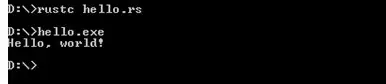
Step 3:- Now, open terminal or command prompt and switch to the folder where our “hello.rs” file is saved. Now, compile the program by typing the following command –

Rust Hello World Program

Step 4 :- After the program is complied, we can run using the filename.exe

Now, when the program is executed it will print “Hello, world!” as below –

Rust Hello World Program

Output:-

Rust Installation

Rust Installation

Installing Rust In Windows

In order to setup Rust development environment you need to have Rust installed, so if you don’t have it installed, check the following instruction to get Rust installed. If you’ve already have installed Rust Language in your system, you can skip this part.

Note:- Installation of visual studio with C++ tools is mandatory to run the rust program.

Step 1:- Download the Rust Windows Installer from the official Rust Language website, link given below –

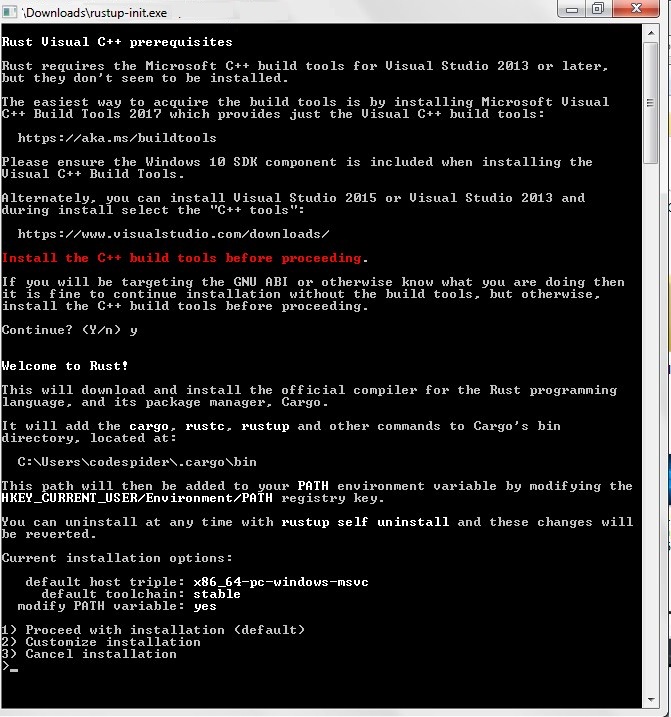
Step 2:- Run the installer (the .exe file you downloaded in the previous step.)

Rust Installation

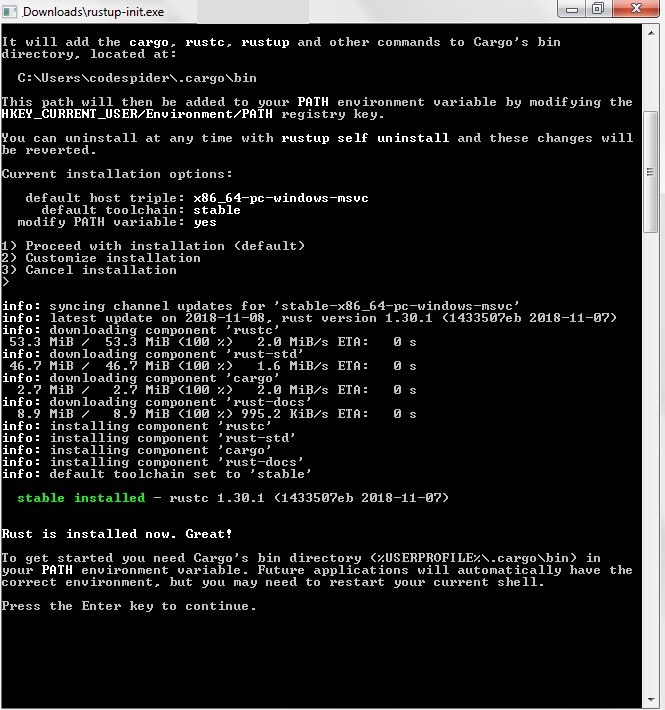
Step 3:- Follow the installation to install Rust.

Rust Installation

Step 4:- After the installation, PATH of Rust automatically added to PATH environment variables in advanced system properties.

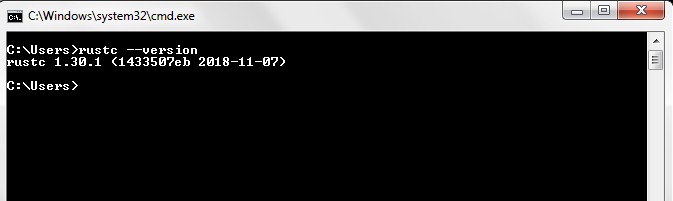
Step 5:- Now, lets open the terminal and run the following command in order to verify the Rust installation.

Rust Installation

Rust Installation in Linux and macOS

In Linux use the following command to download and install rustup, this will install the latest version of Rust.

After the successful installation following message will be displayed on the terminal –

The Rust path is automatically added to system path after your next login. But, if you want to run Rust directly after installation without restarting the terminal, then use the following command to manually add path to your system PATH.

Once the Rust Installation is done, you would additionally require a linker to run your Rust program, otherwise you will get the a linker error. You will also require C compiler as some of the Rust packages are dependent on C.

Rust Updating

Run the following command to update to the latest version of Rust –

Uninstalling Rust

Run the following command to uninstall the Rust –


gj


Rust Features

Rust Features

Rust is a systems programming language that provides lots of convenient features mainly focused on safety, memory management, and concurrency.

Syntax :- Rust syntactically similar to C and C++ which makes it easy to learn system programming language. It supports a mix of imperative procedural, pure functional and object-oriented programming paradigms.

Zero Cost Abstraction :- This makes the Rust good fit for systems programming, it supports a higher level of abstraction without any performance overhead.

Type Inference :- Rust is a type inferred language, which allows compiler automatically infer(know) the type of an expression automatically.

Pattern Matching :- Rust comes with more powerful pattern matching features in conjunction with the match expressions. Pattern matching is very common in Rust, and can be used for variable bindings, match statements, and various other places in Rust program.

Package Manager :- Rust comes with a built-in Package Manager known as Cargo. Cargo is used to download project’s dependencies, compiles your project, makes packages, and upload them to Cargo repository.

Minimal Run Time :- Rust is a language that, that has very minimal runtime. Unlike other modern languages Rust guarantees memory safety, memory management, speed, and concurrency at compile time, hence there is no run-time overhead.

Safe Memory Allocation :- Rust provides memory safety without needing a garbage collector, it uses concept of smart pointers that keeps track memory allocation and clean up.

Ownership :-This is one of Rust’s most unique feature through which Rust achieves all of these memory safety guarantees. In Rust memory is managed through a system of ownership where a set of rules being enforced by the compiler at compile time. In ownership system memory space have a unique owner at a time and its reference can only be temporarily borrowed by the other variables.

Better Error Handling :- Rust comes with much better approach for error handling. In Rust errors are categorized into two major categories: recoverable errors and unrecoverable errors. In Rust, errors and their causes can be communicated in much more clean way.

Concurrency without data races :- Data races usually occurs in multi-threaded programming, where two or more threads in a single process accessing same memory location concurrently. Rust guarantees concurrency with no data races with a system of ownership. In ownership system memory space can be owned by a single thread at a time and its reference can only be temporarily borrowed by the other threads, and two threads can never own the same memory space with write access.

Efficient C bindings :- Rust strives to be interoperable with the existing world just as easily as it talks to itself. Rust makes it easy to communicate with C language without any performance overhead. Rust provides a zero-cost abstraction mechanism known as foreign function interface (FFI). The foreign function interface (FFI) enables function calls between Rust and C have seamless performance as of C function calls itself.

Reusable Code :- Modules are one of the basic building blocks in Rust Programming, Rust allows you to organize code in reusable modules. Rust modules are simply independent, reusable code block which usually contains functions, structures, and even other modules. Modules are organized code as a package that others can use.


Rust Introduction

Rust Introduction

Rust is a modern general-purpose, multi-paradigm systems programming language programming language originally developed/sponsored by Mozilla. Rust is a statically typed compiled language mainly focused on safety, speed, and concurrency. Rust syntactically similar to C++ and supports a mix of imperative procedural, pure functional and object-oriented programming paradigms. Unlike other modern languages Rust achieves all of these memory safety guarantees at compile time, hence there is no run-time overhead, which makes final code as fast as C/C++, but far safer.