Rust Enumerations
Rust Enumerations
Leave a reply

Rust Tutorial
Rust Enumerations
Rust Structures
Rust Slices
Rust Ownership
In Rust, the continue statement gives you way to skip over the current iteration of any loop. When a continue statement is encountered in the loop, the rest of statements in the loop body for current iteration and returns the program execution to the very first statement in the loop body. It does not terminates the loop rather continues with the next iteration.
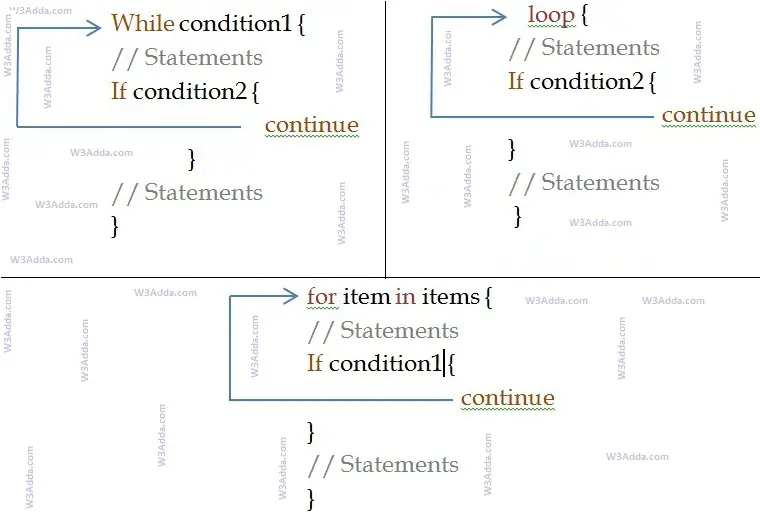
Syntax:-
|
1 |
continue; |
Example:-
|
1 2 3 4 5 6 7 8 9 10 11 12 13 14 |
fn main() { println!("W3Adda Rust continue statement."); for ctr in 1..10 { if ctr == 5 { println!("5 is skipped"); ; } println!("Number is {}",ctr); } println!("Out of loop"); } |
When we run the above Rust program, we will see following output –
Output:-
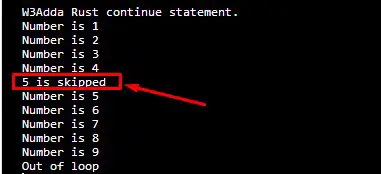
As you can see when ctr == 5, continue statement is executed which causes the current iteration to end and the control moves on to the next iteration.
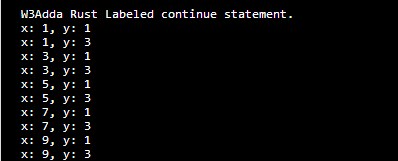
In Rust, sometimes you may encounter situations where you have nested loops, in such case you are required to specify the loop which one your continue statement is applicable for. The standard unlabeled continue statement is applicable for the nearest enclosing loop. In Rust, there is another form of continue(labeled continue) statement is used to continue outer loop. In such cases, the loops must be annotated with some ‘label, which is passed to the continue statement.
Example:-
|
1 2 3 4 5 6 7 8 9 10 11 12 |
fn main() { println!("W3Adda Rust Labeled continue statement."); 'outer: for x in 0..10 { 'inner: for y in 0..5 { if x % 2 == 0 { continue 'outer; } // continues the loop over x if y % 2 == 0 { continue 'inner; } // continues the loop over y println!("x: {}, y: {}", x, y); } } } |
Output:-
In Rust, break statement inside any loop gives you way to break or terminate the execution of loop containing it, and transfers the execution to the next statement following the loop. It is almost always used with if construct.
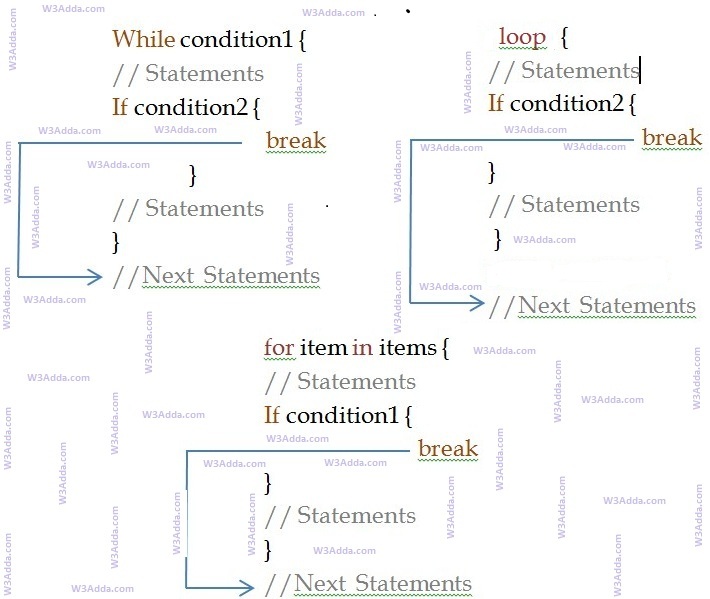
Syntax:-
|
1 |
break; |
Example:-
|
1 2 3 4 5 6 7 8 9 10 11 12 |
fn main(){ let mut ctr = 0; println!("W3Adda - Rust Break Statement"); while ctr <= 10 { ctr = ctr + 1; if ctr == 5 { break; } println!("Inside loop {}", ctr); } println!("Out of while loop"); } |
In this above program, the variable ctr is initialized as 0. Then a while loop is executed as long as the variable ctr is less than 10. Inside the while loop, the ctr variable is incremented by 1 with each iteration (ctr = ctr + 1). Next, we have an if statement that checks the variable ctr is equal to 5, if it return TRUE causes loop to break or terminate. Within the loop there is a println!() statement that will execute with each iteration of the while loop until the loop breaks. Then, there is a final println!() statement outside of the while loop.
When we run this code, our output will be as follows –
Output:-

In Rust, sometimes you may encounter situations where you have nested loops, in such case you are required to specify the loop which one your break statement is applicable for. The standard unlabeled break statement is used to terminates the nearest enclosing loop. In Rust, there is another form of break (labeled break) statement is used to terminate specified loop and control jumps to the statement immediately following the labeled statement. In such cases, the loops must be annotated with some ‘label, which is passed to the break statement.
Example:-
|
1 2 3 4 5 6 7 8 9 10 11 12 13 14 15 16 17 18 19 20 |
#![allow(unreachable_code)] fn main() { println!("W3Adda Rust Labeled break Statement"); 'outer: loop { println!("Entered the outer loop"); 'inner: loop { println!("Entered the inner loop"); // This breaks the outer loop break 'outer; } println!("This point will never be reached"); } println!("Exited the outer loop"); } |
When we run this code, our output will be as follows –
Output:-

Loops statements gives you a way execute the block of code repeatedly. But sometimes, you may want to exit a loop completely or skip specific part of a loop when it meets a specified condition. It can be done using flow control mechanism. In Rust, you have flow control statements that can be used to alter or control the flow of loop execution based on specified conditions. We have following flow control statements –
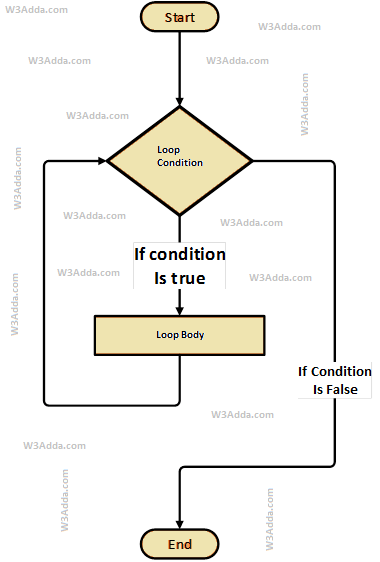
The while loop will execute a block of statement as long as a test expression is true. While loop is useful when the number of iterations can not be predicted beforehand. The while loop evaluates test expression at beginning of each pass.
Syntax:-
|
1 2 3 |
while condition { // loop body } |
Here, Condition is a Boolean expression that results in either True or False, if it results in True then statements inside loop body are executed and condition is evaluated again. This process is repeated until the condition is evaluated to False. If the condition results in False then execution is skipped from loop body and while loop is terminated.
Example:-
|
1 2 3 4 5 6 7 8 9 10 |
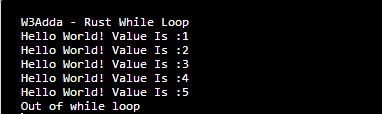
fn main() { let mut ctr = 1; let max_ctr = 5; println!("W3Adda - Rust While Loop"); while ctr <= max_ctr { println!("Hello World! Value Is :{}", ctr); ctr = ctr + 1; } println!("Out of while loop"); } |
Here, we have initialized ctr and max_ctr to 1 and 5 respectively, in the next statement we have while loop, that checks the condition ctr <= max_ctr for each of the iteration. If the test condition returns True, the statements inside loop body are executed and if test condition returns False then the while loop is terminated. Inside the loop body we have incremented the ctr value by one for each if the iteration. When we run the above swift program, we see the following output –
Output:-
If you need an infinite loop, you may use while loop as follows –
Syntax:-
|
1 2 |
while true { } |
However, loop is better suited for infinite loop, while loop should be avoided for this case.
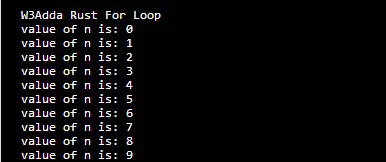
The for loop is used when we want to execute block of code known times. In Rust, the for in loop takes an expression as iterator, and iterate through the elements one at a time in sequence. The value of the element is bound to var, which is valid and available for the loop body. Once the loop statements are executed current iteration, the next element is fetched from the iterator, and we loop another time. When there is no more elements in iterator, the for loop is ended.

Syntax:-
|
1 2 3 |
for var in expression { // Statement(s) } |
Example:-
|
1 2 3 4 5 6 |
fn main() { println!("W3Adda Rust For Loop"); for n in 0..10 { println!("value of n is: {}", n); } } |
Output:-
This loop statement is the simplest form of loop available in Rust. The loop statement provides a way to loop through indefinitely until some terminating statement is found.
Syntax:-
|
1 2 3 |
loop { // Statements(s) } |
Example :-
|
1 2 3 |
loop { println!("W3Adda Loop forever!"); } |
The “break” keyword is used to terminate the loop, if there is no “break” keyword is used then the loop will be executed indefinitely.
Loop statements are used to execute the block of code repeatedly for a specified number of times or until it meets a specified condition. Loop statement are very useful when we want to perform same task for multiple times. In Swift, we have following loop statements available-
In Rust, you have loop control statements that can be used to alter or control the flow of loop execution based on specified conditions. In Rust, we have following loop control statements –