Category Archives: Python

Python List Functions

Python Built In List Functions

Function Description
min(list) It returns the minimum value in the given list.
max(list) It returns the maximum value in the given list.
len(list) It returns length/size of the list, can also be seen as number of elements in a given list.
cmp(list1,list2) It compares the given lists.
list(sequence) It takes a sequence object and converts it into a list.

Python Lists

Python Lists

Python comes with a great built-in sequence data type known as “List”. List is a mutable ordered series of comma-separated values, each of the value as termed as Item. A list variable is defined by having values separated by commas and enclosed within square brackets ([]). A list can hold values of different data types, it means single list can contain strings, integers, as well as objects.

Lists are mutable hence very flexible data type, it mean values or items in a list can be added, removed, and changed any time. Lists are great to deal with data structures like stacks and queues.

Creating Lists

Python list can be defined by simply putting comma-separated values enclosed within square brackets ([ and ]).

Syntax1:-

A list having no elements is called an empty list.

Lists can also be created using the built-in list type object as following –

Syntax2:-

Here, sequence can be any kind of sequence object or iterable. You can also pass in another list, which will makes a copy. Tuples and generators can also be used as sequence object to create a lists.

Syntax3:-

Here, expression is evaluated for every item in the sequence to create list items.

In Python, if you assign a list to a variable, python interpreter will never creates a new list for that variable instead both will point to same list object.

Indexing Lists

Items in the list “colors” are indexed as following –

‘red’ ‘green’ ‘blue’ ‘white’ ‘yellow’
0 1 2 3 4

Negative indexing for the items in the list “colors” can be seen as following –

‘red’ ‘green’ ‘blue’ ‘white’ ‘yellow’
-5 -4 -3 -2 -1

Accessing Lists

An list elements can be accessed easily by index or subscript like list_name[index]. Indexing for any lists starts from zero (0) to the last element of a list is list_name[size-1] where size is the number of elements in the list.

Syntax:-

Example:-

here, L[i] returns the item at index i (Indexing for any lists starts from zero (0))

here, L[i:j] returns a new list, containing the items between index i and j; here i represents the start index and j represents the end index. If the specified index is outside the list, Python raises an IndexError exception.

Example:- List elements can be accessed in numerous way as following –

Output:-

Delete Item from a List

An items from a list can removed simply using the del statement. This will remove the value at the given index. The del statement can be used to delete a single or multiple items from the given list, it can also be used to delete entire list.

Example:-

Output:-

Iterating Through a List

The for-in statement makes it easy to loop over the items in a list:

If you need both the index and the item, use the enumerate function:

If you need only the index, use range and len:

Updating Lists

As Python lists are mutable, you can easily update an individual items or slices of the given list.

Syntax:- dfgdg

Example:- gdgdfg

Output:-

you can update a list slice as following –

Example:-

Output:-

If you want to add one item to a given list or several items to a list, it can be done using append() and extend() method respectively.

Slicing Lists

In Python, you can also extract a sub list from a given list. It can be done as following –

Syntax:-

Here, a sub list is extracted from given list starting from start_index and stopping just before end_index. The default values for start_index and the end_index is zero(0).

If you omit the start_index (before the colon), the slice starts from the beginning of the list. If you omit the end_index, the slice goes to the end of the list. If you omit both, it will return a copy of the given list.

Example:-

Output:-

Python Loop Control Statements

Python Loop Control Statements

In Python, we have loop control statements that can be used to alter or control the flow of loop execution based on specified conditions. Python loop statements gives you a way execute the block of code repeatedly. But sometimes, you may want to exit a loop completely or skip specific part of a loop when it meets a specified condition. It can be done using loop control mechanism.

Types of Loop Control Statements

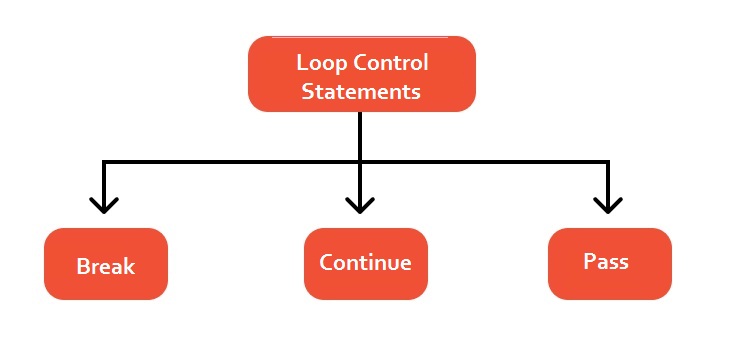
In Python we have following three types of loop control statements :

  • Break Statement
  • Continue Statement
  • Pass Statement

python-loop-control-statements

Python break statement

In Python, break statement inside any loop gives you way to break or terminate the execution of loop containing it, and transfers the execution to the next statement following the loop.

Syntax:-

Example:-

In this above program, the variable count is initialized as 0. Then a while loop is executed as long as the variable count is less than 10.

Inside the while loop, the count variable is incremented by 1 with each iteration (count = count + 1).

Next, we have an if statement that checks the variable count is equal to 5, if it return TRUE causes loop to break or terminate.

Within the loop there is a print() statement that will execute with each iteration of the while loop until the loop breaks.

Then, there is a final print() statement outside of the while loop.

When we run this code, our output will be as follows –

Output:-

Python continue statement

The continue statement gives you way to skip over the current iteration of any loop. When a continue statement is encountered in the loop, the python interpreter ignores rest of statements in the loop body for current iteration and returns the program execution to the very first statement in th loop body. It does not terminates the loop rather continues with the next iteration.

Syntax:-

Example:-

Output:-

As you can see when ctr == 5, continue statement is executed which causes the current iteration to end and the control moves on to the next iteration.

Python pass statement

In Python , the pass statement is considered as no operation statement, means it consumes the execution cycle like a valid python statement but nothing happens actually when pass is executed.The pass statement is much like a comment, but the python interpreter executes the pass statements like a valid python statements, while it ignores the comment statement completely. It is generally used to indicate “null” or unimplemented functions and loops body.

Syntax:-

Example:-

Output:-

Python Variables

What is variable?

In Python, Variables is an identifier used to refer memory location in computer memory that holds a value for that variable, this value can be changed during the execution of the program. Whenever you create a variable in Python programming, this means you are allocating some space in the memory for that variable. The size of memory block allocated and type of the value it holds is completely dependent upon the type of variable. Naming a variable in Python Programming is one of the very important task.

Rules for naming a variable –

  • Variable name can consist of letter, alphabets and start with underscore character.
  • First character of variable name cannot be digit.
  • Keywords are not allowed to use as a variable name.
  • Blank spaces are not allowed in variable name.
  • Python is case sensitive i.e. UPPER and lower case are significant.
  • Special characters like #, $ are not allowed except the underscore.

Recommendation :- Variable name must be readable and should be relative to its purpose.

Variable assignment

In Python it not mandatory too declare a variables beforehand to use it in program. As you assign a value to a variable, the variable is declared automatically. The assignment operator (=) is used to assign values to a variable, any type of value can be assigned to any valid variable.

The operand in the left side of the assignment operator (=) indicates the name of the variable and the operand in the right side of the assignment operator (=) indicates the value stored in that variable.

Example:-

Output:-

Here, we have three assignment statements. In first statement variable “a” is assigned an integer value 5.
Similarly, in the second statement a floating point value 5.5 is assigned to variable “b” and “Hello World is a string assigned to the variables “c”.

Multiple assignments

In Python, it is possible to do multiple assignments in a single statement as follows –

Output:-

If you want to assign the same value to multiple variables at once, can be done as follows –

Output:-


Python if…else Statement

Python if Statement

Block of statement executed only when a specified condition is true.

Syntax:-

Example:-

Output:-

Python if…else Statement

When we want to execute some block of code if a condition is true and another block of code if a condition is false, In such a case we use if….else statement.

Syntax:-

Example:-

Output:-

Python if…elif…else Statement

The if….elif…else statement is used to select one of among several blocks of code to be executed.

Syntax:-

Example:-

Output:-

Python Nested if statements

When there is an if statement inside another if statement then it is known as nested if else.

Syntax:-

Single Statement Condition

Example:-

Output:-

Python Loops

Python Loops

In Python, Loops are a fundamental programming concept. The loop statements are used to execute the block of code repeatedly for a specified number of times or until it meets a specified condition. This way loops are used to execute the block of code repeatedly for a specified number of times or until it meets a specified condition. Loops are also known as iterating statements or looping statements. For example, if you want to print a message 100 times, then rather than typing the same code 100 times, you can use a loop.

Types of Loops In Python

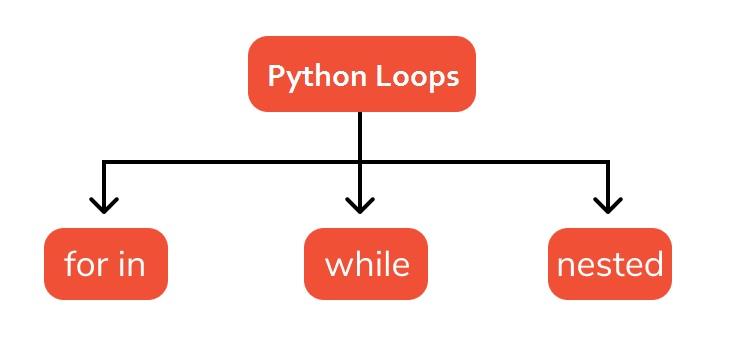
In this tutorial, we will learn about the various types of loops in python. While all python loop types provide the same basic functionality, they differ in their syntax and condition checking time. In Python, we have following three types of loops –

  • for loop
  • while loop
  • nested loop

Types of Loops In Python

Let’s discuss different types of loops in details :

Python for Loop

Python for loop takes a collection of data(list, tuple, string) and iterate the items one at a time in sequence.

Syntax:-

Example:-

Output:-

Python while Loop

While loop will execute a block of statements as long as a test expression or test condition is true. When the expression evaluates to false, the control will move to the next line just after the end of the loop body. In a while loop, the loop variable must be initialized before the loop begins. And the loop variable should be updated inside the while loop’s body.

Syntax:-

Example:-

Output:-

Python Nested Loops

When there is a loop statement inside another loop statement then it is known as a nested loop statement. It is possible to have a loop statement as a part of another loop statement in python programming. There can be any number of loops inside a nested loop.

Syntax:- Nested for loop

Syntax:- Nested while loop

Note:- In nesting a loop we can put any type of loop inside of any other type of loop, it is possible to have for loop inside a while loop or vice versa.

Python Decision Making

In Python, decision-making statements allow you to make a decision, based upon the result of a test condition. The decision-making statements are also referred to as Conditional Statements. Decision Making Statement enable computer to decide which block of code to be execute based on some conditional choices. In Python, if statement, if else statements, elif statements, nested if conditions and single statement conditions used as decision-making statements.

Decision Making Statements In Python

In python, we have a rich set of Decision Making statements that enable computers to decide which block of code to be executed based on some conditional choices. Decision making statement evaluates single or multiple test expressions which results “TRUE” or “FALSE”. The outcome of the test condition helps to determine which block of statement(s) to executed if the condition is “TRUE” or “FALSE” otherwise.

Types of Decision-Making Statements

In Python, we have following types of decision making statements :

  • if statement
  • if-else statement
  • if-elif-else ladder statement
  • nested if statements

Python if statement

Block of statement executed only when specified test expression is true.

Python if-else statement

When we want to execute some block of code if a condition is true and another block of code if a condition is false, In such a case we use if….else statement.

Python if-elif-else ladder

Python Nested if Statements

When there is an if statement inside another if statement then it is known as nested if else.


tyu

Python Statements & Comments

Python Statement

In Python Programming, any executable instruction, that tell the computer to perform a specification action is refer to as statements. These statements are used to build program’s main logic. Program statement can be an input-output statements, arithmetic statements, control statements, simple assignment statements and any other statements and it can also includes comments.

Multi-line statement:- In Python, each of the executable statement must be ended with a newline character. But, if it required you can extend a statement over multiple lines explicitly with the line continuation character (\) as follows –

Example 1:-

You can also extend a statement over multiple lines implicitly using surrounding parentheses ( ), brackets [ ] and braces { }.

Example 2:-

Above multi-line statement is same as in the Example 1

Example 3:-

In Python, if you want to put multiple statements in a single line then each of the executable statement must be ended with semicolon, as follows –

Python Indentation

In Python, a block of code is defined using line indentation, any block of code is started with indentation and ends with the first un-indented line. The amount of spaces is an indentation must be consistent throughout that same block. For example –

Below is a valid block of code –

Below block of code result into an IndentationError error –

The use of indentation makes the code look clean and consistent.

Python Comments

In Python, Comments are a set of statements that are ignored by the python interpreter. The use of comments makes it easy for humans to understand the source code.Usually comments gives you inside or explanation about the variable, method, class or any statement that exists in source code. The comment statements are ignored during the execution of the program.

Single-line Comments:-

A hash sign (#) is used to specify a single line comment, which extends up to the newline character.

Multi-line Comments:-

If you want to comment multiple lines then you can do it using hash sign (#) as follows –

You can do it other way using a triple quotes, either ”’ or “”” as follows –

Docstring in Python

A Python Docstring is a string that is used to specify what a function/class/module does. It usually appear as first statement in a module, function, class, or method definition.

You can write a docstrings using a triple quotes either ”’ or “”” as follows –

the above Docstring is available us as a attribute __doc__ of the function.

Python Data Types

Python Data Types

Variables are used to represent reserved memory locations that is used to store values, when we create a variable we are a suppose to allocate some memory space for that variable. Every variable have data type associated to it, a data type for a variable defines –

  • The amount of memory space allocated for variables.
  • A data type specifies the possible values for variables.
  • The operations that can be performed on variables.

Python is a dynamically-typed language, which means it is not required beforehand to declare a variable explicitly to use in a program. Python interpreter sets the variable’s data type based on the value assigned to it, data type is changed if the variable value is set to different data type value.

Python has following built-in Data Types –

Python Numbers:- The Number data type is used to hold the numeric values. Python supports following numerical data types –

Type Format Description
int a = 10 Signed Integer
long a = 345L (L) Long integers, they can also be represented in octal and hexadecimal
float a = 45.67 (.) Floating point real values
complex a = 3.14J (J) Contains integer in the range 0 to 255.

Python Boolean:- The Boolean data type is used to represent the truth values, which can be either True or False.

Python String:- A string variable is used to hold series or sequence of characters – letters, numbers, and special characters. In Python, string is represented using single quotes or double quotes.

Python List:- A list is an ordered series of comma-separated values, each of the value as termed as Item. A list variable is defined by having values separated by commas and enclosed within square brackets ([]). A list can hold values of different data types.

Python Tuple:- Tuple is an ordered sequence of comma-separated values (items or elements). Tuples are same as list, but the only difference is that tuples are immutable. Once a tuple is created their elements and size can not be changed.A Tuple is defined within parentheses () where items are separated by commas.

Example:-

Output:-

Python Set:- In Python, set is an unordered collection of unique elements or items. A Set is defined by comma-separated values inside braces { }.

Example:-

Output:-

Python Dictionary:- In Python, Dictionary is an unordered collection of key-value pairs. Dictionary is similar to associative arrays or hashes consist of key-value pairs. Dictionary is defined by using curly braces ({ }) and values can be assigned and accessed using square braces ([]).

Example:-


Python String

Python String

A string variable is used to hold series or sequence of characters – letters, numbers, and special characters. In Python, string is represented using single quotes or double quotes.