Category Archives: Java Basic Programs

Java Basic Programs

Java Program to Find Sum of odd digits in a number

In this tutorial, we will learn to create a Java Program to Find sum of odd digits in a number using Java programming.

Prerequisites

Before starting with this tutorial we assume that you are best aware of the following Java programming topics:

  • Java Operators.
  • Basic Input and Output function in Java.
  • Class and Object in Java.
  • Basic Java programming.
  • If-else statements in Java.
  • For loop in Java.
  • Built in functions.

What is Even number.

Even number are that number  that can be divided by two and gives remainder equals to zero and ends with 2,4,6,8 and with 0.
Example: (No/2==0) =>  (8/2==0) so 8 is a even Number.
Some even numbers are 2, 4, 6, 8, 10.

What is Odd Number

Odd numbers are number that are not divide by 2  and does not give remainder to Zero, when divided by 2, some the odd numbers are end with 1, 3, 5, 7, 9.

Example: (No/2==0) =>  (5/2==1) so 5 is an Odd Number.

Java Program to Find Sum of odd digits in a number.

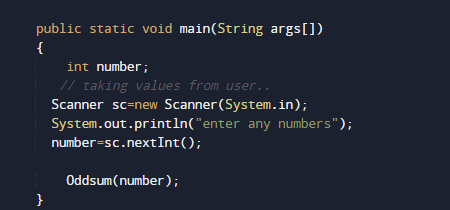
In this program we will learn to create a program that will find sum of Odd digits in a given  number. Firstly we declare required variable and also initiates required values in variable. Next we take value from user at run time and then after we will find the sum of Odd digits in a given number.

Output

In the above program, we have first declared and initialized a set variables required in the program.

  • number= it will hold entered number.
  • Even = it will hold sum or even digit.
  • rev = for reversing a string.

Here in our program we first declared and initialized set of  required variables in the program.Then take a value from user at run time.Afterword we pass the given number to function named Oddsum(). where we calculate sum of all odd digit of a  given number.
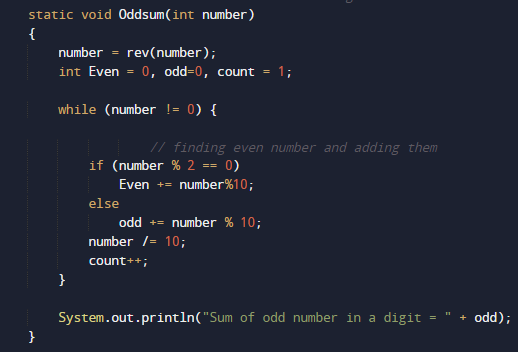
Here we create a method named Oddsum() for finding all the odd number in a digit and adding them at the end return sum of all odd values and print the required output.

.
 

Java Program to Find sum of even digits in a number

In this tutorial, we will learn to create a Java Program to Find sum of even digits in a number using Java programming.

Prerequisites

Before starting with this tutorial we assume that you are best aware of the following Java programming topics:

  • Java Operators.
  • Basic Input and Output function in Java.
  • Class and Object in Java.
  • Basic Java programming. Basic Java programming.
  • If-else statements in Java.
  • For loop in Java.

Even number

Even number are that number  that can be divided by two and gives remainder equals to zero.
Example: (Number/2==0) =>  (4/2==0) so 4 is a even Number.
Some even numbers are 2, 4, 6, 8, 10,……

Odd Number

Odd numbers that are not divisible by 2. and does not give remainder = Zero, when divided by 2, some the odd numbers are end in 1, 3, 5, 7, 9, 11……

Java Program to Find sum of even digits in a number

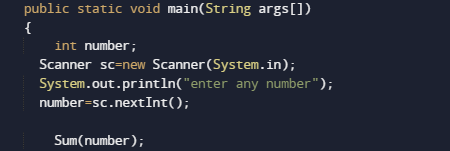
In this program we will learn to create a program that will find sum of even digits in a number. Firstly we declare required header file and variable and also initiates required values in variable. Next we take value from user at run time and then after we will find the sum of even digits in a number.

Output

In the above program, we have first declared and initialized a set variables required in the program.

  • number= it will hold entered number.
  • Even = it will hold sum or even digit.
  • rev = for reversing a string.

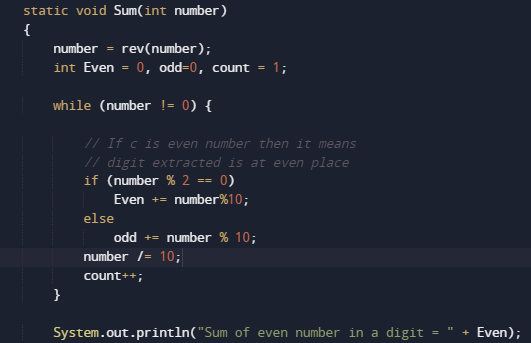
Here we first declared and initialized set of variables required in the program. Then we will take a value from user.After that we pass the given number to function named Sum().where we going to calculate sum of all even digit in a given number .

Steps for adding even values.

  1. Take a number from user,.
  2. Declare a variable Even to store the sum of even value in a number.
  3. Reverse a Digit to find last digit of the number.
  4. Now check all the digit is even or not.
  5. If it even then adds it to Even variable, else go to next step
  6. Remove last digit of the number.
  7. Repeat this until the number becomes 0.
  8. And last print the sum of all even digit in a number.

Java Program to Find sum of N Natural numbers

In this tutorial, we will learn to create a Java Program to Find sum of N Natural numbers   using Java programming.

Prerequisites

Before starting with this tutorial we assume that you are best aware of the following Java programming topics:

  • Java Operators.
  • Basic Input and Output
  • Class and Object.
  • Basic Java programming.
  • Loop in Java 
  • While loop For loops.

What Is Natural  Number?

Mathematically ,Natural numbers are those numbers used for counting and ordering,Simply all the counting numbers  {1, 2,3.4…} are commonly called Natural numbers.Natural numbers  include all the positive integers from 1 to infinity.

Java Program to Calculate the Sum of Natural Numbers

Firstly we declare required header file and variable and also initiates required values in variable. Next we take value from user at run time and then after we will find the sum of all N natural number of given number.

Output

In our program we iterate from 1 to the given (15) and adds all numbers to the variable Sum
sum=sum+i. and after calculating value we will print sum or all natural number.

In the above program, we have first declared and initialized a set variables required in the program.

  • number=to take value from user.
  • i =For iteration.
  • sum = for counting sum of numbers.

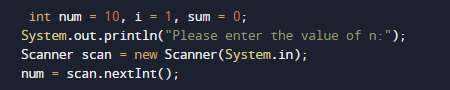
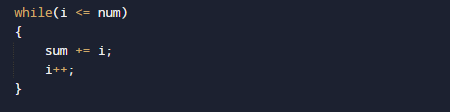
In the above program, we have first declared and initialized a set variables required in the program. In our  program first we will take a value from user.After that we will start loop from 1 to given number.

Within the while loop, we add all values in variable Sum .After calculating values  of all natural number between the given numbers natural number.

and finally we print sum of the all “N” Natural number between 1 to given number.

Java Program to Find GCD of N Numbers

In this tutorial, we will learn to create a Java Program to Find GCD of  N number using Java programming.

Prerequisites

Before starting with this tutorial we assume that you are best aware of the following Java programming topics:

  • Java Operators.
  • Basic Input and Output function in Java.
  • Class and Object in Java.
  • Basic Java programming. Basic Java programming.
  • If-else statements in Java.
  • For loop in Java.

What Is GCD of HCF?

HCF stands for Highest Common Factor or (GCD) Greatest common divisor .When  we finding the factor of two numbers, Highest Common Factor of  numbers is the Largest factor that divides these two numbers. The greatest factor found from the common factors is called the GCD=> “is the largest positive integer that divides each of the integers“.

Java Program to Find GCD of N Numbers

In this program we will find GCD of N given number using For loop. We would first declared and initialized the required variables. Next, we would prompt user to input size of an array Later we will find the GCD or  HCF of given numbers.

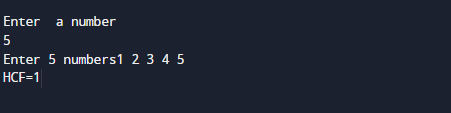
Output

In the above program, we have first declared and initialized a set variables required in the program.

  • number =It will hold size of an array elements
  • arr[] =It will hold N number given by user.
  • i = For iteration.

Let’s see the steps of finding gcd.

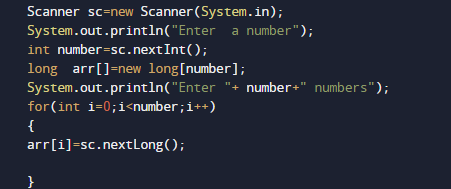
* Read the data from user using scanner class method and store those entered values in to the variables arr[].

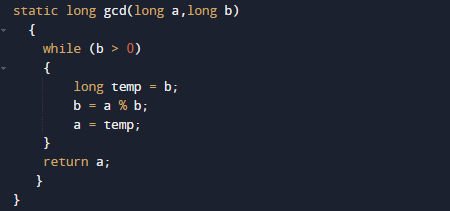
  • Now pass the arr[] and result variable to the static method gcd(result,arr[i]) to find GCD.
  • Where within the function gcd() we will find the greatest common divisor of given values and return the GCD.

Create Electric Bill Calculator Program In java

In this tutorial, we will learn to Create a program of Electric Bill Calculator Program In java  using Java programming.

Prerequisites

Before starting with this tutorial we assume that you are best aware of the following Java programming topics:

  • Java Operators.
  • Basic Input and Output function in Java.
  • Class and Object in Java.
  • Basic Java programming.
  • If-else statements in Java.
  • nested if-else statements.
  • Loop’s in Java.

How to calculate Electricity bill.

Here in this tutorial you will learn to calculate Electricity bill by simply writing  Java program . Create Electric Bill Calculator Program In java

Before, writing a program.

first we know about the tariff rates of per unit according to MPEB .Here we are taking some random charges  user can alter according to their Electric Broad.

  • 1 to 100 units –rs 10/unit.
  • 100 to 200 units –rs 15/unit.
  • 200 to 300 units – rs 20/unit.
  • above 300 units – rs 25/unit.

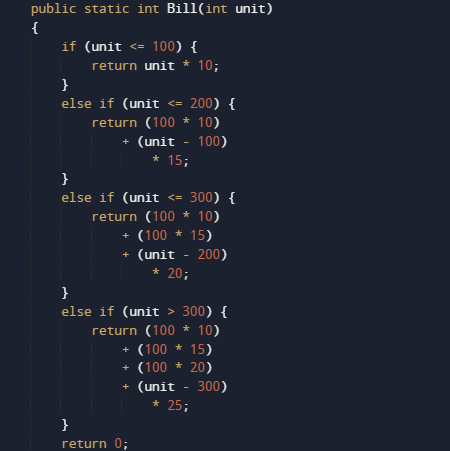
If consumer use electricity between “0-100” unit then he/she have to pay 10 rs per unit, if we consume electricity between 100-200 unit then for the first 100 he/she have to pay 10 per unit (i.e. 100*10), and for remaining pay 15 per unit. Similarly, if consume >200 units then he/she have to pay 10 per unit for the first 100 units 15 per unit for the next 100 units, and 20 per unit for the remaining units. and so on..

Java program to calculate Electricity bill

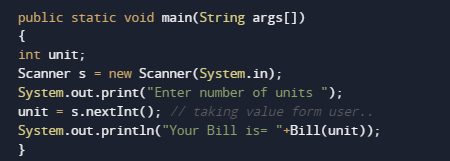
In this program we will to create a java program to generate electric Bill . We would first declared and initialized the required variables. Next, we would prompt user to input the units. Later we will Calculate Bill.

Output

In the above program, we have first declared and initialized a set variables required in the program.

  • unit= it will hold entered units.

After that we pass the given unit by user to a user define function “Bill(unit)”

where we calculate Bill according to provided units using nested if-else statement and after calculate bill reruns the bill to main function.

here we will print the charge payable by user for consuming that number of units


Create BMI (Body Mass Index) Calculator In Java

In this tutorial, we will learn to create a Create BMI (Body Mass Index) Calculator In Java using Java programming.

Prerequisites

Before starting with this tutorial we assume that you are best aware of the following Java programming topics:

  • Java Operators.
  • Basic Input and Output function in Java.
  • Class and Object in Java.
  • Basic Java programming. Basic Java programming.
  • If-else statements in Java.
  • For loop in Java.

What is Body Mass Index (BMI)

It is measured on the basis of “health,height and weight”. So it can be calculated by taking the weight in kg and by dividing the square of your height in meters.

Formula of Calculating BMI.

BMI = (Weight in Kg) / (Height in Meters * Height in Meters).

Example
weight = 70 kg, height = 1.2 m
BMI = 70 / (1.65*1.65) = BMI= 25.7 kg/m2

  • Healthy BMI range is :=> 18.5 kg/m2 – 25 kg/m2
  • Healthy weight for the height ranges :=> 50.4 kgs – 68.1 kgs
  • You need to Lose 1.9 kgs to reach a BMI of 25 kg/m2.
     BMI Range                          Category
     BMI   < 18.5                             Thinness
     BMI 18.5 – 25                             Normal
     BMI   25 – 30                             Overweight
     BMI> 30                             Obese

Create BMI (Body Mass Index) Calculator In Java

In this program we will find BMI(Body Mass Index). We would first declared and initialized the required variables. Next, we would prompt user to input height and weight.Later we will find the BMI. Let’s have a look at the program.

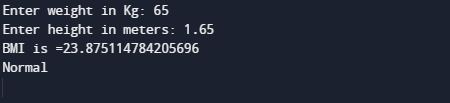
Output

BMI

In the above program, we have first declared and initialized a set variables required in the program.

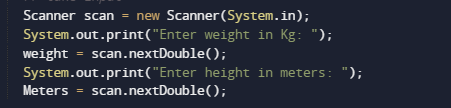
  • weight =It will hold value of kg.
  • meter =It will hold value in meter.
  • BMI =  For calculating BMI.

After that taking value of weight in kg and height in meter we pass these values to function bmicalculator (weight,height).

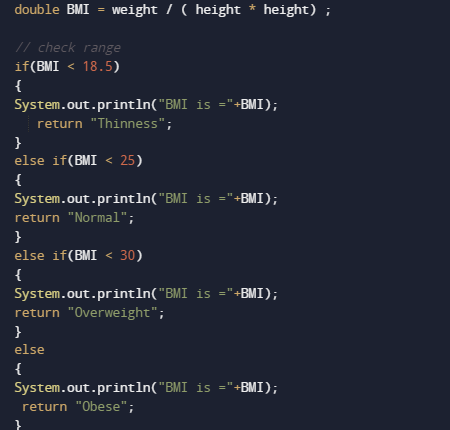
After taking values from user bmicalculator () method takes two arguments and calculate bmi as shown in image below.

Here BMI calculator finds that whether the person is underweight, normal, overweight, or obese and the print result.

Create Simple Calculator Program In Java

In this tutorial, we will learn to create a Java program to make a simple Calculator using Switch case using Java programming.

Prerequisites

Before starting with this tutorial we assume that you are best aware of the following Java programming topics:

  • Java Operators.
  • Basic Input and Output
  • Class and Object.
  • Basic Java programming.
  • if-else statements.
  • Switch case.
  • Nested if-else Statements.
  • Java Scanner class.

What is calculator?

Calculator is a Device that is used to performing mathematical operation like arithmetic operations on numbers.With the Calculators we can perform operation like Addition, Subtraction,Multiplication, and Division… and function like that.

Create Simple Calculator Program In Java

In this our program we will create a small calculator using switch case . We would first declared and initialized the required variables. Next, we would prompt user to input the two values . Later in program we will ask operator and perform that particular operation in our program.

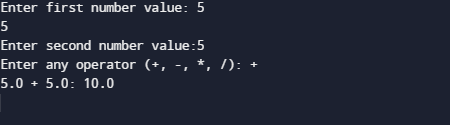
Output

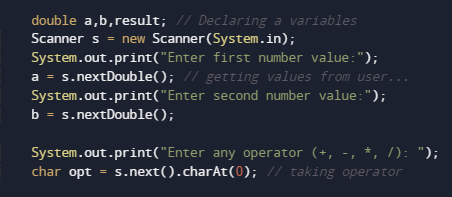
In the above program, we have first declared and initialized a set variables required in the program.

  • a= it will hold First value.
  • b= it will hold second value.
  • opt=it will hold operator value.

After declaring variables  in the next statement user will be prompted to enter two values and  which will be assigned to variable ‘a‘ and ‘b‘ respectively as shown in image below.

Afterword we will ask user to input symbol to perform following task like( +,-,*,/) to perform following task.

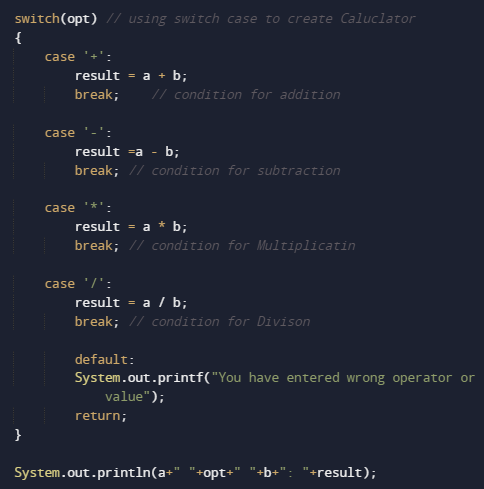
After taking values opt we will pass the value of options to switch case to Calculate result

The above  statements compute the addition of two numbers and print the output.

and finally we will print the result.

Java Program to Print 1 to 100 Without Loop

Java Program to Print 1 to 100 without using Loop

In this tutorial, we will learn to create a Java program that will Print 1 to 100 without using Loop in Java programming.

Prerequisites

Before starting with this tutorial, we assume that you are the best aware of the following Java programming topics:

  • Operators in Java Programming.
  • Basic Input and Output function in Java Programming.
  • Basic Java programming.
  • Conditional Statements in Java programming.

Algorithm:-

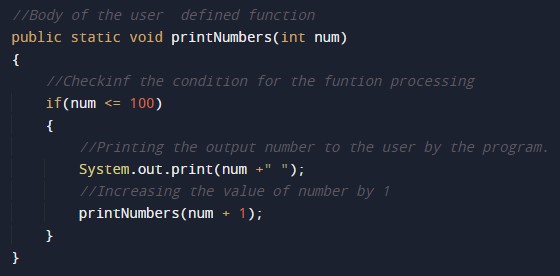
As we all know, the series printing works are done using the loops, but today we will print a series from 1 to 100 without using Loop. In this program, we will first define the variables for the program. Then we will pass that variable to a user-defined function to print the series. The function first prints a number and increases the value by 1.

With Java programming, we can make many arithmetic series with just a little code.

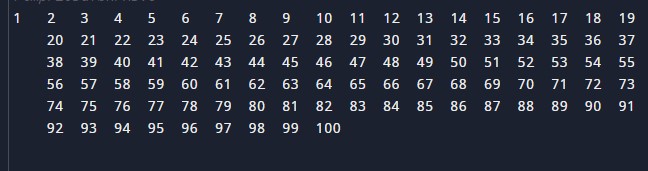
With the help of this program, we can Print 1 to 100 without using Loop.

Program:-

Output:-

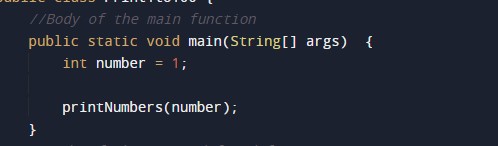
In the above program, we have first initialized the required variable.

  • number = it will hold the integer value for the program.

Sending the data to the user-defined function for the generation of series.

Body of the user-defined function to print the series.

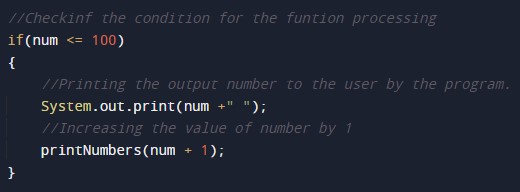
Program code to print the list up to the given number 100.

Java Program to Find Square Root of a Number

In this tutorial, we will learn to create a Java program to Find square Root of a number using Java programming.

Prerequisites

Before starting with this tutorial we assume that you are best aware of the following Java programming topics:

  • Java Operators.
  • Basic Input and Output
  • Class and Object.
  • Basic Java programming.
  • if-else statements.
  • Switch case.
  • Nested if-else Statements.
  • Java Scanner class.

What Is Square root?

Method of Finding “Square Root” is that numbers are multiplying by itself Twice “6 * 6= 36”. Where a square root of a number on getting multiplied by itself gives the original √36 = 6.
A square root of a number a is a number b such that =a.

Java Program to Find Square Root of a Number

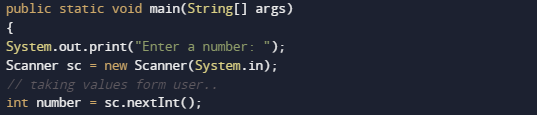
In this our program we will create a program to find “Square Root” of a given number . We would first declared and initialized the required variables. Next, we would prompt user to input value.Later in the program we will find square root.

Output

Square Root

In the above program, we have first declared and initialized a set variables required in the program.

  • number = it will hold  given number.
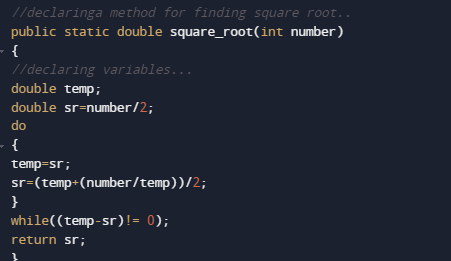
  • temp= it will hold temporary value of a number
  • sr= it will square root of a number.

We going to use the following formula to find the square root of a number.

in our program we have created a method square_root(number), in this method we have written a equation for finding the square root of a number.and for equation we have used do while loop.function returns the square root of a given number to main method

Where we will print the required square root of a given number as shown in image.

Java Program to Find HCF of two numbers

Java Program to Find HCF of two numbers

In this tutorial, we will learn to create a Java program that will find the HCF of two numbers using Java programming.

Prerequisites

Before starting with this tutorial we assume that you are best aware of the following Java programming topics:

  • Operators in Java Programming.
  • Basic Input and Output function in Java Programming.
  • Basic Java programming.
  • While loop in Java programming.
  • Arithmetic operations in Java Programming.

Program Description:-

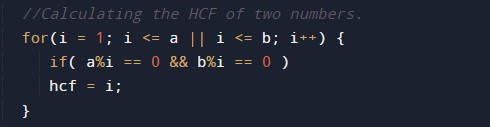
In Java programming, it is possible to take numerical input from the user and find HCF of two numbers with the help of a very small amount of code. The Java programming language has many types of predefined libraries which have support for the function in them with the help of these arithmetic expressions we can find the HCF. The program first takes the two numbers in input then it will find the HCF using the for loop and the conditional statements. At last, we will print the output HCF to the user.

With the help of this program, we can find HCF.

Here,

HCF:- Highest Common Factor.

Program to find HCF of two numbers:-


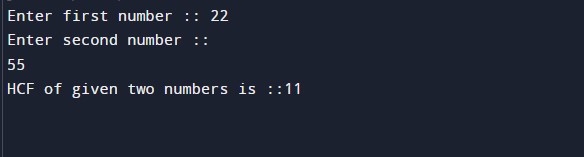
Output:-

In the above program, we have first initialized the required variable.

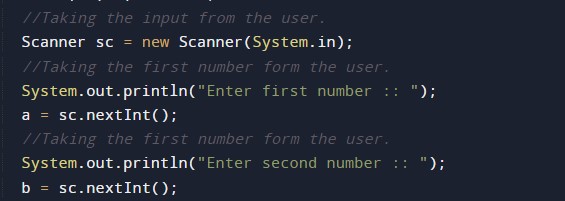
  • a = it will hold the integer value1.
  • b = it will hold the integer value2.
  • t = it will hold the integer temporary value.
  • hcf = it will hold the integer value of calculated hcf.

Input number from the user.


Program Logic Code.

Printing output

Java Program to Find Students Grades using Switch Case

In this tutorial, we will learn to create a Java program to Find students Grade using Switch Case using Java programming.

Prerequisites

Before starting with this tutorial we assume that you are best aware of the following Java programming topics:

  • Java Operators.
  • Basic Input and Output
  • Class and Object.
  • Basic Java programming.
  • if-else statements.
  • Switch case.
  • Nested if-else Statements.
  • Java Scanner class.

Grade of a Student.

Here we are going to write a Java program to find out students grades using switch case statement. The Table shows the grading system.

       Score                 

                        Grade

       Grade >=90                                                  A
       Grade=80-89                                                  B
       Grade=70-79                                                   C
       Grade=60-69                                                    D
       Grade=50-59                                                     E
        Grade <50                                                      F


Java Program to Find Students Grades using Switch Case

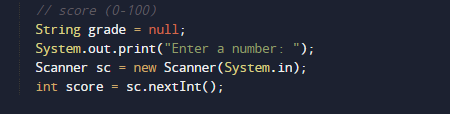
In this our program we will create a program to find Student Grades using Switch Case. We would first declared and initialized the required variables. Next, we would prompt user to input value.Later in the program we will find Garde.

Output

Your Grade

In the above program, we have first declared and initialized a set variables required in the program.

  • score =it will  holds value of score given by user.
  • Grade= it will provide grade of given score.

In the next statement user will be prompted to enter the score then we will find the Grade according to score given bye user.

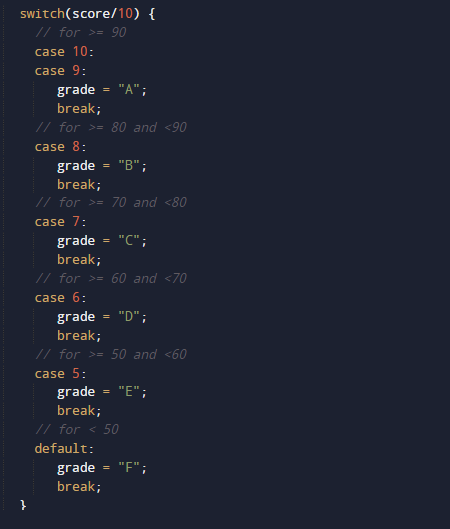
Now,we calculated the grade.Grades must be calculated based on following conditions.
Shown in above table using Switch Case as shown in image below.

In our program, we did not use the break statement. Whenever the condition is satisfied value is returned and the control came back to the main method. and according to return value we will print Grade to given score.

Java Program to Find exponents

In this tutorial, we will learn to create a Java Program to find Exponent using Java programming.

Prerequisites

Before starting with this tutorial we assume that you are best aware of the following Java programming topics:

  • Java Operators.
  • Basic Input and Output function in Java.
  • Class and Object in Java.
  • Basic Java programming.
  • If-else statements in Java.
  • For loop in Java.
  • In-built functions.

Exponent of a Number

Let’s take a value at  base : 2
Now take a value at exponent : 3
So power(Exponent) of any number is basen given as base*base*base (3-times). Here base is called base and 3 is called the exponent.

are some example of exponents.

Java Program to Find exponents

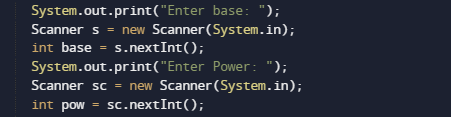
In this program we will find exponent of any given number by user using  loop. We would first declared and initialized the required variables. Next, we would prompt user to input the number and power of number .Then we will find the power of given number.

Output

Note : The above program works only if the Power is a positive integer (number).

In the above program, we have first declared and initialized a set variables required in the program.

  • base = it hold the value of base 
  • pow = it will hold the power.

Let see the logic behind the the program

  • Take value of  “base and exponents(Power)” from user, and put  it in two variables  base and pow respectively.

Here we will to use the “Math.pow(base, pow))” function which is define  in Java standard library.it will take two parameter as a arguments base and power and returns the exponent of value supply to it.

At last print the resultant output as shown in image above.