Category Archives: Java Array Programs

Java Array Programs

Java Program to print smallest element in an array

In this tutorial, we will learn to create a Java Program to print smallest element in an array using java programming.

Prerequisites

Before starting with this tutorial, we assume that you are best aware of the following Java programming concepts:

  • Java Operators.
  • Basic Input and Output function in Java.
  • Class and Object in Java.
  • Basic Java programming.
  • If-else statements in Java.
  • For loop in Java.

Java Program to print smallest element in an array

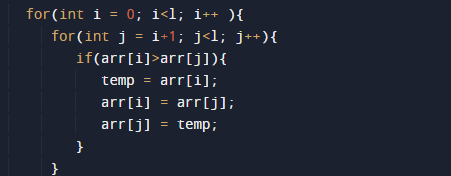
In this program we will find smallest element in an array using nested for loop. We would first declared and initialized the required variables. Next, we will find smallest number in an array. Lets have a look at the code.

Output

Smallest in an array

In the above program, we have first declared and initialized a set variables required in the program.

  • arr[]= it will hold array values
  • l=  it will hold length of an array.
  • i and j for iteration
  • temp = it will hold temporary value of an array.

After declaring variables we initiate values in  an array[]

with the help of length function we  will find the length of an array .

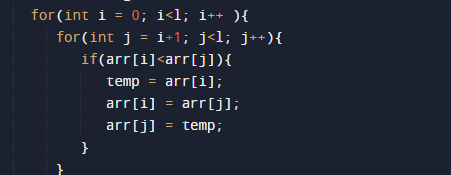
after that with the help or nested for loop we will find smallest element in array as shown in image below
Smallest in an array

  • Here first we assign first value of an array to variable temp.
  • Compare the first two elements of the array.
  • If the value of first element is greater than the second exchange them.
  • Then, compare 2 value and 3 value elements if the second element value is greater than the 3 value swap them.
  • Repeat this till the end of the array[].
  • and finally print smallest in an array.

Java Program to print largest element in an array

In this tutorial, we will learn to create a Java Program to print largest element in an array using java programming.

Prerequisites

Before starting with this tutorial, we assume that you are best aware of the following Java programming concepts:

  • Java Operators.
  • Basic Input and Output function in Java.
  • Class and Object in Java.
  • Basic Java programming.
  • If-else statements in Java.
  • For loop in Java.

Java Program to print largest element in an array

In this program we will find smallest element in an array using nested for loop. We would first declared and initialized the required variables. Next, we will find smallest number in an array. Lets have a look at the code.

Output

Largest in an array

In the above program, we have first declared and initialized a set variables required in the program.

  • arr[]= it will hold array values
  • l=  it will hold length of an array.
  • i and j for iteration
  • temp = it will hold temporary value of an array.

After declaring variables we initiate values in  an array[]

with the help of length function we  will find the length of an array .

after that with the help or nested for loop we will find smallest element in array as shown in image below

Largest in an array

  • Here first we assign first value of an array to variable temp.
  • Compare the first two elements of the array.
  • If the value of first element is smaller than the second exchange them.
  • Then, compare 2 value and 3 value elements if the second element value is smaller than the 3 value swap them.
  • Repeat this till the end of the array[].
  • and finally print largest in an array.

Java Program to print elements of an array present on odd position

In this tutorial, we will learn to create a Java Program to print elements of an array present on odd position using java programming.

Prerequisites

Before starting with this tutorial, we assume that you are best aware of the following Java programming concepts:

  • Java Operators.
  • Basic Input and Output function in Java.
  • Class and Object in Java.
  • Basic Java programming.
  • If-else statements in Java.
  • For loop in Java.

What is Odd even Place in array ?

Odd-Even positions in an array are those element present within even index and for odd present in odd index are called odd even place as shown in the image below. So element on 1,3,5 are odd index value which is => 20,40 and 60 are odd index values.

Java Program to print elements of an array present on odd position

In this program we will print element in present in odd position within the array using for loop. We would first declared and initialized the required variables. Next, we will find odd place  element in an array. Lets have a look at the code.

Output

In the above program, we have first declared and initialized a set variables required in the program.

  • a[]= it will hold array values
  • i = for iteration.

After declaring variables we initiate values in  an array[]

Algorithm

  • 1: Start.
  • 2: Initialize array with vales a[] = {1, 2, 3, 4, 5, 6, 7, 8, 9}
  • 3: Simply print “elements of given array present at odd positions”.
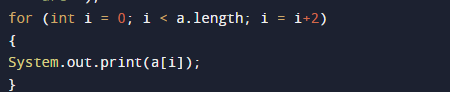
  • 4: Repeat  this step for(i=0; i< arr.length; i= i+2) unitll we  reach at last position of an array.
  • 5: Print a[i].
  •  6: End.

with the help of for loop traverse through the array and printing elements of an array by incrementing value of i by i+2 till the last element of the array.

Java Program to print elements of an array present on even position

In this tutorial, we will learn to create a Java Program to print elements of an array present on even position using java programming.

Prerequisites

Before starting with this tutorial, we assume that you are best aware of the following Java programming concepts:

  • Java Operators.
  • Basic Input and Output function in Java.
  • Class and Object in Java.
  • Basic Java programming.
  • If-else statements in Java.
  • For loop in Java.

What is Even-Odd Place in array ?

Odd-Even positions in an array are those element present within even index and for odd present in odd index are called odd even place as shown in the image below. So element on 1,3,5 are even index value which is => 10,30 and 50 are even index values.

Java Program to print elements of an array present on even position

In this program we will print element in present in even position within the array using for loop. We would first declared and initialized the required variables. Next, we will find even place  element in an array. Lets have a look at the code.
Output

In the above program, we have first declared and initialized a set variables required in the program.

  • a[]= it will hold array values
  • i = for iteration.

After declaring variables we initiate values in  an array[]

Algorithm

  • 1: Start.
  • 2: Initialize array with vales a[] = {1, 2, 3, 4, 5, 6, 7, 8, 9}
  • 3: Simply print “elements of given array present at even positions”.
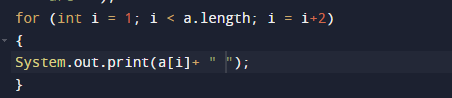
  • 4: Repeat  this step for(i=1; i< arr.length; i= i+2) unitll we  reach at last position of an array.

  • 5: Print a[i].
  •  6: End.

with the help of for loop traverse through the array and printing elements of an array by incrementing value of i by i+2 till the last element of the array.

Java Program to print elements of an array in reverse order

Java Program to print elements of an array in reverse order

In this tutorial, we will learn to create a Java program that will print elements of an array in reverse order using Java programming.

Prerequisites

Before starting with this tutorial, we assume that you are the best aware of the following Java programming topics:

  • Operators in Java Programming.
  • Basic Input and Output function in Java Programming.
  • Basic Java programming.
  • For loop in Java programming.
  • Arithmetic operations in Java Programming.

Reverse Order:-

In reverse order, we first take an array or declare an array, then reverse that array and print it.

Example:-

Array:- {1, 2, 3, 4, 5}

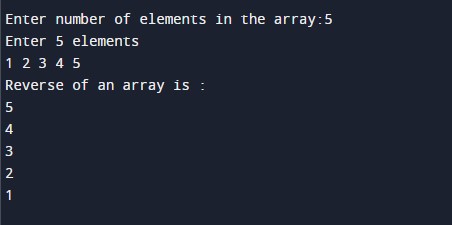
Reversed Array be:-{5, 4, 3, 2, 1} 

Program description to print elements of an array in reverse order.

In this program, First, we will first take the size of the array from the user. Then we will reverse the array using the for-loop and store it in a new variable. Then we will print the reverse of the original array to the user.

With the help of this program, we can print elements of an array in reverse order.

Program Code:-

Output:-

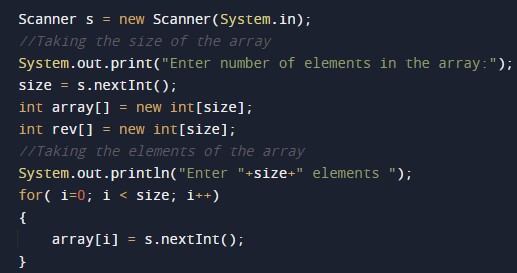
In the above program, we have first initialized the required variable.

  • array[] = it will hold the integer value.
  • i = it will hold the integer value.
  • j = it will hold the integer value.
  • size = it will hold the integer value.

Taking the size of the array and the elements.

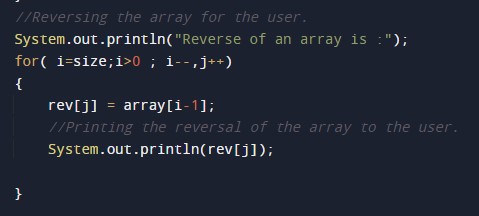
Program Code to Reverse an Array.

Printing reversed array to the user.

Java Program to print elements of an array

Java Program to print elements of an array

In this tutorial, we will learn to create a Java program that will Print Elements in an Array using Java programming.

Prerequisites

Before starting with this tutorial, we assume that you are the best aware of the following Java programming topics:

  • Operators in Java Programming.
  • Basic Input and Output function in Java Programming.
  • Basic Java programming.
  • For loop in Java programming.
  • Arithmetic operations in Java Programming.

What is an array?

An array in a programming language is a collection of a similar set of entities. It means one variable can store multiple values in memory with different indices.

Algorithm:-

Printing the Elements in an Array.

In this program, First, we will first take the size of the array from the user. Then we will take the elements of the array from the user. After that, we will use a for loop to print the elements of the array.

With the help of this program, we can be print the elements of the array.

Program Code:-

Output:-

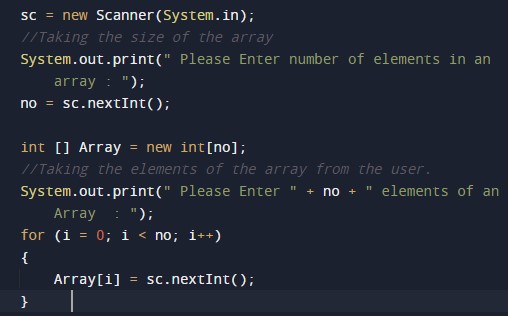
In the above program, we have first initialized the required variable.

  • no = it will hold the integer value.
  • i = it will hold the integer value.

Taking the size of the array and the elements.

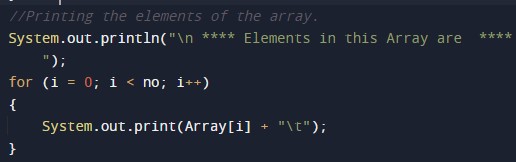
Printing output elements of the array.

Java Program to print the duplicate elements of an array

Java Program to print the duplicate elements of an array

In this tutorial, we will learn to create a Java program that will print the duplicate elements of an array using Java programming.

Prerequisites

Before starting with this tutorial, we assume that you are the best aware of the following Java programming topics:

  • Operators in Java Programming.
  • Basic Input and Output function in Java Programming.
  • Basic Java programming.
  • For loop in Java programming.
  • Arithmetic operations in Java Programming.

What is an array?

An array in a programming language is a collection of a similar set of entities. It means one variable can store multiple values in memory with different indices.

Algorithm:-

Printing the duplicate Elements in an Array.

In this program, First, we will first take the size of the array from the user. Then we will take the elements of the array from the user. After that, we will use the conditional statements and the loops to check the duplicate elements of the array. Then we will be using a for loop to print the duplicate elements of the array.

With the help of this program, we can be print the duplicate elements of the array.

Program Code:-


Output:-

In the above program, we have first initialized the required variable.

  • no = it will hold the integer value.
  • i = it will hold the integer value.
  • j = it will hold the integer value.
  • flag = it will hold the integer value.

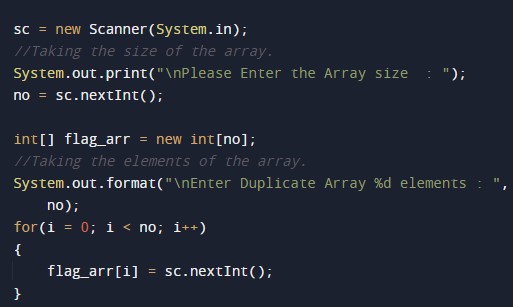
Taking the size of the array and the elements.

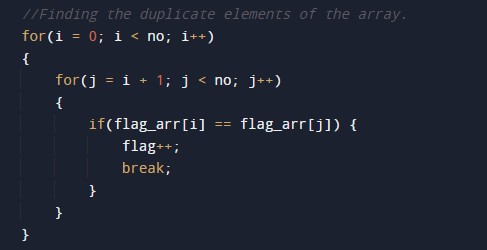
Finding the duplicate elements of the array.

Printing output duplicate elements of the array.

Java Program to left rotate the elements of an array

In this tutorial, we will learn to create a Java Program to left rotate the elements of an array using java programming.

Prerequisites

Before starting with this tutorial, we assume that you are the best aware of the following Java programming concepts:

  • Java Operators.
  • Basic Input and Output function in Java.
  • Class and Object in Java.
  • Basic Java programming.
  • If-else statements in Java.
  • For loop in Java.

Rotate an array left, means?

The array is said to be left rotated if elements in an array are moved to its left >> by one(1) position.

Example:

Array⇾ [1, 2, 3, 4, 5].
Rotate left ⇾ [5,1,2,3,4].

Java Program to left rotate the elements of an array

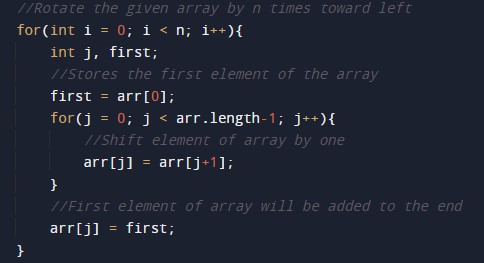
In this program, we will shift the left element in an array using for loop. We would first declare and initialized the required variables. Next, we will shift elements of an array. Let’s have a look at the code.
Output

Left  rotated array[]

In the above program, we have first declared and initialized a set of variables required in the program.

  • arr[]= it will hold array values
  • first =  it will hold rotation position.
  • i       = for iteration of the program.
  • n = it will hold the integer value for left side.

After declaring variables we initiate values in  an array[]

After that, we will call left Rotate(n , first ) where we pass two arguments one array and another is rotated by value i.e. how many times rotate the array to its Left.

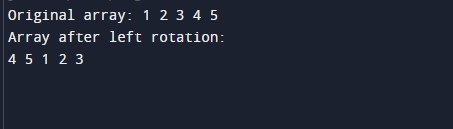
In an array, if Lotby is “1” then, elements of an array are moved to its Left by one position it means the first element of the array takes the second(2) position, the second element will be moved to the third position, and so on. As shown down below⇾

Array⇾ [1, 2, 3, 4, 5].
Rotate Left ⇾ [4, 5, 1, 2, 3].

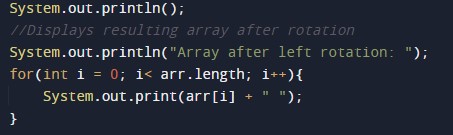
Finally, print the Left rotated array.
Java Program to find the frequency of each element in the array

Java Program to find the frequency of each element in the array

In this tutorial, we will learn to create a Java program that will find the Frequency of each Element in an Array using Java programming.

Prerequisites

Before starting with this tutorial, we assume that you are the best aware of the following Java programming topics:

  • Operators in Java Programming.
  • Basic Input and Output function in Java Programming.
  • Basic Java programming.
  • For loop in Java programming.
  • Arithmetic operations in Java Programming.

Program to Find Frequency of each Element in an Array.

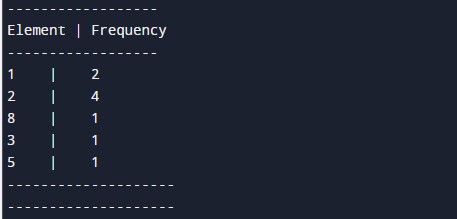
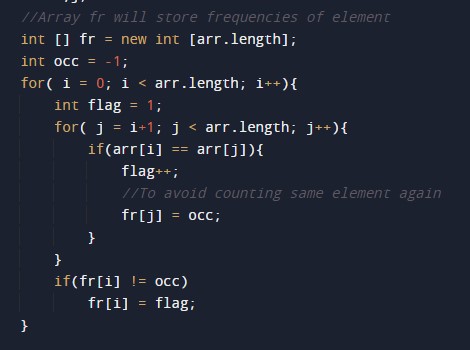
In this program, we will count the frequency of each element in the array. The frequency means the occurrence of the element in that array.


Here, we will first initialize the array. After that, we will find the length of the array. Then we will count the frequency of every element in the array. At last, we will print the frequency of each element to the user.
With the help of this program, we can print the Frequency of each Element in an Array.

Program Code:-


Output:-

In the above program, we have first initialized the required variable.

  • arr[] = it will hold the integer value.
  • i = it will hold the integer value.
  • j = it will hold the integer value.
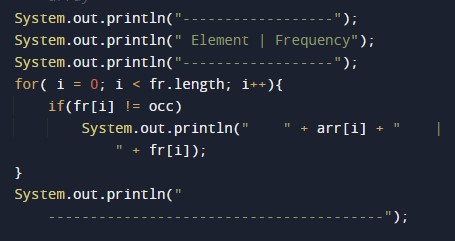
  • occ = it will hold the element’s occurrence.

Calculating the size of the array using the length function, Then we will add count the frequency of each element using the for-loop.

Printing the frequency of each element in the array.

Java Program to copy all elements of one array into another array

Java Program to copy all elements of one array into another array

In this tutorial, we will learn to create a Java program that will copy all elements of one array into another array using Java programming.

Prerequisites

Before starting with this tutorial, we assume that you are the best aware of the following Java programming topics:

  • Operators in Java Programming.
  • Basic Input and Output function in Java Programming.
  • Basic Java programming.
  • For loop in Java programming.
  • Arithmetic operations in Java Programming.

Algorithm:-

Copy all array elements to another array.

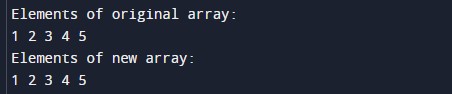
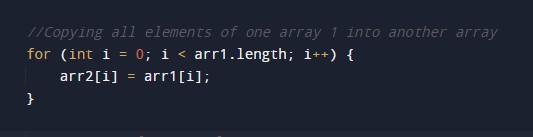
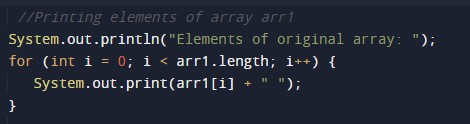
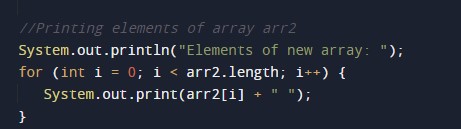
In this program, First, we will first declare the size of the array and its elements for the prorgam. Then we will find the length of array 1 using the length function for the second array. After that we will copy the elements of the array one to array two. At last, we will print the first and the second array to the user.

With the help of this program, we can copy all elements of one array into another array.

Program Code:-


Output:-

In the above program, we have first initialized the required variable.

  • arr1[] = it will hold the integer value.
  • arr2[] = it will hold the integer value.
  • i = it will hold the integer value.

Finding the size of the array one using the length function.

Copying the elements of the array one to the second array.

Printing array 1 to the user.

Printing array 2 to the user.

Java Program to Add Two Matrix Using Multi-dimensional Arrays

Java Program to Add Two Matrices Using Multi-dimensional Arrays

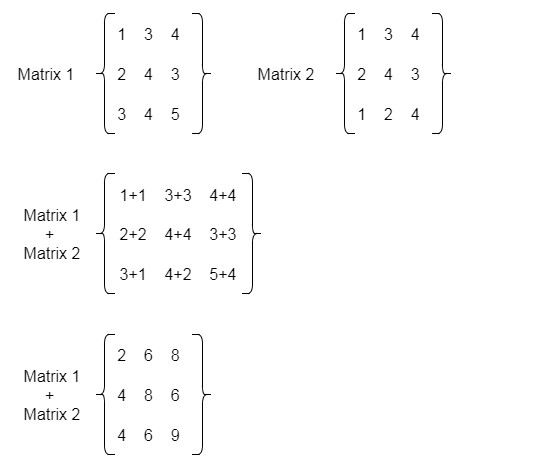
In this tutorial, we will learn to create a Java program that will Add Two Matrix Using Multi-dimensional Arrays using Java programming.

Prerequisites:-

Before starting with the tutorial, we assume that you are the best aware of the following Java programming topics:

  • Operators in Java Programming.
  • Basic Input and Output function in Java Programming.
  • Basic Java programming.
  • For loop in Java programming.

Program to Add Two Matrices Using Multi-dimensional Arrays

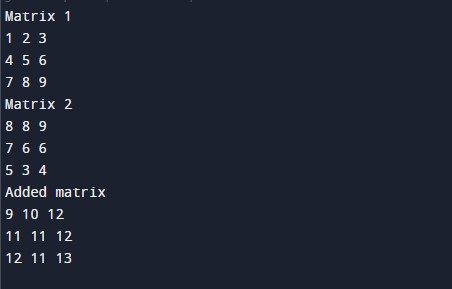
In this program, First, we will take two matrices in input from the user using looping statements for the program. Then secondly, we will add the two matrices using the for loops into a third matrix. At last, we will print the added matrix to the user using the system. Out method.

Algorithm:-

With the help of this program, we can Add Two Matrices Using Multi-dimensional Arrays


Program:-

Output:-

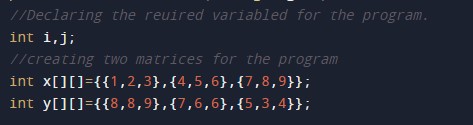
In the above program, we have first initialized the required variable.

  • x[][] = it will hold the integer value.
  • y[][] = it will hold the integer value.
  • sum[][] = it will hold the integer value.
  • i= it will hold the integer value.
  • j= it will hold the integer value.

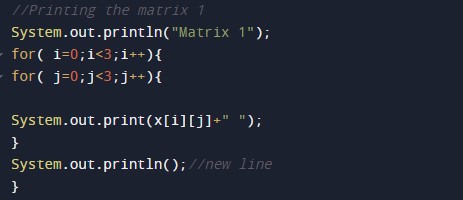
Printing the first matrix to the user.

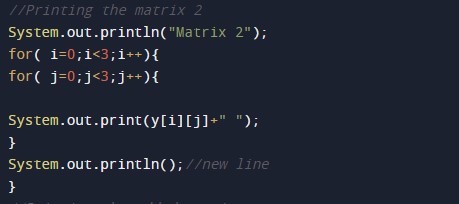
Printing the second matrix to the user.

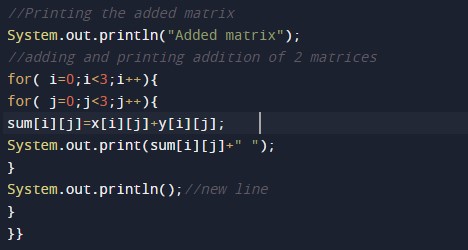
Adding the two matrices into 1 and printing the added matrix to the user.


Java Program to convert char Array to String

Java Program to convert char Array to String

In this tutorial, we will learn to create a Java program that will convert char Array to String using Java programming.

Prerequisites.

Before starting with this tutorial, we assume that you are the best aware of the following C programming topics:

  • Operators in Java Programming.
  • Basic Input and Output function in Java Programming.
  • Basic Java programming.
  • For loop in Java programming.
  • Conditional Statements in Java programming.

Program to convert char Array to String.

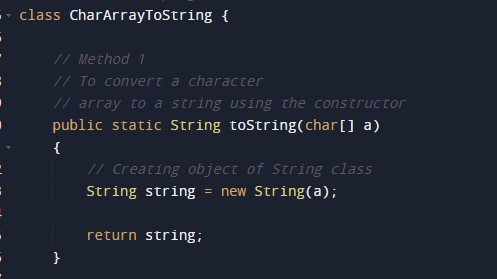
In this program, First, we will declare the array in the java program. Then we will define a  function to convert a character array to a string. Then we will return the string to the main function. At last, we will print the string to the user.

With the help of this program, we can convert char Array to String.

Algorithm:-

Program to convert the character to string:-

Output:-

character to string output.

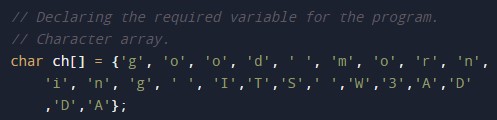
In the above program, we have first initialized the required variable.

  • ch[] = it will hold a character array declared.

Passing that character array to the function for conversion.

A user-defined function that will convert the string from the Character array.

Printing the string by calling the function from the logical code.