Category Archives: C Programs

C Programs

Program to find given no is Prime or not

In this tutorial, we will learn a program to check provided number is Prime number or not using C programming.

Prerequisites

Before starting with this tutorial we assume that you are best aware of the following C programming topics:

  • C Operators.
  • If else statement.
  • C loop statements.

What Is Prime number?

Any positive integer number which is greater than 1 and only it can be divisible by itself and by 1 and it has maximum two factors is called as prime number.Rather we can say that a prime number is a number which only divided by him or 1.

Example:-

primeno

Fact   2  is the only positive(even) and smallest integer prime number.

Program to check Prime number in C.

In this program we will find that given number is prime number or not using for loop.
Firstly we declare required header file and variable and also initiates required values in variable. Next we take value from user at run time and then after we will find that the given value is prime number or not.
Let’s take a  look to the program.

Program.

Output:-

Program to find given no is Prime or not

In the above program, we have first declared and initialized a set variables required in the program.

  • no = number to hold given value.
  • count = count for number divisibility occurrence.
  • i= for iteration of a loop.

In the next statement user will enter the number which will be assigned to variable ‘no’. Now loop start from 2 to given number.
In ever iteration we will check ‘no’ is completely divisible by ‘i’ or not
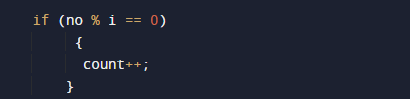
condition

Then we check if any number that divide   completely we increase the value of count ++.
In starting we declare count=0 so in every iteration when value is completely divide we increment the value of count to one.
So , if given number is prime after the end of loop the value of count=1 however if given number is not the value of count is more than 1.
So , we will check that if number is a prime number then the value of count must be equal to one(1).
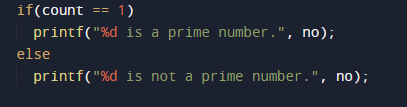
As we can see if our condition satisfy then the given number is prime number if not is not a prime no.

C Program to Replace a Specific Line in a Text File

In this tutorial, we will learn to create c program to replace a specific line in a text file. The file must exist in the directory where the executable file of this program is present.

Prerequisites

Before starting with this tutorial we assume that you are best aware of the following C programming topics: C Pointers, C File Handling, C Strings and C Input Output.

Create required files

Let’s first create files (inside the current project directory) as following:

  • f1.txt – file to count line

The file must be saved in the folder where you are saving program file. Put the following content in the file:

f1.txt

How to Replace a Specific Line in a Text File?

The source file will be opened and being read through character by character and store its contents in temporary file. When we reached the specific line we will copy new line content to temporary file. Finally, the original source file will be deleted and the temporary file will renamed to source file name.

C Program to Replace a Specific Line in a Text File

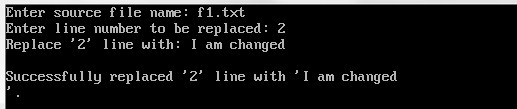
In this C program we will replace a specific line in a text file. The source file will be opened in “read” mode and a temporary target file is opened in “write” mode. The source file (f1.txt) will be opened and being read through character by character and store its contents in temporary file. When we reached the specific line we will copy new line content to temporary file. The file being read copied until its EOF (end of file) is reached. Finally, the original source file will be deleted and the temporary file will renamed to source file name.

Output:-

C-Program-to-Replace-a-Specific-Line-in-a-Text-File

f1.txt :- After replacing line 2

Open source file in read mode, store its reference to fPtr.Create and open a temporary file with name replace.tmp, store its reference to fTemp.Input line number to replace in file from user. Store it in some variable say line.Input new line from user to replace with, store it in newline.Initialize a count variable with 0.Read a line from file and store it in buffer. Increment count by 1.If count == line, then current line should be replaced with newline. Means if (count == 0) then write newline to fTemp, otherwise write buffer to fTemp. Repeat step 6-8 till end of file.Finally close all files.Delete the original source file and rename temporary fTemp file path as of source file.

C Program to Count Number of Lines in a Text File

In this tutorial, we will learn to create c program to Count Number of Lines in a Text File. The file must exist in the directory where the executable file of this program is present.

Prerequisites

Before starting with this tutorial we assume that you are best aware of the following C programming topics: C Pointers, C File Handling, C Strings and C Input Output.

Create required files

Let’s first create files (inside the current project directory) as following:

  • f1.txt – file to count line

The file must be saved in the folder where you are saving program file. Put the following content in corresponding file:

f1.txt

How to Count Number of Lines In Text file?

In this C program we will count number of lines in file (f1.txt). The number of lines in a file can be find by counting the number of new line characters present.

C Program to Count Number of Lines in a Text File

In this program we will count number of lines in a text file. We would first declared and initialized the required variables. Next, we would prompt user to input source file names(f1.txt) . Later in the program we will count number of lines present in file (f1.txt). Finally, we will display the number of lines in text file using printf statement.

Output:-

C-Program-to-Count-Number-of-Lines-in-a-Text-File

In the above program, we have first declared and initialized a set variables required in the program.

  • *fptr= file pointer
  • fname= to hold source file name
  • lcount = number of lines, initialized with 0
  • chr = to extract character

Now, user needs to provide the source file name. We will assign it to variable ‘fname’. Next, we will try to count number of lines in file. Next, we will extract and loop through individual character from file until we reach EOF(end of file). We will count the number of new line characters present in the file and increase the lcount. Finally, we will display the number of lines in text file using printf statement.

C Program to Delete a File from computer

In this tutorial, we will learn to create c program to delete a file In C programming language. The file must exist in the directory where the executable file of this program is present.

Prerequisites

Before starting with this tutorial we assume that you are best aware of the following C programming topics: C Pointers, C File Handling, C Strings and C Input Output.

Create required files to delete

Let’s first create files (inside the current project directory) as following:

  • f1.txt – file to be deleted

The file must be saved in the folder where you are saving program file. Put the following content in corresponding file:

f1.txt

How to Delete Files from computer?

In this C program we will delete file (f1.txt) from computer. The remove macro is used to delete a file from computer. If there is any error on deleting the file, this will be displayed by perror function.

C Program to Delete Files From Computer

In this program we will delete one file from computer . We would first declared and initialized the required variables. Next, we would prompt user to input source file names(f1.txt) . Later in the program we will delete file (f1.txt) using the “remove” macro. The deleted file will not go to the recycle bin, so you would not be able to recover or restore it. In order to recover deleted files you need special recovery software.

Output:-

C-program-to-delete-a-file

In the above program, we have first declared and initialized a set variables required in the program.

  • status = status flag
  • file_name= to hold first source file name

Now, user needs to provide the source file name. We will assign it to variable ‘file_name’. Next, we will try to delete file using remove() function. The remove() function will return 0 if file gets delete. We will assign return value to status variable, to check file deleted or not.

C Program to Copy Files Content From One to Other

In this tutorial, we will learn to create c program to copy files In C programming language. Copying of two file means the contents of one file copied into the other file.

Prerequisites

Before starting with this tutorial we assume that you are best aware of the following C programming topics: C Pointers, C File Handling, C Strings and C Input Output.

Create required files to merge two files

Let’s first create files (inside the current project directory) as following:

  • f1.txt – first source file
  • f2.txt – target file

All of the above files must be saved in the folder where you are saving program file. Put the following content in corresponding file:

f1.txt

How to Copy Files Into Other File?

In this C program we will copy file (f1.txt) contents into other file (f2.txt). We will open source file in “read” mode and target file in “write” mode. Then the content of the Source file (f1.txt) will be copied character by character into target file(f2.txt). The file will be read until their EOF (end of file) is reached.

C Program to Copy Files Content From One to Other

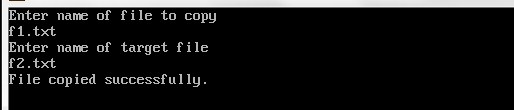
In this program we will copy one file contents into other file . We would first declared and initialized the required variables. Next, we would prompt user to input source and target file names(f1.txt and f2.txt) respectively. Later in the program we will copy file (f1.txt) contents into other file (f2.txt) using c file handling functions. Now, when you open the file (f2.txt) you will see that the content of file (f1.txt) is copied into it.

Output:-

C-Program-to-Copy-Files-Content-From-One-to-Other

In the above program, we have first declared and initialized a set variables required in the program.

  • *source= file pointer for first source file
  • *target= file pointer for second source file
  • source_file = to hold first source file name
  • target_file = to hold second source file name
  • ch = to read character

Now, user needs to provide the source file and target name. We will assign it to variable ‘source_file’ and ‘target_file’ respectively.

Next, we will try to open source and target files using fopen() function. In case, if file doesn’t exist or you don’t have the required  permission, then the function fopen() will returns NULL. Therefore, before starting the operation, we would have to check whether it returns NULL or not. If it returns NULL, then we will print an error message, otherwise will continue with the copy operation.

Now we will read through the character by character using fgetc() function, and will assign to FILE pointer source one by one until it return EOF (End Of File). And using fputc() function, we will put the character into the target FILE pointer. This way we get characters one by one from source file and put into the target file. Now, if you open the file f2.txt, you will see that the content of file(f1.txt) is copied into it.

C Program to Merge Two Files Into Third File

In this tutorial, we will learn to create c program to merge two files using C programming language. Merging of two file means the contents of two files gets merged into the third file.

Prerequisites

Before starting with this tutorial we assume that you are best aware of the following C programming topics:

  • C Input Output
  • C Pointers
  • C File Handling
  • C Strings

Create required files to merge two files

Let’s first create three files (inside the current project directory) as following:

  • f1.txt – first source file
  • f2.txt – second source file
  • f3.txt – target file

All of the above files must be saved in the folder where you are saving program file. Put the following content in corresponding file:

f1.txt

f2.txt

We will keep the third file named f3.txt blank. As we will write the merged content of both the files namely f1.txt and f2.txt into it.

How to Merge Two Files Into Third File?

In this C program we will merge two files(f1.txt and f2.txt) and copy their contents in third file (f3.txt). The files to be merged will be opened in “read” mode and the target file where the contents of both the files will be merged is opened in “write” mode. Initially first file (f1.txt) will be opened and being read through character by character and store its contents in the target file (f3.txt). Then the second file will be opened in same way and being read through character by character and store its contents in the target file (f3.txt).The files are read until their EOF (end of file) is reached.

C Program to Merge Two Files Into Third File

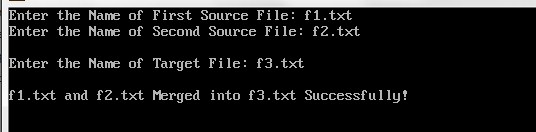
In this program we will merge two files into third file. We would first declared and initialized the required variables. Next, we would prompt user to input source and target file names(f1.txt and f2.txt). Later in the program we will merge two files into third file(f3.txt) using c file handling functions. Now, if you open the file f3.txt, you will see that the content of both the files is copied and merged into it.

Output:-

c-program-to-merge-two-files

In the above program, we have first declared and initialized a set variables required in the program.

  • *fsOne = file pointer for first source file
  • *fsTwo = file pointer for second source file
  • *fTarget = file pointer for target file
  • fName1[20] = to hold first source file name
  • fName2[20] = to hold second source file name
  • fName3[30] = to hold target file name
  • ch = to read character

In the next statement user will be prompted to enter the two source file names which will be assigned to variable ‘fName1’ and ‘fName2’ respectively. Next, we will try to open source files using fopen() function. In case, if any of the file doesn’t exist or you don’t have the required  permission, then the function fopen() will returns NULL. Therefore, before starting the operation, we would have to check whether it returns NULL or not. If it returns NULL, then we will print an error message, otherwise will continue with the merge operation.

Now we will read through the character by character using fgetc() function, and will assign to FILE pointer fsOne and fsTwo one by one until it return EOF (End Of File). And using fputc() function, we will put the character into the target file fTarget. This way we get characters one by one from both the file and put into the third file. Now, if you open the file f3.txt, you will see that the content of both the files is copied and merged into it.

C Program to Print Star Pattern

C Program to Print Star Pattern

In this tutorial, we will learn to create a C program that will Create a Star pattern using C programming.

Prerequisites

Before starting with this tutorial we assume that you are best aware of the following C programming topics:

  • Operators in C Programming.
  • Basic Input and Output function in C Programming.
  • Basic C programming.
  • For loop in C Programming.

Create a Star pattern:-

The C language is a very powerful programming language. In C programming we can perform many operations with the help of codings. The c language is very easy to create any pattern. In this program, we will learn to create star-like patterns with the help of some code.

Algorithm:-

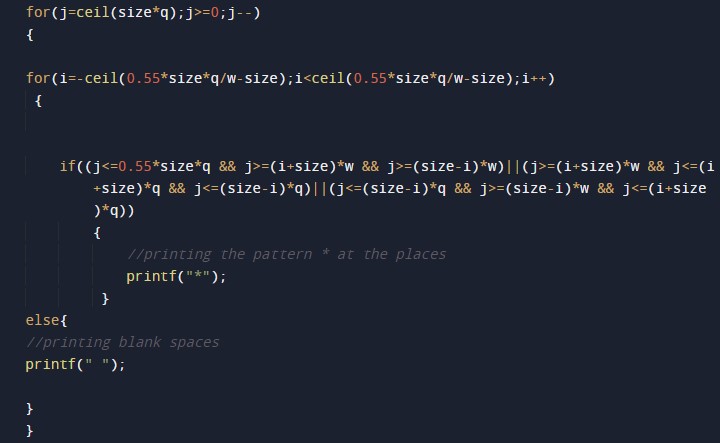
Program:-

To Create a Star pattern


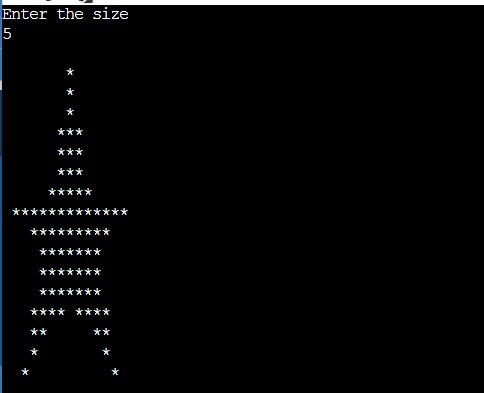
Output:-


The above program we have first initialized the required variable.

  • i = it will hold the integer value to control parent for loop.
  • j = it will hold the integer value to control child for loop.
  • k = it will hold the integer value to control child for loop.
  • size = it will hold the integer value for the number of rows of pattern.

Taking the size of the pattern.

Importing required header files.

Initializing the  for loop size and number of rows.


C Program to Print Diamond Pattern

C Program to Print Diamond Pattern

In this tutorial, we will learn to create a C program that will create a diamond pattern using C programming.

Prerequisites

Before starting with this tutorial we assume that you are best aware of the following C programming topics:

  • Operators in C Programming.
  • Basic Input and Output function in C Programming.
  • Basic C programming.
  • For loop in C Programming.

Create a diamond:-

The C language is a very powerful programming language. In C programming we can perform many operations with the help of codings. The c language is very easy to create any pattern. In this program, we will learn to create diamond-like patterns with the help of some code.

Algorithm:-

Program:-

To create a diamond pattern


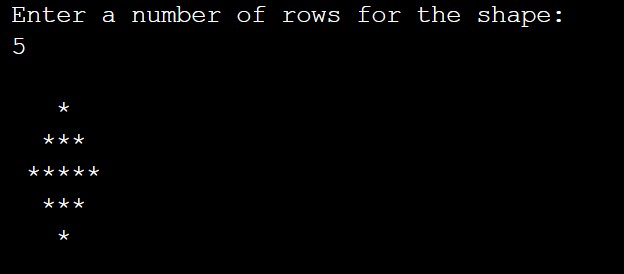
Output:-


The above program we have first initialize the required variable.

  • i = it will hold the integer value to control parent for loop.
  • j = it will hold the integer value to control child for loop.
  • k = it will hold the integer value to control child for loop.
  • r = it will hold the integer value for the number of rows of pattern.

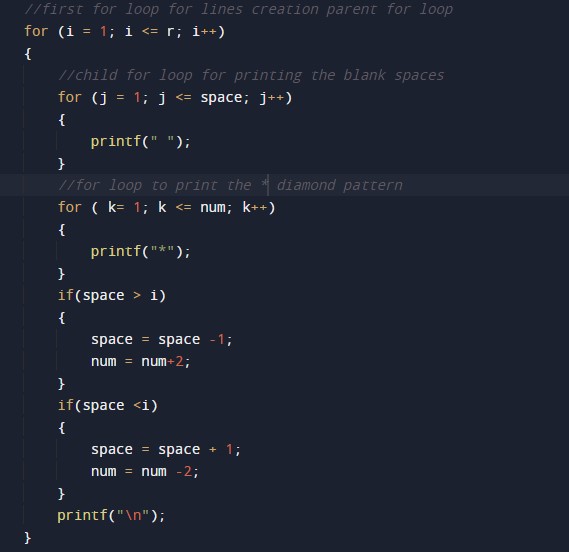
Initializing the first parent for loop size and number of rows.

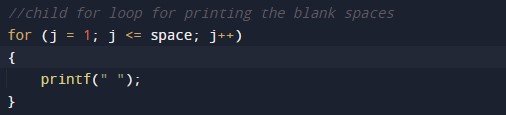
For Loop to print the blank spaces.

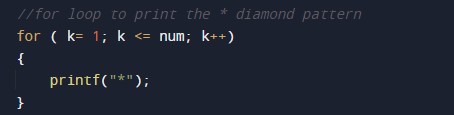
For Loop to print the “*”.

Main Program Code.

C Program to Create Pyramid

C Program to Create Pyramid

In this tutorial, we will learn to create a C program that will create a pyramid using C programming.

Prerequisites

Before starting with this tutorial we assume that you are best aware of the following C programming topics:

  • Operators in C Programming.
  • Basic Input and Output function in C Programming.
  • Basic C programming.
  • For loop in C Programming.

Create a pyramid:-

The C language is a very powerful programming language. In C programming we can perform many operations with the help of codings. The c language is very easy to create any pattern. In this program, we will learn to create pyramid-like patterns with the help of some code.

Algorithm:-

Program:-

To Create a pyramid


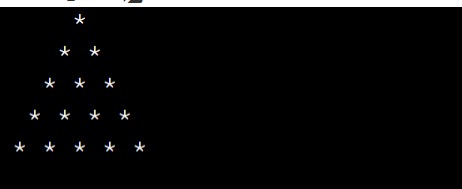
Output:-

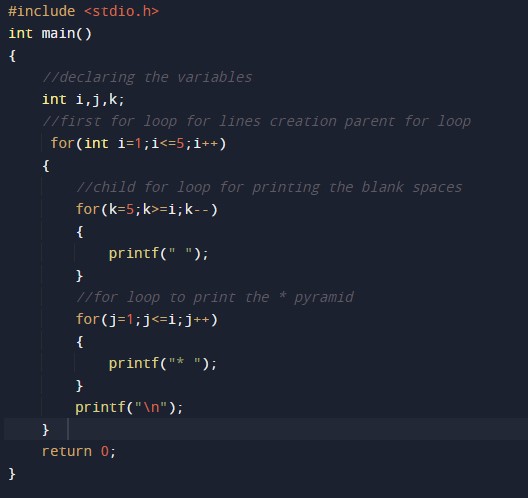
In the above program, we have first initialized the required variable.

  • i = it will hold the integer value to control parent for loop.
  • j = it will hold the integer value to control child for loop.
  • k = it will hold the integer value to control child for loop.

Initializing the first parent for loop.

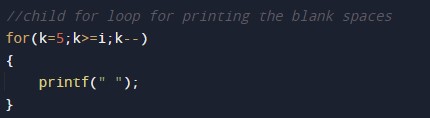
For Loop to print the blank spaces.

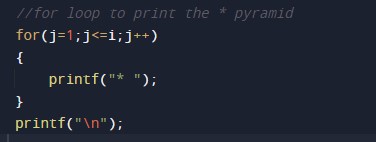
For Loop to print the “*”.

Main Program Code.


C Program to Create Floyd’s Triangle

C Program to Create Floyd’s Triangle

In this tutorial, we will learn to create a C program that will Create a Floyd’s Triangle using C programming.

Prerequisites

Before starting with this tutorial we assume that you are best aware of the following C programming topics:

  • Operators in C Programming.
  • Basic Input and Output function in C Programming.
  • Basic C programming.
  • For loop in C Programming.

Creating a Floyd’s:-

The C language is a very powerful programming language. In C programming we can perform many operations with the help of codings. The c language is very easy to create any shape. In this program, we will learn to create Floyd’s triangle with the help of some code.

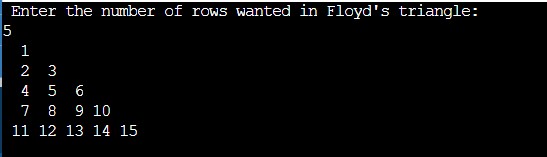
Floyd’s triangle is a right-angled triangle that contains mathematical numbers from 1 and goes up to the required point.

Algorithm:-

Program:-

To Create a Floyd’s Triangle


Output:-

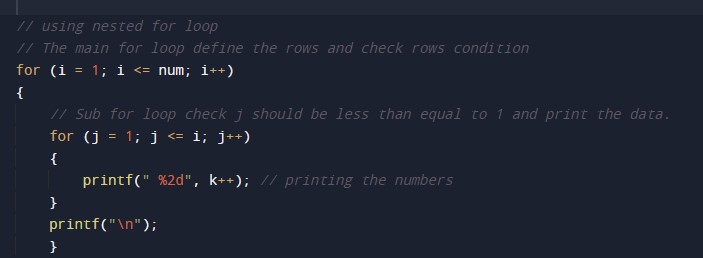
In the above program we have first initialized the required variable.

  • i = it will hold the integer value to control parent for loop.
  • j = it will hold the integer value to control child for loop.
  • k = it will hold the integer value to control child for loop.
  • num = it will hold the integer value for the number of rows.

Taking input Number of rows

Nested For loop the body of the program

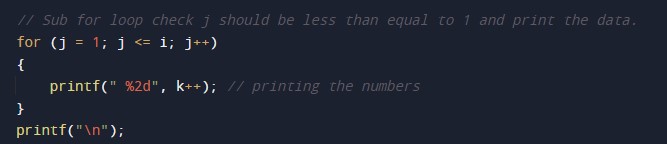
Printing Numbers


C Program to Print Pascal Triangle

C Program to Print Pascal Triangle

In this tutorial, we will learn to create a C program that will create Pascal Triangle using C programming.

Prerequisites

Before starting with this tutorial we assume that you are best aware of the following C programming topics:

  • Operators in C Programming.
  • Basic Input and Output function in C Programming.
  • Basic C programming.
  • Basic arithmetic operations.
  • For loop in C Programming.

Create a Pascal Triangle:-

The C language is a very powerful programming language. In C programming we can perform many operations with the help of codings. The c language is very easy to create any pattern. In this program, we will learn to create pascal’s triangle with the help of some code.

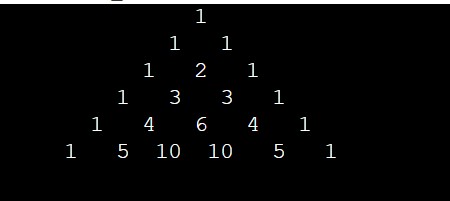
The pascal’s triangle contains binomial coefficients.

Algorithm:-

Program:-

To Create a Pascal Triangle.


Output:-

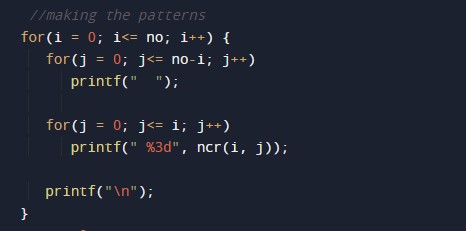
In the above program, we have first initialized the required variable.

  • i = it will hold the integer value to control parent for loop.
  • j = it will hold the integer value to control child for loop.
  • k = it will hold the integer value to control child for loop.

Initializing the first parent for loop.

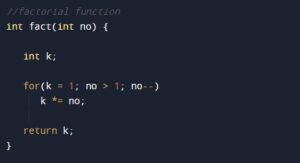
For Loop for factorial.

C Program to Delete an Element from an Array

C Program to Delete an Element from an Array

In this tutorial, we will learn to create a C program that will delete the element of Array using C programming.

Prerequisites

Before starting with this tutorial we assume that you are best aware of the following C programming topics:

  • Operators in C Programming.
  • Basic Input and Output function in C Programming.
  • Basic C programming.
  • For loop in C Programming.

Delete the element of Array

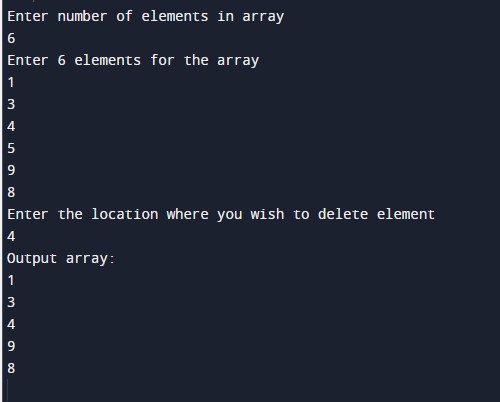
As we all know array is a collection of similar data type elements. In an array, only one variable is declared which can store multiple values. First will take the number of elements of an array from the user. Then will take the elements from the user for the array. And at last, we will delete the array element by asking the user with the help of C Programming Language.

Algorithm:-

Program:-

To Delete an element from the array

Output:-

In the above program, we have first initialized the required variable.

  • x[] = it will hold the elements in an array.
  • n = it will hold the number of elements in an array.
  • i = it will hold the integer value to control the array.
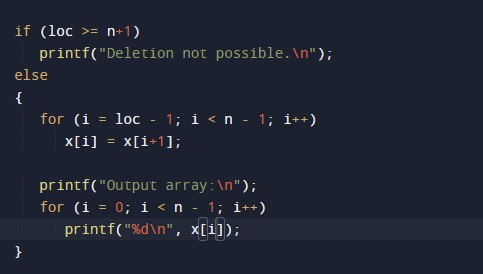
  • loc = it will hold the location for delete element size of the array.

Taking input from the user in an array number of elements in the array

Taking input from the user in array elements in the array

Program Code